
1. Sarrera
The Keenetic Skipper DSL (KN-2112) is a high-performance Wi-Fi 5 Mesh AC1200 modem router designed to provide fast, stable, and secure internet connectivity for your home or office. It integrates Supervectoring VDSL2/ADSL2+ technology, a 4-port Gigabit smart switch, and a USB port, offering versatile connection options and advanced network management capabilities.
This manual provides detailed instructions for setting up, operating, maintaining, and troubleshooting your Keenetic Skipper DSL router to ensure optimal performance and a seamless user experience.
2. Paketearen edukia
Hasi aurretik, egiaztatu paketean elementu guztiak daudela:
- Keenetic Skipper DSL Router
- Elikatze-moldagailua
- Ethernet kablea
- DSL kablea
- Hasierako gida azkarra
3. Produktua amaitu daview
Familiarize yourself with the physical features and ports of your Keenetic Skipper DSL router.

3.1. irudia: Aurrealdea view of the Keenetic Skipper DSL router, showcasing its sleek design and LED indicators.

3.2. irudia: Aldea view of the Keenetic Skipper DSL router, highlighting the USB 2.0 port for external device connectivity.
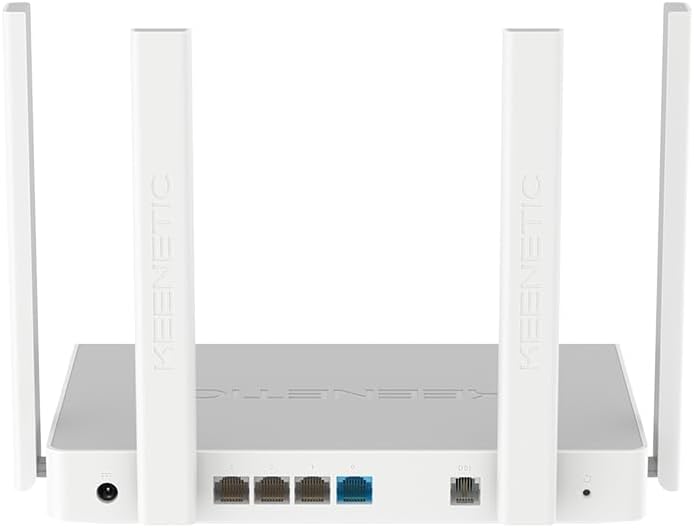
3.3. irudia: Atzekoa view of the Keenetic Skipper DSL router, displaying the power input, four Gigabit Ethernet ports (three LAN, one WAN/LAN), DSL port, and reset button.
LED adierazleak
- Power LED: Potentzia-egoera adierazten du.
- Interneteko LEDa: Interneteko konexioaren egoera adierazten du.
- Wi-Fi LED: Wi-Fi sarearen jarduera adierazten du.
- LAN LEDak: Indicate activity on the respective Gigabit Ethernet ports.
Portuak eta Botoiak
- Potentzia sarrera: Korronte-egokigailura konektatzen da.
- DSL ataka: Connects to your DSL line for internet access.
- WAN/LAN ataka: Can function as either a WAN port for Ethernet internet connection or an additional LAN port.
- LAN atakak (x3): Connect wired devices such as PCs, gaming consoles, or Smart TVs.
- USB 2.0 ataka: Supports external storage, 3G/4G modems, or other USB devices.
- Berrezarri botoia: Used to restore factory default settings (press and hold for 10 seconds).
4. Konfigurazio gida
Follow these steps to set up your Keenetic Skipper DSL router.
4.1 Hardware konexioa
- Konektatu DSL linea: Connect one end of the DSL cable to the DSL port on the router and the other end to your wall DSL socket or splitter.
- Konektatu energia: Plug the power adapter into the router's power input and then into a power outlet. The Power LED should illuminate.
- Optional: Wired Devices: For wired connections, connect an Ethernet cable from a LAN port on the router to your computer or other network device.
4.2 Hasierako konfigurazioa
You can configure your router using the Keenetic web interface or the Keenetic mobile app.
erabiliz Web Interfazea:
- Ensure your computer is connected to the router via Wi-Fi or Ethernet.
- Ireki a web arakatzailea eta sartu
my.keenetic.netor192.168.1.1helbide barran. - Follow the on-screen instructions of the KeeneticOS setup wizard to configure your internet connection (DSL/WAN settings), Wi-Fi network name (SSID), and password.
- Set a strong administrator password for router access.
Using the Keenetic Mobile App:
- Download the Keenetic app from your device's app store (iOS or Android).
- Open the app and follow the prompts to discover and set up your new Keenetic router. The app will guide you through connecting to the router's default Wi-Fi network and configuring your internet and Wi-Fi settings.
5. Funtzionamendu-argibideak
This section covers the daily operation and key features of your Keenetic Skipper DSL router.
5.1 Wi-Fi konexioa
The router supports Wi-Fi 5 (802.11ac) dual-band connectivity, offering speeds up to 300 Mbps on 2.4 GHz and 867 Mbps on 5 GHz.

5.1. irudia: Wi-Fi 5 Dual-Band capabilities, providing 300 Mbps on 2.4 GHz and 867 Mbps on 5 GHz for various activities.
- Gailuak konektatzea: Bilatu your Wi-Fi network name (SSID) on your device and enter the password you set during configuration.
- Gonbidatuen Wi-Fia: Create a separate guest network for visitors to keep your main network secure.
5.2 Keenetic Mesh Wi-Fi
Expand your Wi-Fi coverage by adding other Keenetic devices to create a seamless Mesh Wi-Fi system. This eliminates dead zones and provides consistent high-speed Wi-Fi throughout your entire home.
- Refer to the Keenetic app or web interface for instructions on adding mesh extenders.
5.3 USB atakaren funtzionaltasuna
The USB 2.0 port offers several functionalities:

5.2. irudia: Detail of the USB 2.0 port, enabling file sharing and remote access to personal cloud storage.
- File Partekatzea: Konektatu USB biltegiratze gailu bat (adibidez, flash unitate bat, kanpoko disko gogorra) partekatzeko files zure sarean zehar.
- 3G/4G Modem Support: Connect a compatible USB 3G/4G modem for backup internet access or as a primary connection.
- Inprimagailua partekatzea: Connect a USB printer to make it accessible to all network devices.
5.4 Keenetic App Management
The Keenetic app provides convenient remote management of your network.

5.3. irudia: Keenetic app interface showing network overview, device list, and QoS settings for real-time control.
- Sarea amaituview: Monitor connected devices, internet status, and traffic.
- Gurasoen kontrola: Set internet access schedules and content filters for specific devices.
- Device Prioritization (QoS): Prioritize bandwidth for important devices or applications.
- Urruneko kudeaketa: Manage your router settings from anywhere with an internet connection.
6. Ezaugarri aurreratuak
The Keenetic Skipper DSL router offers a range of advanced features for enhanced network control and security.
6.1 VPN laguntza
KeeneticOS supports over 50 types of VPN connections, including WireGuard, OpenVPN, and IPSec, allowing you to create secure tunnels for remote access or privacy.
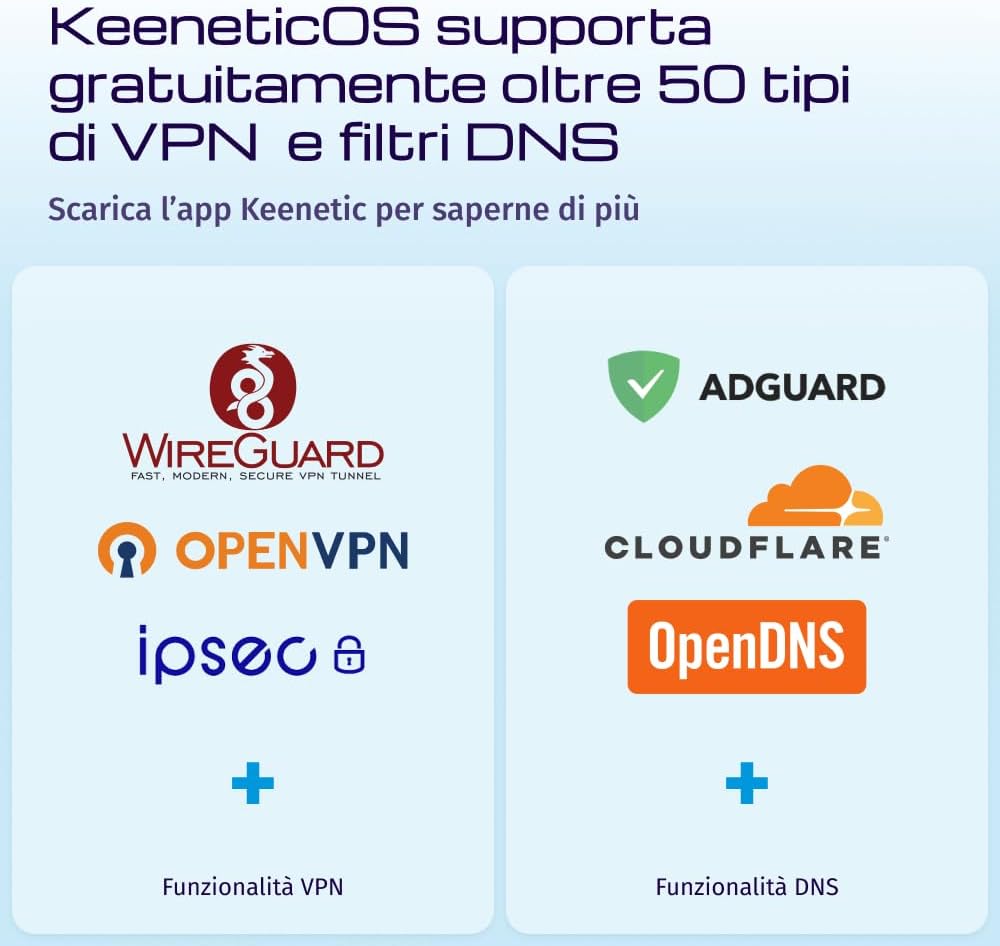
6.1. irudia: KeeneticOS supports various VPN protocols and DNS filtering services for enhanced security and privacy.
6.2 DNS Filters
Integrate popular DNS filtering services like AdGuard, Cloudflare DNS, and OpenDNS directly into your router for network-wide content filtering and ad blocking.
6.3 Sarearen segurtasuna
The router provides robust security features to protect your network:

6.2. irudia: The router facilitates network segmentation for Smart Home and IoT devices, enhancing overall IT security.
- SPI suebakia: Stateful Packet Inspection firewall for advanced threat detection.
- WPA3 enkriptatzea: Supports the latest Wi-Fi security protocol for stronger encryption.
- IoT Network Segmentation: Isolate Smart Home and IoT devices on a separate network segment to prevent potential security breaches from affecting your main network.
7. Mantentzea
Mantentze egokiak zure routerraren iraupena eta errendimendu optimoa bermatzen ditu.
7.1 Firmware eguneraketak
KeeneticOS provides automatic updates to ensure your router has the latest features, security patches, and performance improvements. It is recommended to keep automatic updates enabled.
- You can check for and manually apply updates via the Keenetic app or web interfazea.
7.2 Zaintza fisikoa
- Gorde routerra ondo aireztatutako leku batean gehiegi berotzea saihesteko.
- Saihestu bideratzailea interferentzia iturrien ondoan jartzea (adibidez, mikrouhin-labeak, haririk gabeko telefonoak).
- Clean the device periodically with a soft, dry cloth. Do not use liquid cleaners.
8. Arazoak
This section addresses common issues you might encounter with your Keenetic Skipper DSL router.
8.1 Interneteko konexiorik ez
- Egiaztatu kableak: Ensure the DSL cable is securely connected to both the router and the wall socket.
- Egiaztatu LEDak: Verify that the Power and Internet LEDs are solid green. If the Internet LED is off or blinking, there might be an issue with your DSL line or ISP.
- Berrabiarazi bideratzailea: Power cycle the router by unplugging it from the power outlet, waiting 30 seconds, and plugging it back in.
- ISP ezarpenak: Confirm your DSL connection settings (VPI/VCI, encapsulation, etc.) are correct in the router's web interface, as provided by your Internet Service Provider.
8.2 Weak Wi-Fi Signal or Coverage Issues
- Routerraren kokapena: Position the router in a central location, away from obstructions and potential interference sources.
- Antenaren orientazioa: Doitu bideratzailearen antenak seinalearen hedapen optimoa lortzeko.
- Mesh System: Consider adding Keenetic Wi-Fi extenders to create a Mesh Wi-Fi system for broader coverage.
- Kanalen interferentzia: Use the Keenetic app or web interface to analyze Wi-Fi channels and select a less congested one.
8.3 Unable to Access Router Settings
- Egiaztatu konexioa: Ziurtatu zure gailua bideratzailearen sarera konektatuta dagoela.
- Helbide zuzena: Double-check that you are entering
my.keenetic.netor192.168.1.1zure nabigatzailean. - Garbitu arakatzailearen cachea: Garbitu arakatzailearen cachea eta cookieak, edo saiatu beste arakatzaile bat erabiltzen.
- Berrezarri bideratzailea: If all else fails, perform a factory reset by pressing and holding the reset button for 10 seconds. Note that this will erase all your custom settings.
9. Zehaztapenak
Detailed technical specifications for the Keenetic Skipper DSL (KN-2112) router.
| Ezaugarri | Zehaztapena |
|---|---|
| Marka | Keenetic |
| Ereduaren izena | Keenetic Skipper |
| Modelo zenbakia | KN-2112 |
| Konektibitate Teknologia | Ethernet, Wi-Fi, DSL |
| Haririk gabeko komunikazio estandarra | 802.11ac (Wi-Fi 5) |
| Maiztasun Banda Klasea | Banda bikoitza (2.4 GHz, 5 GHz) |
| Datuen transferentzia-tasa | 1200 Mbps (AC1200: 300 Mbps on 2.4 GHz, 867 Mbps on 5 GHz) |
| Max Upstream Data Transfer Rate | 300 Mbps (Supervectoring DSL) |
| LAN ataka banda-zabalera | 1000 Mbps (Gigabit Ethernet) |
| Portu kopurua | 4 (3x LAN, 1x WAN/LAN) + 1x DSL + 1x USB 2.0 |
| Antena Mota | Barnekoa |
| Sistema eragilea | KeeneticOS |
| Segurtasun Protokoloa | WPA3, SPI Firewall |
| Kontrol-metodoa | Aplikazioa, Web Interfazea |
| Gailu bateragarriak | Gaming Consoles, PC, Smartphones, Tablets, Laptops |
| Erabilera gomendatua | Etxeko bulegoa |
| Etxe adimendunen bateragarritasuna | Bai |
| Neurriak (LxWxH) | 36L x 6W x 28.5H cm |
| Kolorea | Zuria |
10. Bermea eta Laguntza
10.1 Produktuaren bermea
The Keenetic Skipper DSL (KN-2112) router comes with a 3 urteko bermea erosketa-datatik aurrera, fabrikazio-akatsak eta erabilera normalaren ondoriozko matxurak estaliz. Gorde erosketaren egiaztagiria berme-erreklamazioetarako.
10.2 Laguntza Teknikoa
For technical assistance, troubleshooting, or further information, please refer to the following resources:
- Keenetic Webgunea: Visit the official Keenetic website for comprehensive documentation, FAQs, and support forums.
- Keenetic App: The mobile app provides diagnostic tools and direct access to support resources.
- Bezeroarentzako arreta: Contact Keenetic customer service through the channels provided on their official webgunea.