
1. Produktua amaitu daview
This manual provides comprehensive instructions for the HP Pavilion 15.6" FHD Laptop. This device is designed for general computing tasks, offering a balance of performance and portability. It features an Intel Core i3-N305 processor, 16GB of DDR4 RAM, and a 1TB storage solution comprising a 512GB PCIe SSD and an additional 500GB HP P500 Portable SSD. The laptop includes a 15.6-inch Full HD anti-glare display, Wi-Fi 6 connectivity, and runs on Windows 11.

Figure 1: HP Pavilion 15.6" FHD Laptop with included HP P500 Portable SSD.
Ezaugarri nagusiak:
- Prozesadorea: Intel Core i3-N305 (8 Cores, 8 Threads, up to 3.80 GHz)
- Grafikoak: Intel UHD grafikoak
- Pantaila: 15.6" Full HD (1920x1080) IPS Anti-glare
- Memoria: 16 GB DDR4 RAM
- Biltegiratzea: 512GB PCIe SSD + 500GB HP P500 Portable SSD (1TB total)
- Sistema eragilea: Windows 11
- Konektibitatea: Wi-Fi 6, Bluetooth 5.3
- Portuak: USB-C, USB Type-A (x2), HDMI, Headphone/Microphone Combo
- Segurtasuna: Built-in Fingerprint Reader
- Webkamera: HD 720p pribatutasun obturadorearekin
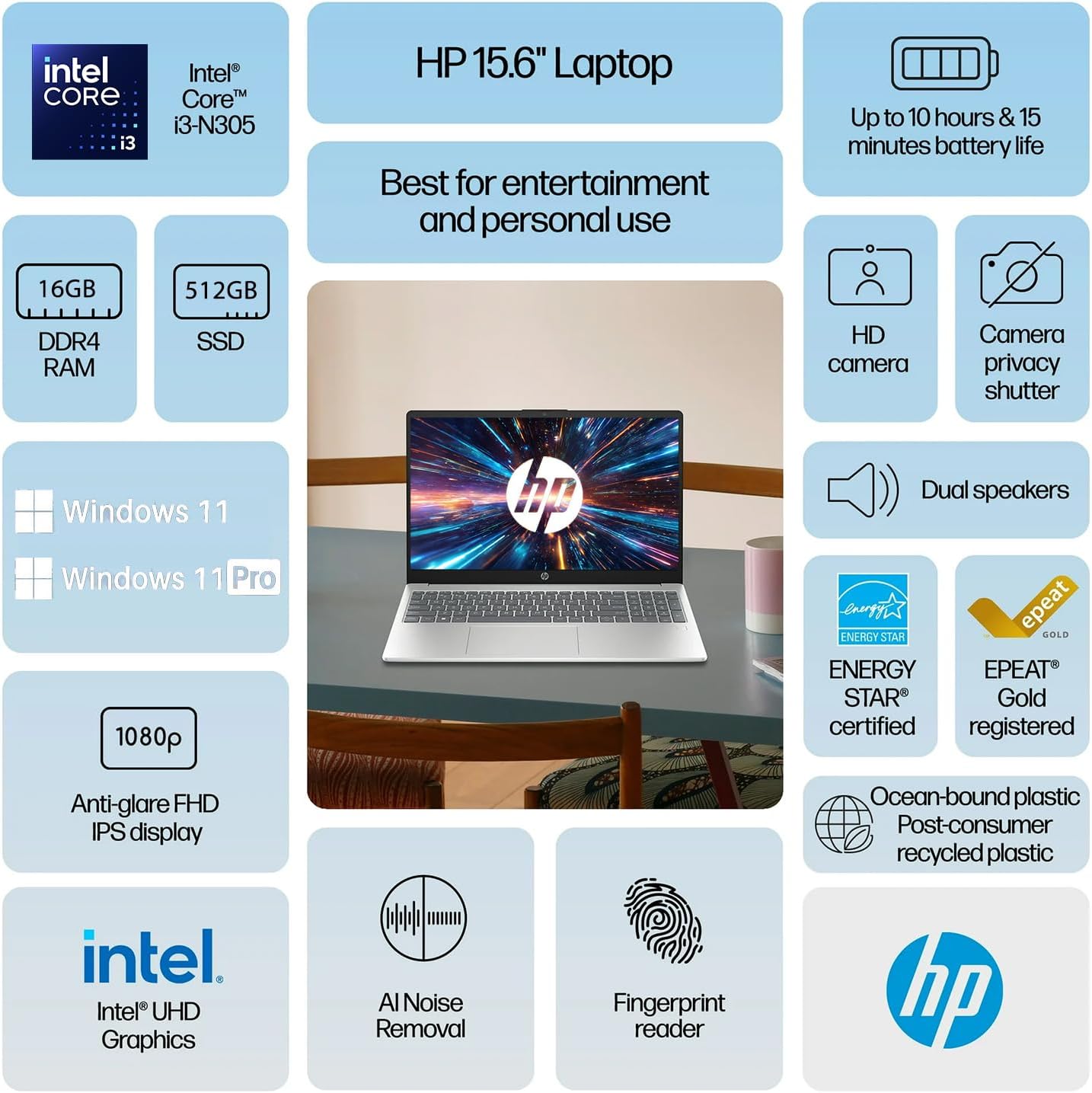
2 Irudia: Gainetikview of HP Pavilion 15.6" Laptop features.
2. Hasierako konfigurazioa
2.1 Desontziratzea eta lehen aldiz piztea
- Kontu handiz atera ordenagailu eramangarria eta osagarri guztiak paketetik.
- Konektatu korronte-egokitzailea ordenagailu eramangarriaren korronte-konektorera eta gero korronte-hartune batera.
- Open the laptop lid. The laptop may power on automatically, or you may need to press the power button located on the keyboard.
- Jarraitu pantailan agertzen diren argibideei Windows 11-en hasierako konfigurazioa osatzeko, hizkuntza hautatzea, sareko konexioa eta erabiltzaile kontua sortzea barne.
2.2 Connecting the HP P500 Portable SSD
The HP P500 Portable SSD is an external storage device included with your laptop. To connect it:
- Locate the USB-C cable provided with the portable SSD.
- Connect one end of the USB-C cable to the HP P500 Portable SSD.
- Connect the other end of the USB-C cable to an available USB-C port on your HP Pavilion laptop.
- The operating system will automatically detect and configure the drive. You can access it through File Esploratzailea.

Figure 3: HP P500 Portable SSD and its connection cable.
3. Zure ordenagailu eramangarria erabiltzea
3.1 Teklatua eta ukipen-panela
The laptop features a full-size English (US) keyboard and a multi-touch touchpad. Refer to the HP laguntza webgunea for detailed information on keyboard shortcuts and touchpad gestures.
3.2 hatz-marken irakurgailua
The built-in fingerprint reader allows for secure and quick login. To set up your fingerprint:
- Joan zaitez Ezarpenak > Kontuak > Saioa hasteko aukerak.
- Under "Ways to sign in," select Hatz-markak hautematea (Windows Hello) eta jarraitu pantailan agertzen diren argibideei zure hatz-markak erregistratzeko.

Figure 4: Fingerprint reader for secure access.
3.3 Connectivity (Wi-Fi 6 and Bluetooth 5.3)
Your laptop supports Wi-Fi 6 for high-speed wireless internet and Bluetooth 5.3 for connecting wireless peripherals.
- Wi-Fi: Click the Wi-Fi icon in the taskbar, select your desired network, and enter the password if prompted.
- Bluetootha: Joan zaitez Ezarpenak > Bluetootha eta gailuak to pair new Bluetooth devices.

Figure 5: Laptop demonstrating Wi-Fi 6 and audio capabilities during a video call.
3.4 External Ports
Ordenagailu eramangarriak kanpoko gailuak konektatzeko hainbat ataka ditu:
- USB-C (1x): For data transfer and connecting USB-C compatible devices.
- USB A mota (2x): USB gailu estandarrak konektatzeko, hala nola saguak, teklatuak edo kanpoko unitateak.
- HDMI (1x): Kanpoko pantailetara edo proiektoreetara konektatzeko.
- Headphone / microphone combo jack (1x): Aurikularrak edo mikrofonodun aurikularrak konektatzeko.
- Power connector (1x): Korronte alternoko egokitzailea konektatzeko.
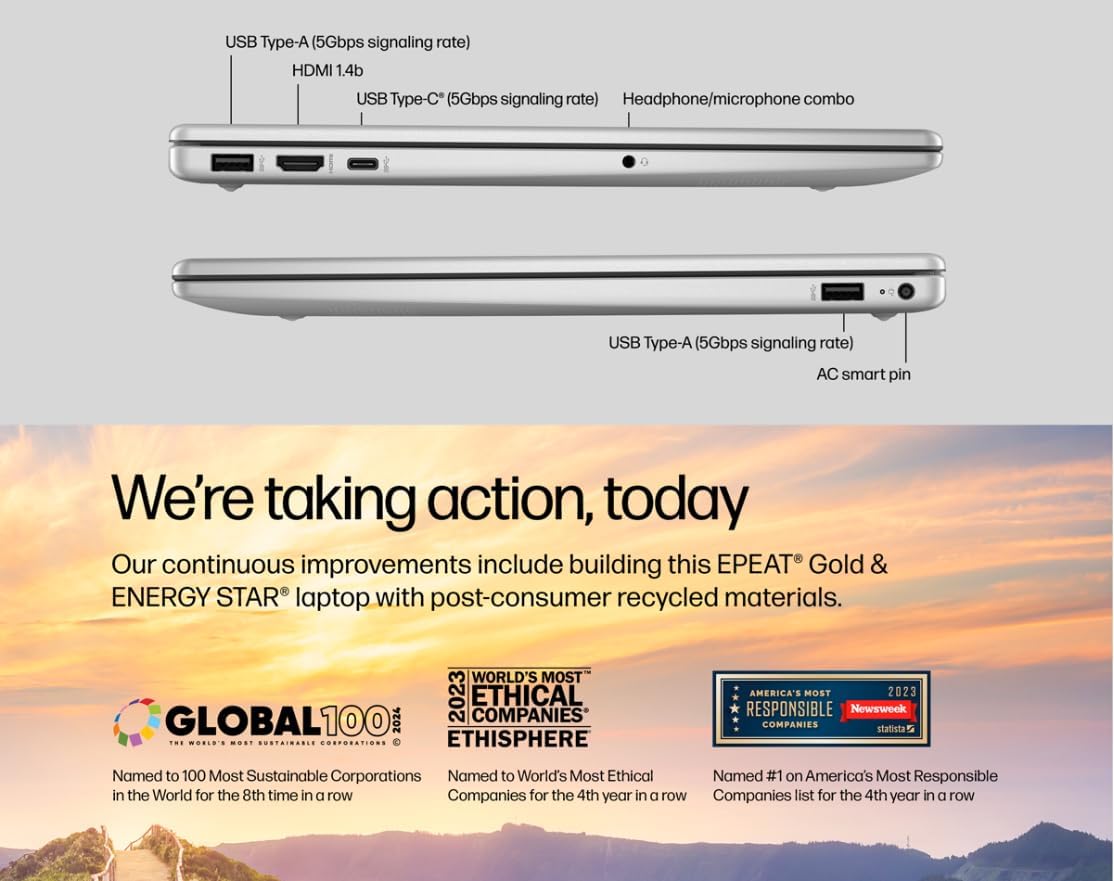
Figure 6: Laptop ports for external connections.
4. Mantentzea eta Zainketa
4.1 Bateria zaintzea
- Bateriaren iraupena maximizatzeko, saihestu tenperatura altuenak.
- For optimal performance, allow the battery to discharge partially before recharging.
- The laptop supports HP Fast Charge, allowing it to charge 0 to 50% in approximately 45 minutes.
4.2 Ordenagailu eramangarria garbitzea
- Erabili lipurrik gabeko zapi leun bat dampPantaila garbitzeko, urarekin edo pantaila-garbitzaile batekin garbitu.
- Teklatuarentzat eta xasisarentzat, erabili oihal leun eta lehor bat. Saihestu produktu kimiko gogorrak.
- Ziurtatu ordenagailu eramangarria itzalita eta deskonektatuta dagoela garbitu aurretik.
4.3 Software eguneraketak
Regularly update your Windows 11 operating system and drivers to ensure optimal performance and security.
- Windows eguneraketak: Joan zaitez Ezarpenak > Windows Update and check for updates.
- Gidarien eguneraketak: HP provides driver updates through its support website or HP Support Assistant software.
5. Ohiko arazoak konpontzea
5.1 Energia arazoak
- Ordenagailu eramangarria ez da pizten: Ziurtatu korronte-egokitzailea ondo konektatuta dagoela ordenagailu eramangarrira eta funtzionatzen duen entxufe batera. Saiatu beste entxufe batekin.
- Bateria ez da kargatzen: Verify the power adapter is functioning correctly. Check for any physical damage to the adapter or charging port.
5.2 Bistaratzeko arazoak
- Ez da pantailan agertzen: Connect an external monitor via HDMI to check if the issue is with the laptop's internal display. If the external monitor works, the internal display may require service.
- Pantaila keinuka edo desitxuratuta: Update your graphics drivers. Adjust display resolution in Windows settings.
5.3 Konexio arazoak
- Wi-Fia ez da konektatzen: Ensure Wi-Fi is enabled. Restart your router and modem. Forget the network and reconnect.
- Bluetooth gailua ez da parekatzen: Ensure the Bluetooth device is in pairing mode and within range. Restart the laptop and the Bluetooth device.
5.4 Errendimendu arazoak
- Errendimendu motela: Close unnecessary applications. Check Task Manager for high CPU/RAM usage. Ensure sufficient free space on the primary SSD.
- Sistemak blokeatzen du: Perform a system restart. Check for recent software installations or updates that might be causing conflicts.
6. Zehaztapen Teknikoak
| Ezaugarri | Zehaztapena |
|---|---|
| Prozesadorea | Intel Core i3-N305 (8 Cores, 8 Threads, up to 3.80 GHz, 6 MB Intel Smart Cache) |
| Grafikoak | Intel UHD grafikoak |
| Sistema eragilea | Windows 11 Home |
| Memoria (RAM) | 16 GB DDR4 |
| Barne Biltegiratzea | 512 GB-ko PCIe NVMe M.2 SSD |
| Kanpoko Biltegiratzea | HP P500 500GB Portable SSD (Red) |
| Bistaratzea | 15.6 hazbeteko FHD (1920x1080) IPS distira-kontrakoa |
| Audioa | Bozgorailu estereoa |
| Teklatua | English (US) with Numeric Keypad |
| Hatz-marken irakurgailua | Eraikituta |
| Webkamara | HD 720p pribatutasun obturadorearekin |
| Bateriaren iraupena | Gehienez 10 ordu |
| Haririk gabeko konexioa | Wi-Fi 6 (802.11ax), Bluetooth 5.3 |
| Portuak | 1x USB-C, 2x USB Type-A, 1x HDMI, 1x Headphone / microphone combo jack, 1x Power connector |
| Kolorea | Zilar Naturala |
| Neurriak (L x W x H) | 14.2 x 9.51 x 0.7 hazbete |
| Pisua | 3.59 kilo |

Figure 7: The laptop's 15.6-inch anti-glare display.
7. Bermea eta Laguntza
For warranty information, technical support, and driver downloads, please visit the official HP Support website. It is recommended to register your product to receive updates and support notifications.
- HP laguntza Webgunea: support.hp.com
- Produktuen erregistroa: Register your HP product online to access personalized support and warranty details.
Please have your product model number (HP Pavilion 15.6" Laptop) and serial number ready when contacting support.