
1. Sarrera
Thank you for choosing the JAGJOG Walking Pad with Incline. This portable under desk treadmill is designed to provide a convenient and effective way to incorporate walking and light jogging into your daily routine, whether at home or in the office. Please read this manual thoroughly before initial use to ensure proper setup, safe operation, and optimal performance of your device. Keep this manual for future reference.
2. Segurtasun-argibideak
Your safety is paramount. Adhere to all warnings and instructions to reduce the risk of injury or damage to the equipment.
2.1 Segurtasun orokorra
- Jarri beti zinta-korrikalaria gainazal lau eta egonkor batean.
- Ensure adequate clear space (at least 2 meters behind and 0.6 meters on each side) around the treadmill during operation.
- Do not allow children or pets near the treadmill while it is in use.
- The maximum user weight capacity for this treadmill is 265 lbs (approximately 120 kg). Do not exceed this limit.
- Erabili kirol oinetako egokiak erabiltzean.
- Zorabioak, goragalea, bularreko mina edo beste edozein sintoma anormal izanez gero, utzi berehala ariketa fisikoa egiten eta kontsultatu medikuari.
- Do not use the treadmill if it is damaged or malfunctioning.
- Mantendu eskuak eta oinak mugitzen diren pieza guztietatik urrun.
2.2 Segurtasun elektrikoa
- Plug the treadmill into a grounded electrical outlet.
- Ez erabili luzapen-kablerik edo egokitzailerik.
- Unplug the treadmill from the power source before cleaning, maintenance, or moving.
- Mantendu korronte-kablea gainazal beroetatik urrun.
- Ez erabili zinta elektrikoa korronte-kablea edo entxufea hondatuta badago.
3. Paketearen edukia
Egiaztatu elementu guztiak paketean daudela:
- Treadmill (Fully Assembled) x1
- Erabiltzailearen eskuliburua x1
- Urruneko kontrola x1
- Lubrifikatzailea x1
- Tool Kit (L-shaped wrench with Cross Screwdriver) x1
- Front Foot Cushion x2

Image: All components included in the JAGJOG Walking Pad package.
4. Konfigurazioa
4.1 Desontziratzea eta kokatzea
- Kontu handiz atera zinta-korrikalaria eta osagarri guztiak paketetik.
- Place the treadmill on a firm, level surface, ensuring sufficient clearance around the unit.
- The treadmill is designed for easy movement and storage. It can be stored flat under furniture when not in use.

Image: The JAGJOG Walking Pad in use, demonstrating its compact design and suitability for various environments.
4.2 Inklinazio-doikuntza
The walking pad features a manual 15° incline adjustment. To activate the incline, locate the adjustable feet at the front of the treadmill and extend them. This will elevate the front of the running surface, simulating an uphill walk.

Image: Demonstrating the manual 15° incline adjustment for increased workout intensity.
4.3 Urruneko kontrolaren parekatzea
The treadmill operates via a wireless remote control. Ensure the battery is correctly inserted. The remote is typically pre-paired. If not, refer to the specific pairing instructions in the included user manual for your model.
5. Produktuaren ezaugarriak
5.1 Adjustable Incline
Elevate your workout with the manual 15° incline adjustment. This feature allows for a true hill-training effect, targeting leg muscles more effectively and increasing cardio intensity. Simply adjust the incline feet for an instant boost to your exercise.
5.2 Self-Aligning Treadmill Belt
The innovative auto-align technology keeps the running belt centered during workouts, eliminating the need for frequent manual adjustments. The wide 40” x 15.3” anti-slip surface is designed to absorb shock, providing a smooth and joint-friendly experience for walking, jogging, or climbing.
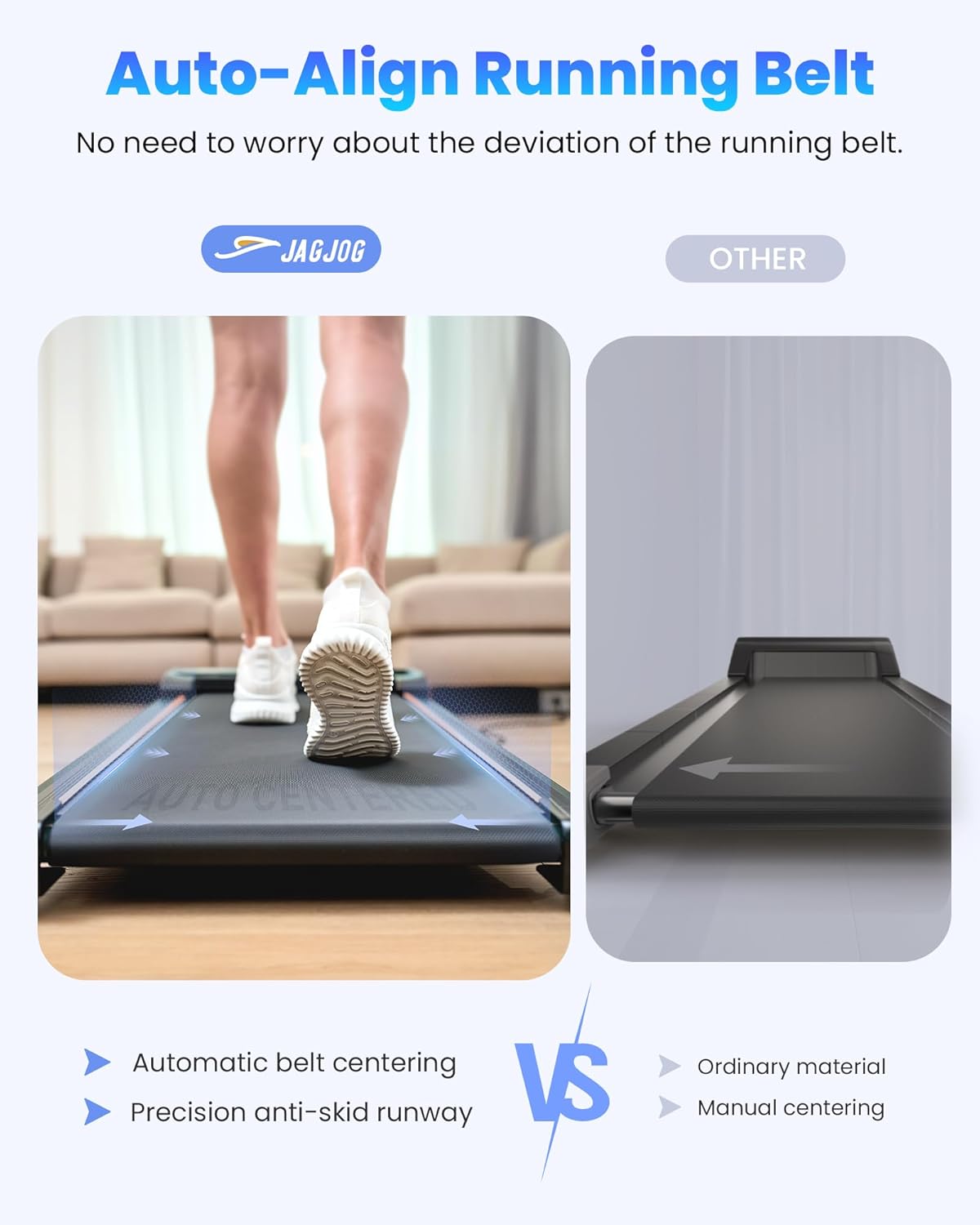
Image: Illustration of the self-aligning running belt technology.
5.3 4-in-1 Smart Modes
This under desk treadmill offers versatile modes to suit various fitness goals:
- Lan egiteko modua: 0.6-1.5 MPH for low-intensity movement while working.
- Ibiltzeko modua: 0.6-1.8 MPH for a steady walking pace.
- Jog modua: 2.5-3.8 MPH for increased cardiovascular activity.
- Climb Mode: Utilizes the 15° incline for hill-style intensity.

Image: Visual representation of the four available operating modes.
5.4 Powerful & Quiet Motor
Equipped with a 2.5 HP motor, the treadmill supports users up to 265 lbs while operating quietly (below 45 dB). Its steel frame and multi-layer belt minimize vibrations, making it suitable for use in quiet environments like apartments or offices.

Irudia: Barnekoa view of the 2.5 HP motor and its specifications.
5.5 Remote Control & LED Display
The included remote control allows for easy adjustment of speed and instant stopping during your workout. The integrated LED display tracks essential fitness data in real-time, including speed, distance, time, and calories burned.

Image: The LED display and remote control for tracking workout data.
5.6 Deep Shock Absorption
Designed for knee joint protection, the treadmill features 8 silicone shock-absorbers, a shock absorption running board, and a 5-layer non-slip running belt. This multi-layer system reduces impact on your joints, providing a comfortable and safe exercise experience.

Image: Components of the deep shock absorption system.
6. Funtzionamendu-argibideak
6.1 Piztu/Itzali
- Sartu korronte-kablea lurreko hartune batera.
- Locate the main power switch (usually at the front or rear of the treadmill) and turn it to the 'ON' position.
- LED pantaila piztuko da.
- To turn off, press the 'STOP' button on the remote, then turn off the main power switch and unplug the unit.
6.2 Abiadura Doikuntza
Use the '+' and '-' buttons on the remote control to increase or decrease the speed. The speed range is 0.6-3.8 MPH.
6.3 Modu hautaketa
Press the 'M' button on the remote control to cycle through the available modes (Work, Walk, Jog, Climb). Each mode has a predefined speed range or incline setting.
6.4 Monitoring Progress
The LED display automatically cycles through Time, Distance, Calories, and Speed, allowing you to monitor your workout progress in real-time.
7. Mantentzea
Regular maintenance ensures the longevity and smooth operation of your treadmill.
7.1 Lubrifikazioa
The running belt requires periodic lubrication to reduce friction and extend its lifespan. Use the provided silicone lubricant. Refer to the detailed instructions in the included user manual for the correct application procedure and frequency.
7.2 Garbiketa
Garbitu zinta-kordaren gainazala iragarkiarekinamp Erabili ondoren zapi bat garbitu izerdia eta hautsa kentzeko. Ez erabili garbitzaile edo disolbatzaile urratzailerik.
7.3 Gerriko doikuntza
While the treadmill features auto-align technology, occasional manual belt adjustment may be necessary if the belt starts to drift or slip. Use the provided tool kit and follow the specific instructions in the included user manual for proper adjustment.
8. Arazoak
If you encounter issues with your treadmill, consult the following common troubleshooting tips:
- Treadmill not powering on: Ensure the power cord is securely plugged in and the main power switch is 'ON'. Check the circuit breaker.
- Belt not moving: Ensure the safety key (if applicable, though not explicitly mentioned for this model, it's a common treadmill feature) is in place. Check if the remote control battery needs replacement.
- Ezohiko zaratak: Inspect the running belt for debris. Ensure the treadmill is on a level surface. Lubricate the belt if necessary.
- Errore kodea E07: This error code has been reported by some users. If you encounter E07, it typically indicates a motor or sensor issue. Please contact customer support for assistance.
- Belt slipping or drifting: Perform belt adjustment as described in Section 7.3.
For issues not covered here, please contact JAGJOG customer support.
9. Zehaztapenak
| Ezaugarri | Zehaztapena |
|---|---|
| Produktuaren neurriak | 106 x 48.5 x 10.6 cm |
| Elementuaren pisua | 17 kg |
| Kolorea | Black With Incline |
| Bistaratzeko mota | LED |
| Markoaren materiala | Karbono altzairua |
| Running Belt Material | Alloy Steel (Base), Multi-layer (Belt) |
| Zaldi-potentzia | 2.5 HP |
| Meter Displays | Calories Burned, Distance, Speed, Time |
| Energia iturria | Kable elektrikoa |
| Ezaugarri bereziak | Lightweight, Manual 15° Incline, Under desk design, Portable, Shock Absorbent, Running Belt Automatic Correction |
| Gehienezko Abiadura | 6.12 Kilometers per Hour (approx. 3.8 MPH) |
| Gehienezko inklinazioa ehunekotage | 15° |
| Muntaia Beharrezkoa | Ez |
10. Bermea eta Laguntza
JAGJOG products are manufactured to high-quality standards. For warranty information, technical support, or any questions regarding your Walking Pad, please refer to the contact details provided in the included warranty card or visit the official JAGJOG webgunea. Gorde erosketaren egiaztagiria bermearen erreklamazioetarako.