Sarrera
This document provides essential instructions for the use and maintenance of your Generic replacement remote control. This remote is specifically designed to be compatible with Ridgeway QS-2821 and QS-855 portable stereo power amplifiers, offering a direct replacement for your original remote without requiring any programming.
Please read this manual thoroughly to ensure proper operation and longevity of your remote control.
Konfigurazioa: Bateriaren instalazioa
The remote control requires batteries for operation. Batteries are not included in the package and must be purchased separately.
- Kokatu bateriaren konpartimendua urrutiko agintearen atzealdean.
- Ireki bateriaren konpartimenduaren estalkia.
- Txertatu AAA bateria bat (1), ziurtatuz terminal positiboak (+) eta negatiboak (-) konpartimentuaren barruko markekin behar bezala lerrokatuta daudela.
- Itxi bateriaren konpartimenduaren estalkia ondo.
Once new batteries are inserted, the remote control is ready for immediate use with your compatible Ridgeway ampbiziagoa.
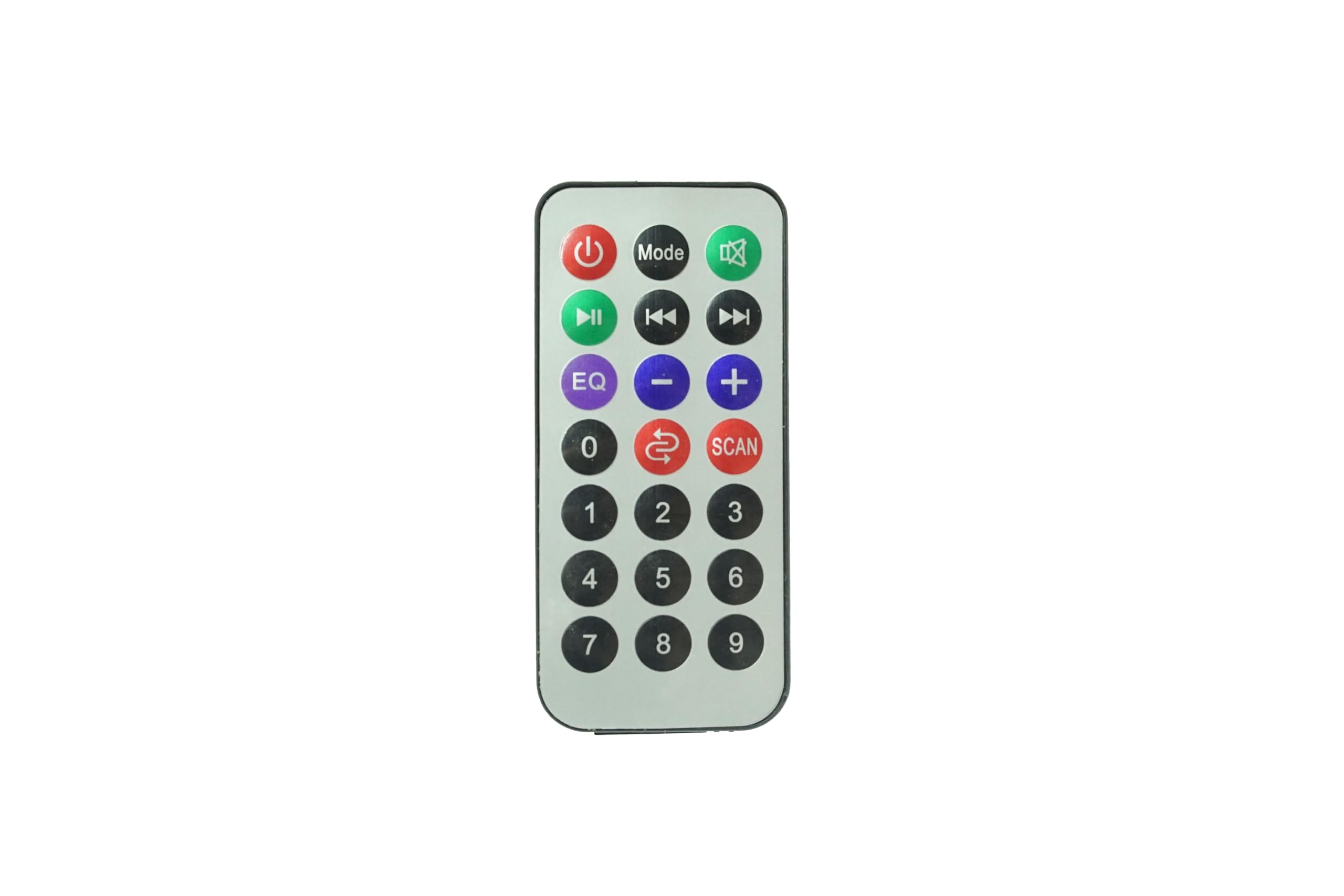
Irudia: Aurrealdea view of the Generic Replacement Remote Control. This image displays the layout of buttons including power, volume, and navigation controls, designed for compatibility with Ridgeway QS-2821 and QS-855 ampigogailuak.
Funtzionamendu-argibideak
This replacement remote control is pre-programmed and requires no additional setup or coding. It functions identically to the original remote control for your Ridgeway QS-2821 or QS-855 ampbiziagoa.
To operate your ampbiziagoa:
- Piztu/Itzali: Sakatu BOTEREA botoia biratzeko ampbiziago edo aktibatuta.
- Bolumen kontrola: Erabili BOLUMENA + eta BOLUMENA - botoiak soinu-maila doitzeko.
- Sarrera hautatzea: Erabili SARRERA or source buttons to switch between different audio inputs (e.g., AUX, USB, Bluetooth).
- Erreprodukzio kontrolak: For media playback, use buttons such as JOLASTU/PAUSTU, AURRERA SALTU, eta ATZERA EGIN.
- Ezkutatu: Sakatu MUTU botoia audioa aldi baterako isilarazteko.
Ensure there is a clear line of sight between the remote control and the infrared (IR) receiver on your amperrendimendu optimorako zalifikatzailea.
Mantentzea
- Garbiketa: Garbitu urrutiko agintea oihal leun eta lehor batekin. Ez erabili garbitzaile likidorik edo material urratzailerik, gainazala edo barneko osagaiak kaltetu baitezakete.
- Bateria ordezkatzea: Replace batteries when the remote control's response becomes sluggish or stops working. Always replace with new batteries of the specified type (AAA).
- Biltegiratzea: Gorde urrutiko agintea leku fresko eta lehor batean, eguzki-argitik eta muturreko tenperaturetatik babestuta. Urrutiko agintea denbora luzez erabiliko ez baduzu, kendu pilak isuriak saihesteko.
- Saihestu tantoak: Babestu urrutiko agintea kolpe fisikoetatik, erorketek barneko zirkuituak kaltetu baititzakete.
Arazoak konpontzea
| Arazoa | Kausa posiblea | Irtenbidea |
|---|---|---|
| Urruneko kontrola ez dabil. |
|
|
| Botoiek ez dute erantzuten edo atzerapenarekin funtzionatzen dute. |
|
|
| Urrunetik funtzionatzen du funtzio batzuetarako, baina ez beste batzuetarako. |
|
|
Zehaztapenak
- Marka: Generikoa
- Gailu bateragarriak: Ridgeway QS-2821, Ridgeway QS-855 Portable Stereo Power Ampigogailuak
- Ezaugarri berezia: Ez da programaziorik behar
- Konektore mota: Infragorriak (IR)
- Beharrezko bateriak: 1 x AAA (ez dago barne)
- Onartutako gailuen gehienezko kopurua: 1
- Kolorea: Erakusten den bezala
Bermea eta Laguntza
Specific warranty information for this Generic replacement remote control is not provided in the product details. For any warranty claims, technical support, or inquiries regarding your purchase, please contact the seller directly through the platform where the item was purchased.
Please retain your proof of purchase for any support requests.


