
1. Sarrera
This user manual provides comprehensive instructions for the setup, operation, and maintenance of your Ryoko Portable WiFi Hotspot (Model: DFGV324). This device offers high-speed, portable internet access, designed for global coverage via satellite technology, allowing you to stay connected wherever you are.
2. Produktua amaitu daview
2.1 Paketearen edukia
Kutxa irekitzean, egiaztatu paketean elementu hauek guztiak daudela:
- 1 x Ryoko Portable WiFi Hotspot device
- 1 x USB kargatzeko kablea
- 1 x Lithium Battery (2400 mAh)
- 1 x Erabiltzailearen gida (eskuliburu hau)
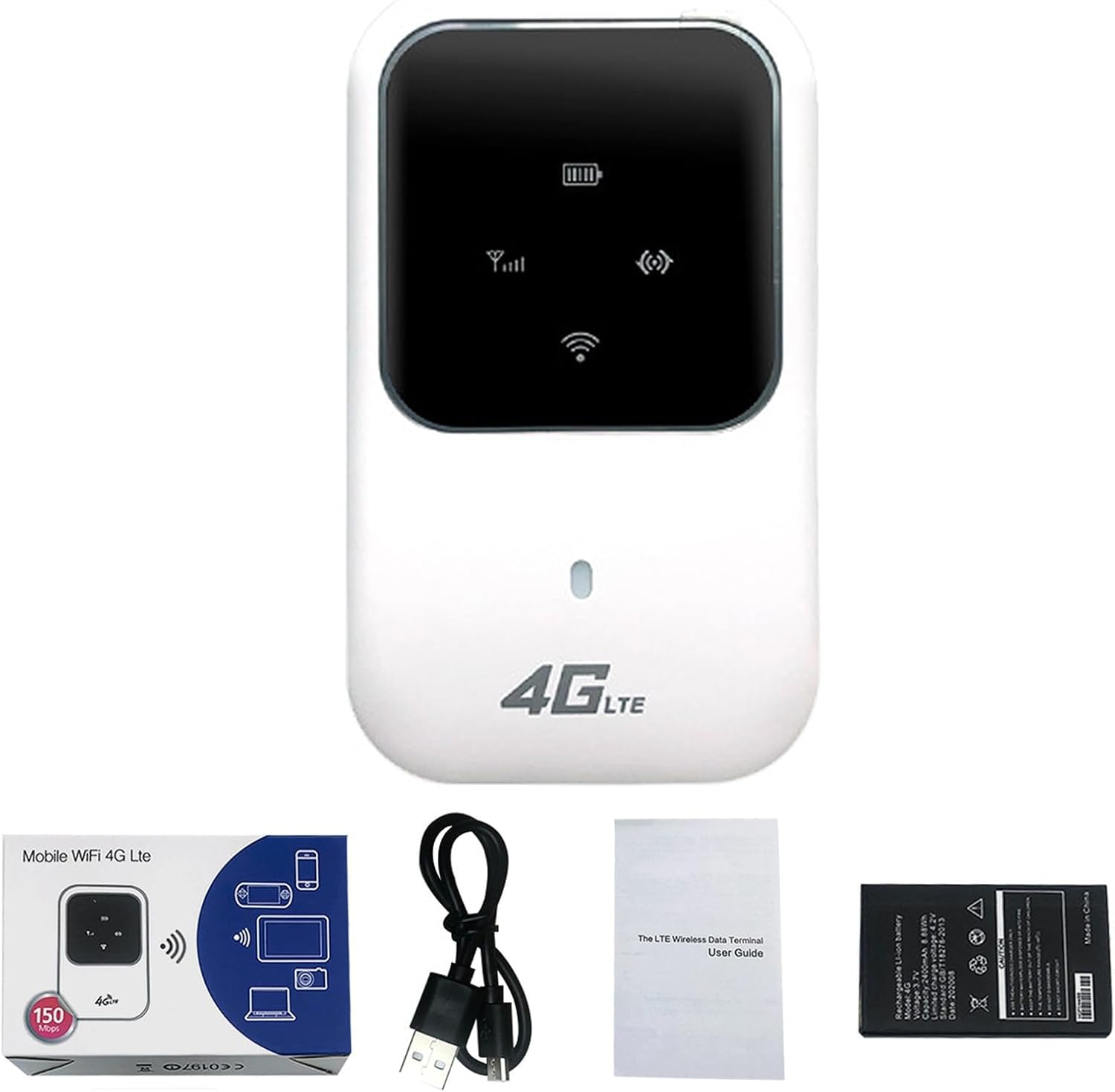
Figure 2.1: Ryoko Portable WiFi Hotspot and included accessories.
2.2 Gailuaren Ezaugarriak
- Estaldura globala: Connects via satellite for internet access anywhere.
- Abiadura Handiko Konektibitatea: Supports up to 100Mbps download and 50Mbps upload speeds.
- Gailu anitzeko laguntza: Connects up to 10 users simultaneously.
- Bateriaren iraupen luzea: 2400 mAh lithium battery provides over 4-6 hours of continuous operation and over 30 hours of standby time.
- Trinkoa eta eramangarria: Bidaia errazak egiteko diseinu arina.
- Konfigurazio erraza: Plug-and-play functionality.
3. Konfigurazio gida
3.1 SIM txartela eta bateria sartzea
- Gently remove the back cover of the Ryoko Portable WiFi Hotspot.
- Locate the SIM card slot. Insert your active SIM card into the designated slot, ensuring it is correctly oriented.
- Insert the 2400 mAh lithium battery into its compartment.
- Jarri atzeko estalkia modu seguruan.

Figure 3.1: SIM card and battery installation area.
3.2 Gailua piztea
Press and hold the power button (usually located on the side or front of the device) for a few seconds until the indicator lights illuminate. The device will begin searching for a network signal.
4. Funtzionamendu-argibideak
4.1 Connecting to the WiFi Network
- Ensure your Ryoko Portable WiFi Hotspot is powered on and has established a network connection (indicated by the signal strength icon on the device screen).
- On your smartphone, tablet, laptop, or other Wi-Fi enabled device, open the Wi-Fi settings.
- Scan for available Wi-Fi networks. You will find the network name (SSID) and password printed on a sticker inside the device (often under the battery) or on the device itself. Each device has a unique SSID and password.
- Select the Ryoko network name (SSID) from the list and enter the password when prompted.
- Behin konektatuta, zure gailuak Interneterako sarbidea izango du.

Figure 4.1: Device in operation, showing connectivity.

Figure 4.2: The Ryoko Portable WiFi Hotspot in a typical usage environment.
4.2 Internet Speed and Sharing
The Ryoko Portable WiFi Hotspot supports download speeds of up to 100Mbps and upload speeds of up to 50Mbps, depending on network conditions and signal strength. It can support up to 10 connected users simultaneously, making it suitable for personal use or small group sharing.
5. Mantentzea
5.1 Bateria kargatzea
When the battery indicator shows low power, connect the device to a power source using the provided USB charging cable. A full charge typically takes a few hours.
5.2 Arreta orokorra
- Mantendu gailua lehor eta muturreko tenperaturetatik urrun.
- Saihestu gailua kolpe gogorrak erortzea edo jasaten.
- Garbitu gailua zapi leun eta lehor batekin. Ez erabili garbitzaile likidorik.
6. Arazoak
6.1 Ohiko arazoak eta irtenbideak
| Arazoa | Kausa posiblea | Irtenbidea |
|---|---|---|
| Ez dago sareko seinalerik | SIM card not inserted correctly or inactive; out of service area. | Ensure SIM card is properly inserted and active. Move to an area with better signal coverage. |
| Ezin da konektatu WiFi-ra | Incorrect Wi-Fi password; device too far from hotspot. | Verify the Wi-Fi password (found inside the device). Move closer to the hotspot. Restart both devices. |
| Interneteko abiadura motela | Seinale ahula; gailu gehiegi konektatuta; sareko pilaketak. | Relocate the hotspot for better signal. Disconnect unnecessary devices. Try again later during off-peak hours. |
| Gailua ez da pizten | Battery drained or not inserted correctly. | Charge the device. Ensure the battery is properly seated. |
If you encounter issues not listed here or if the solutions do not resolve your problem, please refer to the support section.
7. Zehaztapenak
| Ezaugarri | Xehetasuna |
|---|---|
| Modelo zenbakia | DFGV324 |
| Marka | Generikoa |
| Konektibitate Teknologia | Wi-Fi |
| Deskargatu Abiadura | Gehienez 100 Mbps |
| Kargatzeko abiadura | Gehienez 50 Mbps |
| Partekatzeko gaitasuna | Gehienez 10 erabiltzaile onartzen ditu |
| Bateria mota | 2400 mAh litiozko bateria |
| Egonean Denbora | 30 ordu baino gehiago |
| Etengabeko funtzionamendua | Over 4-6 hours |
| Antena | Integratua |
| Sarrera boltage | 100V ~ 240V, 50Hz ~ 60Hz |
| Irteera boltage | 5 V DC ± % 10 |
| Irteera Korrontea | 1.0 A |
| Neurriak (L x W x H) | 59 x 93.3 x 14.4 mm |
| Pisua | 110 g |
8. Bermea eta Laguntza
As this product is listed under a "Generic" brand, specific warranty details may vary. Please refer to the purchase documentation or contact your retailer directly for information regarding warranty coverage and support services.
For technical assistance or further inquiries, please reach out to the seller or the platform where the product was purchased.