
1. Sarrera
This manual provides detailed instructions for the Acouto 5V-24V Motor Control Board, a versatile module designed for controlling DC/AC motor forward and reverse operations with integrated time delay relay functions. It supports multiple control modes and offers customizable timing and cycle settings for various applications.
2. Produktua amaitu daview

1. irudia: Aurrealdea view of the Acouto motor control board, featuring a digital display, two blue relays, and several control buttons (SET, ++, --, OK) on the right side. Input and output terminals are visible along the edges.
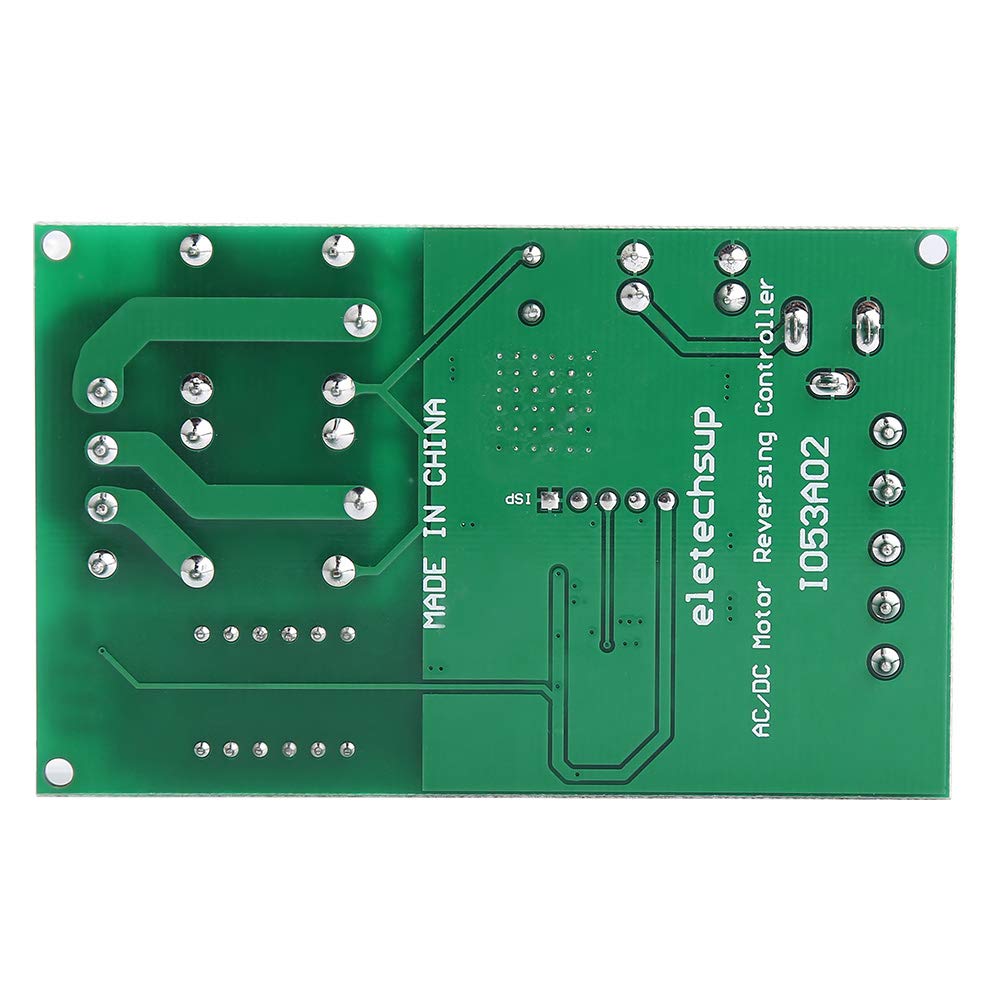
2. irudia: Atzealdea view of the Acouto motor control board, displaying the green PCB with circuit traces and the text 'MADE IN CHINA' and 'eletechsup AC/DC Motor Reversing Controller 1053A02'.
2.1 Ezaugarri nagusiak
- Versatile Control Options: Offers input control options for forward, reverse, and stop functions, catering to various user preferences and needs.
- Flexible Trigger Modes: Supports two input trigger modes: Low-Pulse trigger mode and Low-Level trigger mode, allowing users to select the mode that suits their application for accurate and efficient motor control.
- Pertsonalizagarria den atzerapen-denbora: Features a precise timing control with delay options ranging from 0.1 seconds to 9999 minutes, enabling users to tailor the controller's performance to specific requirements.
- Effective Cycle Options: Cycle times can be set to no cycle, 2-99 cycles, or always cycle, providing flexibility to customize motor operation and achieve optimal results in various scenarios.
- Adierazle-argi garbiak: Equipped with three LED indicators (Forward, Reverse, Stop) for easy monitoring of the motor's status at a glance, ensuring quick and efficient troubleshooting when necessary.
3. Zehaztapenak
- Elikatze-iturria: Two options (do not power simultaneously):
- Power Supply 1 (DC 5.5MM female jack): DC 5V
- Power Supply 2 (VIN/GND terminals): DC 6.5-25V
- Lan-korrontea:
- Normal Mode: Standby 41mA, Working 83mA
- Energy-Saving Mode: Standby 7mA, Working 44mA
- Input Control Ports: Forward (FWD), Reverse (REV), Stop (STOP)
- Input Trigger Modes: Low-Pulse trigger mode, Low-Level trigger mode
- Atzerapen denbora tartea: 0.1-999.9 seconds, 1-9999 seconds, 1-9999 minutes
- Ziklo-denborak: No cycle, 2-99 cycles, Always cycle
- Adierazleak: Forward (F LED), Reverse (R LED), Stop (S LED)
- Relay Load Current: Recommended less than 5A
3.1 Port Descriptions
- DC 5.5MM female: Power supply 1, DC 5V input.
- VIN: Power supply 2 positive, DC 6.5-25V input.
- GND: Power supply 2 negative.
- FWD: Forward input control (functionality may vary based on selected mode).
- BERRIA: Reverse input control (functionality may vary based on selected mode).
- GELDITU: Stop input control (functionality may vary based on selected mode).
- M+: Motor positive output.
- M-: Motor negative output.
- P+: Positive terminal for motor power supply (if separate motor power is used).

Figure 3: Dimensions of the control board, measuring approximately 8cm (3.2in) in length and 3.2cm (2in) in width.
4. Konfigurazioa eta instalazioa
4.1 Energia-konexioa
- Choose one power supply option: either connect a DC 5V power source to the DC 5.5MM female jack, or connect a DC 6.5-25V power source to the VIN and GND terminals. Do not connect both power supplies simultaneously.
- Ziurtatu elikadura hornidura boltage is within the specified range to prevent damage to the module.
4.2 Motor-konexioa
- Connect the positive terminal of your DC motor to the M+ terminal on the control board.
- Connect the negative terminal of your DC motor to the M- terminal on the control board.
- If your motor requires a separate power supply, connect its positive terminal to P+ and its negative terminal to M-. Ensure the motor power supply is appropriate for your motor.
- Ensure the relay load current does not exceed the recommended 5A.
4.3 Control Input Connections

4. irudia: Angeludun view highlighting the VIN, GND, FWD, REV, and STOP input terminals for power and control signals.
- Connect your control signals (e.g., from buttons, microcontrollers) to the FWD, REV, and STOP input terminals.
- Refer to the specific function mode selected for how these inputs will trigger actions (Low-Pulse or Low-Level).
5. Funtzionamendu-argibideak
The control board features a digital display and several buttons (SET, ++, --, OK) for configuration. The exact operational modes and their settings are determined by the firmware. This section provides general guidance.

Figure 5: Close-up of the control buttons and digital display, used for setting parameters.
5.1 Oinarrizko funtzionamendua
- Forward Control: Apply a trigger signal to the FWD input. The F LED will illuminate, and the motor will run in the forward direction.
- Reverse Control: Apply a trigger signal to the REV input. The R LED will illuminate, and the motor will run in the reverse direction.
- Stop Control: Apply a trigger signal to the STOP input. The S LED will illuminate, and the motor will stop.
5.2 Setting Delay Times and Cycles
- Sakatu EZARTU button to enter the parameter setting mode. The digital display will show the current parameter.
- Erabili ++ eta -- buttons to adjust the value of the displayed parameter (e.g., delay time, cycle count).
- Sakatu EZARTU again to move to the next parameter or to confirm the current setting.
- Sakatu OK button to save all settings and exit the parameter setting mode.
- The delay time can be set in seconds (0.1-999.9s, 1-9999s) or minutes (1-9999min). The unit is typically indicated on the display or by a specific mode.
- Cycle times can be configured for no cycle, a specific number of cycles (2-99), or continuous cycling.
6. Mantentzea
- Keep the control board clean and free from dust and moisture.
- Avoid exposing the board to extreme temperatures or direct sunlight.
- Regularly check all wire connections to ensure they are secure.
- Do not attempt to repair the board if you are not qualified. Contact a professional if issues arise.
7. Arazoak
- Ez dago pizterik/Pantaila itzalita:
- Check power supply connections and ensure voltage is within the specified range (DC 5V or DC 6.5-25V).
- Verify that only one power supply option is connected.
- Motorrak ez du erantzuten:
- Ensure motor connections (M+, M-) are correct and secure.
- Check if the control input signals (FWD, REV, STOP) are being correctly applied according to the selected trigger mode.
- Verify that the motor's current draw does not exceed the relay's 5A capacity.
- Confirm that the selected operating mode and delay settings are appropriate.
- Motorraren norabide okerra:
- Reverse the M+ and M- connections to change the motor's default direction.
- LED adierazleak ez funtzionatzen:
- Ensure the board is powered correctly and the corresponding function is active.
8. Segurtasun informazioa
- Always disconnect power before making any connections or adjustments to the board.
- Ensure proper insulation for all wiring to prevent short circuits.
- Ez gainditu zehaztutako bolumenatage and current ratings for the power supply and motor load.
- This product is an electronic component; handle with care to avoid electrostatic discharge.
- Mantendu haurren eskura.