
1. Sarrera
This manual provides essential instructions for the safe and efficient operation, setup, and maintenance of your OMTech Turbo-535 50W CO2 Laser Engraver and Cutter. Please read this manual thoroughly before using the machine to ensure proper functionality and to prevent injury or damage.

Figure 1: OMTech Turbo-535 50W CO2 Laser Engraver and Cutter machine, front-side view. The machine features a blue and grey casing with a transparent lid and a control panel on the right side.
2. Segurtasun informazioa
Operating a laser engraver requires strict adherence to safety protocols. Failure to follow these guidelines can result in serious injury or damage to the equipment.
2.1 Segurtasun-neurri orokorrak
- Always wear appropriate laser safety glasses when the machine is in operation.
- Ensure the work area is well-ventilated to remove fumes and smoke.
- Ez utzi inoiz makina arretarik gabe funtzionatzen ari den bitartean.
- Su-itzalgailu bat gertu eduki eta nola erabili jakin.
- Do not engrave or cut materials that produce toxic fumes or are highly flammable.
- Ensure all safety interlocks are functioning correctly. The machine features an automatic shutdown when the lid is opened.
2.2 Segurtasun elektrikoa
- Konektatu makina behar bezala lurrera konektatutako entxufe batera.
- Ez erabili makina esku bustiekin edo lehorrean.amp baldintzak.
- Regularly inspect power cords for damage.
- The machine includes a safety relay and dual circuit design to minimize electrical malfunctions.

Figure 2: The OMTech laser engraver features Class 1 laser safety with comprehensive safety devices, including a flame-retardant window for safe observation of the engraving process.
3. Produktua amaitu daview
The OMTech Turbo-535 is a versatile 50W CO2 laser engraver and cutter designed for precision work on various non-metallic materials. It offers a generous working area and advanced features for both hobbyists and commercial users.
3.1 Ezaugarri nagusiak
- 50W CO2 Laser Tube: Provides reliable power for engraving and cutting, with a lifespan of up to 1,000 hours, extendable at lower settings.
- Lan-eremu handia: A 300 x 500 mm work surface with both honeycomb and aluminum slat tables.
- Abiadura Handia: Engraving speeds up to 600 mm/s for efficient project completion.
- Materialen bateragarritasuna: Capable of engraving up to 10mm deep into non-metallic materials such as wood, glass, acrylic, and leather.
- Integrated Air Assist: Effectively removes smoke and dust, protecting laser optics and ensuring clean engraving.
- Kontrol panel digitala: User-friendly interface with indicator lights (green, yellow, red) for real-time status and a reset button for quick issue resolution.
- Softwarearen bateragarritasuna: Supports LightBurn (macOS/Windows) and includes free RDWorks software (Windows).
- Rotary Axis Support: Compatible with rotary attachments for engraving cylindrical objects.

3 Irudia: Gainetikview of the OMTech Turbo-535's key features, highlighting its 50W laser power, 600mm/s maximum engraving speed, 500x300mm processing area, and support for rotary engraving.

Figure 4: The digital control panel provides an intuitive interface for operating the machine, compatible with various design software.
4. Konfigurazioa
Proper setup is crucial for the performance and safety of your laser engraver. Follow these steps carefully.
4.1 Desontziratzea eta kokatzea
- Kontu handiz atera makina bere ontzitik. Gorde ontziratzeko material guztiak etorkizunean garraiatzeko edo biltegiratzeko.
- Place the machine on a stable, level surface capable of supporting its weight (75 kg). Ensure adequate clearance around the machine for ventilation and access.
- Verify all included components are present: 1 CO2 laser engraver machine, 1 accessory kit.
4.2 Konexio elektrikoa
- Connect the power cable to the machine and then to a grounded AC power outlet.
- Ensure the emergency stop button is disengaged (pulled out) before powering on.
4.3 Aireztapen Sistemaren Konfigurazioa
The integrated air assist and exhaust system are vital for safety and clean operation.
- Connect the exhaust hose to the machine's exhaust port and route it to an external vent or a dedicated fume extractor.
- If using an external air compressor for enhanced air assist, connect it to the designated port.
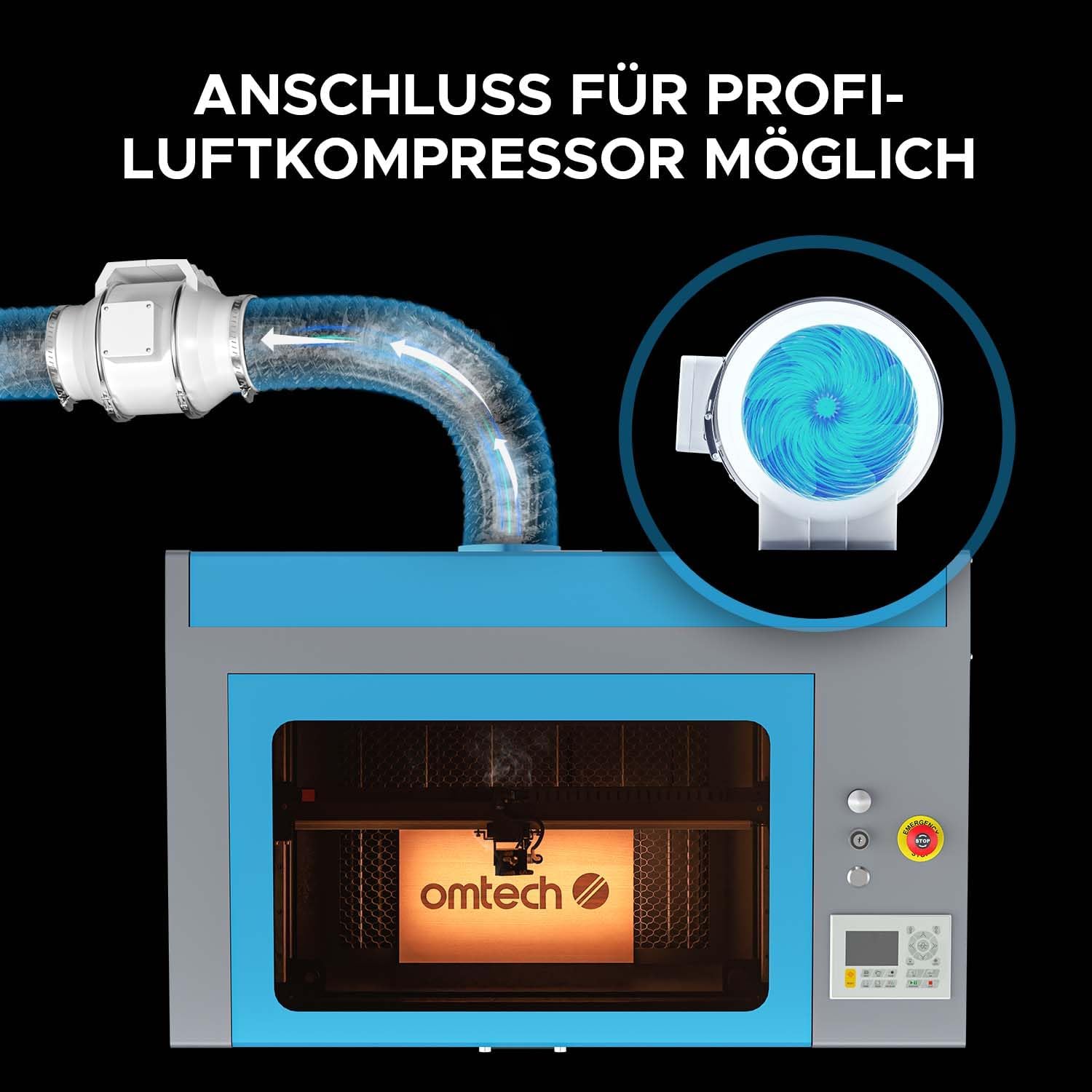
Figure 5: The machine allows for connection to a professional air compressor to enhance air assist, which helps clear smoke and debris from the engraving area.

Figure 6: A powerful exhaust fan system is integrated to provide quick and efficient ventilation, ensuring a cleaner and safer workspace.
5. Funtzionamendu-argibideak
This section outlines the basic steps for operating your OMTech Turbo-535 laser engraver.
5.1 Software Installation and Setup
- Install the provided RDWorks software or your preferred compatible software (e.g., LightBurn).
- Follow the software's instructions to connect it to the laser engraver.

Figure 7: The laser engraver is compatible with professional software like LightBurn and RDWorks, allowing for versatile design and control.
5.2 Grabatzeko/Mozteko prestatzea
- Place the material to be processed on the appropriate work table (honeycomb for cutting, aluminum slats for engraving). The machine offers a 300x500mm working area.
- Adjust the focus of the laser head according to the material thickness.
- Ensure the lid is securely closed before starting any operation.

Figure 8: The machine includes both a honeycomb bed and an aluminum slat bed, providing flexibility for various engraving and cutting tasks within the 300x500mm work area.
5.3 Starting an Operation
- Load your design into the software.
- Set the appropriate laser power, speed, and other parameters for your material.
- Initiate the job from the software or the machine's digital control panel.
- Monitor the process through the flame-retardant viewleihoa.

Figure 9: The OMTech laser engraver is capable of high-speed engraving, reaching up to 600 mm/s, which significantly boosts productivity.

Figure 10: The 50W laser can cut through materials like 15mm acrylic and 14mm wood in a single pass, demonstrating its cutting capability.
6. Mantentzea
Mantentze-lan erregularrak zure laser grabagailuaren iraupena eta errendimendu optimoa bermatzen ditu.
6.1 Eguneko mantentze-lanak
- Clean the work area and honeycomb/slat bed to remove debris.
- Inspect the laser lens and mirrors for dust or residue and clean them with appropriate lens cleaning solution and wipes.
6.2 Asteroko mantentze-lanak
- Check and clean the exhaust fan and ducting.
- Lubricate the guide rails and bearings as per manufacturer recommendations.
6.3 Laser Tube Care
The 50W DC laser tube has a lifespan of up to 1,000 hours, which can be extended by operating at lower power settings. Avoid operating the laser at 100% power for extended periods to maximize its lifespan.

Figure 11: The powerful DC laser tube is a core component, offering high efficiency and a long operational lifespan with proper care.
7. Arazoak
Atal honek aurki ditzakezun arazo ohikoenei irtenbideak eskaintzen ditu.
7.1 Ohiko arazoak eta irtenbideak
| Arazoa | Kausa posiblea | Irtenbidea |
|---|---|---|
| Laserrak ez du jaurtitzen | Lid open, emergency stop engaged, power issue, laser tube fault. | Close lid, disengage emergency stop, check power connections, consult support if tube fault suspected. |
| Grabatuaren kalitate eskasa | Incorrect focus, dirty optics, wrong power/speed settings, material issues. | Adjust focus, clean lens/mirrors, optimize settings for material, use suitable materials. |
| Machine not responding | Software connection issue, control panel error, machine frozen. | Check USB/network connection, use the reset button on the control panel, power cycle the machine. |
| Excessive smoke/fumes | Ineffective ventilation, wrong material. | Ensure exhaust system is clear and running, verify material is safe for laser processing. |
For issues not listed here, please refer to the comprehensive troubleshooting guide available on the OMTech support webwebgunean edo jarri harremanetan bezeroarentzako zerbitzuarekin.
8. Zehaztapenak
| Ezaugarri | Xehetasuna |
|---|---|
| Fabrikatzailea | OMTech |
| Modelo zenbakia | DE-0503 |
| Produktuaren neurriak (L x W x H) | 103 x 65 x 57 cm |
| Pisua | 75 kg |
| Laser Potentzia | 50 W |
| Grabatu Eremua | 500 x 300 mm |
| Grabatzeko abiadura maximoa | 600 mm/s |
| Potentzia Mota | AC |
| Dakarten osagaiak | 1 CO2 laser engraver machine, 1 accessory kit |
| Ordezko piezen erabilgarritasuna | Informazioa ez dago erabilgarri |
9. Bermea eta Laguntza
For warranty information, technical support, or to purchase spare parts, please visit the official OMTech website or contact their customer service department. Refer to your purchase documentation for specific warranty terms and conditions.
OMTech Official Webgunea: www.omtechlaser.com


