
Xvive P58
Xvive P58 Wireless Guitar Pedal System User Manual
Model: P58 | Brand: Xvive
Sarrera
The Xvive P58 Wireless Guitar Pedal System offers a reliable and high-fidelity wireless solution for guitarists and bassists. Operating on the 5.8 GHz frequency band, it provides crystal-clear 24-bit/48 kHz audio with minimal latency and a robust transmission range. This system features a versatile transmitter compatible with both active and passive pickups, and a pedal-style receiver that doubles as a chromatic tuner with switchable true or buffered bypass. Designed for seamless integration into any setup, the P58 ensures stable performance whether on stage edo estudioan.
Zer sartzen da
Your Xvive P58 Wireless Guitar Pedal System package contains the following components:
- A58T Transmitter
- P58R Pedal Receiver
- C motako USB kargatzeko kablea
- DC 12V korronte egokitzailea
- Erabiltzailearen Gida
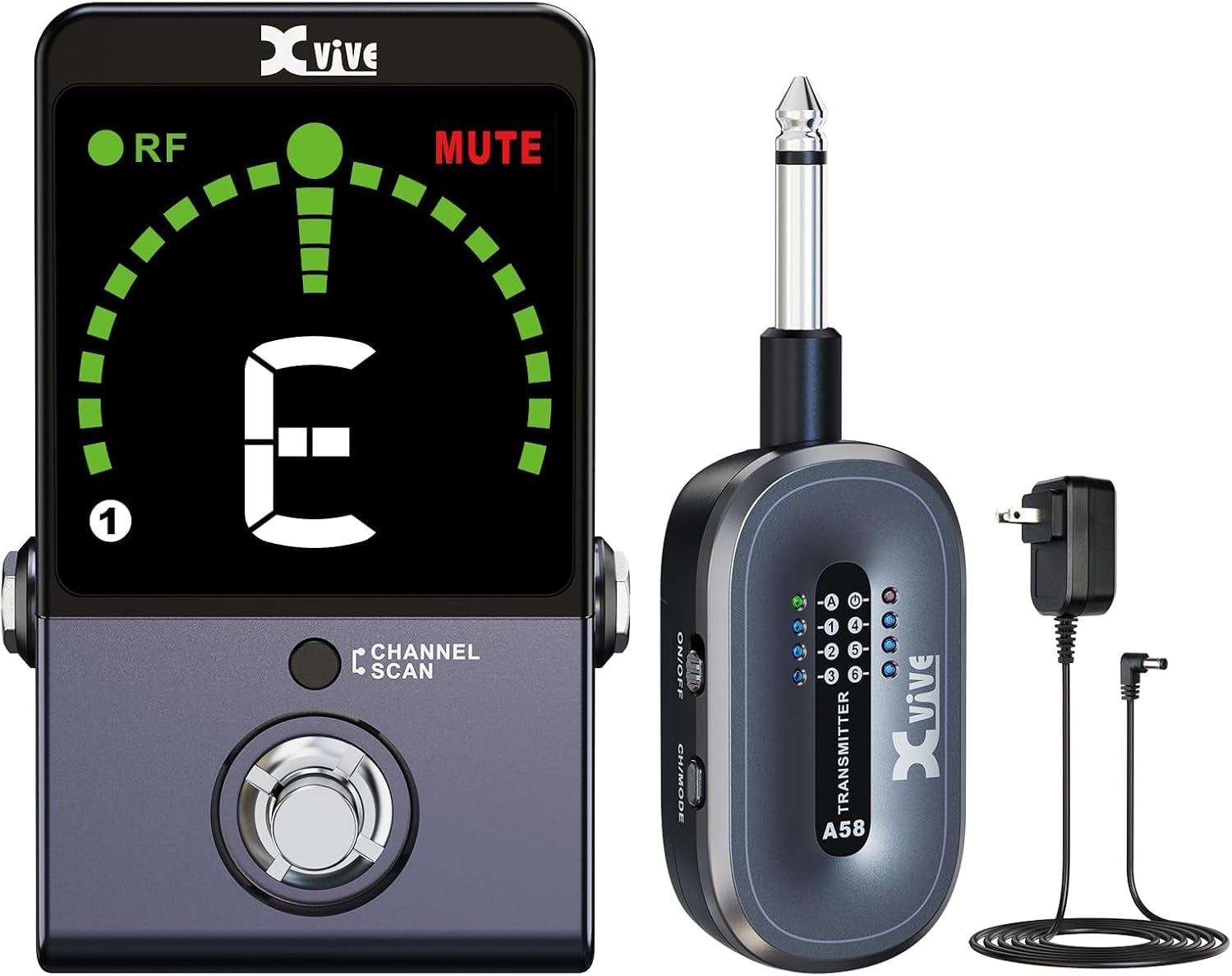
Image: The Xvive P58 system showing the A58T transmitter, P58R pedal receiver, and included power adapter and cable.
Produktua amaituview
Familiarize yourself with the various parts and controls of your P58 system.

Image: Detailed diagram labeling all ports, buttons, and indicators on both the A58T transmitter and P58R receiver.
P58R Pedal Receiver Features:
- Tuner ON/OFF Footswitch: Activates or deactivates the tuner function.
- Channel / Scan Button: Used to manually select channels or initiate a channel scan.
- Tuner Screen: Displays tuning information, wireless RF LED, and current channel.
- 1/4" TS Output: Zurekin konektatzen da ampargitzailea edo beste audio-ekipo bat.
- DC 9-12V Input: Power input for the receiver.
- USB C motako irteera: Provides power for charging the A58T transmitter.
- True Bypass/Buffered Bypass Switch: Selects between true bypass for pure signal or buffered bypass for signal integrity over long cable runs.
- 1/4" TS Guitar Input: For direct wired connection of your instrument (disables wireless receiver module).
A58T Transmitter Features:
- Power LED: Potentzia-egoera adierazten du.
- Active/Passive Mode LED: Shows the current pickup mode.
- Kanalaren LEDa: Displays the selected wireless channel.
- Bateriaren konpartimendua: Bateria kargagarria gordetzen du.
- Pizteko / itzaltzeko etengailua: Transmisorea piztu edo itzaltzen du.
- CH/MODE Button: Selects the channel or switches between Active/Passive modes.
- 1/4" TS Input: Connects to your instrument's output jack.
- USB kargatzeko ataka: Transmisorea kargatzeko.
Konfigurazioa
1. Hasierako kargatzea
Before first use, fully charge both the A58T transmitter and P58R receiver. Use the provided Type-C USB cable and DC 12V adapter. The transmitter can also be charged directly from the receiver's USB Type-C output port.
Video: Official Xvive P58 Wireless Guitar Pedal System overview, demonstrating charging and key features. This video shows the charging process and various functionalities of the system.
2. Igorlea konektatzea
Plug the A58T transmitter's 1/4" TS input directly into your guitar or bass's output jack. Ensure it is securely connected.
3. Hargailua konektatzea
Connect the P58R receiver's 1/4" TS output to your amplifier, audio interface, or the input of your first pedal on your pedalboard. Power the receiver using the DC 12V adapter.

Image: The P58R receiver integrated into a guitar pedalboard, connected to other pedals and an instrument.
Funtzionamendu-argibideak
1. Piztea eta parekatzea
Turn on both the A58T transmitter and P58R receiver using their respective ON/OFF switches. The units will automatically attempt to pair. The RF LED on the receiver will illuminate solid green when successfully connected.
2. Channel Scan Mode
To find the clearest available wireless channel, press and hold the P58R receiver's Channel button for 3 seconds. The receiver's LED will flash during scanning and then stay solid on the optimal channel. Manually set the transmitter's channel to match the receiver's channel by pressing its CH/MODE button repeatedly until the correct channel is selected.

Image: A close-up of the P58R receiver's screen showing the channel scan in progress, indicating the selection of the best wireless channel.
3. Active and Passive Modes
The P58 system supports both active and passive pickups. To activate Active mode for high-output active pickups, hold the A58T transmitter's CH/MODE button for 3 seconds. The Active LED on the transmitter will illuminate. For passive pickups, ensure the Active LED is off.

Image: Visual representation of the P58 transmitter's compatibility with bass, electric guitar, and piezo-electric acoustic guitar, highlighting active and passive pickup support.
4. Tuner Function
The P58R receiver features a built-in chromatic tuner. Tap the footswitch to activate the tuner. When the tuner is active, the output signal will be muted, and the MUTE LED will light up. The tuner screen will display the note you are tuning. Blue dots indicate flat, red dots indicate sharp, and a green circle indicates a perfectly tuned note.

Image: A graphic illustrating the tuner display, explaining the meaning of RF LED, MUTE LED, channel display, and how to interpret flat, sharp, and in-tune indications.
5. True Bypass / Buffered Bypass
The P58R receiver offers a switch to select between True Bypass and Buffered Bypass modes. True Bypass provides a completely unaltered signal path when the pedal is off, while Buffered Bypass maintains signal integrity over long cable runs or through complex pedal chains.
Zehaztapen Teknikoak
| Ezaugarri | Zehaztapena |
|---|---|
| Haririk gabeko maiztasun-banda | 5.8 GHz |
| Audioaren kalitatea | 24-bit/48 kHz High-Resolution Audio |
| Transmisio-barrutia | Gehienez 100 oin (ikusmen-lerroa) |
| Latentzia | 5 ms baino gutxiago |
| Seinaleen eta zarataren arteko erlazioa | 110 dB |
| Maiztasun Erantzuna | 20Hz - 20kHz |
| Haririk gabeko kanalak | 6 |
| Transmisorearen bateriaren iraupena | Gehienez 5 ordu |
| Transmisorearen bateria mota | Litio ioia (barne) |
| Hartzailearen Potentzia Sarrera | DC 9-12V |
| Produktuaren neurriak | 3.2 x 2.5 x 2.5 hazbete |
| Elementuaren pisua | 4 ontza |
Arazoak konpontzea
- No Signal/Interference:
- Ziurtatu igorlea eta hartzailea piztuta eta guztiz kargatuta daudela.
- Perform a Channel Scan on the receiver to find a clear channel, then match the transmitter's channel.
- Check for other 5.8 GHz wireless devices nearby that might be causing interference.
- Ensure the transmitter is securely plugged into the instrument and the receiver into the amplifier/pedalboard.
- Soinu kalitate eskasa:
- Verify the transmitter is in the correct Active/Passive mode for your instrument's pickups.
- Egiaztatu kableen konexioak solteak edo kalteak dauden.
- Ensure the units are within the specified 100-foot range and have a clear line of sight.
- Tuner Not Responding:
- Ensure the tuner is activated by pressing the footswitch.
- Check that the instrument is properly connected to the receiver's input.
- Bateria azkar husten:
- Ziurtatu unitateak guztiz kargatuta daudela erabili aurretik.
- Turn off units when not in use to conserve battery life.
Mantentzea
- Garbiketa: Use a soft, dry cloth to clean the units. Avoid using abrasive cleaners or solvents.
- Biltegiratzea: Gorde sistema leku fresko eta lehor batean, eguzki-argitik eta muturreko tenperaturetatik babestuta.
- Bateria zaintzea: For optimal battery longevity, avoid completely discharging the units regularly. If storing for extended periods, charge the batteries to about 50% every few months.
Bermea eta Laguntza
For warranty information, technical support, or service inquiries, please refer to the official Xvive website or contact Xvive customer support directly. Keep your purchase receipt as proof of purchase for warranty claims.
Visit the Xvive Store: Xvive Official Store
Erlazionatutako dokumentuak - P58
 |
Xvive P58 Guitar Wireless System User Manual Comprehensive user manual for the Xvive P58 Guitar Wireless System, detailing features, setup, operation, safety guidelines, technical specifications, and troubleshooting for this 5.8 GHz wireless audio transmission device. |
 |
NUX NTU-3 MKII FLOW Compact Guitar Tuner Pedal Explore the NUX NTU-3 MKII FLOW, a versatile compact guitar tuner pedal. Learn about its multiple tuning modes (Chromatic, Guitar-Standard, Guitar-Compensated, Bass), display options, bypass settings (True Bypass, Buffered Bypass), specifications, and safety guidelines. |
 |
NUX Flow Tune NTU-3 MKII Mini Pedal Tuner - User Manual, Features, and Specifications A comprehensive guide to the NUX Flow Tune NTU-3 MKII mini pedal tuner, detailing its features, operation, product interface, tuning modes, bypass options, technical specifications, safety warnings, and compliance information. |
 |
D'Addario Pedal Tuner+ | Accurate Guitar Pedal Tuning & Countdown Timer The D'Addario Pedal Tuner+ is a versatile and accurate chromatic guitar pedal tuner featuring a clear LED display, a convenient countdown timer, and selectable buffered or true bypass modes. Learn how to use its features, calibrate, and optimize your signal chain. |
 |
Digitech HardWire Tuner eskuliburua: Ezaugarriak, funtzionamendua eta zehaztapenak Digitech HardWire afinagailuaren gida osoa, gitarra-jotzaile eta baxu-jotzaileentzako ezaugarriak, afinatze moduak, funtzionamendua eta zehaztapen teknikoak zehaztuz. |
 |
D'Addario PW-CT-20 Chromatic Pedal Tuner - User Guide and Specifications Learn about the D'Addario PW-CT-20 Chromatic Pedal Tuner, including its features, connections, calibration, and FCC compliance information. This guide provides essential details for musicians. |
Ask a question about this manual
Ask about setup, troubleshooting, compatibility, parts, safety, or missing instructions. Manuals+ will review the question and use this page’s manual context to help answer it.