
1. Sarrera
Eskerrik asko erosketagatik.asing the KTC 24-inch WQHD 100Hz IPS Monitor. This manual provides essential information for the safe and efficient use of your new monitor. Please read it thoroughly before use and keep it for future reference.
This monitor features a 24-inch IPS panel with WQHD (2560x1440) resolution, offering stunning visual clarity and vibrant colors with 122% sRGB coverage. A 100Hz refresh rate and FreeSync & G-Sync compatibility ensure smooth, tear-free visuals, ideal for both office work and casual gaming. Advanced eye care technologies, including blue light reduction and flicker-free operation, provide a comfortable viewing experience even during extended use. The monitor also supports HDR10 for enhanced dynamic range and features flexible connectivity options with HDMI and DisplayPort.
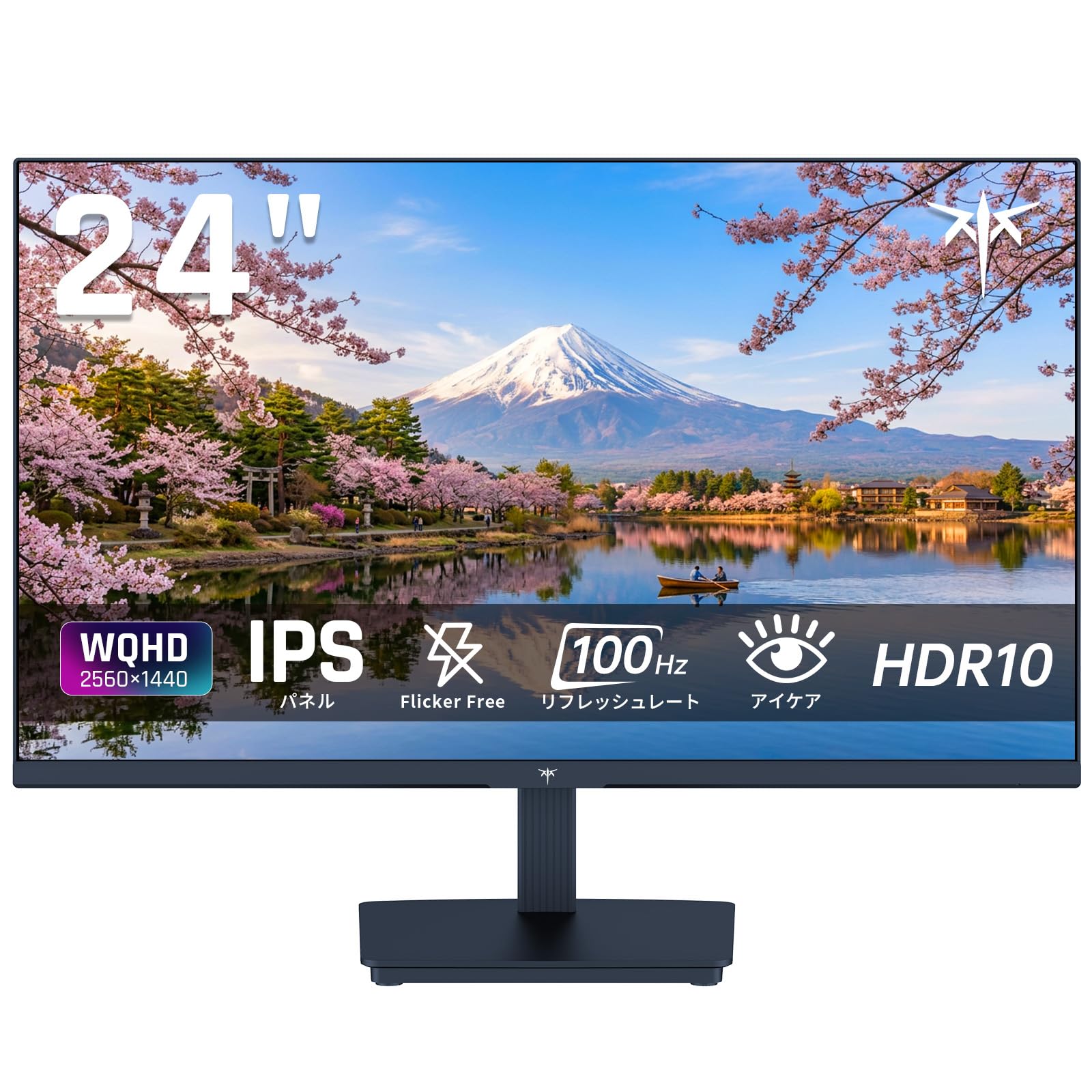
Image: KTC 24-inch WQHD 100Hz IPS Monitor.
2. Segurtasun informazioa
Please observe the following safety precautions to prevent damage to the monitor or injury to yourself or others:
- Ez jarri monitoreari euriari, hezetasunari edo muturreko tenperaturei.
- Ziurtatu aireztapen egokia monitorearen inguruan, gehiegi berotu ez dadin.
- Erabili monitorearekin batera datorren korronte-egokitzailea soilik.
- Saihestu objektu astunak kablearen edo monitorearen gainean jartzea.
- Ez saiatu monitoreak zeuk desmuntatzen edo konpontzen. Jarri harremanetan zerbitzu-langile kualifikatuekin.
- Mantendu monitoreak eremu magnetiko indartsuetatik urrun.
3. Paketearen edukia
Egiaztatu elementu guztiak paketean daudela:
- KTC 24-inch WQHD 100Hz IPS Monitor (H24T27)
- Monitorearen oinarria
- HDMI kablea
- Elikatze-moldagailua
- Erabiltzailearen eskuliburua
4. Konfigurazioa
4.1 Standa muntatzea
- Carefully remove the monitor and base from the packaging.
- Lotu euskarriaren lepoa monitorearen panelera.
- Secure the base to the stand neck using the provided screws.
4.2 Monitorea konektatzea
Konektatu monitorea zure ordenagailura edo beste gailu batzuetara kable egokiak erabiliz.
- Potentzia-konexioa: Konektatu korronte-egokitzailea monitorearen DC sarrerara eta gero entxufe batera.
- Bideo-konexioa: Use the supplied HDMI cable or a DisplayPort cable to connect your computer's video output to the corresponding port on the monitor.
- Audio irteera: If desired, connect headphones or external speakers to the 3.5mm audio output jack.

Image: Close-up of the KTC monitor's rear ports, including DC power, HDMI, DisplayPort, and audio out.
5. Funtzionamendu-argibideak
5.1 Piztu/Itzali
Sakatu monitorearen gainean dagoen pizteko botoia pizteko edo itzaltzeko.
5.2 Pantailan bistaratzeko (OSD) menua
The OSD menu allows you to adjust various monitor settings. Use the control buttons (usually located on the back or bottom of the monitor) to navigate the menu and make selections.
5.3 Pantailaren ezarpenak
- Ebazpena: The monitor supports WQHD (2560x1440) resolution for sharp and detailed images. Ensure your graphics card is set to this resolution for optimal display.
- Freskatze-tasa: Enjoy smooth visuals with a 100Hz refresh rate. This can be configured in your operating system's display settings.
- Kolore gama: The monitor offers 122% sRGB coverage for rich and accurate colors.

Image: KTC monitor highlighting key features like IPS panel, 100Hz, WQHD, 24-inch, Adaptive Sync, and blue light reduction.

Image: Comparison of WQHD (2560x1440) and FHD (1920x1080) resolutions, demonstrating enhanced detail with WQHD.

Image: Comparison of 100Hz and 60Hz refresh rates, showing smoother motion with 100Hz.
5.4 Adaptive Sync (FreeSync & G-Sync)
The monitor supports both FreeSync and G-Sync technologies to eliminate screen tearing and stuttering, providing a fluid gaming experience. Ensure this feature is enabled in your graphics card settings and the monitor's OSD.

Image: Monitor display showing HDR10 content on one side and standard HDR on the other, along with FreeSync & G-Sync comparison (ON/OFF).
5.5 Begien Zainketaren Ezaugarriak
The monitor includes Flicker-Free technology and a Blue Light Reduction mode to minimize eye strain during prolonged use. These settings can be adjusted via the OSD menu.

Image: KTC monitor displaying eye care features: Low Blue Light (ON/OFF) and Flicker-Free (ON/OFF).
5.6 HDR10 euskarria
This monitor supports HDR10, providing a wider range of colors and contrasts for a more immersive viewing experience. Ensure HDR is enabled in your device's display settings for compatible content.
5.7 Zutik erregulagarria
The monitor stand allows for tilt adjustment from -5° to 15°, enabling you to find the most comfortable viewangelua.

Irudia: Albokoa view of the KTC monitor demonstrating the tilt-adjustable stand (-5° to 15°).
5.8 Zabala Viewangelua
The IPS panel provides a wide 178-degree viewing angle, ensuring consistent color and image quality from almost any perspective.

Image: KTC monitor showcasing a wide 178-degree viewing angle with consistent color.
6. Mantentzea
6.1 Monitorea garbitzea
- Deskonektatu beti monitorea garbitu aurretik.
- Erabili lipurrik gabeko zapi leun bat dampUrarekin edo pantaila-garbitzaile leun eta ez-urratzaile batekin garbitu.
- Ez ihinztatu garbitzailea zuzenean pantailan.
- Saihestu produktu kimiko gogorrak edo material urratzaileak erabiltzea.
6.2 Arreta orokorra
- Keep the monitor in a clean, dry environment.
- Babestu pantaila objektu zorrotzetatik.
- When moving the monitor, handle it carefully and avoid putting pressure on the screen.
7. Arazoak
Monitorearekin arazoak badituzu, jo ezazu honako arazo eta irtenbide ohikoenei:
| Arazoa | Irtenbide posiblea |
|---|---|
| Ez dago irudirik pantailan | Check power connections. Ensure video cable is securely connected to both monitor and computer. Select correct input source via OSD. |
| Irudia lausoa edo distortsionatua dago | Ensure the display resolution is set to 2560x1440. Check video cable for damage. |
| Pantailaren urratzea edo tartekatzea | Verify FreeSync/G-Sync is enabled in both monitor OSD and graphics card settings. |
| Ez dago soinurik entzungailuetatik/bozgorailuetatik | Check audio cable connection. Ensure volume is not muted on monitor or computer. |
| Monitorea ez da pizten | Check power outlet and power adapter connection. Try a different power outlet. |
If the problem persists after trying these solutions, please contact KTC customer support.
8. Zehaztapenak
KTC H24T27 monitorearen zehaztapen tekniko zehatzak:
| Ezaugarri | Zehaztapena |
|---|---|
| Marka | CTC |
| Modelo zenbakia | H24T27 |
| Pantailaren tamaina | 24 hazbetekoa |
| Ebazpena | WQHD (2560 x 1440 pixels) |
| Aspektu-erlazioa | 16:9 |
| Panel mota | IPS |
| Pantailaren gainazala | Ez distira |
| Freskatze tasa | 100 Hz |
| Erantzun Denbora | 7 ms |
| Kontraste-erlazioa | 1300:1 |
| Distira | 300 cd/m² |
| Kolore gama | %122 sRGB |
| Viewangelua | 178 gradu |
| HDR Teknologia | HDR10 |
| Sinkronizazio egokitzailea | FreeSync, G-Sync |
| Konektibitatea | 1x HDMI, 1x DisplayPort, Audio Out |
| Energia-kontsumoa | 12 Watt |
| liburukiatage | 100 Volt |
| Neurriak (L x W x H) | 18.3 x 54 x 40.5 cm |
| Ezaugarri gehigarriak | Adaptive Sync, Eye Care, Flicker-Free, Blue Light Filter, Tilt Adjustment |
| Gailu bateragarriak | Game Consoles, Laptops |
| Kolorea | Beltza |
| Forma | Laua |
| Jatorria | Txina |
9. Bermea eta Laguntza
9.1 Bermearen informazioa
Your KTC monitor comes with a 3 urteko fabrikatzailearen bermea. In the event of a product defect, a free replacement will be provided. Please note that this warranty does not cover loss or damage caused by customer negligence.

Image: KTC's 3-year free replacement warranty details and contact information.
9.2 Bezeroarentzako laguntza
For any inquiries or concerns, please feel free to contact us. We are committed to providing full support to ensure your satisfaction.
Telefonoa: 050-3606-8990
Posta elektronikoa: support@ktcplay.com
You can also contact support through Amazon:

Image: Step-by-step guide on how to contact customer support via Amazon.
10. Produktua amaitu daview Bideoa
Ikusi bideo hau ikuspegi orokorra lortzekoview of the KTC QHD computer monitor and its features.
Video: This video showcases the KTC QHD computer monitor, highlighting its 2560x1440 (2K) resolution, 100Hz refresh rate, FreeSync and G-Sync compatibility, flicker-free and low blue light features, 8-bit & 116% sRGB color gamut, 3-side frameless design, -5° to 15° tilt adjustable stand, and available sizes (24, 27, 32 inches). It emphasizes its suitability for professional office use.