
1. Sarrera
Eskerrik asko erosketagatik.asing the Kaiser MSA-2073M Professional One Body Speaker. This powerful and versatile audio system is designed to deliver clear, robust sound for various events, both indoors and outdoors. Featuring dual 8-inch woofers, 70W RMS power, Bluetooth connectivity, a wireless microphone, and dynamic Infinity Light effects, the MSA-2073M is built to enhance your audio experience. Please read this manual carefully to ensure proper setup, operation, and maintenance of your speaker.
2. Segurtasun-argibideak
- Ez jarri bozgorailua euripean edo hezetasunean, suteak edo deskarga elektrikoak saihesteko.
- Ez ireki bozgorailua casing. Konponketa guztiak langile kualifikatuen esku utzi.
- Mantendu bozgorailua bero-iturrietatik urrun, hala nola erradiadoreetatik, bero-erregistroetatik, sukaldeetatik edo beroa sortzen duten beste aparatu batzuetatik.
- Erabili fabrikatzaileak zehaztutako eranskinak/osagarriak soilik.
- Deskonektatu bozgorailua tximista-ekaitzetan edo denbora luzez erabili gabe dagoenean.
- Ziurtatu aireztapen egokia dagoela. Ez blokeatu aireztapen-irekidurak.
- Ez jarri objektu astunak bozgorailuaren gainean.
- Avoid placing the speaker in unstable positions where it might fall.
3. Paketearen edukia
Mesedez, egiaztatu paketearen edukia. Elementuren bat falta bada edo hondatuta badago, jarri harremanetan zure saltzailearekin.
- Kaiser MSA-2073M Professional One Body Speaker
- Haririk gabeko mikrofonoa
- USB kargatzeko kablea
- Audio kablea (3.5 mm-ko AUX)
- Erabiltzailearen eskuliburua
4. Produktua amaitu daview
Familiarize yourself with the different parts and controls of your Kaiser MSA-2073M speaker.

4.1. irudia: Aurrealdea View. Shows the speaker's front panel with dual 8-inch woofers and the dynamic Infinity Light display.

4.2. Irudia: Atzealdea View. Displays the speaker's rear, including the integrated handle and transport wheels for easy mobility.
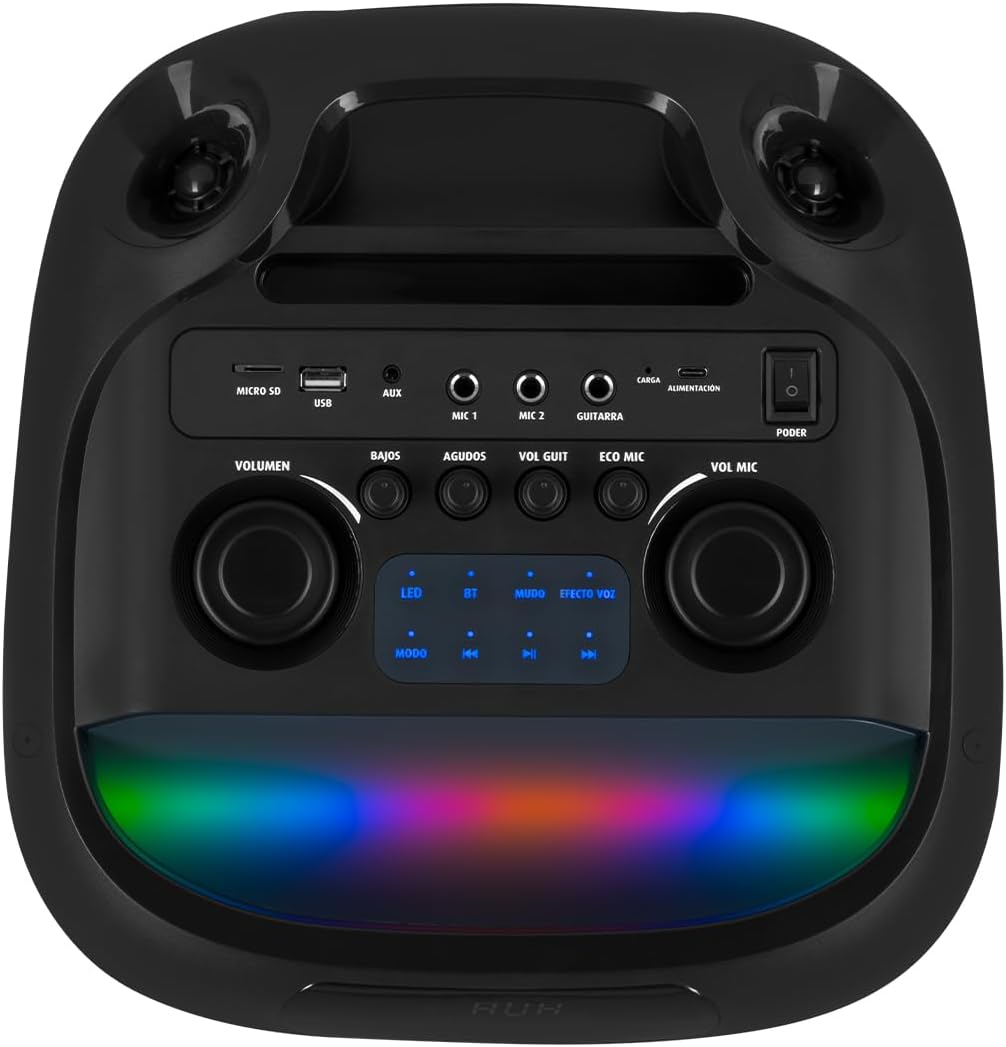
4.3. irudia: Kontrol-panela. Details the top-mounted control panel with inputs for USB, Micro SD, AUX, two microphones, and a guitar, along with volume, bass, treble, and effect controls.

Figure 4.4: Wireless Microphone. The included wireless microphone for vocal performances and announcements.
5. Konfigurazioa
5.1 Paketatzea
- Kontu handiz atera bozgorailua eta osagarri guztiak paketetik.
- Gorde ontzia etorkizunean garraiatzeko edo biltegiratzeko.
5.2 Hasierako karga
Before first use, it is recommended to fully charge the speaker's internal battery.
- Connect the provided USB charging cable to the speaker's charging port (labeled 'CARGA' or 'ALIMENTACIÓN' on the control panel).
- Konektatu USB kablearen beste muturra USB elikatze-egokitzaile bateragarri batera (ez dago barne) edo USB ataka elikagarri batera.
- The charging indicator light will illuminate. Allow several hours for a full charge.
- Guztiz kargatuta dagoenean, adierazle-argia aldatu edo itzali egin daiteke. Deskonektatu kargatzeko kablea.
5.3 Piztu/Itzali
To power on the speaker, locate the 'PODER' (Power) switch on the control panel and slide it to the 'ON' position. To power off, slide it to 'OFF'.
6. Funtzionamendu-argibideak
6.1 Bluetooth konexioa
Connect your mobile device wirelessly to the speaker.
- Turn on the speaker. The 'BT' indicator on the control panel should blink, indicating it's in pairing mode.
- Zure gailu mugikorrean, gaitu Bluetootha eta bilatu eskuragarri dauden gailuak.
- Select "Kaiser MSA-2073M" from the list of devices.
- Once paired, the 'BT' indicator will stop blinking and remain solid. You can now play audio from your device through the speaker.
- Bluetooth-aren irismena 10 metrorainokoa da.
6.2 AUX sarrera
Konektatu kanpoko audio gailuak 3.5 mm-ko AUX kablea erabiliz.
- Connect one end of the 3.5mm audio cable to the 'AUX' port on the speaker.
- Konektatu beste muturra kanpoko gailuaren entzungailuen konektorera edo audio irteerara.
- Press the 'MODE' button on the speaker until 'AUX' mode is selected.
- Erreproduzitu audioa zure kanpoko gailutik.
6.3 USB/Micro SD erreprodukzioa
Play music directly from a USB flash drive or Micro SD card.
- Insert a USB flash drive into the 'USB' port or a Micro SD card into the 'MICRO SD' slot.
- The speaker will automatically switch to USB/Micro SD mode and begin playing compatible audio files. Bestela, sakatu 'MODE' botoia sarrera zuzena hautatzeko.
- Use the playback controls (play/pause, next/previous track) on the speaker to manage your music.
6.4 Mikrofonoaren erabilera
Use the included wireless microphone for karaoke or announcements.
- Ziurtatu haririk gabeko mikrofonoa piztuta dagoela.
- The microphone will automatically connect to the speaker.
- Adjust the microphone volume using the 'VOL MIC' knob on the control panel.
- Use the 'ECO MIC' knob to adjust the echo effect for the microphone.
- The speaker also features five voice effects for the microphone, accessible via the 'EFECTOS VOZ' button.
6.5 Gitarra Sarrera
Connect an electric guitar to the speaker.
- Connect your guitar to the 'GUITARRA' input jack on the control panel.
- Adjust the guitar volume using the 'VOL GUIT' knob.
6.6 Soinuaren doikuntzak
Customize your audio output.
- bolumena: Adjusts the overall master volume of the speaker.
- BAJOS (Bass): Maiztasun baxuko irteera doitzen du.
- AGUDOS (Treble): Maiztasun handiko irteera doitzen du.
6.7 Infinity Light Effects
Enhance your listening experience with dynamic LED lighting.
- Press the 'LED' button on the control panel to cycle through different light modes or turn the lights off.
- The lights synchronize with the music for an immersive effect.
6.8 KSR-LINK (True Wireless Stereo)
Connect two MSA-2073M speakers for a true wireless stereo experience.
- Ziurtatu bi bozgorailuak piztuta eta Bluetooth moduan daudela, baina ez inongo gailutara konektatuta.
- On one speaker, press and hold the 'MUDO' (Mute) button (which also functions as the KSR-LINK pairing button). You will hear a confirmation tone.
- The two speakers will automatically pair with each other.
- Once paired, connect your mobile device to one of the speakers via Bluetooth as described in section 6.1. Audio will now play in stereo through both speakers.
7. Kargatzea
The speaker features a rechargeable battery for portable use. A full charge allows for prolonged use.
- Connect the USB charging cable to the speaker's charging port and a power source.
- Kargatzeko adierazleak kargatzeko egoera erakutsiko du.
- Avoid overcharging the battery. Disconnect the charger once the battery is full.
8. Mantentzea
8.1 Garbiketa
- Garbitu bozgorailua zapi leun eta lehor batekin.
- Ez erabili garbitzaile urratzailerik, argizaririk edo disolbatzailerik.
8.2 Biltegiratzea
- Gorde bozgorailua leku fresko eta lehor batean, eguzki-argitik eta muturreko tenperaturetatik babestuta.
- Denbora luzez gordetzen baduzu, kargatu bateria aldian-aldian bere iraupena mantentzeko.
9. Arazoak
| Arazoa | Kausa posiblea | Irtenbidea |
|---|---|---|
| Botererik ez | Bateria agortuta dago; etengailua itzalita dago. | Charge the speaker; Turn the power switch to 'ON'. |
| Soinurik ez | Bolumena baxuegia da; Sarrera modu okerra hautatu da; Gailua ez dago behar bezala konektatuta. | Increase volume; Press 'MODE' to select correct input; Reconnect device/Bluetooth. |
| Bluetootha ez da konektatzen | Speaker not in pairing mode; Device too far; Already connected to another device. | Ensure 'BT' indicator is blinking; Move device closer; Disconnect from other devices and try again. |
| Mikrofonoa ez dabil | Microphone is off; Microphone volume is low; Microphone battery is low. | Turn on microphone; Increase 'VOL MIC' knob; Charge/replace microphone battery. |
10. Zehaztapenak
| Ezaugarri | Zehaztapena |
|---|---|
| Marka | Kaiser |
| Eredua | MSA-2073M |
| Bozgorailuaren tamaina | 2 x 8 hazbete |
| RMS potentzia irteera | 70 Watt |
| PMPO Power Output | 28000 Watt |
| Konektibitate Teknologia | Haririk gabeko (Bluetooth) |
| Bluetooth barrutia | Gehienez 10 metro |
| Audio irteera modua | Estereoa |
| Inpedantzia | 3 Ohm |
| Maiztasun Erantzuna | 60 Hz |
| Kontrol-metodoa | Sakatzeko botoia, biraketa-eskuontziak |
| Energia iturria | Bateria |
| Neurriak (LxWxH) | 37.4 x 36.2 x 80 cm |
| Elementuaren pisua | 10.8 kilogramo |
| Osagarriak barne | Haririk gabeko mikrofonoa |
11. Produktuaren bideoaview
Video 11.1: Product Features and Unboxing. This video provides a quick overview of the Kaiser MSA-2073M speaker, showcasing its unboxing, key features like 70W RMS power, 10m Bluetooth range, included cables, and detailed views of the control panel with independent volume, bass, treble, microphone, guitar, and echo controls. It also highlights the five voice effects for the microphone, 3 Ohm impedance, and convenient transport wheels. The video also mentions the KSR-LINK technology for connecting two speakers.
12. Bermea eta Laguntza
Your Kaiser MSA-2073M speaker comes with a 90-day factory warrantyGorde erosketaren egiaztagiria bermearen erreklamazioetarako.
For technical support, troubleshooting assistance, or warranty inquiries, please contact Kaiser customer service through their official website or the retailer where you purchased the product. Do not attempt to repair the device yourself, as this may void your warranty.