
1. Sarrera
This manual provides essential instructions for the safe and efficient operation of your Jectse 5G Portable Wi-Fi Hotspot, Model Jectsekwnbat6q37. Please read this manual thoroughly before using the device and retain it for future reference.
2. Paketearen edukia
Egiaztatu elementu guztiak zure paketean daudela:
- Jectse 5G Portable Wi-Fi Hotspot (Model Jectsekwnbat6q37)
- USB-C kargatzeko kablea
- Erabiltzailearen eskuliburua (dokumentu hau)
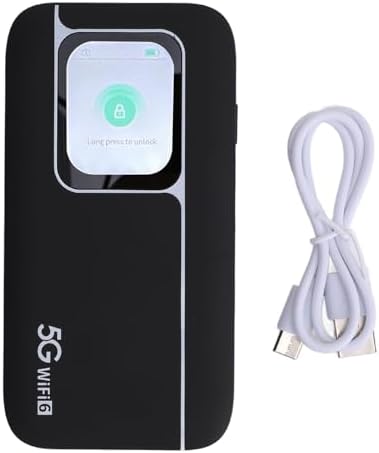
Image: The Jectse 5G Portable Wi-Fi Hotspot shown next to its included USB-C charging cable.
3. Gailua amaitu daview
Familiarize yourself with the physical components of your hotspot.
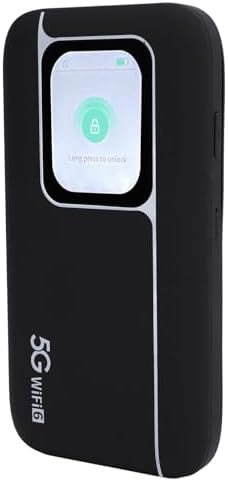
Irudia: Aurrealdea view of the Jectse 5G Portable Wi-Fi Hotspot, showcasing its display screen with a lock icon and "Long press to unlock" message.
- Bistaratzeko pantaila: Shows network status, signal strength, battery level, and data usage.
- Pizteko botoia: Used to turn the device on/off and wake/sleep the screen.
- USB-C ataka: Gailua kargatzeko.
- SIM txartelaren zirrikitua: Located on the side or back, for inserting your 5G/4G/3G SIM card.
- LED adierazleak: Provide quick visual cues for device status (e.g., signal, battery).
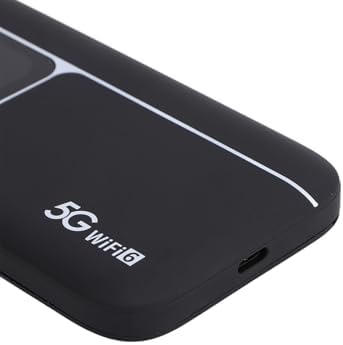
Irudia: Gertutik view of the USB-C charging port located on the side of the Jectse 5G Portable Wi-Fi Hotspot.
4. Konfigurazioa
- Sartu SIM txartela:
Locate the SIM card slot. Carefully insert your activated 5G/4G/3G SIM card into the slot until it clicks into place. Ensure the SIM card is correctly oriented.
- Gailua kargatu:
Connect the provided USB-C cable to the hotspot's charging port and the other end to a compatible USB power adapter (not included) or a computer's USB port. The device features a 7100mAh polymer battery. Allow the device to fully charge before first use.
- Piztu:
Press and hold the Power Button for a few seconds until the display screen illuminates. The device will begin to boot up and connect to the cellular network.
- Hasierako Wi-Fi konexioa:
Once powered on, the device's display will show the default Wi-Fi Network Name (SSID) and Password (Wi-Fi Key). You can also find this information on the back of the device.
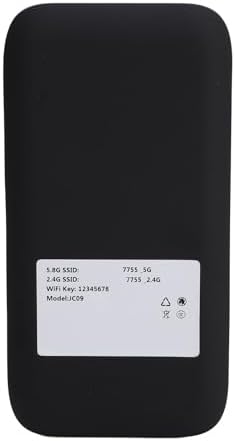
Image: The back panel of the Jectse 5G Portable Wi-Fi Hotspot, displaying the default 5.8G SSID, 2.4G SSID, and Wi-Fi Key.
On your computer, smartphone, or other Wi-Fi enabled device, search for available Wi-Fi networks. Select the SSID matching your hotspot and enter the Wi-Fi Key to connect.
5. Funtzionamendu-argibideak
- Hainbat gailu konektatzea:
The hotspot supports connecting up to 16 devices simultaneously. It operates on dual bands (2.4GHz and 5.8GHz) with WiFi6 (802.11 a/b/g/n/ac/ax) for optimized performance across various devices.

Image: An illustration depicting the Jectse 5G Portable Wi-Fi Hotspot providing high-speed internet to several users with laptops, tablets, and smartphones.
- Monitoring Device Status:
The display screen and LED lights provide real-time information on signal strength, battery level, and data usage. Refer to the screen for detailed status updates.
- Network Frequency Support:
The device supports a broad range of network frequencies, including 5G NR, 4G, and 3G, ensuring connectivity in various locations. The built-in 1T4R 5G antenna enhances signal reception.
- Hot Swappable SIM:
The device supports hot-swapping of SIM cards, allowing you to change SIM cards without powering down the device, though a brief network re-connection period may occur.
6. Mantentzea
- Bateria zaintzea: To prolong battery life, avoid exposing the device to extreme temperatures. Charge the 7100mAh battery regularly and avoid complete discharge.
- Garbiketa: The device features an IP67 reinforced design, offering protection against dust and water. To clean, gently wipe the exterior with a soft, dry cloth. Do not use harsh chemicals or abrasive materials.
- Biltegiratzea: Denbora luzez erabiltzen ez baduzu, gorde gailua leku fresko eta lehor batean.
7. Arazoak
If you encounter issues with your Jectse 5G Portable Wi-Fi Hotspot, refer to the following common solutions:
| Arazoa | Kausa posiblea | Irtenbidea |
|---|---|---|
| Ez dago sareko seinalerik | SIM card not inserted correctly, no cellular coverage, or SIM not activated. | Reinsert SIM card, move to an area with better coverage, or contact your service provider to activate SIM. |
| Ezin da wifira konektatu | Incorrect Wi-Fi password, device too far from hotspot, or hotspot is off. | Verify password, move closer to the hotspot, ensure hotspot is powered on. |
| Interneteko abiadura motela | Weak signal, too many connected devices, or network congestion. | Check signal strength on the display, reduce number of connected devices, or try connecting in a less congested area. |
| Gailua ez da pizten | Bateria baxua edo gailuaren matxura. | Charge the device for at least 30 minutes. If issue persists, contact support. |
Konponbide hauek saiatu ondoren arazoa konpontzen ez bada, jarri harremanetan bezeroarentzako arreta-zerbitzuarekin.
8. Zehaztapenak
| Ezaugarri | Xehetasuna |
|---|---|
| Ereduaren izena | Jectsekwnbat6q37 |
| Marka | Jetse |
| Konektibitate Teknologia | 5G |
| Haririk gabeko komunikazio estandarra | 802.11ax (WiFi6) |
| Maiztasun Banda Klasea | Banda bikoitza (2.4 GHz eta 5.8 GHz) |
| Data Transfer Rate (Download) | Gehienez 2.77 Gbps |
| Data Transfer Rate (Upload) | Gehienez 1.25 Gbps |
| Bateria Edukiera | 7100 mAh polimerozko bateria |
| Antena | 1T4R 5G Antenna |
| Diseinu malkartsua | IP67 (Protection against drops, dust, and water) |
| Gehienezko konektatutako gailu kopurua | 16 |
| Sistema eragilea | ZyNOS |
| Paketearen neurriak | 17 x 10 x 4 cm |
| Elementuaren pisua | 280 g |
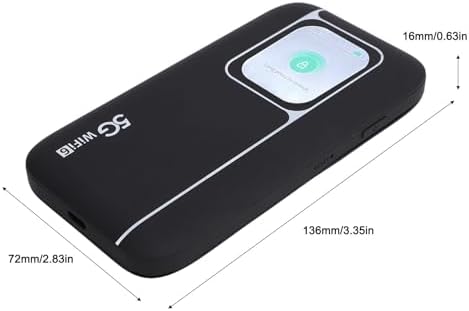
Image: A visual representation of the Jectse 5G Portable Wi-Fi Hotspot's dimensions, showing its length (136mm/3.35in), width (72mm/2.83in), and thickness (16mm/0.63in).
9. Bermea eta Laguntza
Jectse products are designed for reliability and performance. For warranty information, please refer to the warranty card included with your purchase or visit the official Jectse webgunea.
For technical support, troubleshooting assistance, or service inquiries, please contact Jectse customer support through the contact information provided on the official webgunea edo zure erosketa-dokumentazioa.
Please have your model number (Jectsekwnbat6q37) and purchase details ready when contacting support.