
Tronsmart Mirtune C3
Tronsmart Mirtune C3 Portable Bluetooth Speaker User Manual
Model: Mirtune C3 | Brand: Tronsmart
Sarrera
The Tronsmart Mirtune C3 is a portable Bluetooth speaker designed for high-fidelity audio experiences. Featuring 24W stereo sound, IPX7 waterproof rating, and up to 12 hours of playtime, it is suitable for various environments including outdoor activities, home use, and parties. This manual provides detailed instructions for setting up, operating, maintaining, and troubleshooting your Mirtune C3 speaker.
Paketearen edukia
- Tronsmart Mirtune C3 Portable Bluetooth Speaker
- USB-C kargatzeko kablea
- Erabiltzailearen eskuliburua
- Berme Txartela
Produktua amaituview
Familiarize yourself with the main components of your Tronsmart Mirtune C3 speaker.
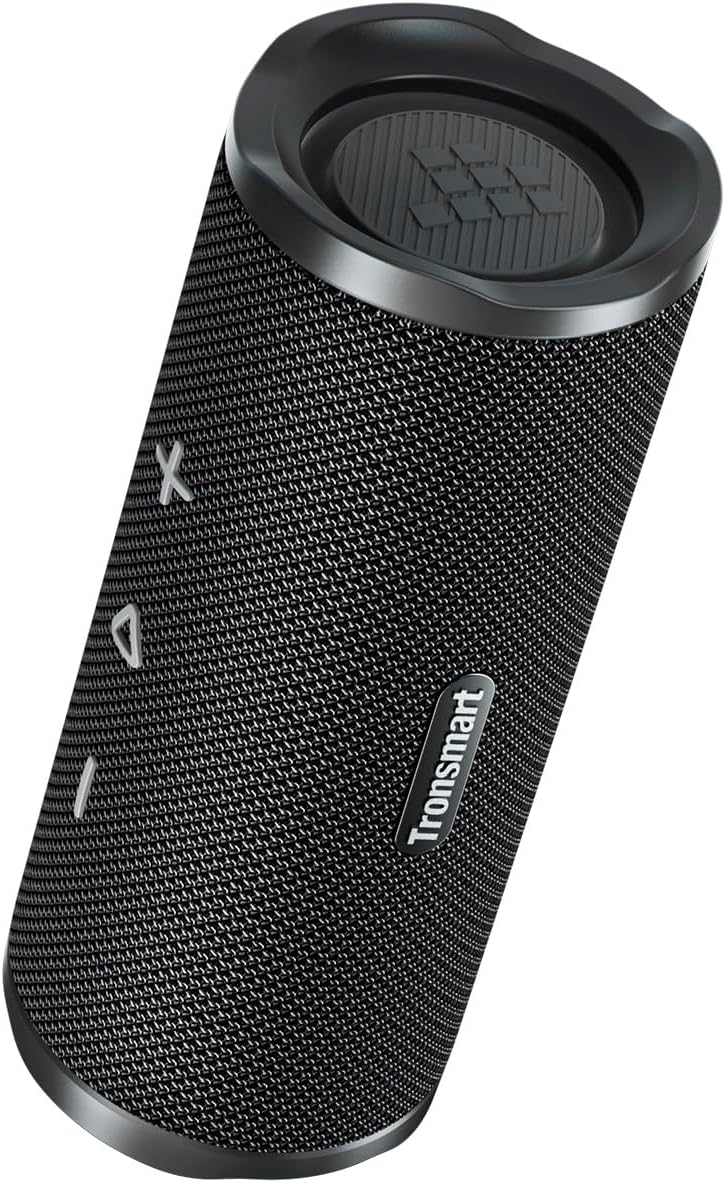
1. irudia: Aurrealdea view of the Tronsmart Mirtune C3 speaker, showcasing its mesh grille and control buttons.

2. irudia: Aldea view of the Tronsmart Mirtune C3 speaker, highlighting its portable strap for easy carrying.
Konfigurazioa
Hizlaria kargatzen
Before first use, fully charge the speaker using the provided USB-C cable. The charging indicator light will show charging status.
Piztu/Itzali
- Pizteko, sakatu eta eutsi pizteko botoia 2 segundoz.
- Itzaltzeko, sakatu eta eutsi pizteko botoia 2 segundoz.
Bluetooth parekatzea
Follow these steps to pair your Tronsmart Mirtune C3 speaker with a Bluetooth-enabled device:
- Ensure the speaker is powered on and in pairing mode (Bluetooth indicator will flash).
- On your device, enable Bluetooth and search for "Tronsmart Mirtune C3".
- Select "Tronsmart Mirtune C3" from the list to connect. A voice prompt will confirm successful pairing.
Video 1: Demonstrates how to power on the speaker and connect it via Bluetooth to a mobile device.
Funtzionamendu-argibideak
Musika erreproduzitzea
- Erreproduzitu/Pausatu: Sakatu Erreproduzitu/Pausatu botoia behin musika erreproduzitzeko edo eteteko.
- Bolumena igo: Press the '+' button once to increase volume.
- Bolumena jaitsi: Press the '-' button once to decrease volume.
- Hurrengo ibilbidea: Sakatu eta eutsi '+' botoia 2 segundoz hurrengo abestira salto egiteko.
- Aurreko pista: Press and hold the '-' button for 2 seconds to skip to the previous track.
Video 2: Illustrates how to control music playback, including play/pause, volume adjustment, and track skipping using the speaker's buttons.
Ahots Laguntzailea
Double-press the Play/Pause button to activate your device's voice assistant (e.g., Siri, Google Assistant).
Telefono-deiak
- Deia erantzun/amaitu: Sakatu Erreproduzitu/Pausatu botoia behin.
- Deia baztertu: Eduki sakatuta Erreproduzitu/Pausatu botoia 2 segundoz.
- Switch Audio: During a call, press the Bluetooth button once to switch audio between the speaker and your phone.
Video 3: Demonstrates how to manage phone calls (answer, end, reject) and switch audio output between the speaker and phone.
SoundPulse™ Technology & EQ Modes
The Mirtune C3 features SoundPulse™ technology for enhanced audio. You can switch between different EQ modes or customize them via the Tronsmart App.
- Switch EQ Mode (Speaker): Press the 'SoundPulse' button once to cycle through available EQ modes.
- Customize EQ (App): Download the Tronsmart App. Connect your speaker via the app. You can then adjust the equalizer settings or select preset modes like Default, SoundPulse, Deep Bass, Classical, Rock, or Custom.
Video 4: Shows how to switch EQ modes directly on the speaker and how to customize EQ settings using the Tronsmart app.
True Wireless Stereo (TWS) parekatzea
Pair two Mirtune C3 speakers for an immersive stereo sound experience.
- Ziurtatu bi bozgorailuak piztuta daudela.
- On both speakers, press and hold the Bluetooth button for 3 seconds to enter TWS pairing mode. You will hear a prompt.
- Once successfully paired, the Bluetooth indicator on one speaker will flash, and the other will be solid.
- Connect your device to one of the speakers via Bluetooth. Both speakers will now play in stereo.
- To exit TWS mode, press the Bluetooth button on either speaker once.
Video 5: Guides users through the process of entering and exiting True Wireless Stereo (TWS) pairing mode with two Mirtune C3 speakers.
Mantentzea
- Garbiketa: Garbitu bozgorailua leun batekin, damp oihal. Ez erabili produktu kimiko gogorrak edo garbitzaile urratzaileak.
- Uraren erresistentzia: The speaker is IPX7 waterproof, meaning it can be submerged in water up to 1 meter for 30 minutes. Ensure the charging port cover is securely closed before exposure to water. Do not expose to saltwater or other chemicals.
- Biltegiratzea: Gorde bozgorailua leku fresko eta lehor batean, tenperatura altuetatik eta eguzki-argitik babestuta.

Figure 3: The Tronsmart Mirtune C3 speaker demonstrating its IPX7 waterproof capability with water splashing on it.
Arazoak konpontzea
| Arazoa | Irtenbidea |
|---|---|
| Bozgorailua ez da pizten. | Ziurtatu bozgorailua kargatuta dagoela. Konektatu energia-iturri batera eta saiatu berriro. |
| Ezin da gailuarekin parekatu. |
|
| Soinurik ez edo bolumen baxua. |
|
| Bozgorailuak ez du erantzuten. | Reset the speaker by pressing and holding the Bluetooth button for 8 seconds. |
Zehaztapenak
| Ezaugarri | Xehetasuna |
|---|---|
| Modelo zenbakia | Mirtune C3 |
| Marka | Tronsmart |
| Bozgorailuaren irteera potentzia | 24 Watt |
| Maiztasun Erantzuna | 20 KHz |
| Konektibitate Teknologia | Bluetooth 5.3 |
| Audio irteera modua | Estereoa |
| Iragazgaitzaren balorazioa | IPX7 |
| Produktuaren neurriak | 21 x 8 x 21 cm |
| Pisua | 640 g |
| Bateria | 9V-ko bateria (barne) |
| Jatorrizko Herrialdea | Txina |
Bermea eta Laguntza
Tronsmart products are designed and manufactured to the highest standards. For warranty information, technical support, or customer service inquiries, please refer to the warranty card included in your package or visit the official Tronsmart webgunea. Gorde erosketaren egiaztagiria bermearen erreklamazioetarako.
Ask a question about this manual
Ask about setup, troubleshooting, compatibility, parts, safety, or missing instructions. Manuals+ will review the question and use this page’s manual context to help answer it.