
Junsun B0DQD577F2
Junsun Android 13 Car Radio Stereo Instruction Manual
Model: B0DQD577F2 | Brand: Junsun
1. Sarrera
Welcome to your new Junsun Android 13 Car Radio Stereo. This manual provides detailed instructions for the installation, operation, and maintenance of your device. This unit is designed to enhance your driving experience with advanced features and connectivity.
Key features include an Android 13 operating system, wireless CarPlay and Android Auto compatibility, integrated GPS navigation, Wi-Fi connectivity, Bluetooth for hands-free communication and audio streaming, FM/AM radio, and support for steering wheel controls.
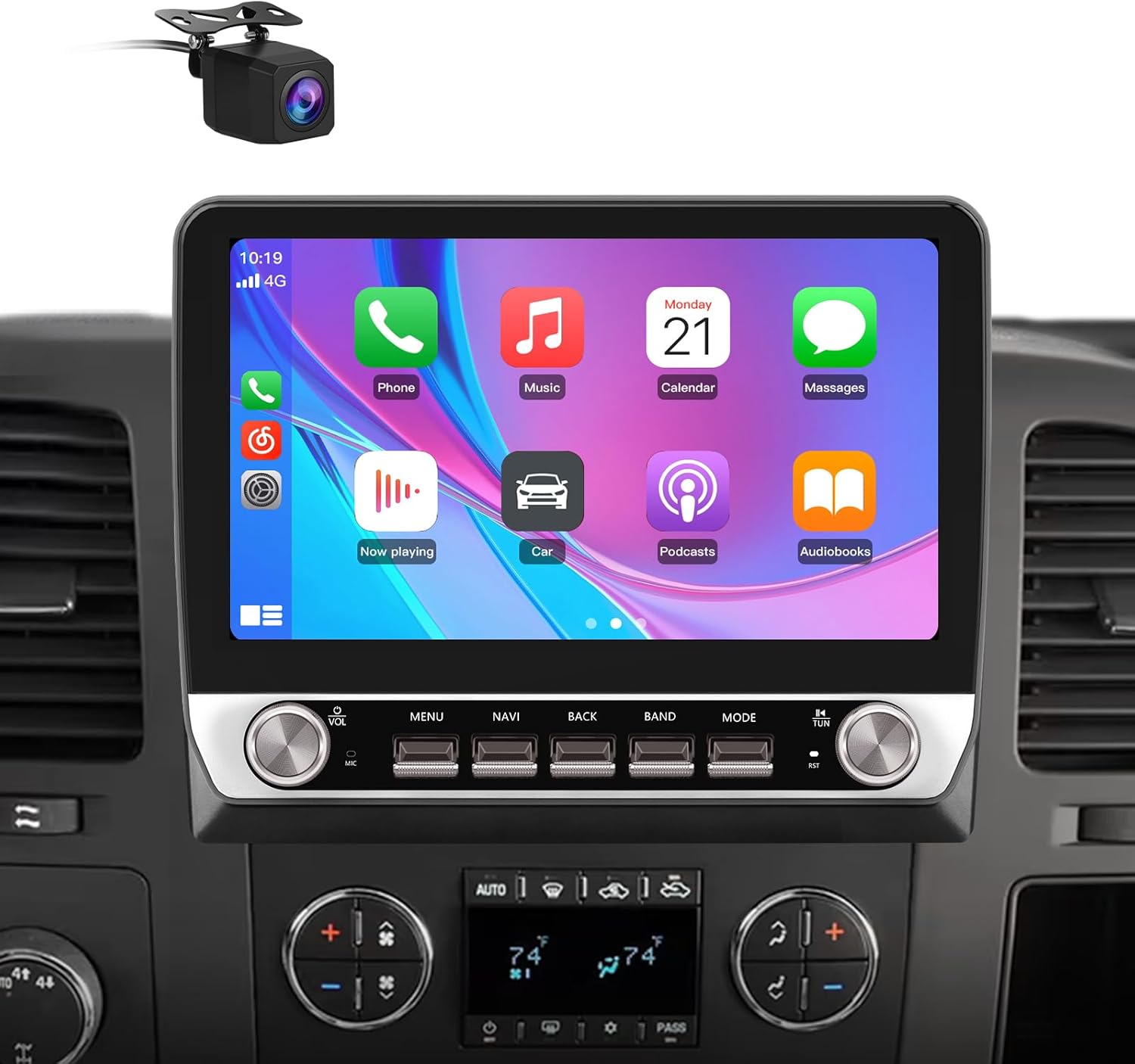
Figure 1.1: Junsun Android 13 Car Radio Stereo with CarPlay interface.
2. Applicable Car Models
This Junsun car radio stereo is specifically designed for the following Chevrolet and GMC vehicle models. Please verify your vehicle's compatibility before proceeding with installation.
- For Chevy Silverado 1500 (2007-2013)
- For Chevy Silverado 2500HD (2007-2013)
- For Chevy Silverado 3500HD (2007-2013)
- For Chevrolet Avalanche (2007-2011)
- For Chevrolet Express Van (2008-2011)
- For Chevrolet Impala (2006-2012)
- For GMC Acadia (2007-2012)
- For GMC Savana (2008-2013)
- For GMC Sierra (2007-2011)
- For GMC Yukon (2007-2013)

Figure 2.1: List of compatible vehicle models.
3. Paketearen edukia
Please carefully unpack the product and ensure all the following components are included in your package:
- Junsun Android 13 Car Radio Stereo Unit
- Power Cables (x2)
- RCA Kablea
- Alderantzizko lerroa
- Antenna & Back Video-in Cable
- Can Bus Decoder
- USB kableak (x2)
- Crowbar Tool
- Bihurkin
- Hizlaria
- Mikrofonoa
- Mounting Frame and Trim

Figure 3.1: All included components in the package.
4. Instalazio gida
4.1. Instalazio aurreko egiaztapena
Before beginning the installation process, ensure the vehicle's battery is disconnected to prevent electrical damage. It is recommended to consult a professional if you are unfamiliar with car stereo installations.
4.2. Kableatuen Diagrama
Refer to the following diagram for proper wiring connections. Ensure all cables are securely connected to their corresponding ports. Incorrect wiring can lead to device malfunction or damage to your vehicle's electrical system.

Figure 4.1: ISO Wiring Harness and RCA Cable Connections.
4.3. Instalazio fisikoa
The Junsun car radio stereo is designed for a direct fit into compatible vehicle dashboards. Carefully remove your original stereo unit. Install the new unit using the provided mounting frame and trim, ensuring it is securely fastened and flush with the dashboard.

Figure 4.2: Before and After Installation comparison.
5. Funtzionamendu-argibideak
5.1. Piztea/Itzaltzea eta Oinarrizko Kontrolak
The unit powers on automatically with the vehicle's ignition. Use the physical buttons located on the front panel for quick access to essential functions such as volume, menu, navigation, and mode selection. These buttons are designed for intuitive control, minimizing driver distraction.

Figure 5.1: Physical Button Layout and Functions.
5.2. Android 13 Sistema
The unit operates on the Android 13 system, providing a smooth and responsive user experience. Navigate through applications and settings using the touchscreen interface. You can install or delete Android applications from the Application Store, similar to a smartphone.
5.3. Haririk gabeko CarPlay eta Android Auto
Connect your iPhone or Android smartphone wirelessly or via a USB cable to access CarPlay or Android Auto. This feature allows you to use your phone's address book, notifications, messages, map navigation, and music directly on the stereo's display.

Figure 5.2: Wireless CarPlay and Android Auto Interface.
5.4. GPS Navigation & Wi-Fi Connectivity
The unit supports online maps. After connecting to a Wi-Fi network (e.g., via a mobile hotspot), you can use GPS navigation anywhere. Wi-Fi also enables access to various online applications and services.

Figure 5.3: GPS Navigation in action.

Figure 5.4: Wi-Fi Connectivity for online applications.
5.5. Bluetooth konexioa
Pair your smartphone via Bluetooth for hands-free calling and audio streaming. The external microphone ensures clear voice pickup, and your car speakers provide precise audio output for calls.

Figure 5.5: Bluetooth Phone Interface.
5.6. FM/AM Irratia
The unit features FM/AM radio functionality with a digital display for precise tuning. Access news, music, and weather broadcasts with ease.

Figure 5.6: FM Radio Interface.
5.7. Bolantearen kontrola
If your vehicle supports it, you can configure the steering wheel buttons to control the stereo, allowing you to adjust volume, change tracks, and switch radio stations without taking your hands off the wheel.
5.8. Backup Camera
The unit supports a backup camera (included in some packages) for enhanced safety during reversing. The display automatically switches to the camera view when the vehicle is in reverse gear.

5.7 irudia: Atzerako kamera View.
6. Mantentzea
To ensure the longevity and optimal performance of your Junsun car radio stereo, follow these maintenance guidelines:
- Pantaila garbitzea: Erabili zapi leun eta lihorik gabeko bat ukipen-pantaila astiro-astiro garbitzeko. Orban egoskorrak izanez gero, garbitu apur batampen the cloth with water or a screen-safe cleaner. Avoid abrasive materials or harsh chemical cleaners, as they can damage the screen coating.
- Garbiketa orokorra: Mantendu unitatea hautsik eta hondakinik gabe. Erabili eskuila leun bat edo aire konprimatua botoien eta ataken ingurua garbitzeko.
- Tenperatura: Saihestu unitatea denbora luzez tenperatura altuetan jartzea.
- Software eguneraketak: Periodically check for available software updates to ensure optimal performance and access to new features. Follow the on-screen instructions for any updates.
7. Arazoak
If you encounter issues with your Junsun car radio stereo, refer to the following common problems and solutions:
7.1. Botererik ez
- Egiaztatu kableak: Ensure all power cables are securely connected to the vehicle's electrical system and the stereo unit.
- Egiaztatu fusiblea: Inspect the fuse connected to the stereo's power line. Replace if blown.
- Ibilgailuaren bateria: Confirm the vehicle's battery is charged and properly connected.
7.2. Soinu irteerarik ez
- Bolumen maila: Ensure the volume is not muted or set to a very low level.
- Bozgorailu konexioak: Verify that all speaker wires are correctly connected to the unit and the speakers.
- AmpLider Konexioa: Zure ibilgailuak fabrika bat badu ampbizigarria, ziurtatu amplifier turn-on wire (often a blue wire) from the stereo is connected to the amplifier's remote turn-on input.
- Audio iturria: Confirm the correct audio source (e.g., FM, Bluetooth, CarPlay) is selected.
7.3. CarPlay/Android Auto Connection Issues
- Telefonoaren bateragarritasuna: Ensure your smartphone is compatible with CarPlay or Android Auto and has the latest operating system updates.
- Kable konexioa: If using a wired connection, try a different USB cable, preferably the original cable that came with your phone.
- Berrabiarazi gailuak: Restart both your smartphone and the car stereo unit.
- Bluetooth/Wi-Fi: For wireless connections, ensure Bluetooth and Wi-Fi are enabled on your phone and the stereo.
7.4. Steering Wheel Controls Not Working
- Kableatua: Verify that the steering wheel control wires are correctly connected to the stereo unit.
- Ezarpenak: Access the stereo's settings menu to configure or calibrate the steering wheel controls. Refer to the on-screen instructions for this process.
- CAN Bus deskodetzailea: Ensure the CAN Bus decoder (if applicable to your vehicle) is correctly installed and functioning.
8. Zehaztapen Teknikoak
| Ezaugarri | Zehaztapena |
|---|---|
| Sistema eragilea | Android 13 |
| Bistaratzeko tamaina | 10 hazbete |
| Memoria (RAM) | 2 GB |
| Biltegiratzea (ROM) | 64 GB |
| Konektibitatea | Bluetooth konexioa, Wi-Fi |
| Ezaugarri bereziak | Wireless CarPlay, Android Auto, GPS Navigation, FM/AM Radio, Steering Wheel Control Support |
| Ibilgailuen Zerbitzu Mota | Kotxea, Kamioia |
| Muntatze Mota | Arbelaren mendia |
| Elementuaren pisua | 4.84 kilo |
| Paketearen neurriak | 12.52 x 9.13 x 5.08 hazbete |
9. Bermea eta Laguntza
This Junsun car radio stereo comes with a 1 urteko fabrikatzailearen bermea erosketa-datatik aurrera. Berme honek ohiko erabileran materialen eta eskulanen akatsak estaltzen ditu.
For technical assistance, troubleshooting, or to inquire about warranty claims, please contact Junsun customer support:
Posta elektronikoa: Junsun-US@outlook.com
When contacting support, please provide your product model number (B0DQD577F2) and a detailed description of the issue.

Figure 9.1: Junsun Customer Support.
Ask a question about this manual
Ask about setup, troubleshooting, compatibility, parts, safety, or missing instructions. Manuals+ will review the question and use this page’s manual context to help answer it.