
1. Sarrera
This manual provides detailed instructions for the installation, operation, and maintenance of your PopBloom RL60 WiFi Reef LED Light. This 60W full spectrum marine reef LED aquarium lighting system is designed for soft and LPS corals, as well as saltwater fish nano tanks. It features a built-in timer, WiFi phone programmability, and sunrise/sunset simulation capabilities.
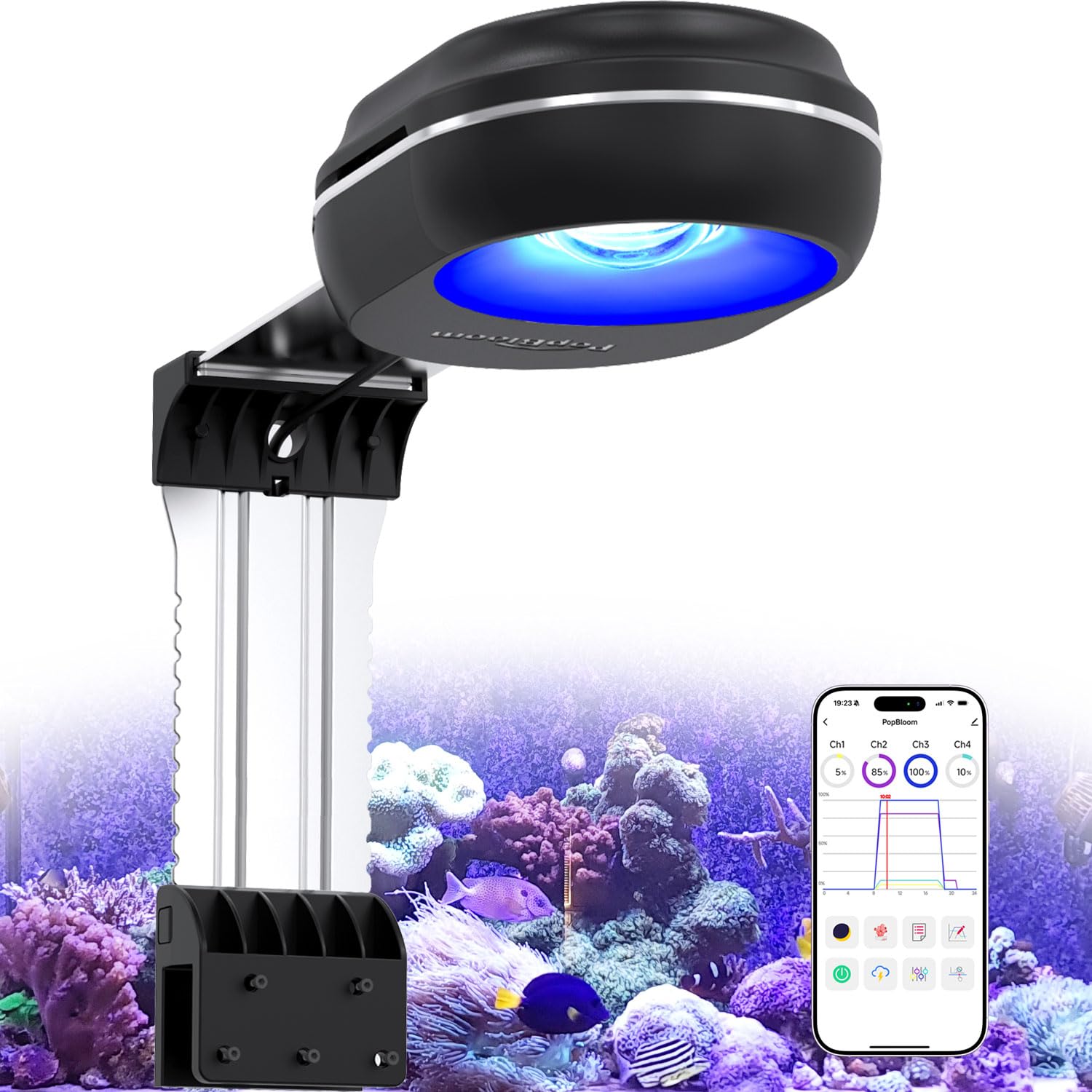
Figure 1.1: PopBloom RL60 WiFi Reef LED Light.
2. Paketearen edukia
Egiaztatu behean zerrendatutako elementu guztiak zure paketean sartuta daudela:
- 1x RL60 black light
- 1x black arm kit
- Elikatze-kablea
- Erabiltzailearen eskuliburua

Figure 2.1: Contents of the RL60 package, including the light unit, arm kit, power supply, and user manual.
3. Zehaztapenak
| Ezaugarri | Deskribapena |
|---|---|
| Modelo zenbakia | RL60 WiFi |
| Boterea | 60 watt |
| Argi iturri mota | LED |
| Produktuaren neurriak | 4.8" L x 6.4" W x 2" H |
| Elementuaren pisua | 2.5 kilo |
| Material Mota | Aluminioa |
| Kontrol-metodoa | App (WiFi) |
| Muntatze Mota | Clamp Mount (Arm Bracket) |
| Bateragarritasuna | Fits 20–36” L, 24” W, 24” D tanks, rimless & rimmed compatible |
| Ezaugarri gehigarriak | WiFi Group Control, 24Hrs Cycle, Sunrise/Sunset, 4 Season, Lunar Cycle |

Figure 3.1: Detailed parameters of the RL60 light, including wattage, PAR values, and 4-channel LED configuration.

Figure 3.2: PAR distribution map showing light intensity at various depths and distances from the RL60 light source.
4. Konfigurazioa eta instalazioa
The PopBloom RL60 light is designed for easy, tool-free installation on both rimless and rimmed aquariums.
4.1 Argia muntatzea
- Attach the vertical bar into the base.
- Sartu lamp into the vertical bar.
- Manage the power cable and attach screws to secure the base to your aquarium rim. The adjustable arm kit allows for flexible positioning.
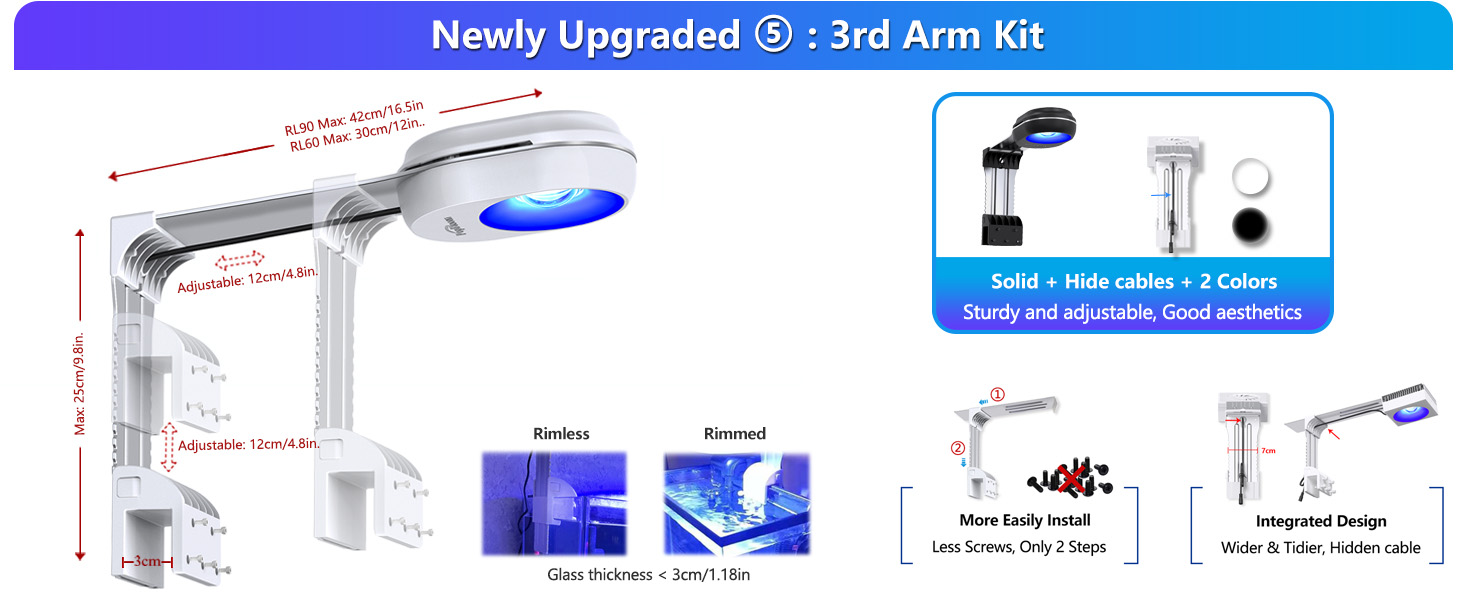
Figure 4.1: The adjustable arm kit, showing adjustable length and height, and compatibility with rimless and rimmed tanks up to 3cm/1.18in glass thickness.
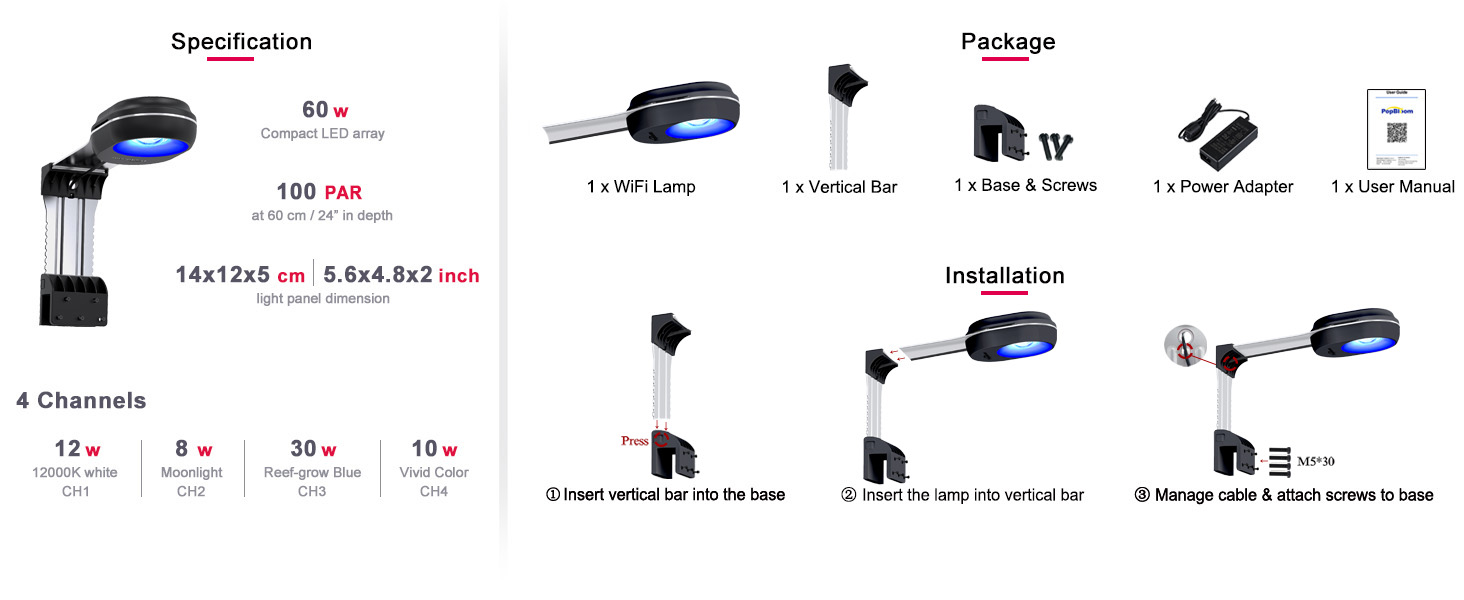
Figure 4.2: Visual guide for the installation process of the RL60 light, from assembling the arm to mounting it on the tank.
4.2 Tank Compatibility
The RL60 is suitable for tanks ranging from 20 to 36 inches in length, 24 inches in width, and 24 inches in depth. The rearward sliding mounting arms ensure compatibility with various tank sizes and types.

4.3. irudia: Sample tank sizing and light quantity reference for various Redsea tank models, indicating optimal light usage.
5. Funtzionamendua
The PopBloom RL60 features WiFi connectivity for smart control via a dedicated mobile application.
5.1 Aplikazioaren konexioa
- Download and install the recommended app (e.g., SmartLife - Smart Living) on your smartphone.
- Ensure your phone's WiFi and Bluetooth are enabled.
- Open the app and select "Add Device".
- Connect your phone to your home 2.4GHz WiFi network.
- Follow the in-app instructions to add and connect to the RL60 light.

Figure 5.1: Visual guide for connecting the RL60 light to the mobile application via WiFi.
5.2 Lighting Presets and Customization
The app offers various options for controlling your light:
- Aurrez ezarritako moduak: Choose from 16 dedicated lighting preset programs for different reef scenarios, including SPS, LPS, mixed corals, fish, acclimation, and sea-depth simulations.
- 24-Hour Auto Cycle: Set a daily schedule for automated lighting changes.
- 4-Channel Independent Dimming: Adjust the brightness of each of the four LED channels independently.
- DIY (Custom) Program: Create personalized lighting schedules by setting ramp-gora eta ramp-down times, and adjusting the brightness of each channel at specific time points throughout a 24-hour cycle.
- Natural Simulation: Simulate natural lighting conditions such as lunar cycles, temperate and tropical seasons, and lightning storms.

Figure 5.2: The app interface showing various preset modes and the 24-hour auto cycle feature, designed for ease of use.

Figure 5.3: The DIY program interface, allowing users to customize ramp times and individual channel brightness settings.

Figure 5.4: App features for simulating natural phenomena like lunar cycles, seasonal changes, and lightning.
5.3 Dual Light Sync
For larger tanks (e.g., 36" L tanks), two RL60 units can be synchronized via the app to provide uniform brightness across the entire aquarium.

5.5 Irudia: Gainetikview of WiFi smart control and the dual light sync feature for extended tank coverage.
5.4 Media Examples of Light in Use
Video 5.1: Demonstration of the PopBloom RL60 light enhancing coral colors in an aquarium.
5.2 bideoa: Laburbilduzview of the light's performance in an aquarium setting.
Video 5.3: The RL60 light illuminating a 20-gallon cube reef tank.
Video 5.4: Display of the light's color rendition and suitability for nano reef tanks.
Video 5.5: Features of the RL60 light, highlighting its reef-safe spectrum and intelligent app control.
Video 5.6: Showcase of the beautiful shimmering lighting effect provided by the RL60 in a nano reef tank.
6. Mantentzea
To ensure optimal performance and longevity of your PopBloom RL60 WiFi Reef LED Light, regular maintenance is recommended:
- Garbiketa: Periodically wipe the light fixture and lens with a soft, damp cloth to remove salt creep, dust, and water spots. Ensure the light is unplugged before cleaning.
- Aireztapena: Ensure the fan and ventilation openings are free from obstructions to allow for proper heat dissipation.
- Kableen ikuskapena: Regularly check the power cable for any signs of damage or wear. Replace if necessary.
7. Arazoak
If you encounter issues with your PopBloom RL60 light, refer to the following common solutions:
- Argia ez pizten: Check the power connection to ensure it is securely plugged into both the light and the power outlet. Verify the power adapter is functioning correctly.
- Aplikazioaren konexio-arazoak: Ensure your smartphone is connected to a 2.4GHz WiFi network. Restart the app and the light fixture. Confirm that the light is in pairing mode if attempting to reconnect.
- Settings Not Retained After Power Outage: Potentzia bat gertatuz gerotage, the light may not retain its programmed schedule. You may need to resync the light with the app and re-enter your desired schedule.
- Fan zarata: Some fan noise is normal during operation. If the fan becomes excessively loud, ensure there are no obstructions to the fan blades and that the unit is clean.
- Inconsistent Light Output: Check app settings to ensure no unintended programs or dimming schedules are active. Clean the lens to remove any buildup that might be affecting light distribution.
For further assistance, please contact PopBloom customer support.
8. Bermea eta Laguntza
The PopBloom RL60 WiFi Reef LED Light comes with a 2 urteko fabrikatzailearen bermea. For warranty claims, technical support, or any product-related inquiries, please contact Shenzhen PopBloom Electronic Technology Co., Ltd. or your authorized retailer.
Manufacturer: Shenzhen PopBloom Electronic Technology Co., Ltd