
1. Sarrera
Welcome to the user manual for your new XIAOMI Redmi Note 14 Pro+ 5G Smartphone. This guide provides essential information on setting up, operating, and maintaining your device. Please read it carefully to ensure optimal performance and longevity of your smartphone.
2. Paketearen edukia
Egiaztatu zure paketeak elementu hauek dituela:
- XIAOMI Redmi Note 14 Pro+ 5G Smartphone
- USB kablea
- Hasiera Azkarreko Gida (eskualdearen arabera alda daiteke)
- SIM txartela ateratzeko tresna (eskualdearen arabera alda daiteke)
Note: A charger is not included in the package. Please use a compatible 120W HyperCharge adapter for optimal charging.
3. Gailua amaitu daview
Familiarize yourself with the physical components of your Redmi Note 14 Pro+ 5G.
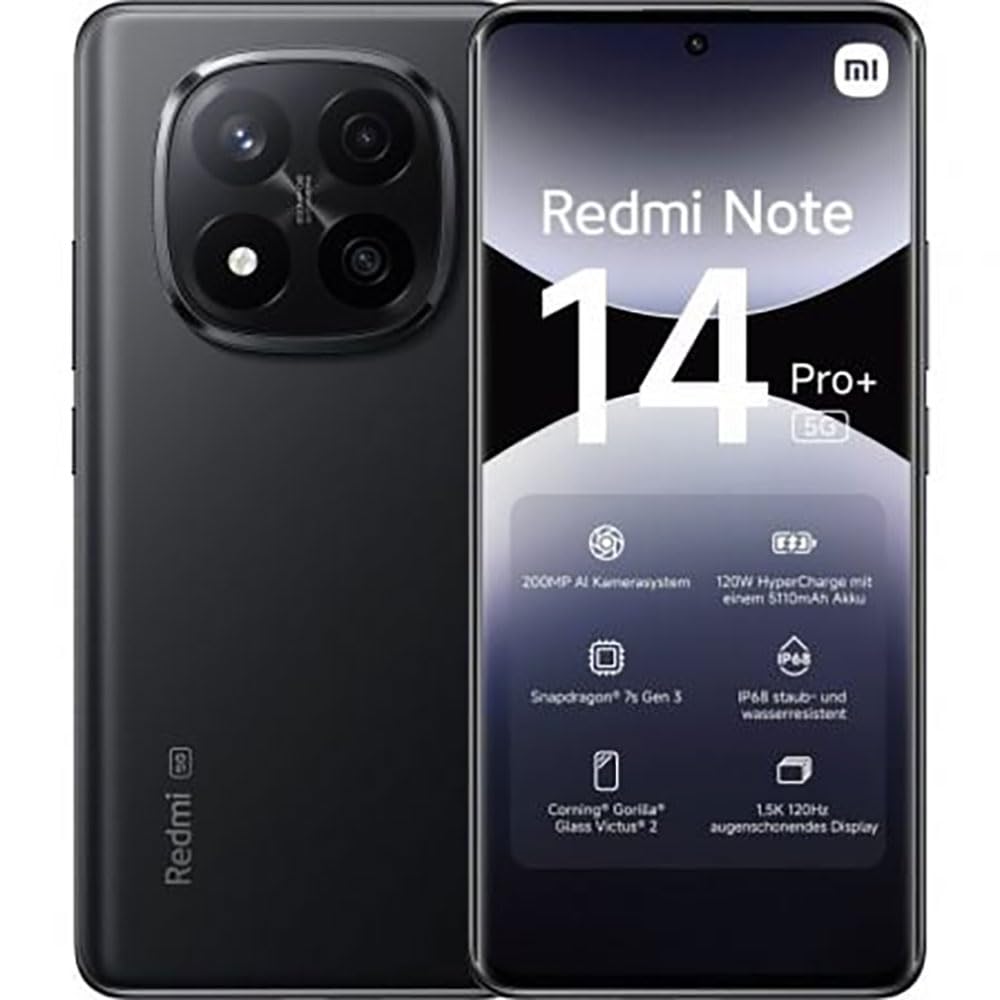
The image displays the front and back of the XIAOMI Redmi Note 14 Pro+ 5G smartphone. The front shows the display with 'Redmi Note 14 Pro+ 5G', '200 Megapixels', and '256 GB' text. The back features a prominent camera module with multiple lenses and the 'Redmi 5G' branding.
Funtsezko osagaiak:
- Aurrealdeko pantaila: 6.67-inch 1.5K 120Hz AMOLED display with Corning Gorilla Glass Victus 2.
- Atzeko Kamera Modulua: Houses the 200MP Pro-Grade AI Camera system.
- Pizteko botoia: Alboan kokatuta, gailua pizteko/itzaltzeko eta esnatzeko/lo hartzeko erabiltzen da.
- Bolumen-botoiak: Alboan kokatuta, multimedia eta dei bolumena doitzeko erabiltzen da.
- USB C motako ataka: Kargatzeko eta datuak transferitzeko.
- SIM txartelaren zirrikitua: Supports Dual SIM Nano SIM cards.
- Hizlariak: Stereo speakers for audio output.
4. Konfigurazioa
4.1. SIM txartela sartzea
- Bilatu SIM txartelaren erretilua zure gailuaren alboan.
- Sartu SIM txartela ateratzeko tresna erretiluaren ondoko zulo txikian eta sakatu ondo erretilua atera arte.
- Place your Nano SIM card(s) into the tray with the gold contacts facing down. Ensure proper orientation.
- Sartu erretilua astiro-astiro zirrikituan klik egin arte.
4.2. Gailua piztea
Eduki sakatuta Pizteko botoia on the side of the phone until the XIAOMI logo appears on the screen. Follow the on-screen instructions to complete the initial setup, including connecting to Wi-Fi, setting up your Google account, and configuring security features like fingerprint recognition.
4.3. Hasierako karga
It is recommended to fully charge your device before first use. Connect the USB Type-C cable to the phone and a compatible 120W HyperCharge adapter (not included) to a power outlet.
5. Zure telefonoa erabiltzea
5.1. Oinarrizko nabigazioa
- Ukipen-pantaila: Sakatu hautatzeko, irristatu korritzeko, apurtu handitzeko.
- Hasierako pantaila: Aplikazio eta widgeten gune nagusia.
- Jakinarazpen panela: Irristatu hatza pantailaren goialdetik behera jakinarazpenak eta ezarpen azkarrak atzitzeko.
- Aplikazioen tiradera: Swipe up from the bottom of the screen (or tap the app drawer icon) to view instalatutako aplikazio guztiak.
5.2. Piztu/Itzali eta Berrabiarazi
- To Itzali: Press and hold the Power Button until the power menu appears, then select "Power off."
- To Berrabiarazi: Press and hold the Power Button until the power menu appears, then select "Restart."
5.3. Segurtasun Ezaugarriak
Your device supports various security options:
- Hatz-markak hautematea: Erregistratu zure hatz-markak desblokeatzeko azkar eta segurua izateko.
- Aurpegia desblokeatzea: Use your face to unlock the device.
- PINa/Eredua/Pasahitza: Standard security methods.
Access these settings via Ezarpenak > Segurtasuna eta pribatutasuna.
6. Kameraren ezaugarriak
The Redmi Note 14 Pro+ 5G features a powerful 200MP Pro-Grade AI Camera system designed to enhance your photography experience.
- 200MP-ko kamera nagusia: Capture highly detailed images with optical image stabilization (OIS).
- Multiple Camera Modes: Includes automatic, scene, portrait, and manual modes for versatile shooting.
- Dual LED Flash: Provides enhanced lighting in low-light conditions.
- Aurrealdeko kamera: A 20MP front sensor for high-quality selfies and video calls.
- Bideo Grabaketa: Supports up to 8K video capture at 120 fps.
7. IAren ezaugarriak
Leverage the integrated AI functionalities for a smarter user experience:
- AI Erase Pro: Intelligently remove unwanted objects or people from your photos.
- AI Image Expansion: Expand the boundaries of your images using AI.
- AI Notes: Smart note-taking capabilities.
- AI azpitituluak: Generate subtitles for videos or audio in real-time.
- AI Recorder: Enhanced voice recording with AI features.
- IA interpretea: Denbora errealeko hizkuntza-itzulpena.
- Geminiak: Integrated AI assistant.
- Circle to Search by Google: Bilatu informazioa azkar pantailan objektuak zirkulu batekin inguratuz.
8. Kargatzea
Your Redmi Note 14 Pro+ 5G supports 120W HyperCharge technology for rapid charging.
- Bateriaren edukiera: 5110mAh Lithium-polymer battery.
- Kargatzen: Use the provided USB Type-C cable with a compatible 120W power adapter (sold separately) for optimal charging speeds.
- Bateriaren iraupena: Expect up to 20 hours of talk time. Actual battery life may vary based on usage.
Always use certified charging accessories to prevent damage to your device.
9. Mantentzea
9.1. Uraren eta hautsaren aurkako erresistentzia
Gailuak ezaugarri bat du: IP68 kalifikazioa for dust and water resistance. This means it is protected against dust ingress and can withstand immersion in water up to 1.5 meters for 30 minutes. However, this resistance is not permanent and may decrease over time with normal wear. Avoid exposing the device to hot water, saltwater, or other liquids.
9.2. Zure gailua garbitzea
- Erabili zapi leun eta lihorik gabeko bat pantaila eta gorputza garbitzeko.
- Saihestu garbitzaile urratzaileak, disolbatzaileak edo aerosolak erabiltzea.
- If the device gets wet, wipe it thoroughly with a clean, dry cloth before charging or using ports.
9.3. Software eguneraketak
Egiaztatu eta instalatu software eguneraketak aldizka, zure gailuak azken funtzioak, segurtasun adabakiak eta errendimendu hobekuntzak dituela ziurtatzeko. Joan honera Ezarpenak > Telefonoari buruz > MIUI bertsioa eguneraketak ikusteko.
10. Arazoak
If you encounter issues with your device, try the following common solutions:
- Gailua ez da pizten: Ziurtatu bateria kargatuta dagoela. Konektatu kargagailu batera gutxienez 15 minutuz, eta gero saiatu pizten.
- Aplikazioak huts egiten edo blokeatzen: Close the problematic app and reopen it. If the issue persists, restart your phone.
- Sare-konexio txarra: Check your SIM card is correctly inserted. Try toggling Airplane Mode on and off. If the issue persists, contact your network provider.
- Bateria azkar agortzen da: Murriztu pantailaren distira, itxi erabiltzen ez diren aplikazioak eta desgaitu beharrezkoak ez diren funtzioak, hala nola GPSa edo Bluetooth, erabiltzen ez dituzunean.
- Pantailak ez du erantzuten: Force restart your device by holding the Power Button for approximately 10-15 seconds.
Arazo konplexuagoetarako, jo XIAOMIren laguntza ofizialera. webwebgunean edo jarri harremanetan bezeroarentzako zerbitzuarekin.
11. Zehaztapenak
| Ezaugarri | Zehaztapena |
|---|---|
| Marka | XIAOMI |
| Ereduaren izena | Redmi Note 14 Pro+ 5G |
| Sistema eragilea | Android 14 |
| CPU eredua | Snapdragon 7 3. belaunaldia |
| RAM | 8 GB |
| Biltegiratze Ahalmena | 256 GB |
| Pantailaren tamaina | 6.67 hazbete |
| Bistaratzeko ebazpena | 2712 x 1220 pixel |
| Freskatze tasa | 120 Hz |
| Atzeko kameraren bereizmena | 200 Megapixels (with OIS) |
| Aurrealdeko kameraren bereizmena | 20 megapixelekoa |
| Bateria Edukiera | 5110 mAh |
| Kargatzeko Teknologia | 120W-ko hiperkarga |
| Uraren Erresistentzia | IP68 |
| Teknologia Zelularra | 5G |
| SIM txartela mota | Nano SIM (Dual SIM) |
| Konektibitatea | USB C motakoa |
12. Bermea eta Laguntza
12.1. Fabrikatzailearen bermea
Your XIAOMI Redmi Note 14 Pro+ 5G Smartphone comes with a 2 urteko fabrikatzailearen bermeaBerme honek materialen eta fabrikazioaren akatsak estaltzen ditu erabilera normalaren pean. Gorde erosketaren egiaztagiria bermearen erreklamazioak egiteko.
The warranty does not cover damage caused by accidents, misuse, unauthorized modifications, or normal wear and tear.
12.2. Bezeroarentzako arreta
For technical assistance, warranty claims, or further information, please visit the official XIAOMI support website or contact their customer service department. Contact details can typically be found on the XIAOMI webgunean edo produktuarekin batera datorren berme-txartelean.


