Sarrera
The Generic TYX-3615 Multi-function Charging and Cooling Dock is designed for Xbox Series S and Xbox Series X game consoles. This accessory integrates cooling, dual controller charging, and ambient RGB lighting to enhance the gaming experience. It also includes a dedicated headset holder for organized storage.
Paketearen edukia
Mesedez, egiaztatu elementu guztiak paketean daudela:
- TYX-3615 Cooling Fan Base (1)
- Headset Holder (1)
- USB Power Cable (1)

Irudia: Goitik behera view of the TYX-3615 cooling stand, showing the main base unit and the detachable headset holder component.
Konfigurazio Argibideak
- Kokatu standa: Place the TYX-3615 cooling stand on a stable, flat surface near your Xbox Series X or S console.
- Konektatu energia: Connect the provided USB power cable from the stand to an available USB port on your Xbox console or a compatible USB power adapter (not included).
- Install Console: Carefully place your Xbox Series X or S console vertically onto the designated slot on the cooling stand. Ensure it is securely seated.
- Entzungailuen euskarria erantsi: Insert the headset holder into the slot located at the top rear of the stand.
- Charge Controllers: Place your Xbox Series controllers onto the charging docks. Ensure the charging contacts align properly.
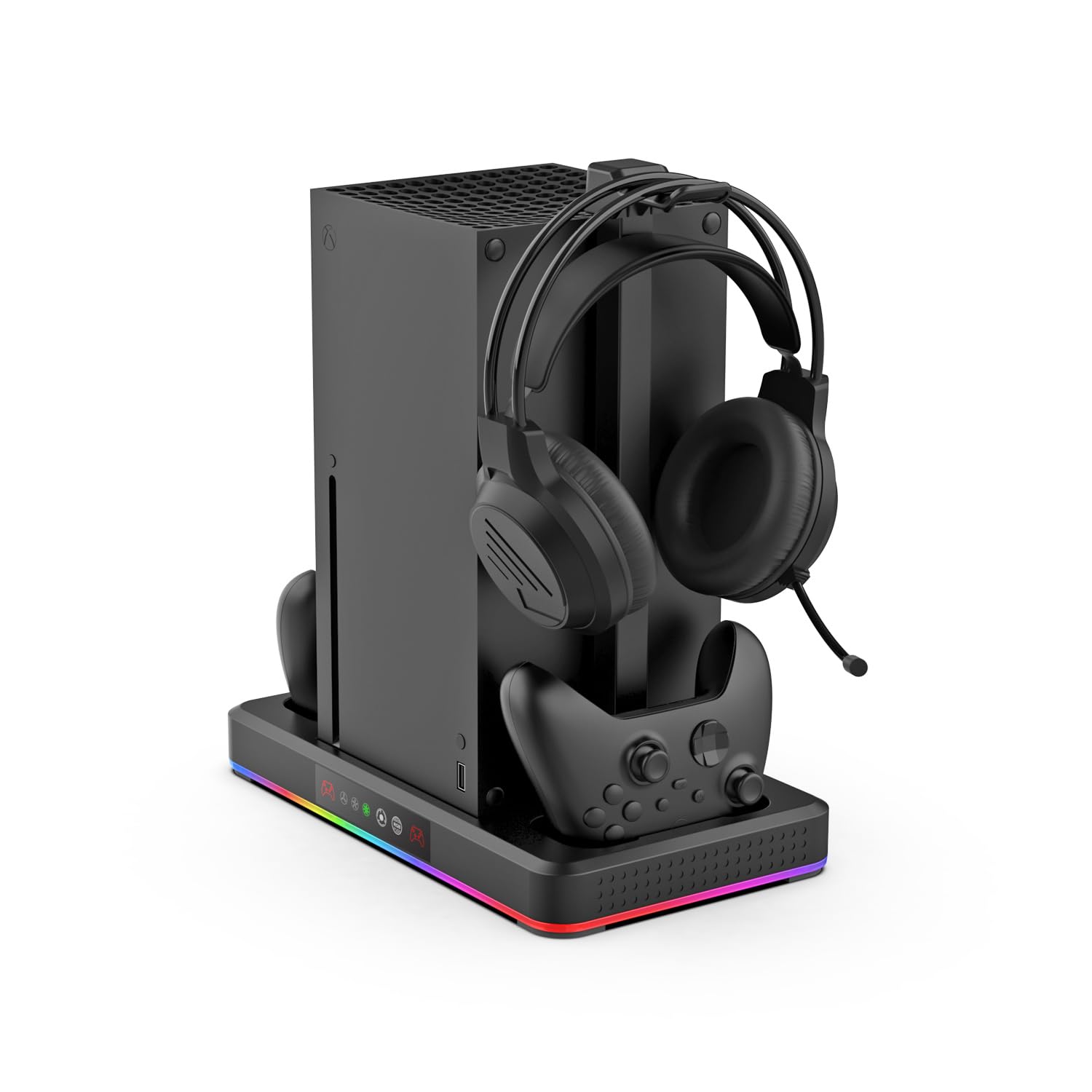
Image: The TYX-3615 cooling stand fully assembled with an Xbox Series X console, two controllers, and a headset, demonstrating proper setup.
Funtzionamendu-argibideak
Hozteko haizagailuaren funtzionamendua
The stand features a built-in turbo high-speed cooling fan to help dissipate heat from your console. The fan has three adjustable speed levels and a power-off memory function, which recalls the last used setting.
- Pizteko botoia: Press the fan icon touch button on the front panel to cycle through fan speeds (Low, Medium, High, Off).
- Abiaduraren adierazlea: The fan speed is indicated by LED lights on the front panel.

Image: An illustrative diagram demonstrating the cooling fan's airflow directed towards the Xbox console, highlighting the 3-speed rotation and power-off memory function.
Kontrolagailuaren karga
The stand can simultaneously charge two Xbox Series controllers. It is compatible with official original Xbox batteries and DOBE TYX-1889, TYX-2611, or TYX-0634 battery packs.
- Kargatzeko egoera: The joystick icons on the front panel illuminate to indicate the charging status of each controller.
- Karga osoa: The indicator light will change color or turn off when the controller is fully charged.
RGB giro-argiztapena
The stand features RGB ambient lighting with multiple modes to customize your gaming environment.
- Modu aldaketa: Press the RGB touch key on the front control panel to cycle through different lighting modes and colors.

Image: The TYX-3615 stand in operation, showcasing the RGB lighting effects, dual charging capability, and fan speed indicators.
Mantentzea
To ensure optimal performance and longevity of your cooling stand, follow these maintenance guidelines:
- Garbiketa: Regularly wipe the surface of the stand with a soft, dry cloth to remove dust. Do not use abrasive cleaners or solvents.
- Aire irteerak: Ensure the air vents on the stand and your console remain clear of obstructions to allow for proper airflow.
- Biltegiratzea: When not in use for extended periods, store the stand in a cool, dry place away from direct sunlight.
Arazoak konpontzea
If you encounter issues with your TYX-3615 cooling stand, refer to the following common problems and solutions:
- Stand Not Powering On:
- Ensure the USB power cable is securely connected to both the stand and a powered USB port on your console or adapter.
- Try connecting the stand to a different USB port or power source.
- Kontrolagailuak ez dira kargatzen:
- Verify that the controllers are correctly seated in the charging docks and that the charging contacts are aligned.
- Confirm that the controller batteries are compatible with the charging dock (official original Xbox batteries or DOBE TYX-1889/TYX-2611/TYX-0634 battery packs).
- Check the charging indicator lights on the front panel. If they are not illuminating, refer to "Stand Not Powering On."
- Cooling Fan Not Working:
- Press the fan icon touch button to ensure the fan is turned on and set to a desired speed.
- Check for any obstructions blocking the fan's intake or exhaust vents.
- RGB argiztapena ez dabil:
- Press the RGB touch key to cycle through lighting modes.
- Ensure the stand is receiving power.
Zehaztapenak
| Eredua | TYX-3615 |
| Bateragarritasuna | Xbox Series X, Xbox Series S |
| Funtzioak | Console Cooling, Dual Controller Charging, RGB Ambient Lighting, Headset Storage |
| Hozteko haizagailua | Turbo high-speed fan, 3 adjustable speed levels, Power-off memory function |
| Kontrolagailuaren karga | Supports official Xbox batteries, DOBE TYX-1889, TYX-2611, TYX-0634 battery packs |
| Argiztapena | RGB ambient lighting with multiple modes |
| Potentzia Sarrera | USBa (5V) |
| ASIN | B0DRCQXC26 |
| Fabrikatzailea | Dwdzey |
| Eskuragarri dagoen lehen data | 25ko azaroaren 2024a |
Bermea eta Laguntza
Warranty information for this product is typically provided by the retailer or manufacturer at the time of purchase. Please refer to your purchase documentation or contact the seller directly for details regarding warranty coverage and support.
For technical assistance or further inquiries, please contact the product manufacturer or the retailer from whom you purchased the item.


