
LIONWEI LIUC6101B
LIONWEI USB C Docking Station User Manual
Model: LIUC6101B
Produktua amaituview
The LIONWEI USB C Docking Station is a versatile 5-in-1 hub designed to expand the connectivity of your USB-C enabled devices. It supports dual 4K@60Hz video output via DisplayPort Alt Mode, high-speed 10Gbps data transfer, and 100W Power Delivery charging.
This docking station is ideal for enhancing productivity by allowing multiple external displays and connecting various peripherals through a single USB-C port on your laptop or compatible device.
Ezaugarri nagusiak:
- Dual 4K USB C Video Output: Supports 4K@60Hz resolution on two external monitors via DP Alt Mode 1.4.
- Abiadura handiko datuen transferentzia: Features two USB-C 3.1 ports with 10Gbps data transfer speeds.
- 100W potentzia-ematea: Provides up to 87W pass-through charging to your laptop (charger and cable not included).
- Multi-Stream Transport (MST) Support: Enables extended dual-display modes for Windows laptops with Thunderbolt 4/USB 4.
- Diseinu trinkoa eta eramangarria: Easy to carry for on-the-go productivity.

Image: The LIONWEI USB C Docking Station, showcasing its compact design and various connectivity options including USB-C ports for video and data, and a power delivery port.
Konfigurazio Gida
Paketearen edukia:
- LIONWEI USB C Docking Station (Model: LIUC6101B)
- Erabiltzailearen eskuliburua (dokumentu hau)
Note: Power adapter and USB-C cables for monitors are not included and must be purchased separately.
Connecting Your Docking Station:
- Konektatu ostalari gailura: Plug the integrated USB-C cable from the docking station into a fully functional USB-C port (Thunderbolt 4/USB 4 recommended) on your laptop or compatible device.
- Konektatu energia (aukerakoa baina gomendagarria): For stable performance and laptop charging, connect a 100W USB-C Power Delivery (PD) charger (not included) to the PD port on the docking station. Ensure the power supply is 65W or higher to prevent charging issues.
- Connect External Monitors:
- Connect your USB-C monitors to the two USB-C DP Alt Mode ports on the docking station.
- Ensure your monitors support DP Alt Mode for video output.
- Konektatu periferikoak: Plug your USB-C data devices (e.g., external hard drives, USB drives) into the two USB-C 3.1 data ports.
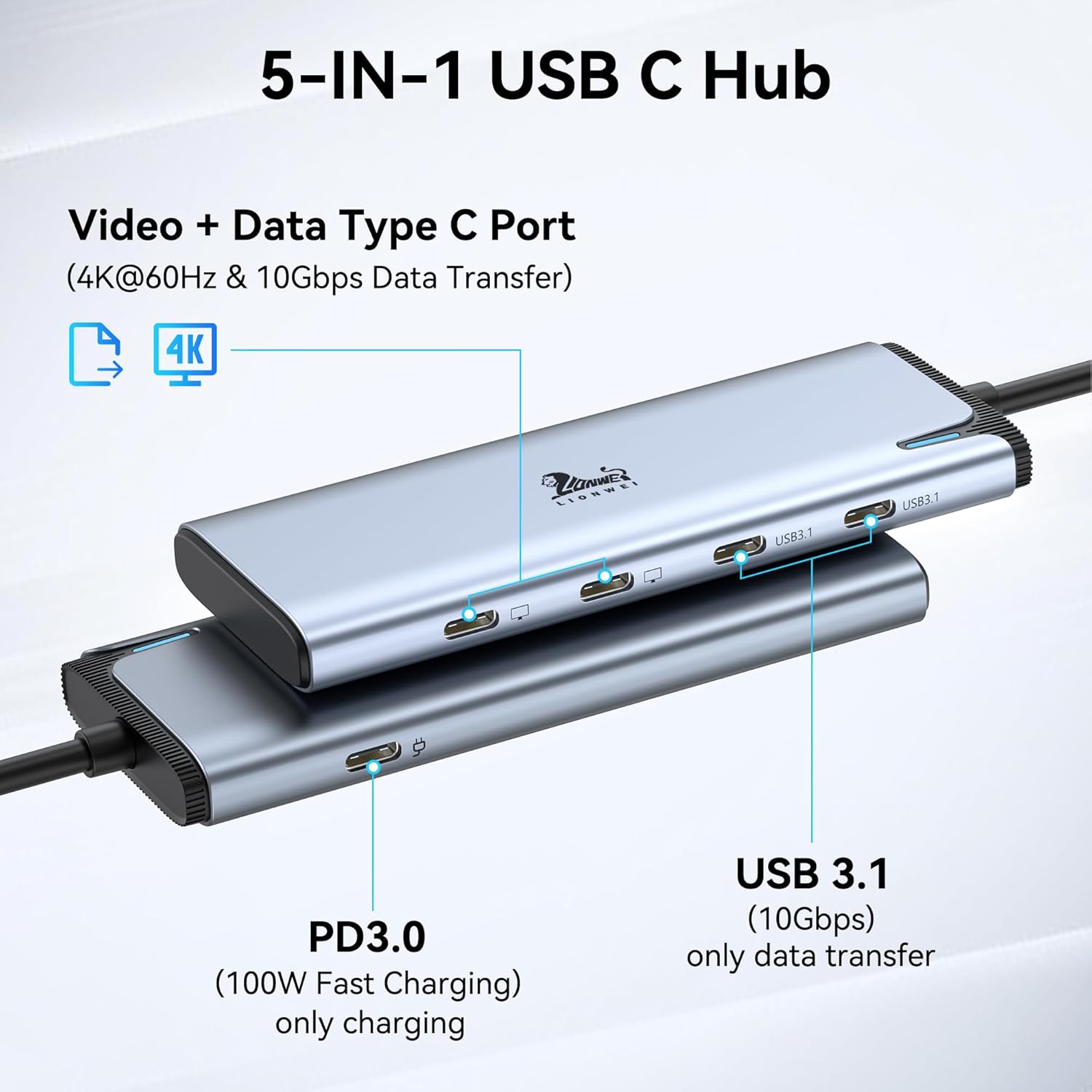
Irudia: Xehetasun zehatza view of the LIONWEI 5-in-1 USB C Hub, highlighting its various ports and their functions, including video, data, and power delivery.

Image: Illustration of the 100W Power Delivery feature, showing the docking station connected to a laptop and a power source for efficient charging.
Funtzionamendu-argibideak
Bistaratzeko moduak:
The docking station supports different display modes depending on your operating system.
For Windows Laptops (Thunderbolt 4/USB 4 Host):
Windows operating systems support both Mirror Mode and Extended Mode (MST/SST) for dual displays. This allows you to duplicate your laptop screen or extend your desktop across two external monitors at 4K@60Hz.

Image: Visual representation of multiple display configurations for Windows, demonstrating both mirror and extended desktop modes with two external monitors.
For macOS Laptops:
Due to limitations of the macOS system, this docking station only supports Mirror Mode (identical screens) when expanding to dual monitors. Extended display with different content on each external monitor is not supported on macOS.

Image: Visual representation of multiple display configurations for macOS, showing only mirror mode support and explicitly indicating that extended mode is not supported.
Datuen transferentzia:
The two USB-C 3.1 data ports provide high-speed data transfer up to 10Gbps. This allows for quick transfer of large files, such as videos, photos, and documents, between your device and connected storage.
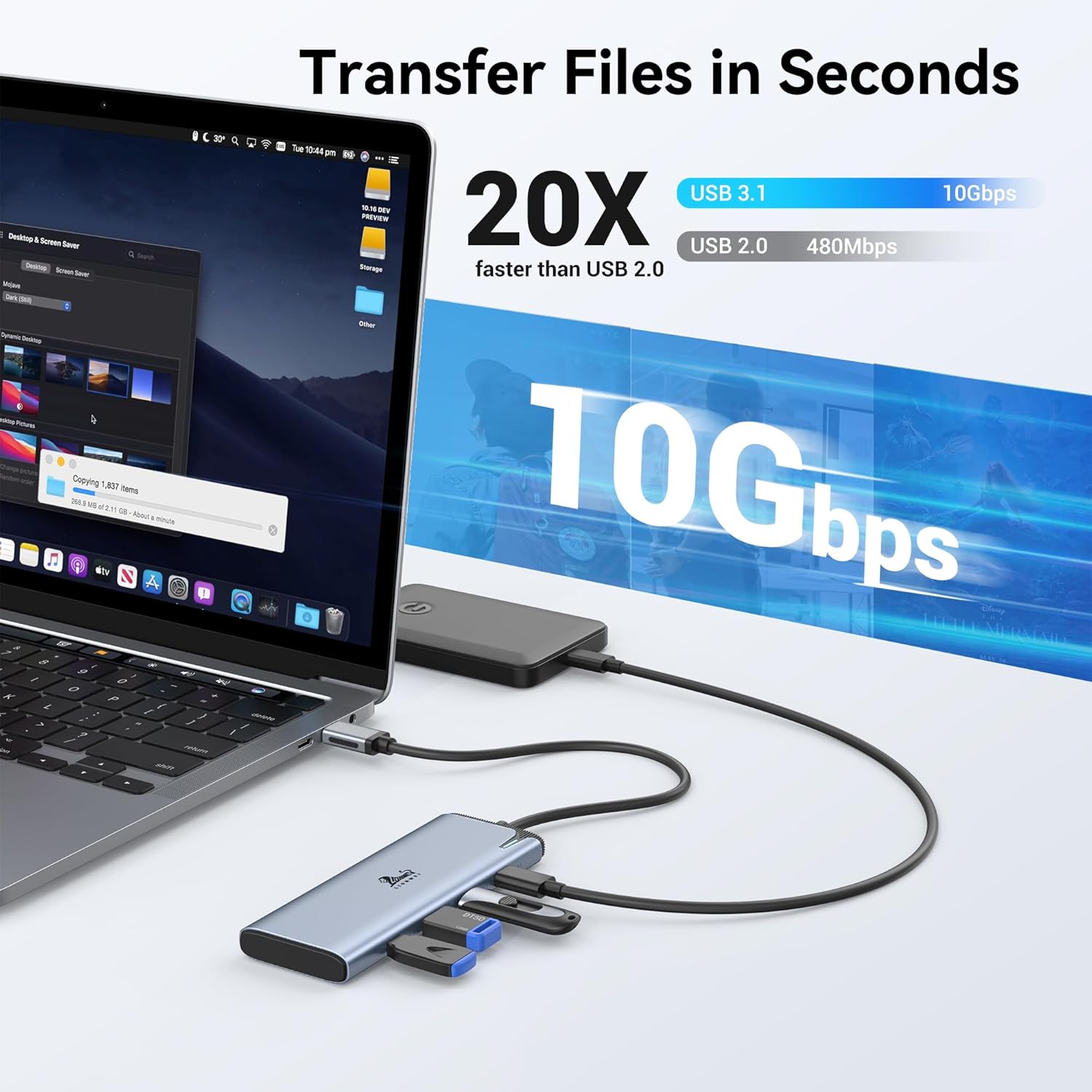
Image: Demonstrating the 10Gbps data transfer capability, showing files being transferred rapidly via the docking station's USB 3.1 ports.
Kargatzeko funtzionaltasuna:
When a compatible PD charger is connected to the docking station's PD port, it can deliver up to 87W of power to your connected laptop, ensuring it stays charged during use. This allows for simultaneous charging and peripheral connectivity.
Mantentzea
- Mantendu kargatzeko estazioa garbi oihal leun eta lehor batekin garbituz.
- Saihestu gailua muturreko tenperatura, hezetasun edo eguzki-argia zuzenaren eraginpean jartzea.
- Ez erabili garbitzaile edo disolbatzaile urratzailerik.
- Store the docking station in a cool, dry place when not in use.
- Saihestu gailua kolpe gogorrak erortzea edo jasaten.
Arazoak konpontzea
| Arazoa | Kausa posiblea | Irtenbidea |
|---|---|---|
| Ez dago kanpoko monitore(etan) bistaratzen |
|
|
| Dual extended display not working on macOS | macOS system limitation. | macOS only supports mirror mode (identical screens) for dual external displays with this hub. This is a system limitation, not a product defect. |
| Kargatzea motela edo kargatzea ez |
|
|
| Data transfer issues or slow speeds |
|
|
Zehaztapenak
| Ezaugarri | Xehetasuna |
|---|---|
| Modelo zenbakia | LIUC6101B |
| Marka | LIONWEI |
| Hardware interfazea | USB C mota |
| Bideo Irteera | Dual 4K@60Hz via USB-C DP Alt Mode 1.4 |
| Datu Portuak | 2 x USB-C 3.1 (10 Gbps) |
| Potentzia Entrega | Up to 100W input, 87W pass-through charging |
| Compatibility (Windows) | Thunderbolt 4/USB 4 laptops (supports MST/SST dual-display) |
| Compatibility (macOS) | Supports mirror mode only for dual displays |
| Neurriak | 7.91 x 2.52 x 0.75 hazbete |
| Elementuaren pisua | 3.2 ontza |
| Ezaugarri bereziak | Fast Charging, Fast Data Transfer, Plug and Play, Portable |
Bermea eta Laguntza
LIONWEI products typically come with an 18-month warranty. For specific warranty details and to register your product, please refer to the warranty card included in your product packaging or visit the official LIONWEI webgunea.
For technical support, troubleshooting assistance, or any inquiries regarding your LIONWEI USB C Docking Station, please contact our customer support team:
- Posta elektronikoa: Please refer to your product packaging for direct email support.
- Webgunea: Visit the LIONWEI Store on Amazon
- 24 orduko lineako zerbitzua: As indicated in product media, LIONWEI offers 24-hour online service for support.

Image: LIONWEI's commitment to quality and support, highlighting stable chip technology, 24-hour online service, and an 18-month warranty.
Produktuaren bideo ofiziala
Watch the official product video for a visual guide on the LIONWEI USB C Docking Station's features and usage.
Video: An official demonstration of the LIONWEI USB C Docking Station, showcasing its various ports, connectivity, and how it functions with different devices and operating systems. This video highlights the dual monitor capabilities, power delivery, and high-speed data transfer features.
Ask a question about this manual
Ask about setup, troubleshooting, compatibility, parts, safety, or missing instructions. Manuals+ will review the question and use this page’s manual context to help answer it.