
1. Sarrera
Thank you for choosing the Sifely Keyless Entry Keypad Smart Door Lock. This smart lock offers enhanced security and convenience for your home, office, or rental property. Please read this manual carefully before installation and operation to ensure proper use and optimal performance.
2. Produktua amaitu daview
The Sifely Smart Door Lock provides multiple access methods and smart features for flexible control. It is designed for easy installation on various door types, including front, bedroom, office, and interior doors.
Ezaugarri nagusiak:
- 5 Ways to Unlock: Access your door using a keypad code, the Sifely app, a traditional physical key, a key FOB, or the interior knob.
- Aplikazio polifazetikoa: Suitable for residential homes, rental properties, shared living spaces, and guest rooms.
- App Control & Access Records: Manage user codes, view unlock history, and share remote access (with optional gateway) directly from your smartphone.
- Brikolaje instalazio erraza: Designed for quick installation with minimal tools, fitting most standard US doors without requiring additional drilling or wiring.
- Etxe adimenduna prest: Compatible with Alexa or Google Assistant via an optional gateway for voice control.

Figure 2.1: Five convenient ways to access your Sifely Smart Lock.
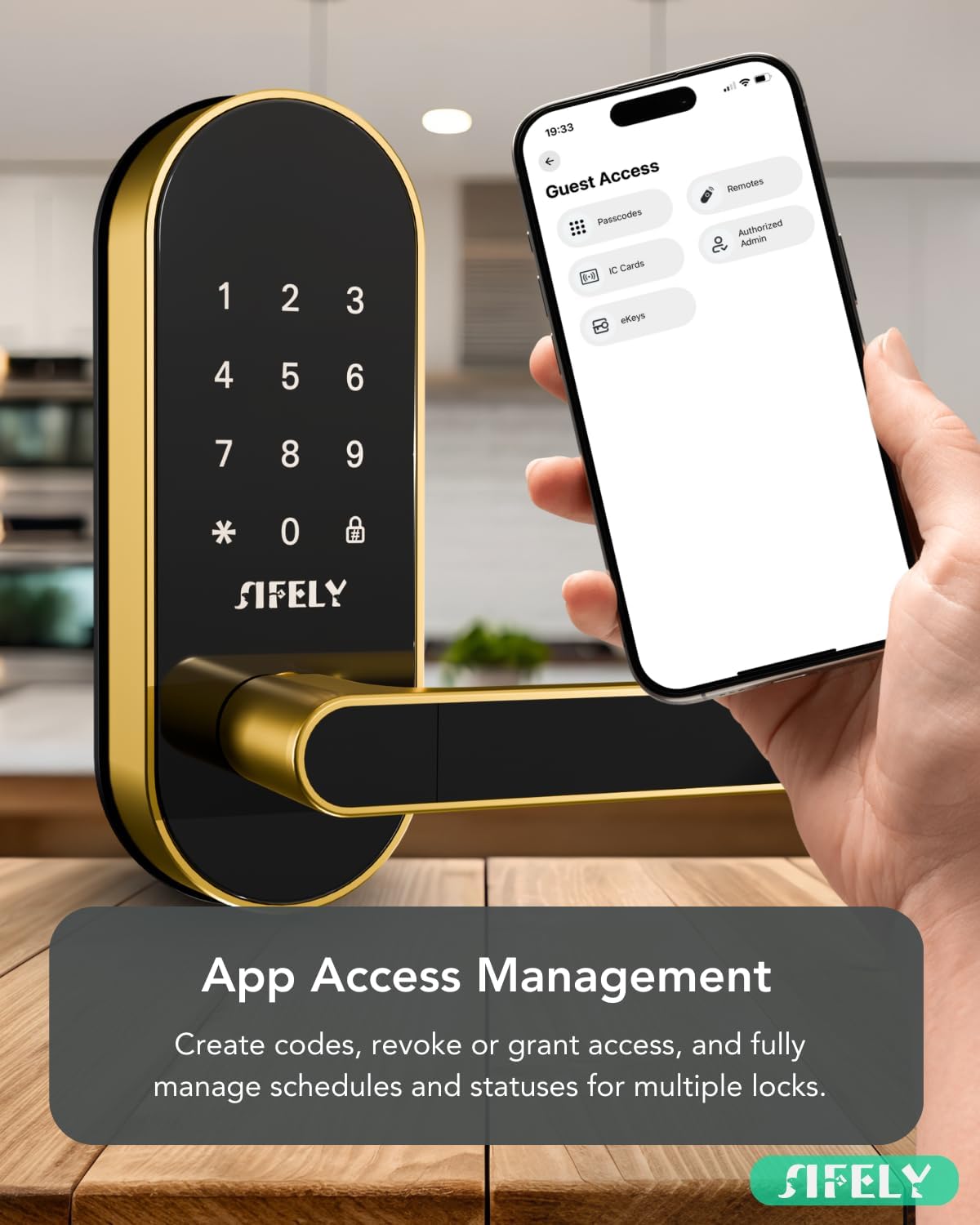
Figure 2.2: App Access Management interface for creating codes and managing access.
3. Paketearen edukia
Mesedez, egiaztatu osagai guztiak daudela instalazioa hasi aurretik:
- Muntatzeko Plaka
- Gomazko junta
- Aurpegiko Plaka
- Atzeko plaka
- Bolt muntaia
- 2 x Giltza fisiko
- 2 x giltza-eraztun
4. Zehaztapenak
| Ezaugarri | Xehetasuna |
|---|---|
| Marka | Sifely |
| Modelo zenbakia | Sifely St |
| Kolorea | Urrea |
| Materiala | Aluminioa, zinka |
| Elementuaren neurriak (L x W x H) | 3 x 1.22 x 7 hazbete |
| Elementuaren pisua | 3.56 kilo |
| Blokeo mota | Combination Lock, Keypad |
| Ezaugarri bereziak | Anti-Peeping Password, Auto-Lock, Fob Unlock |
| Atearen lodieraren bateragarritasuna | 1 3/8" - 2 3/16" (35-55mm) |
| Bore Hole Backset | 2 3/8" or 2 3/4" (60mm or 70mm) |
| Bore Hole Diameter | 2 1/8" (54mm) |
| IP balorazioa | IP55 (Hauts eta ur-zorrotaden aurkakoa) |

Figure 4.1: Detailed specifications for door compatibility and dimensions.
5. Konfigurazioa (Instalazioa)
The Sifely Smart Door Lock is designed for easy DIY installation, typically requiring only a screwdriver. No additional drilling or wiring is needed for most standard US doors. Ensure your door meets the specifications listed in Section 4 before proceeding.
Instalazio urratsak:
- Atea prestatu: Ensure the door is properly prepped according to the dimensions provided in the specifications.
- Install the Bolt Assembly: Insert the bolt assembly into the door edge and secure it with screws.
- Install the Exterior Panel: Route the wire connector and spindle through the bolt assembly. Position the exterior panel on the door.
- Barneko muntaketa-plaka instalatu: Secure the interior mounting plate to the exterior panel using the provided screws.
- Connect Wires and Install Interior Panel: Connect the wire harness from the exterior panel to the interior panel. Carefully tuck excess wire into the door cavity. Attach the interior panel, ensuring the spindle engages correctly.
- Instalatu bateriak: Insert 4 AA batteries into the battery compartment of the interior panel.
- Proba funtzionamendua: Test the lock with a physical key and the interior knob to ensure smooth operation before closing the battery cover.
Video 5.1: Official Sifely Smart Lock Installation Guide. This video demonstrates the step-by-step process for installing the Sifely Smart Lock, including preparing the door, installing the bolt assembly, mounting the exterior and interior panels, connecting wires, and inserting batteries. It provides visual guidance for a smooth installation.
6. Funtzionamendu-argibideak
Atea desblokeatzea:
- Teklatua: Enter your programmed passcode followed by the '#' key. The lock will emit a voice confirmation.
- Aplikazioa: Use the Sifely app on your smartphone to unlock the door via Bluetooth. For remote unlocking, an optional Sifely WiFi Gateway is required.
- Giltza fisikoa: Insert the provided physical key into the keyhole and turn to unlock.
- Giltza-giltza: Present the key fob to the designated sensor area on the lock.
- Barruko botoia: Turn the interior knob to unlock from the inside.
Atea ixtea:
- Blokeo automatikoa: The lock can be configured to automatically lock after a set period (e.g., 5 seconds) once closed.
- Eskuzko blokeoa: Press and hold the '#' key on the keypad for 2 seconds to manually lock the door from the outside.
- Aplikazioa: Use the Sifely app to lock the door via Bluetooth or remotely with the optional Sifely WiFi Gateway.
- Barruko botoia: Turn the interior knob to lock from the inside.
Ezaugarri aurreratuak:
- Peeping-aren aurkako pasahitza: Enter random digits before or after your actual passcode to prevent others from guessing your code. Example: XXX + Passcode + XXX.
- Ahotsaren iritzia: The lock provides audible feedback (e.g., "Unlocked!", "Locked!") to confirm actions.

Figure 6.1: Passcode protection using random numbers to enhance privacy.

Figure 6.2: Card access for convenient and versatile entry.

Figure 6.3: Auto-Lock feature ensures your door is always secured.

Figure 6.4: Voice feedback provides audible confirmation of lock status.
7. Aplikazioaren Ezaugarriak
The Sifely app provides comprehensive control and management capabilities for your smart lock.
Key App Functions:
- Erabiltzaileen kudeaketa: Create, modify, and delete passcodes, key fobs, and eKeys for various users (e.g., family, guests, Airbnb renters).
- Sarbide-erregistroak: View a detailed history of all lock and unlock events, including the method used and the user.
- Aldi baterako sarbidea: Generate temporary or scheduled passcodes for guests or service providers.
- Urruneko kontrola (gateway-arekin): With the optional Sifely WiFi Gateway (sold separately), you can control your lock and view access logs from anywhere.
- Manager Portal: For property managers, a web portal offers advanced management features for multiple locks and properties.
- Auto-Booking Code: (Premium Feature) Automatically generate passcodes for vacation rental guests.

Figure 7.1: Secure, reliable, and versatile management through the Sifely app.

Figure 7.2: Secure access logs maintain a record of all entry events.
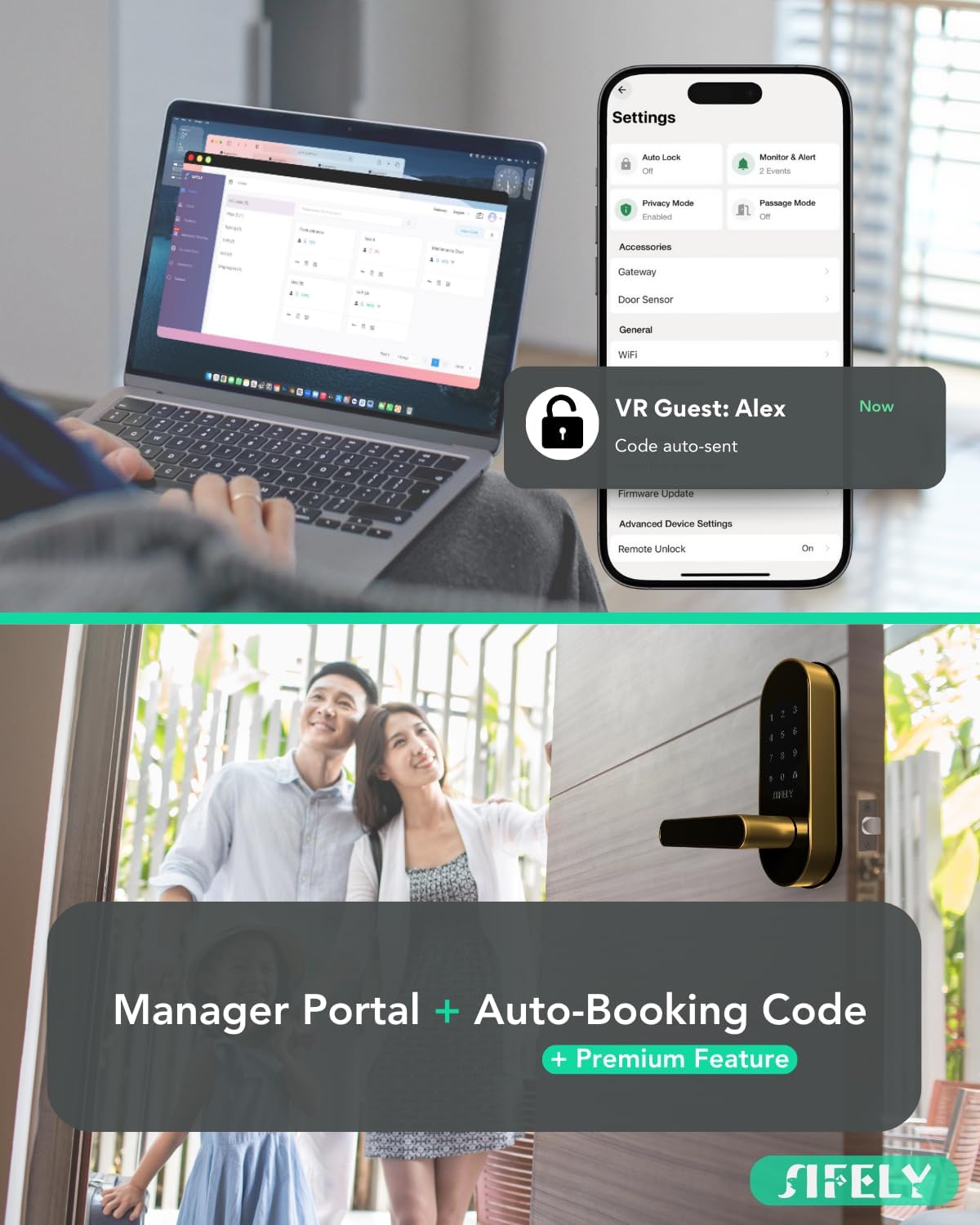
Figure 7.3: The Manager Portal and app provide comprehensive property management tools.

Figure 7.4: Voice control for hands-free convenience (requires optional gateway).

Figure 7.5: Easily manage family access with personalized passcodes.

Figure 7.6: Auto-Booking Code feature for seamless vacation rental management.
8. Mantentzea
Bateria ordezkatzea:
The Sifely Smart Door Lock operates on 4 AA batteries, providing approximately 12 months of battery life under normal usage. The Sifely app will provide low battery alerts.
- When the battery is low, the lock will provide an audible warning.
- Replace all 4 AA batteries simultaneously with new, high-quality alkaline batteries.
- Ziurtatu polaritate zuzena bateriak sartzerakoan.
Larrialdietako energia-erreserbak:
In case of complete battery depletion, the lock features a Type-C USB port for emergency power. Connect a portable power bank to this port to temporarily power the lock and gain entry.

Figure 8.1: Type-C port for emergency power backup.

Figure 8.2: Battery alerts notify you when to change batteries.
Garbiketa:
Garbitu giltzarrapoaren kanpoaldea oihal leun batekinamp oihal. Saihestu akabera kaltetu dezaketen garbitzaile edo disolbatzaile urratzaileak.
9. Arazoak
If you encounter issues with your Sifely Smart Door Lock, please refer to the following common problems and solutions:
- Blokeoak ez du erantzuten: Check battery levels. If batteries are depleted, use the Type-C emergency power backup or the physical key.
- Keypad not working: Ensure the keypad is clean and dry. Re-enter the code carefully. If the issue persists, try replacing batteries.
- Aplikazioaren konexio arazoak: Ensure Bluetooth is enabled on your phone and you are within range of the lock. Restart the app or your phone. If using a gateway, ensure it is powered on and connected to your network.
- Lock mechanism jamming: Check for any obstructions in the door frame or bolt path. Ensure the lock is installed correctly and aligned with the strike plate.
- Incorrect mounting screws: Some users have reported short mounting screws. If you encounter this, contact Sifely support for longer screws or source appropriate replacements.
For more detailed troubleshooting or persistent issues, please contact Sifely customer support.
10. Bermea eta laguntza
Sifely is committed to providing high-quality products and excellent customer service.
Bezeroarentzako laguntza:
Sifely offers comprehensive support to assist you with any questions or issues:
- USA Live Support: Access live support for immediate assistance.
- Full Installation & Tech Support: Expert guidance for installation and technical queries.
- Laguntza eleanitza: Support available in English and Spanish.
Please refer to the Sifely website or your product packaging for specific warranty details and contact information.

Figure 10.1: Sifely customer support is available to assist you.