
1. Sarrera
This manual provides essential information for the installation, operation, and maintenance of your Sophos XGS 88 (Gen2) Security Appliance. The XGS 88 is a high-performance desktop firewall designed to provide robust network security for small to medium-sized businesses. It features advanced threat protection, high throughput capabilities, and seamless centralized management.
2. Segurtasun informazioa
Please read all safety instructions carefully before operating the device. Failure to do so may result in injury or damage to the equipment.
- Ziurtatu gailua gainazal egonkor eta mailakatu batean jartzen dela.
- Ez blokeatu aireztapen baoak.
- Erabili gailuarekin hornitutako korronte-egokigailua soilik.
- Mantendu gailua uretatik, hezetasunetik eta gehiegizko berotik urrun.
- Ez saiatu gailua zeuk irekitzen edo konpontzen. Mantendu konponketa guztiak langile kualifikatuen esku.
3. Paketearen edukia
Egiaztatu elementu guztiak paketean daudela:
- Sophos XGS 88 (Gen2) Security Appliance
- Elikatze-moldagailua
- Ethernet kablea
- Hasierako gida azkarra
4. Produktua amaitu daview
The Sophos XGS 88 is a compact and powerful security appliance. Familiarize yourself with its components:
4.1 Aurreko panela
The front panel features status indicators and essential ports for initial setup and management.

4.1. irudia: Aurrealdea view of the Sophos XGS 88 appliance, showing the COM port, USB port, and LED indicators for LAN/WAN activity and device status.
- COM ataka: Console port for direct management.
- USB ataka: Kanpoko gailuak edo biltegiratzea konektatzeko.
- LED adierazleak: Provide visual feedback on network activity (ACT/LNK, Speed) and overall device status (Status, Alarm).
4.2 Atzeko panela
The rear panel provides connectivity for power, network interfaces, and a reset button.
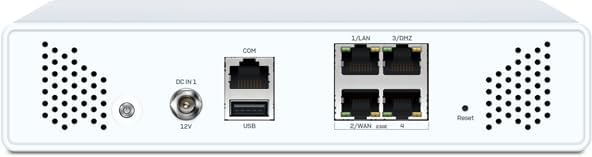
4.2. Irudia: Atzealdea view of the Sophos XGS 88 appliance, displaying the DC power input, COM port, USB port, four 2.5 GE network ports (LAN/WAN), and a reset button.
- DC IN 12V: Energia sarrerako konektorea.
- COM ataka: Kontsolaren ataka.
- USB ataka: Kanpoko gailuak konektatzeko.
- LAN/WAN Ports (1-4): Four 2.5 Gigabit Ethernet ports for network connectivity.
- Berrezarri botoia: Fabrika-ezarpen lehenetsiak berrezartzeko erabiltzen da.
4.3 Goia View (with labels)
Buru bat view highlighting key components and their labels.

4.3. irudia: Goikoa view of the Sophos XGS 88 appliance, indicating the location of the COM Micro USB port, USB 2.0 port, Port LEDs, and Status LEDs. Note: External antenna ports are for XGS 88w models only.
- COM Micro USB: Alternative console port.
- USB 2.0: USB ataka estandarra.
- Portuko LEDak: Indicators for individual network port status.
- Egoera LEDak: Overall device status indicators.
5. Konfigurazioa
Follow these steps to set up your Sophos XGS 88 appliance:
- Lekua: Choose a cool, dry, and well-ventilated location for the appliance. Ensure adequate space around the device for airflow.
- Konektatu sareko kableak:
- Connect your internet modem or upstream network device to the designated WAN port (e.g., Port 2/WAN).
- Connect your internal network switch or a client device to a LAN port (e.g., Port 1/LAN).
- Konektatu energia: Connect the supplied power adapter to the DC IN 12V port on the rear panel, then plug the adapter into a power outlet.
- Piztu: The appliance will automatically power on. Observe the LED indicators on the front panel. The Status LED should turn green once the system has booted.
- Hasierako konfigurazioa: Access the appliance's web-based management interface from a connected computer. Refer to the Quick Start Guide for the default IP address and login credentials.
6. Funtzionamendu-argibideak
The Sophos XGS 88 operates as a network security gateway. Its primary functions include:
6.1 Sarearen babesa
The appliance provides comprehensive threat protection:
- Advanced AI-Powered Threat Protection: Utilizes deep learning technology to detect and respond to evolving cyber threats like ransomware, malware, and phishing attacks in real-time.
- Intrusion Prevention Systems (IPS): Monitors network traffic for malicious activity and blocks intrusions.
- URL Iragazkia: Controls access to websites based on categories and policies.
- Paketeen Ikuskapen Sakona: Examines the content of network packets for threats.
6.2 Xstream Protection
For enhanced security, the XGS 88 with Xstream Protection offers:
- AI-powered Deep Packet Inspection: Provides superior threat detection.
- Cloud Sandboxing: Analyzes suspicious files in a secure, isolated environment to identify zero-day threats.
- TLS 1.3 Inspection: Inspects encrypted traffic for hidden threats.
6.3 Centralized Management
Manage your XGS 88 effortlessly using Sophos Central, a cloud-based platform. This allows for remote monitoring and configuration, simplifying network security management.
7. Mantentzea
Regular maintenance ensures optimal performance and longevity of your Sophos XGS 88 appliance:
- Firmware eguneraketak: Regularly check for and apply the latest firmware updates to ensure you have the most current security features and bug fixes. This can typically be done through the Sophos Central management interface.
- Garbiketa: Keep the appliance clean and free of dust. Use a soft, dry cloth to wipe the exterior. Do not use liquid cleaners or aerosols.
- Aireztapena: Ziurtatu aireztapen-irekidurak ez daudela oztopatuta gehiegi berotzea saihesteko.
- Babeskopiaren konfigurazioa: Periodically back up your appliance's configuration settings. This will allow for quick restoration in case of an issue or replacement.
8. Arazoak
This section addresses common issues you might encounter with your Sophos XGS 88 appliance.
| Arazoa | Kausa posiblea | Irtenbidea |
|---|---|---|
| Gailua ez da pizten. | Korronterik ez, korronte-egokitzaile akastuna edo korronte-hartunearen arazoa. | Check power cable connection. Verify power outlet is functional. Ensure power adapter is correctly connected. |
| Sare konexiorik ez. | Incorrect cable connection, misconfigured network settings, or ISP issue. | Verify Ethernet cables are securely connected to the correct ports. Check network configuration in the management interface. Contact your ISP if the issue persists. |
| Sarearen errendimendu motela. | High network traffic, misconfiguration, or outdated firmware. | Review network usage. Optimize security policies. Ensure firmware is up to date. |
| Ezin da kudeaketa interfazera sartu. | Incorrect IP address, network issue, or firewall blocking access. | Verify the appliance's IP address. Ensure your computer is on the same network segment. Temporarily disable client-side firewalls. |
If the problem persists after attempting these solutions, please refer to the official Sophos support resources or contact technical support.
9. Zehaztapenak
Key technical specifications for the Sophos XGS 88 (Gen2) Security Appliance:
- Ereduaren izena: XGS 88
- Marka: Sophos
- Fabrikatzailea: SOPHOS
- Sareko interfazeak: 4 x 2.5 GE Copper Ports
- Konektibitatea: USB, COM (Micro USB)
- Forma-faktorea: Desktop Appliance
- Hoztea: Fanless (for XGS 88 model)
- Lehenengo eskuragarri: 3ko urtarrilaren 2025a
10. Bermea eta Laguntza
For detailed information regarding the product warranty, technical support, and service agreements, please refer to the official documentation provided with your Sophos XGS 88 appliance or visit the official Sophos website. Support resources typically include knowledge bases, FAQs, and contact information for technical assistance.
Bisita dezakezu Sophos denda Amazonen produktuaren informazio gehigarrirako.