
1. Sarrera
This manual provides detailed instructions for the installation, operation, and maintenance of the TMEZON MZ-VDP-NE160 4-wire doorbell camera. This outdoor station is designed to work seamlessly with compatible TMEZON videophone monitors, such as the MZ-IP-V728TW, to provide secure and convenient visitor management for your property.
2. Segurtasun informazioa
Mesedez, irakurri eta ulertu segurtasun-jarraibide guztiak gailu hau instalatu edo erabili aurretik. Argibide hauek ez jarraitzeak deskarga elektrikoak, sua edo produktua kaltetu dezake.
- Segurtasun elektrikoa: Installation should be performed by a qualified electrician or technician. Ensure power is disconnected before any wiring work.
- Uraren esposizioa: While designed for outdoor use, avoid direct high-pressure water jets. Ensure all connections are properly sealed.
- Tenperatura: Ez jarri gailua bere funtzionamendu-eremutik kanpo dauden tenperatura altuen eraginpean.
- Garbiketa: Erabili zapi leun eta lehor bat garbitzeko. Ez erabili garbitzaile edo disolbatzaile urratzailerik.
3. Paketearen edukia
Egiaztatu osagai guztiak paketean daudela:
- 1 x TMEZON MZ-VDP-NE160 Doorbell Camera Unit
- Muntatzeko torlojuak eta hormako takoak
- Kableatu konektoreak
- Erabiltzailearen eskuliburua (dokumentu hau)
4. Produktua amaitu daview
The TMEZON MZ-VDP-NE160 is an outdoor doorbell camera unit. It features a camera for video surveillance, a microphone for audio input, a speaker for audio output, and a call button to initiate communication with the indoor monitor.
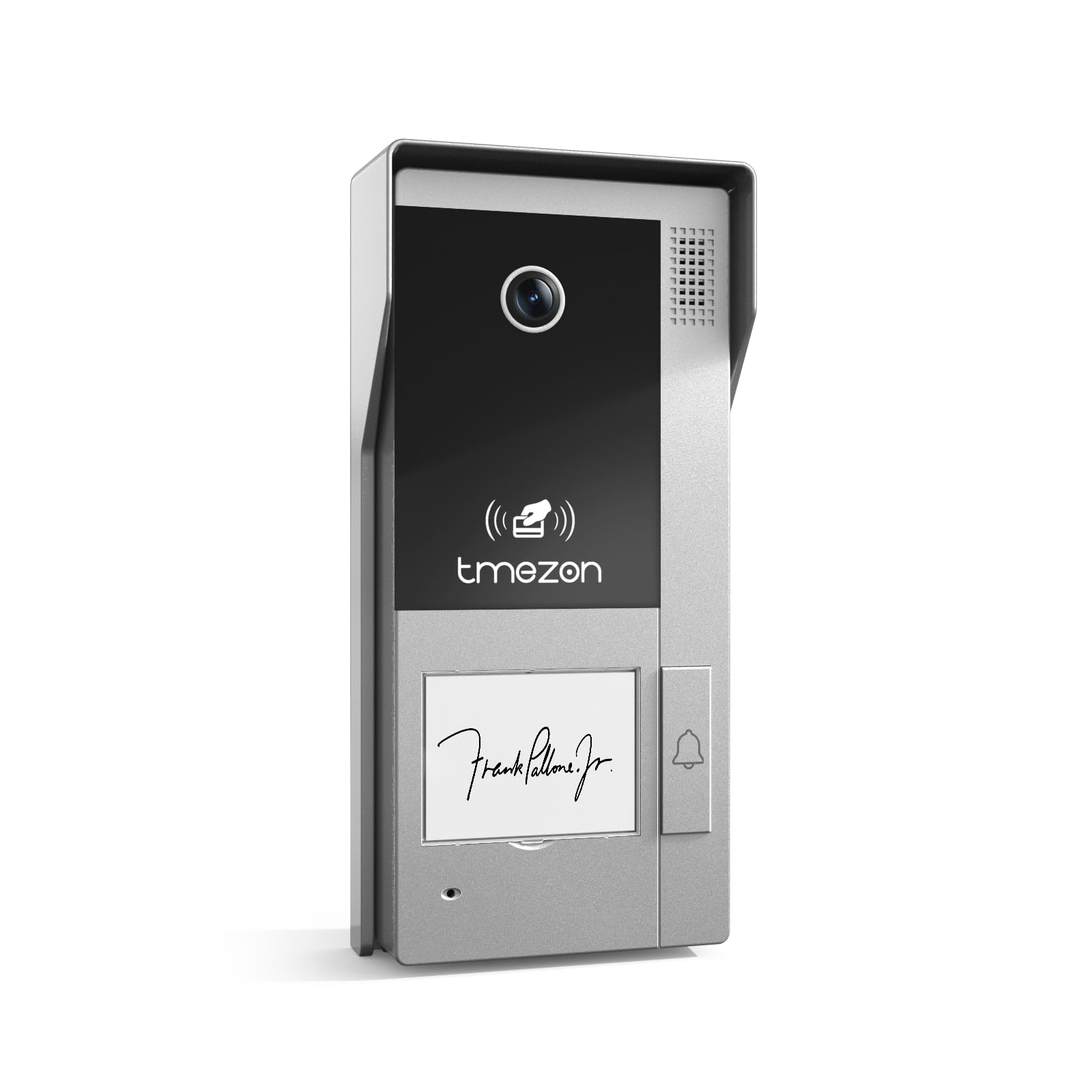
1. irudia: Aurrealdea view of the TMEZON MZ-VDP-NE160 doorbell camera, showing the camera lens, call button, microphone, and speaker grille.
Osagai nagusiak honako hauek dira:
- Kameraren lentea: Bideo-jarioa grabatzen du.
- Deitzeko botoia: Activates the indoor monitor and initiates communication.
- Mikrofonoa: Bisitarien audioa grabatzen du.
- Hizlaria: Allows two-way audio communication.
- Wiring Terminal (Rear): For connecting the 4-wire cable to the indoor monitor and power supply.
5. Konfigurazioa eta instalazioa
The MZ-VDP-NE160 is a 4-wire system. Proper wiring is crucial for correct operation. It is recommended to consult a professional for installation if you are unfamiliar with electrical wiring.
5.1 Muntatzeko kokapena
- Choose a location near your entrance, typically at a height of 1.4 to 1.6 meters (4.6 to 5.2 feet) from the ground, ensuring a clear view bisitarien.
- Avoid direct sunlight or strong light sources that could cause glare on the camera.
- Ziurtatu muntatzeko gainazala laua eta egonkorra dela.
5.2 Kableatu-diagrama (orokorra)
The doorbell camera connects to the indoor monitor (e.g., MZ-IP-V728TW) using a 4-wire cable. The typical connections are:
- 1. haria: Audioa
- 2. haria: Bideoa
- 3. haria: Lurra (GND)
- 4. haria: Potentzia (DC 12V)
Note: Refer to the specific wiring diagram provided with your indoor monitor for precise connection details. Ensure polarity is correct for power connections.
5.3 Instalazio-urratsak
- Deskonektatu energia: Before starting, ensure all power to the existing doorbell system and the indoor monitor is turned off at the circuit breaker.
- Muntatzeko euskarria: Secure the mounting bracket (if applicable, or the unit directly) to the wall using the provided screws and wall plugs.
- Hari-konexioa: Connect the 4-wire cable from the indoor monitor to the corresponding terminals on the rear of the MZ-VDP-NE160 doorbell camera. Ensure connections are secure.
- Unitate Segurua: Attach the doorbell camera unit to the mounting bracket or directly to the wall, ensuring it is firmly in place.
- Berrezarri boterea: Once all connections are made and secured, restore power to the system.
- Proba sistema: Test the doorbell functionality by pressing the call button and verifying communication with the indoor monitor.
6. Funtzionamendu-argibideak
The TMEZON MZ-VDP-NE160 doorbell camera operates in conjunction with your TMEZON indoor monitor.
- Visitor Call: When a visitor presses the call button on the MZ-VDP-NE160, the indoor monitor will ring and display the video feed from the doorbell camera.
- Bi norabideko komunikazioa: On the indoor monitor, you can answer the call to engage in two-way audio communication with the visitor.
- Door Release (if connected): If an electronic door lock is connected to your indoor monitor system, you can typically unlock the door from the indoor monitor during a call.
- Jarraipena: Some indoor monitors allow you to manually view the live video feed from the doorbell camera at any time, even without a visitor pressing the button.
7. Mantentzea
Regular maintenance helps ensure the longevity and optimal performance of your doorbell camera.
- Garbiketa: Periodically wipe the camera lens and the front panel with a soft, slightly damp zapi hautsa eta zikinkeria kentzeko. Ez erabili produktu kimiko gogorrik edo material urratzailerik.
- Ikuskatu konexioak: Annually, inspect the wiring connections for any signs of corrosion or loosening. Ensure the unit is securely mounted.
- Software eguneraketak: While this specific unit does not have user-updatable software, ensure your indoor monitor's firmware is up to date for best compatibility and features.
8. Arazoak
If you encounter issues with your MZ-VDP-NE160 doorbell camera, refer to the following common problems and solutions:
| Arazoa | Kausa posiblea | Irtenbidea |
|---|---|---|
| No video/audio on indoor monitor |
|
|
| Call button not responding |
|
|
| Bideoaren kalitate eskasa |
|
|
If the problem persists after attempting these solutions, please contact TMEZON customer support.
9. Zehaztapenak
| Ezaugarri | Xehetasuna |
|---|---|
| Eredua | MZ-VDP-NE160 |
| Marka | TMEZON |
| Produktuaren neurriak (L x W x H) | 1 x 1 x 1 cm |
| Kableatu mota | 4-Hari Sistema |
| Bolumen eragileatage | 240 Volts (System dependent, typically 12V DC for the unit itself, 240V might refer to power supply input) |
| Energia-kontsumoa | 5 Watt |
| Kolorea | Grisa |
| Dakarten osagaiak | Txirrinaren unitatea |
10. Bermea eta Laguntza
For warranty information and technical support, please refer to the documentation provided with your complete TMEZON videophone system or visit the official TMEZON webgunea. Gorde erosketa-agiria erosketaren frogagiri gisa berme-erreklamazioetarako.
For direct assistance, you may contact TMEZON customer service through their official channels.