
Sarrera
Thank you for choosing the Casio MWA-300H Series watch. This manual provides essential information regarding the setup, operation, and maintenance of your new timepiece. Please read this manual carefully to ensure proper use and to fully understand the features of your watch.
The Casio MWA-300H is an analog watch featuring a chronograph, 100-meter water resistance, and luminous hands for enhanced readability. It is designed for versatile wear, suitable for both daily use and recreational water activities.
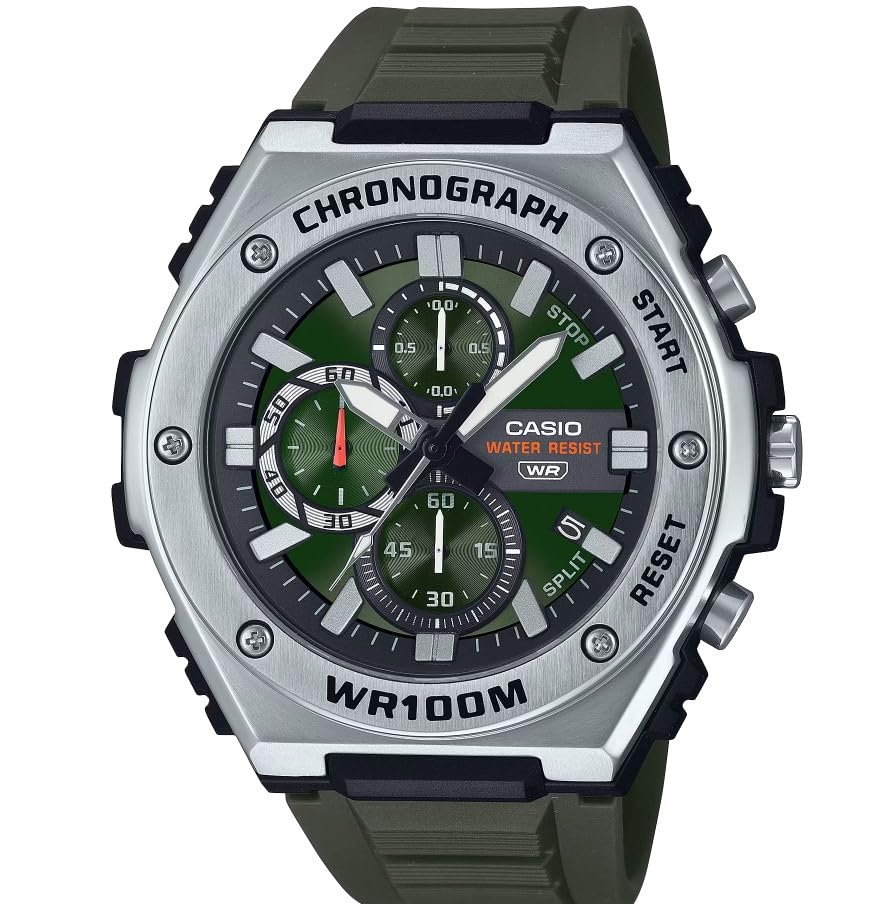
Irudia: Aurrealdea view of the Casio MWA-300H Series watch, highlighting its green dial, chronograph sub-dials, and black resin band.
Setup: Initial Settings
Ordua ezartzea
- Pull the crown out to the second click (time setting position). The second hand will stop.
- Rotate the crown to set the hour and minute hands. Ensure the AM/PM setting is correct if your watch has a 24-hour indicator or date changes at midnight.
- Sakatu koroa berriro ohiko posiziora. Segunduen orratzak mugimendua berreskuratuko du.
Data ezartzea
- Pull the crown out to the first click (date setting position).
- Biratu koroa data ezartzeko. Saihestu data 9:00etatik 1:00etara ez jartzea, horrek data automatikoki aldatzeko mekanismoan eragin baitezake.
- Bultzatu koroa berriro posizio normalera.
Bateriaren informazioa
Your Casio MWA-300H watch is powered by 1 LR44 battery, which is included. The battery life is approximately 3 years. When the battery runs low, the watch may exhibit irregular movement or stop. It is recommended to have the battery replaced by a qualified watch technician to maintain water resistance.
Operating: Watch Functions
Kronografoa (kronometroa) erabiltzea
The chronograph function allows for precise timing of events. Your watch features a 1/10-second stopwatch that captures elapsed, split, and 1st/2nd place times across three dedicated sub-dials.
- Starting the Stopwatch: Press button A (typically the upper right button) to start the stopwatch.
- Stopping the Stopwatch: Press button A again to stop the stopwatch.
- Resetting the Stopwatch: After stopping, press button B (typically the lower right button) to reset the stopwatch hands to zero.
- Denbora zatituaren neurketa: While the stopwatch is running, press button B to measure split times. The stopwatch hands will momentarily stop to indicate the split time, then resume timing. Press button B again to release the split time and display the current elapsed time.
Note: Refer to the specific button layout on your watch for exact button assignments.
Water Resistance (100 Meters)
Your Casio MWA-300H watch is water resistant up to 100 meters (330 feet). This rating means the watch is suitable for swimming, showering, and recreational water activities. It is not suitable for diving or snorkeling where significant water pressure changes occur.
- Do not operate the crown or buttons while the watch is wet or submerged.
- Ur gazian egon ondoren, garbitu erlojua ur gezarekin eta lehortu.
Luminous Hands and Markers
The watch features luminous hands and markers that absorb light and glow in the dark, providing readability in low-light conditions. The intensity and duration of the glow depend on the amount and type of light exposure.
Mantentzea
Zaintza Orokorra
- Garbitu erlojua aldizka zapi leun eta lehor batekin zikinkeria eta hezetasuna kentzeko.
- Saihestu erlojua tenperatura altuen, eguzki-argiaren eraginpean denbora luzez edo eremu magnetiko indartsuen eraginpean jartzea.
- Keep the watch away from solvents, detergents, perfumes, and cosmetics, as these can damage the resin materials.
Bateria ordezkatzea
When the battery needs replacement, it is highly recommended to take your watch to an authorized Casio service center or a reputable watch repair shop. This ensures that the watch is properly sealed and its water resistance is maintained after battery replacement.
Water Resistance Checks
To maintain the water resistance of your watch, it is advisable to have it inspected periodically (e.g., every 2-3 years) by an authorized service center, especially if it is frequently exposed to water.
Arazoak konpontzea
| Arazoa | Kausa posiblea | Irtenbidea |
|---|---|---|
| Watch hands do not move or move irregularly. | Bateria baxua. | Ordeztu bateria. Kontsultatu erloju-teknikari profesional bati. |
| Ordua ez da zuzena. | Time not set correctly; watch has stopped and restarted. | Berrezarri ordua "Ordua ezartzea" ataleko argibideen arabera. |
| Data eguerdian aldatzen da gauerdiaren ordez. | AM/PM ezarpena ez da zuzena. | Aurreratu ordua 12 orduz. |
| Kronografoaren orratzak ez dira zeroraino berrezartzen. | Kronografoaren orratzen deslerrokatzea. | Consult the full Casio module manual for chronograph hand adjustment procedures, or contact customer support. |
| Hezetasuna erlojuaren barruan. | Crown or buttons operated underwater; seals compromised. | Eraman erlojua berehala baimendutako zerbitzu-zentro batera ikuskatu eta konpontzeko, kalte gehiago saihesteko. |
Zehaztapenak
| Ereduaren izena | MWA-300H |
| Bistaratzeko mota | Analogikoa |
| Mugimendu Mota | Kuartzoa |
| Urarekiko erresistentzia sakonera | 100 metro (330 oin) |
| Ezaugarri gehigarriak | Chronograph, Date Display, Luminous Hands |
| Energia iturria | Battery Powered (1 x LR44 included) |
| Kasu Materiala | Erretxina |
| Banda Materiala | Erretxina |
| Kristalezko materiala | Erretxina |
| Kasuaren Diametroa | 50.9 milimetro |
| Kasuen lodiera | 14.3 milimetro |
| Bandaren Zabalera | 22 milimetro |
| Lotura mota | Buklea |
Bermea eta Laguntza
Berme mugatua
Your Casio MWA-300H watch comes with a limited warranty. Please refer to the warranty card included with your purchase for specific terms, conditions, and duration of coverage. The warranty typically covers manufacturing defects under normal use.
Bezeroarentzako Arreta
For further assistance, technical support, or warranty claims, please contact Casio customer service. You can find contact information on the official Casio webgunean edo erlojuarekin batera emandako dokumentazioan.
For more detailed information, including specific module operations or advanced settings, please visit the official Casio support website or refer to the full module manual for your watch.