
1. Sarrera
This manual provides comprehensive instructions for the installation, operation, and programming of your DieseRC Wireless Roller Shutter Remote Control Switch. This device is designed to wirelessly control AC motors, enabling forward, reverse, and stop functions for applications such as garage doors, electric gates, and roller shutters. Please read this manual carefully before use to ensure proper functionality and safety.
2. Paketearen edukia
- 1 x Relay Receiver Board
- 2 x Transmitters (battery included)
- 1 x produktuaren eskuliburua
3. Zehaztapenak
| Ezaugarri | Zehaztapena |
|---|---|
| Hartzailea lan egiten duen voltage | AC 90V~250V |
| Korronte lasaia | <10 mA |
| Max. Oraingoa | 3A (Inductive Load), 10A (Resistive Load) |
| RF maiztasuna | 433MHz |
| Funtzionamendu-tenperatura | -30°C eta +80°C artean |
| Sentikortasuna jasotzea | > 97 dBm |
| Number of Storable Remotes | 20 arte |
| Kodeketa euskarria | 1527 Learning-Code |
| RF Operating Mode | ASK Superheterodyne Wireless Reception |
| Harrera Barrutia | Approx. 20 ~ 50 meters (open area) |
| Funtzionamendu moduak | Momentary / Toggle / Latched Mode |
| Transmisorearen bateria | 2 x CR2016 (barne) |
| Gailu bateragarriak | Garage door, electric curtain, electric gate, roller door |
4. Konfigurazioa
4.1 Segurtasun-neurriak
- Ensure power is disconnected before any wiring.
- Wiring should be performed by a qualified electrician if you are unsure.
- Verify correct polarity (Live, Neutral) to avoid damage or short circuits.
4.2 Hartzailearen kableatzea
Connect the receiver to your AC motor and power supply according to the diagram below. The receiver supports AC 90V-250V input. Ensure secure connections for all wires.

Image: Receiver dimensions and wiring diagram. Note the 'Up' and 'Down' motor connections and AC 90-250V power input.
The receiver features large screw ports for easy installation and metal clips for secure wiring. A transparent flip cover allows for circuit adjustment.

Irudia: Xehetasun handikoa view of the receiver's screw terminals and cable compatibility.
4.3 Hasierako piztea
After wiring, apply power to the receiver. The indicator light on the receiver will illuminate, indicating it is ready for operation or programming.
4.4 Produktua gainditzeaview Bideoa
Bideoa: Bideo honek ikuspegi orokorra eskaintzen duview of the DieseRC 2201COM receiver and KT03 remote control, highlighting their design and features.
5. Funtzionamendu moduak
The DieseRC remote control switch supports three main operating modes: Momentary, Toggle, and Latched. All products are set to Toggle mode before shipment. If you wish to change the operating mode, you must first reset the receiver (see Section 6.2).
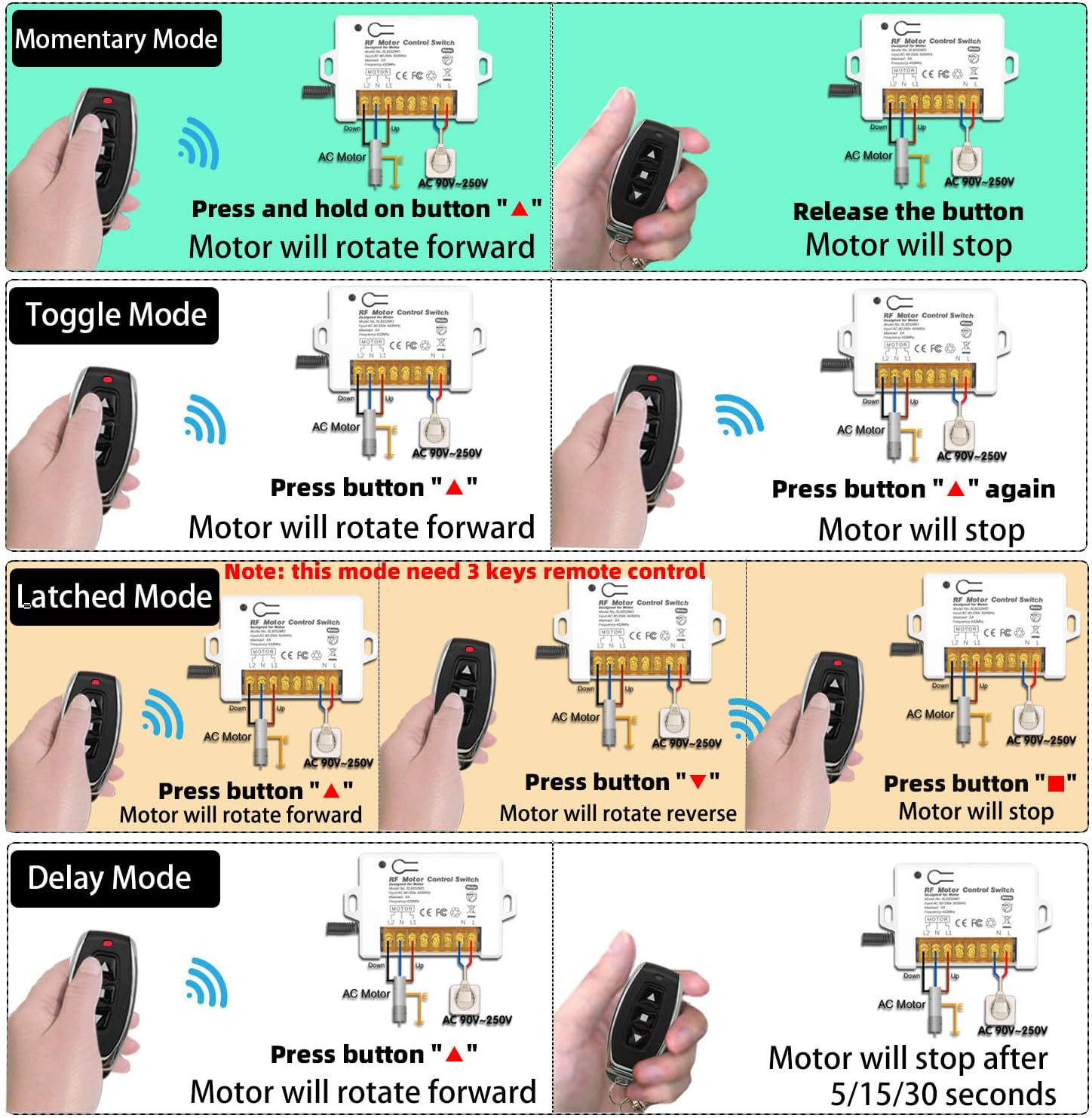
Image: Visual representation of Momentary, Toggle, Latched, and Delay operating modes.
5.1 Momentary Mode
- Sakatu eta eutsi "▲" button: The motor rotates forward.
- Release the button: The motor stops.
5.2 Aldatu modua
- Sakatu "▲" button once: The motor rotates forward.
- Sakatu "▲" button again: The motor stops.
5.3 Latched Mode
- Sakatu "▲" button: The motor rotates forward.
- Sakatu "▼" button: The motor rotates backward.
- Sakatu "■" button: The motor stops.
5.4 Eskaera Adibamples

Irudia: Adibample of the remote control switch used for a garage door.
Video: This video demonstrates various applications of the DieseRC Wireless Roller Shutter Remote Control Switch, showcasing its functionality in controlling different types of AC motors.
6. Urrutiko aginteak programatzea
The receiver can store up to 20 transmitters. Follow these steps to program your remote control to the desired operating mode.

Image: Step-by-step programming instructions for different modes.
6.1 Urrutiko aginte bat ikastea
- Press the learning button on the receiver:
- Sakatu 1 aldiz for Momentary Mode.
- Sakatu 2 aldiz for Toggle Mode.
- Sakatu 3 aldiz for Latched Mode.
- Sakatu "▲" button on your remote control. Wait 3 seconds.
- Sakatu "▼" button on your remote control. The programming is successful.
Note: For Latched Mode, the remote control requires 3 keys (Forward, Reverse, Stop).
6.2 Resetting the Receiver
To clear all programmed remote controls from the receiver's memory:
- Press the learning button on the receiver 8 aldiz.
Important: After resetting, all previously programmed remote controls will no longer work and must be re-programmed.
6.3 Programming Demonstration Video
Video: A step-by-step video guide on how to program the DieseRC 2201COM receiver, covering the different operating modes and remote control pairing.
7. Mantentzea
7.1 Transmisorearen bateriaren ordezkapena
The remote control transmitters use 2 x CR2016 batteries. If the remote's range decreases or it becomes unresponsive, replace the batteries. Refer to the transmitter image for visual guidance.

Image: DieseRC remote control transmitter.
7.2 Garbiketa
Wipe the receiver and transmitters with a dry, soft cloth. Do not use abrasive cleaners or solvents.
7.3 Ingurumen Baldintzak
Avoid exposing the device to extreme temperatures, high humidity, or direct sunlight. Ensure the receiver is installed in a location with adequate ventilation.
8. Arazoak
- Urrutiko agintea ez da erantzuten:
- Check the battery in the transmitter. Replace if necessary.
- Ensure the receiver has power.
- If the receiver was recently reset, re-program the remote control (see Section 6.1).
- Ensure the remote is within the effective operating range (20-50 meters).
- Motor not moving:
- Egiaztatu kableatu guztiak ondo eta ondo lotuta daudela (ikusi 4.2 atala).
- Check the power supply to the receiver and motor.
- Ensure the motor itself is functioning correctly.
- Interferentzia:
- While multiple remote control sets can be used in the same area without interference (except in Momentary mode), strong local RF interference might affect performance. Try relocating the receiver if possible.
9. Bermea eta Laguntza
DieseRC products are manufactured to high-quality standards. For specific warranty information, please refer to the product packaging or contact your retailer. If you encounter any issues or require technical assistance, please reach out to DieseRC customer support through the vendor's contact information provided at the point of purchase.