
Produktua amaituview
The Sena BiKom 20 is an ultra-lightweight and compact open-ear communication device designed for cycling. It offers seamless communication and enhanced safety features for riders.
- 0.5 mile communication range with an effective talk time of up to 7 hours.
- Advanced Noise Control enables your voice to be heard clearly in noisy environments.
- Talk to virtually unlimited users over 9 communication channels.
- Weighs in at only 20 grams.
- Convenient Over-The-Air firmware updates.

Sena BiKom 20 unit, highlighting its ultra-lightweight and portable design.

Cyclists riding in a group, demonstrating the long-range communication capability of the Sena BiKom 20.

Two individuals wearing the Sena BiKom 20, one attached to a cycling helmet and the other to a baseball cap, showcasing multiple mounting options.

Close-up of the Sena BiKom 20 unit with sound wave graphics, illustrating its advanced noise control feature for clear audio in noisy environments.
Konfigurazio Gida
Follow these steps to properly set up your Sena BiKom 20 for optimal performance.
Kutxatik ateratzea eta osagaiak
This video provides a step-by-step guide on unboxing the Sena BiKom 20 and identifying all included components.
The package includes the main unit, hat clip mount, 2x strap mounts, microphone sponges, and a USB-C cable.
Muntatzeko aukerak

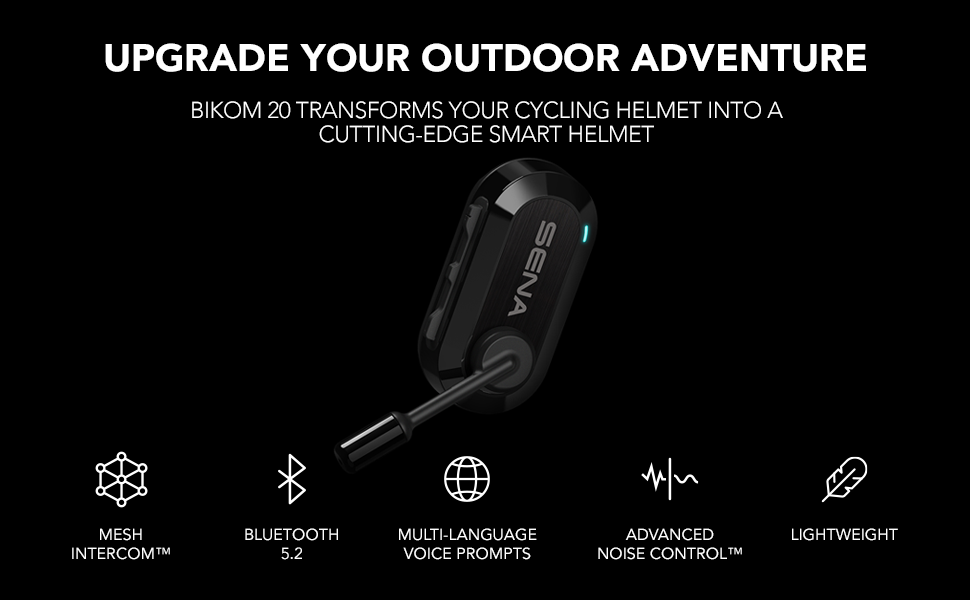
An illustration of the Sena BiKom 20 unit highlighting key features like Mesh Intercom, Bluetooth 5.2, Multi-language Voice Prompts, Advanced Noise Control, and Lightweight design.
The BiKom 20 offers versatile mounting options to fit most cycling and multi-sport helmets. Use the strap mounts for secure attachment to helmet straps or the hat clip mount for other headwear.
Hasierako Konfigurazioa
This video offers technical insights and setup tips for the Sena BiKom 20, including button functions and basic operation.
Download the Sena Utility App to manage settings, pair devices, and perform firmware updates. The app allows for visual pairing via QR code for Bluetooth Intercom.

A smartphone screen displaying the Sena Cycling App interface, demonstrating how to manage device settings from your phone.
Funtzionamendu-argibideak
Piztu/Itzaltzea
- To power on, press and hold the (+) button and the Center button for 1 second.
- To power off, tap the (+) button and the Center button.
Bolumen kontrola
- To increase volume, tap the (+) button.
- To decrease volume, tap the (-) button.
Sareko interfonoa
- The BiKom 20 utilizes Mesh Intercom technology for group communication.
- To start Mesh Intercom, press the Mesh Intercom button.
- To end Mesh Intercom, press the Mesh Intercom button again.
- The device supports 9 communication channels for virtually unlimited users.
Bluetooth bidezko atezaina
- The BiKom 20 supports 2-way Bluetooth Intercom with another Sena Pi or Sena Bluetooth helmet user.
- To pair, refer to the Sena Utility App's Smart Intercom Pairing feature.
Telefonoaren Konektibitatea
- Pair your smartphone via Bluetooth 5.0 to listen to music, receive GPS navigation, and take phone calls.
- Use the Sena Utility App for advanced settings and firmware updates.
Cyclists riding with a graphic illustrating Bluetooth pairing of the Sena BiKom 20 with a smartphone for on-the-go access to features.
Mantentzea
Garbiketa
Garbitu unitatea leuna batekinamp oihal. Ez erabili produktu kimiko edo disolbatzaile gogorrak.
Kargatzen
Charge the device using the provided USB-C cable. Battery charge time is approximately 2.5 hours. Average battery life is 7 hours of talk time.
Firmware eguneraketak
Perform Over-The-Air firmware updates via the Sena Utility App to ensure optimal performance and access to new features.
Arazoak konpontzea
Botererik ez
Ensure the device is fully charged. Connect to the USB-C charger and check the indicator light.
Audiorik ez
Check volume levels on the device and your connected smartphone. Ensure speakers are correctly positioned over your ears.
Intercom deskonexioa
Ensure devices are within the 0.5-mile communication range. Re-pair devices using the Sena Utility App if necessary.
Haizearen Zarata
The Advanced Noise Control feature minimizes wind noise. Ensure the microphone sponge is properly installed.
Zehaztapen Teknikoak
| Ezaugarri | Zehaztapena |
|---|---|
| Marka | Sena |
| Modelo zenbakia | BIKOM20-01 |
| Ereduaren izena | BiKom |
| Komunikazio-eremua | 0.5 Mila |
| Hitzaldi Denbora | 7 ordu |
| Bateria kargatzeko denbora | 2.5 ordu |
| Bluetooth bertsioa | 5.0 |
| Zarata Kontrola | Zarata Deuseztatze Aktiboa |
| Elementuaren pisua | 0.7 ontza |
| Uraren Erresistentzia Maila | Urarekiko erresistentea |
| Kontrol-metodoa | App, Button |
| Gailu bateragarriak | Smartphones, Tablets, Bluetooth-enabled Devices |
Bermea eta Laguntza
Bermearen informazioa
The Sena BiKom 20 comes with a 2-year warranty. Please retain your proof of purchase for warranty claims.
Bezeroarentzako Arreta
For further assistance, visit the official Sena website or contact their customer support. Over-The-Air firmware updates are available via the Sena Utility App.