
1. Sarrera
The VOTOL EM50-4 is a high-performance programmable motor controller designed for electric scooters, supporting 48V-72V battery systems and motors ranging from 400W to 2000W. This controller features a sine wave output for smooth operation and offers extensive customization through PC programming. This manual provides essential information for the proper installation, operation, and maintenance of your EM50-4 controller.
2. Zehaztapenak
| Ezaugarri | Xehetasuna |
|---|---|
| Eredua | EM50-4 ECU Sine Wave Controller |
| Available Battery Voltage | 48V-72V |
| Korronte DC nominala | 40A |
| Boost DC Current | 80A |
| Goiko Fase Korrontea | 170A |
| Gehienezko potentzia | 5760W |
| MOSFETak | 12 FET |
| Matched Motor Rated Power | 800W-2000W |
| Eraginkortasun handiena | %92 |
| Iragazgaitzaren balorazioa | IP65 |
| Flux Weakening Ratio | %150 |
| Ziurtagiria | CE, CCC |
| Komunikazioa | Hall Sensor |
| Pisu garbia | 800 g (1.76 lb) |
| Neurriak (L x W x H) | 181 mm x 94 mm x 50 mm (7.13" x 3.7" x 1.97") |
| Programagarria | Yes, via PC |
3. Dakarten osagaiak
The package for the VOTOL EM50-4 controller typically includes the following items:
- 1 x EM50-4 Controller with pre-attached function cables
- 1 x USB cable for PC programming
4. Konfigurazioa eta instalazioa
Proper installation is crucial for the safe and efficient operation of your EM50-4 controller. It is recommended that installation be performed by a qualified technician. Ensure the battery is disconnected before beginning any wiring procedures.
4.1 Instalazio fisikoa
Mount the controller securely in a location that provides adequate ventilation and protection from direct water exposure. The aluminum heat sink on the bottom of the controller (Image 4.1) is designed to dissipate heat, so ensure it is not obstructed.

4.1. irudia: The VOTOL EM50-4 controller, showing its main body, attached wiring harness, and the included USB programming cable.

4.2. irudia: Behean view of the EM50-4 controller, highlighting the aluminum heat sink fins for thermal management.

4.3. irudia: Dimensional drawing of the VOTOL EM50-4 controller, providing measurements in millimeters for mounting purposes.
4.2 Kableatutako konexioak
Refer to the following diagrams for correct wiring of the controller to your electric scooter's components. Incorrect wiring can cause damage to the controller or other electrical systems.

4.4. irudia: Gertutik view of the EM50-4 controller's wiring harness, with individual wires and connectors labeled for various functions such as throttle, brakes, and anti-theft.
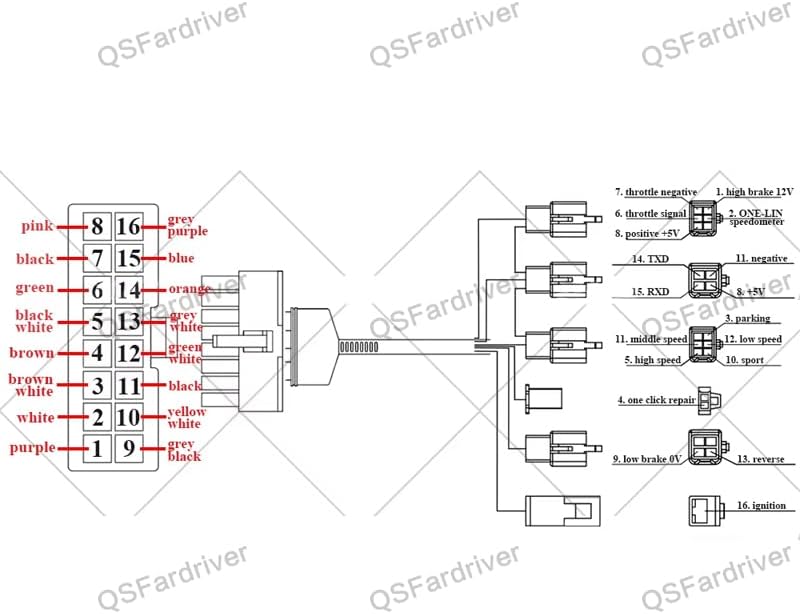
4.5. irudia: Pinout diagram illustrating the connections for the EM50-4 controller, detailing each pin's function and corresponding wire color.
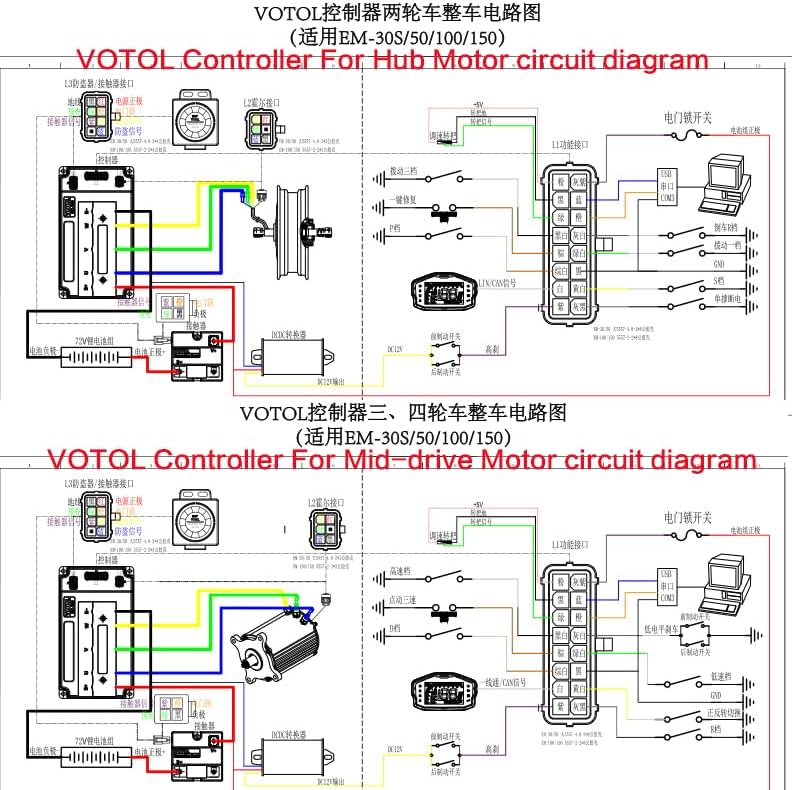
4.6. irudia: Comprehensive circuit diagram for the VOTOL EM50-4 controller, showing wiring configurations for both hub motors and mid-drive motors, including connections for various peripherals.
Kableatu puntu nagusiak:
- Potentzia-konexioa: Connect the main battery positive (B+) and negative (B-) terminals to the corresponding controller inputs.
- Motor Phase Wires: Connect the three phase wires from the motor to the controller's phase outputs.
- Hall Sensor Wires: Connect the motor's Hall sensor wires to the controller's Hall sensor input.
- throttle: Connect the throttle (0-5V) signal wire, positive, and negative wires.
- Balaztak: Connect low brake (0V) and high brake (12V) wires as per your system.
- Piztea: Connect the ignition wire to the vehicle's ignition switch.
- Learning Wires: Two learning wires are provided to assist in motor phase angle detection. Connect them temporarily during initial setup to allow the controller to learn the motor's phase angle, then disconnect.
- Beste funtzio batzuk: Connect wires for reverse, one-LIN/Hall speed sensor, program port, three-speed switch, sport mode, parking, anti-theft, and regen charge as required by your setup.
5. Funtzionamendua
5.1 Default Functions
The EM50-4 controller comes with the following default functions enabled:
- Hall Plug
- Alderantziz
- Low Brake (0V)
- Throttle (0-5V)
- High Brake (12V)
- Piztea
- One-LIN/Hall Speed Sensor
- Programaren ataka
- Hiru Abiadura
- Kirol Eredua
- Aparkalekua
- Lapurretaren Aurkakoa
- Regen Charge
- Flux Weaken Current
5.2 PC Programming
The EM50-4 controller is fully programmable via a PC using the provided USB cable. This allows for fine-tuning of various parameters to match your motor and riding preferences. The programming interface typically includes settings for:
- Bateria boltage limits (overvoltage, azpiantage)
- Current limits (busbar current, phase current)
- Throttle voltage ezarpenak
- Start torque and rate of rise
- Brake settings
- Abiadura moduak
- Flux weakening parameters
Connect the controller to your PC using the USB cable. Open the programming software (not included, typically provided by the manufacturer or seller) and follow the on-screen instructions to adjust parameters. Always save your current configuration before making significant changes.
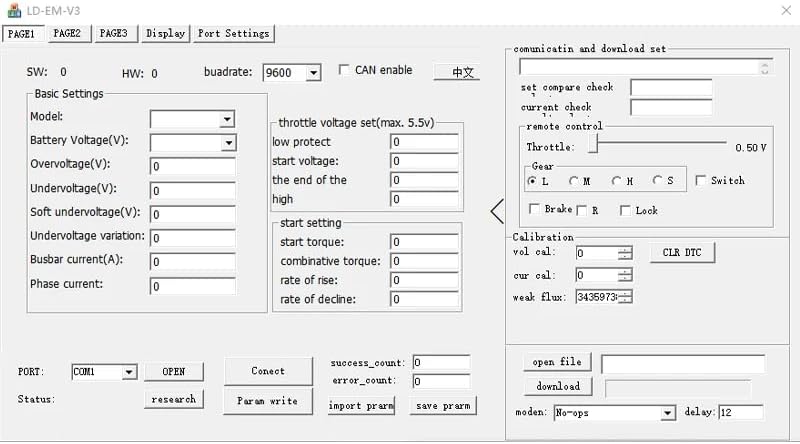
5.1. irudia: Screenshot of the PC programming interface for the VOTOL EM50-4 controller, showing various adjustable parameters and settings.
6. Mantentzea
The VOTOL EM50-4 controller is designed for durability and requires minimal maintenance. However, adhering to the following guidelines can extend its lifespan:
- Ohiko ikuskapena: Aldian-aldian egiaztatu kableatu guztien konexioak estutasuna eta higadura edo korrosio zantzurik dagoen egiaztatzeko.
- Garbitasuna: Keep the controller free from dust, dirt, and moisture. Use a dry, soft cloth for cleaning. Avoid using harsh chemicals or solvents.
- Aireztapena: Ensure the controller's mounting location allows for adequate airflow around the heat sink to prevent overheating.
- Saihestu gainkargatzea: Operate the controller within its specified voltage eta egungo mugak kalteak saihesteko.
7. Arazoak
If you encounter issues with your EM50-4 controller, consider the following common troubleshooting steps:
- Potentziarik gabe: Check battery connections, ignition switch, and main power fuses. Ensure the battery voltage is within the controller's operating range (48V-72V).
- Motorrak ez du erantzuten: Verify throttle connections and functionality. Check motor phase wire connections and Hall sensor connections. Ensure the motor's Hall sensors are functioning correctly.
- Eragiketa irregularra: Inspect all wiring for loose connections or shorts. Ensure no water or moisture has entered the controller. If recently programmed, revert to a known working configuration or default settings.
- Gehiegizko berotzea: Check for obstructions around the controller's heat sink. Reduce continuous high-power operation if possible. Ensure the motor is not drawing excessive current.
- Programazio arazoak: Ensure the correct USB cable is used and drivers are installed on your PC. Verify the programming software is compatible with your controller model.
For persistent issues, consult a qualified technician or contact the product support for assistance.
8. Bermea eta Laguntza
Specific warranty terms and conditions are typically provided by the seller or manufacturer at the time of purchase. Please refer to your purchase documentation for details regarding warranty coverage and duration.
For technical support, troubleshooting assistance beyond this manual, or inquiries about replacement parts, please contact the retailer or manufacturer directly. Have your product model number (EM50-4) and purchase information ready when seeking support.