1. Sarrera
This user manual provides essential information for the safe and efficient operation of your iFFALCON 65U85 4K Mini LED Google TV. Please read this manual thoroughly before using the product and retain it for future reference.
2. Segurtasun informazioa
Jarraitu beti oinarrizko segurtasun neurriak telebista hau erabiltzean sute, deskarga elektriko eta lesio arriskua murrizteko.
- Ez jarri telebista euri edo hezetasunera.
- Ez ireki telebistaren c.asing; bidali mantentze-lan guztiak langile kualifikatuen esku.
- Ensure proper ventilation and do not block ventilation openings.
- Use only the power cord and accessories specified by the manufacturer.
- Mantendu telebista bero-iturrietatik eta eguzki-argitik zuzenean urrun.
3. Paketearen edukia
Egiaztatu elementu guztiak paketean daudela:
- iFFALCON 65U85 4K Mini LED Google TV
- Urruneko Kontrola
- Elikatze-kablea
- Erabiltzailearen eskuliburua (dokumentu hau)
- Berme Txartela
- Wall Bracket (if included)
4. Konfigurazioa
4.1 Desontziratzea eta kokatzea
Carefully remove the TV from its packaging. Place the TV on a stable, flat surface or mount it on a wall using a VESA-compatible bracket. Ensure adequate space around the TV for ventilation.
4.2 Energia eta gailuak konektatzea
- Konektatu elikatze-kablea telebistara eta gero entxufe batera.
- Connect external devices (e.g., gaming consoles, Blu-ray players) to the HDMI 2.1 ports.
- For internet access, connect an Ethernet cable to the LAN port or prepare for Wi-Fi setup.
4.3 Initial Setup and Remote Pairing
Upon first power-on, the TV will guide you through the initial setup process. This includes language selection, network connection, and Google account login.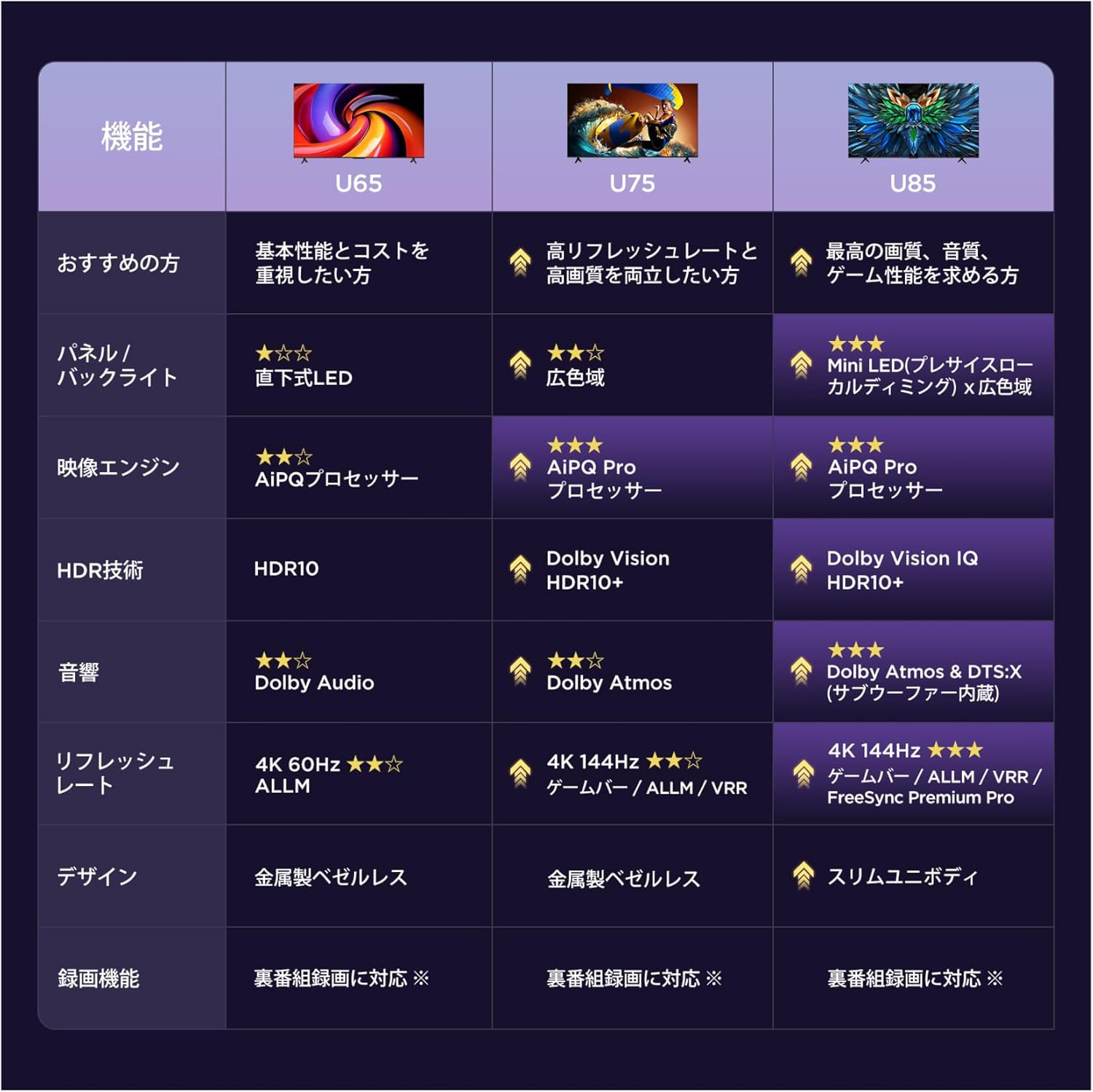
To pair the Bluetooth remote control:
- Zuzen ezazu urrutiko agintea telebistara.
- Eduki sakatuta Ezarpenak botoia eta Hasiera botoia aldi berean 4 segundoz.
- The TV will display a pairing confirmation message once successful.
4.4 Sareko konexioa
Connect your TV to the internet via Wi-Fi or Ethernet to access Google TV features and streaming services.
- Wi-Fi: Select your network from the list and enter the password.
- Ethernet: Konektatu Ethernet kable bat zure bideratzailetik telebistaren LAN atakara.
5. Zure telebista funtzionatzea
5.1 Google TV interfazea
Your iFFALCON 65U85 features Google TV, providing a personalized experience with access to a vast library of content and apps.
5.2 Ahots-kontrola Google Assistant-ekin
Use the built-in Google Assistant for hands-free control. Press the Google Assistant button on your remote and speak your commands.
- Bilatu filmak eta ikuskizunak.
- Etxe adimenduneko gailuak kontrolatu.
- Lortu galderen erantzunak.

5.3 Casting Content (AirPlay2 & Chromecast)
Easily share content from your smartphone or tablet to the TV screen.
- AirPlay2: For Apple devices, use AirPlay2 to stream videos, photos, and music.
- Chromecast: For Android devices and Chrome browser, use Chromecast built-in to cast content.

6. Ezaugarri nagusiak
6.1 Display Technology: Mini LED & 4K HDR
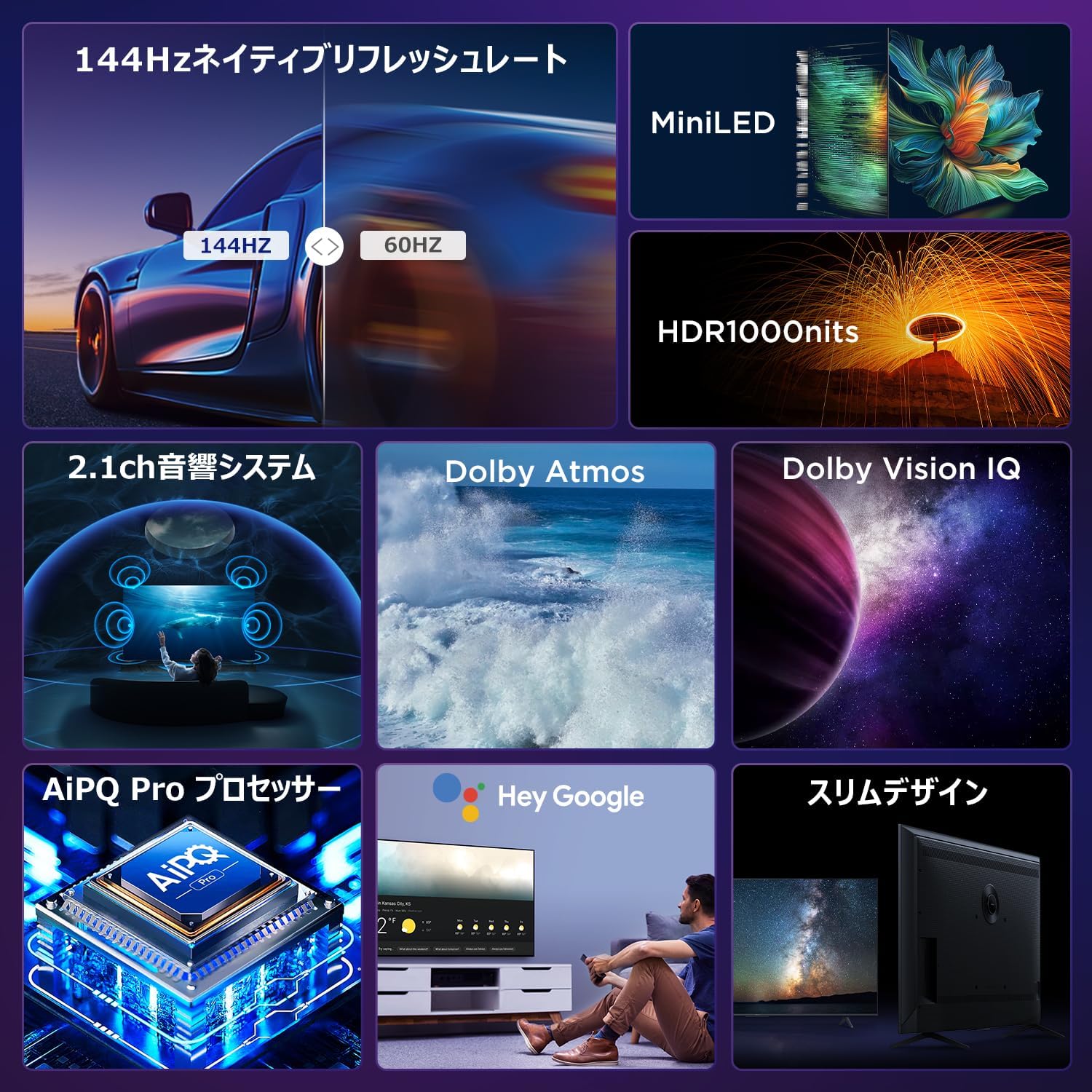
Experience stunning visuals with Mini LED backlight technology, delivering 1000 nits peak brightness and enhanced contrast. Combined with 4K resolution, Dolby Vision IQ, and HDR10+, you get precise brightness, vibrant colors, and deep blacks.


6.2 Immersive Audio: Dolby Atmos & DTS Virtual:X
Enjoy a captivating audio experience with Dolby Atmos and DTS Virtual:X, delivering multi-dimensional sound that fills your room. The 2.1ch speaker system provides powerful bass and clear audio.


6.3 Gaming Features: 144Hz VRR & Game Master
Designed for gamers, the 65U85 offers a native 144Hz refresh rate, Variable Refresh Rate (VRR), Auto Low Latency Mode (ALLM), and FreeSync Premium Pro for smooth, tear-free gameplay.

6.4 AiPQ Pro Processor
The AiPQ Pro processor intelligently optimizes color, contrast, and motion for every scene, delivering a visually stunning and immersive viewesperientzia.

6.5 Slim Metal Bezel-less Design
The TV features a sleek, metal bezel-less design that blends seamlessly into any living space, offering a premium aesthetic.

7. Zehaztapenak
| Ezaugarri | Deskribapena |
|---|---|
| Pantailaren tamaina | 65 hazbetekoa |
| Bistaratzeko mota | VA Panel, Mini LED |
| Ebazpena | 4K (3840 x 2160) |
| Freskatze tasa | 144 Hz (Natiboa) |
| HDR euskarria | Dolby Vision IQ, HDR10+ |
| Audioa | 2.1ch Speaker System, Dolby Atmos, DTS Virtual:X |
| Smart TV Plataforma | Google TV |
| Ahots Laguntzailea | Google Laguntzailea |
| Konektibitatea | 3x HDMI 2.1, 2x USB, Wi-Fi, Bluetooth |
| Neurriak (W x D x H) | 144.8 x 32.4 x 89.5 cm (euskarriarekin) |
| Pisua | 19 kg |
| VESA bateragarritasuna | Bai |

8. Arazoak
Telebistarekin arazoak badituzu, jo ezazu ohiko irtenbide hauetara:
- Potentziarik gabe: Ziurtatu kablea ondo konektatuta dagoela eta entxufea funtzionatzen duela.
- Irudi/soinurik ez: Check all cable connections (HDMI, audio). Verify the correct input source is selected.
- Urrunekoa ez dabil: Replace batteries. Re-pair the remote control as described in Section 4.3.
- Ez dago Interneteko konexiorik: Check your router and modem. Reconnect to the Wi-Fi network or ensure the Ethernet cable is properly connected.
- Irudiaren kalitate arazoak: Adjust picture settings (brightness, contrast, color). Ensure content source is high quality.
Arazo iraunkorretarako, jarri harremanetan bezeroarentzako arreta-zerbitzuarekin.
9. Mantentzea
Proper maintenance ensures the longevity of your iFFALCON TV:
- Pantaila garbitzea: Gently wipe the screen with a soft, dry, lint-free cloth. Do not use harsh chemicals or abrasive cleaners.
- C garbiketaasing: Erabili biguna, damp cloth to wipe the TV casing.
- Aireztapena: Mantendu aireztapen-irekidurak hautsik eta oztoporik gabe.
- Itzali: Deskonektatu telebista korronte-entxufetik tximista-ekaitzetan edo denbora luzez zaindu gabe uzten denean.
10. Bermea eta Laguntza
Your iFFALCON 65U85 TV comes with a manufacturer's warranty. Please refer to the included warranty card for details on coverage, terms, and conditions.
For technical support, service inquiries, or further assistance, please visit the official iFFALCON website or contact their customer service hotline. Contact information can be found on the warranty card or the official product page.
11. Produktuen bideoak
11.1 Mini LED Quantum Dot 144Hz 65-inch TV
This video showcases the Mini LED and Quantum Dot display technology of the 65-inch iFFALCON TV, highlighting its 144Hz refresh rate for smooth visuals.