
1. Sarrera
The DOOGEE Blade GT Play is a robust 5G rugged smartphone designed for durability and performance. It features a slim profile, a vibrant 120Hz display, a powerful processor, and a long-lasting battery, making it suitable for various environments and demanding tasks. This manual provides essential information for setting up, operating, and maintaining your device.
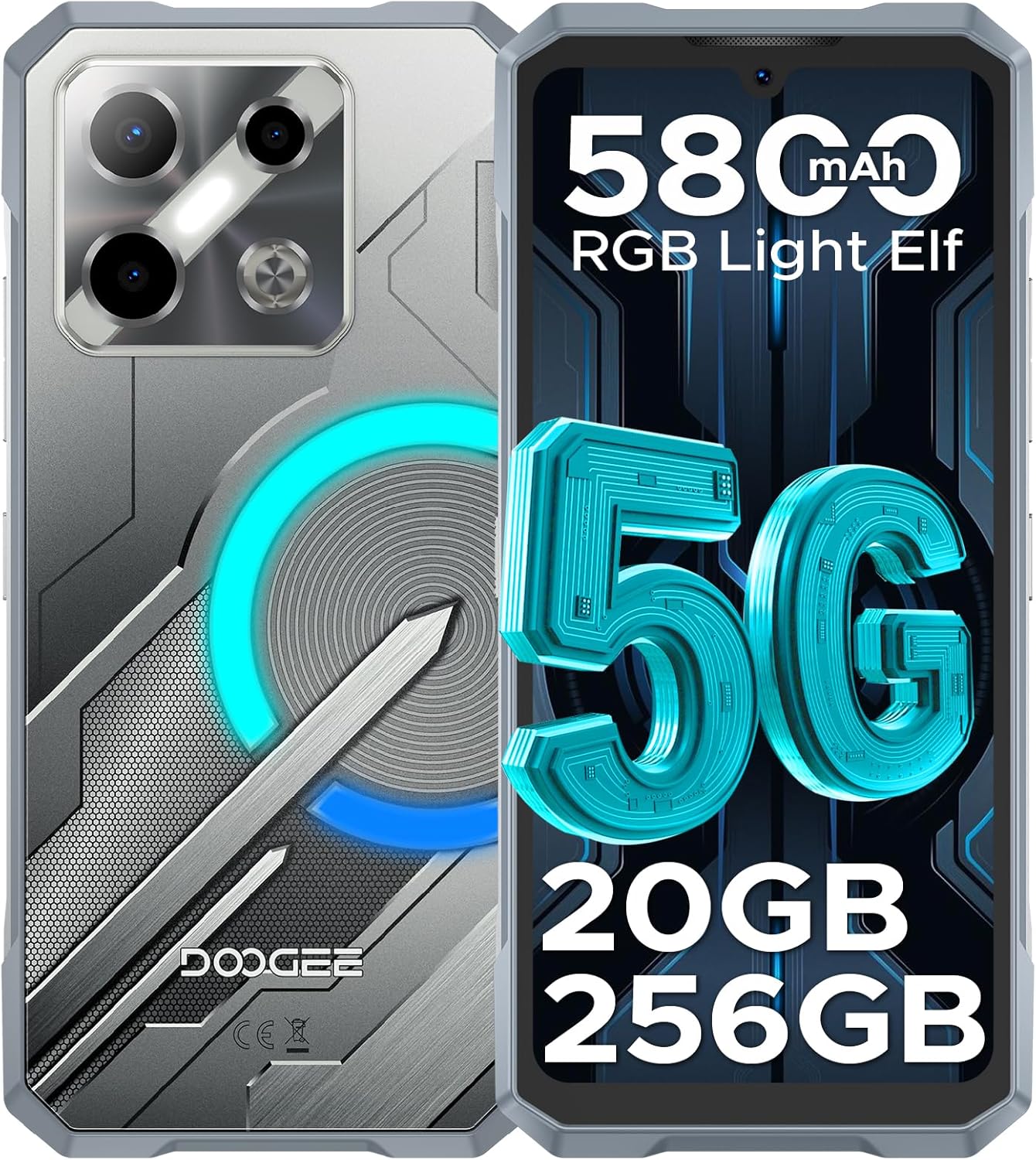
Irudia: Aurrealdea eta atzealdea view of the DOOGEE Blade GT Play 5G Rugged Smartphone, highlighting its design and key features like 5G connectivity, 5800mAh battery, 20GB RAM, and 256GB storage.
2. Paketearen edukia
Egiaztatu elementu guztiak zure produktuaren paketean daudela:
- 1 x DOOGEE Blade GT Play Rugged Smartphone
- 1 x C motako USB kablea
- 1 x 18W-ko kargagailua
- 1 x Erabiltzailearen eskuliburua
- 1 x Berme Txartela
- 1 x Anti-Explosion Film (Screen Protector)
- 1 x Telefonozko kaxa
- 1 x Enbalatzeko Kutxa

Image: All components included in the DOOGEE Blade GT Play retail package, neatly arranged.
3. Gailuaren diseinua
The DOOGEE Blade GT Play features a thoughtful design for both aesthetics and functionality. Key physical components include:
- Aurrealdea: 6.72-inch FHD+ IPS display, 16MP front camera, earpiece.
- Atzekoa: 50MP main camera, 2MP macro camera, LED flash, RGB LED light effect panel.
- Aldeak: Power button (integrated with fingerprint sensor), volume up/down buttons, USB Type-C port, dual SIM/TF card slot.

Image: The DOOGEE Blade GT Play showcasing its ultra-slim 10.5mm thickness and ergonomic design, emphasizing its comfortable grip and light weight of 260g.
4. Hasierako konfigurazioa
4.1. SIM/TF txartela instalatzea
- Bilatu SIM/TF txartelaren zirrikitua gailuaren alboan.
- Erabili SIM txartelaren kanporatzeko tresna erretilua irekitzeko.
- Carefully place your Nano-SIM card(s) and/or TF card into the designated slots on the tray. Ensure correct orientation.
- Sartu erretilua astiro-astiro gailuan berriro, berdindu arte.
4.2. Piztu/Itzaltzea
- Pizteko: Sakatu eta eutsi pizteko botoiari (alboan dago) DOOGEE logotipoa agertu arte.
- Itzaltzeko: Sakatu eta eutsi pizteko botoiari, eta ondoren hautatu 'Itzali' pantailan agertzen diren aukeren artean.
- Berrabiarazteko: Sakatu eta eutsi pizteko botoiari, eta ondoren hautatu 'Berrabiarazi' aukeren artean.
4.3. Hasierako Konfigurazioa
Lehen aldiz piztean, jarraitu pantailan agertzen diren argibideei gailua konfiguratzeko. Horrek barne hartzen ditu hizkuntza hautatzea, Wi-Fi sarera konektatzea, Google kontua konfiguratzea eta segurtasun funtzioak konfiguratzea, hala nola hatz-marka eta aurpegi bidezko desblokeoa.
5. Funtzionamendu-argibideak
5.1. Android 14 sistema eragilea
Your DOOGEE Blade GT Play runs on Android 14, offering a secure, smooth, and responsive user experience. It includes features such as App Cloning, Anti-Peeping mode, Anti-theft Alarm, and Fingerprint App Lock for enhanced privacy and security.

Image: Multiple screens of the Android 14 interface on the DOOGEE Blade GT Play, demonstrating various applications and system features.
5.2. RGB LED Light Effect
The device features an RGB LED light effect panel on the rear, offering 8 lighting modes and 3 flashing styles. These can be customized via the 'Cyber Aura' app to sync with music, notifications, calls, messages, gaming, and charging status. You can also adjust brightness and lighting speed.
- Pertsonalizazioa: Access the 'Cyber Aura' app to select lighting modes (e.g., Call, Message, Music, Gaming, Charging), color combinations, and notification styles (Flicking, Breathing, Flowing).
- Distira eta abiadura: Adjust the intensity and speed of the light effects within the app settings.

Image: Illustration of the DOOGEE Blade GT Play's smart RGB lighting effects, showing various customization options for calls, messages, games, music, charging, and brightness.
5.3. Kameraren funtzionamendua
The DOOGEE Blade GT Play is equipped with a 50MP AI main camera, a 2MP macro lens, and a 16MP front camera. The camera app provides various modes and AI features to enhance your photography.
- Kamera nagusia (50MP): For high-resolution photos in various conditions.
- Macro Camera (2MP): Objektu txikien plano hurbil eta zehatzak egiteko.
- Aurreko kamera (16MP): For selfies and video calls, with AI beauty features.
- Kamera moduak: Explore modes like Night Mode, Beauty Mode, Time-lapse, and Portrait Mode for different photographic effects.
- AI Ezaugarriak: Utilize AI Recognition for automatic scene detection and Google Intelligent Camera features like View Search, E-commerce Search, Plant & Animal Identification, Text Extraction & Translation, and Homework Analysis.

Image: Diagram illustrating the camera setup of the DOOGEE Blade GT Play, highlighting the 50MP main camera, 2MP macro camera, and 16MP selfie camera.

Irudia: Adibamples of different camera modes available on the DOOGEE Blade GT Play, including Night Mode, Beauty Mode, Time-lapse, and Portrait Mode.
5.4. Segurtasun Ezaugarriak
The device offers multiple security options for quick and secure access:
- Side Fingerprint ID: Register your fingerprint for fast unlocking and app access.
- Aurpegia desblokeatzea: Erabili aurpegi-ezagutza eroso desblokeatzeko.
- NFC: Supports Google Pay and mobile ID for contactless transactions.

Image: Visual representation of the DOOGEE Blade GT Play's convenient NFC for payments, face and side fingerprint unlock, and the dual-card slot.
6. Iraunkortasuna eta Arreta
The DOOGEE Blade GT Play is built to withstand challenging conditions, featuring:
- IP68/IP69K Certification: Provides resistance against dust, dirt, and water immersion.
- MIL-STD-810H Standard: Military-grade durability for shock and drop protection.
- Eraikuntza indartua: Four-corner tire-style design and reinforced rubber for superior impact protection.
6.1. Zaintza orokorra
- Keep all ports and covers securely closed to maintain water and dust resistance.
- Garbitu gailua leun batekin, damp oihal. Saihestu produktu kimiko gogorrak.
- Saihestu gailua denbora luzez tenperatura altuetan jartzea.

Image: Demonstrations of the DOOGEE Blade GT Play's IP68 & IP69K waterproof, drop-proof, and dust-proof capabilities in various outdoor settings.
7. Zehaztapen Teknikoak
| Ezaugarri | Zehaztapena |
|---|---|
| Ereduaren izena | BLADEGTPLAY |
| Sistema eragilea | Android 14 |
| Prozesadorea | MediaTek Dimensity 7025 Octa-Core (2.5GHz, 6nm) |
| RAM | 20GB (8GB Basic + 12GB Extended) |
| Barne Biltegiratzea | 256 GB (TF txartelaren bidez 2 TB arte zabaldu daiteke) |
| Bistaratzea | 6.72-inch FHD+ IPS Waterdrop Display, 1080x2400 resolution, 120Hz Refresh Rate, 380cd/m² brightness |
| Kamera Nagusia | 50MP-ko AI kamera nagusia |
| Makro kamera | 2MP |
| Aurrealdeko kamera | 16MP |
| Bateria | 5800mAh Si-C Battery, 18W Fast Charging |
| Konektibitatea | 5G, Dual SIM, Wi-Fi (2.4/5GHz), Bluetooth 5.2, NFC, GPS (GLONASS, Galileo, Beidou) |
| Iraunkortasuna | IP68/IP69K Iragazgaitza eta hautsaren aurkakoa, MIL-STD-810H ziurtagiria |
| Neurriak | 7 x 3 x 0.4 hazbete (10.5 mm-ko lodiera) |
| Pisua | 1.1 libra (260 g) |
| Audio Jack | C MOTA |

Image: A visual representation of the Dimensity 7025 5G Octa-Core Processor, highlighting its 5G capability, 6nm process technology, and 2.5GHz frequency.

Image: Illustration of the DOOGEE Blade GT Play's memory configuration, showing 20GB RAM (8GB basic + 12GB extended) and 256GB ROM (expandable up to 2TB).

Image: The DOOGEE Blade GT Play's 6.72-inch 120Hz ultra-clear display, emphasizing smooth visuals and its FHD+ resolution.

Irudia: Xehetasun handikoa view of the DOOGEE Blade GT Play's enhanced Si-C 5800mAh battery, highlighting its durability with 1000 charging cycle times and 3 years of battery durability.
8. Arazoak
If you encounter issues with your DOOGEE Blade GT Play, consider the following common solutions:
- Gailua ez da pizten: Ziurtatu bateria kargatuta dagoela. Konektatu gailua kargagailura eta itxaron minutu batzuk berriro pizten saiatu aurretik.
- Aplikazioak kraskatzen/izozten: Close background applications. Clear the cache of the problematic app (Settings > Apps > [App Name] > Storage > Clear Cache). Restart the device.
- Sare konexio eskasa: Check if your SIM card is properly inserted. Ensure mobile data is enabled. Try toggling Airplane Mode on and off.
- Fingerprint/Face Unlock Not Working: Ensure your fingers/face are clean and dry. Re-register your fingerprint or face data in Settings > Security.
- Bateria azkar husten: Reduce screen brightness, disable unnecessary features like GPS or Bluetooth when not in use, and close background apps. Check battery usage in Settings to identify power-hungry apps.
- Gailuak ez du erantzuten: Berrabiarazi behartu bat pizteko botoia 10-15 segundoz sakatuta edukiz, gailua berrabiarazi arte.
- Fabrika berrezartzea (azken aukera): Arazoak jarraitzen badute, baliteke fabrikako ezarpenetara berrezarri behar izatea. Abisua: Honek zure gailuko datu guztiak ezabatuko ditu. Jarraitu aurretik, egin datu garrantzitsuen babeskopia. Joan Ezarpenak > Sistema > Berrezarri aukerak > Ezabatu datu guztiak (fabrika berrezartzea).
9. Bermea eta Laguntza
Your DOOGEE Blade GT Play comes with a standard manufacturer's warranty. Please refer to the included Warranty Card for specific terms, conditions, and duration of coverage. For technical support, service, or warranty claims, please contact DOOGEE customer service through their official webgunea edo bermearen dokumentazioan emandako harremanetarako informazioa.
Gorde erosketaren egiaztagiria bermea balioztatzeko.