
Brother DCP-T730DW
Brother DCP-T730DW Multifunction Printer User Manual
Model: DCP-T730DW
1. Sarrera
This manual provides essential information for the safe and efficient use of your Brother DCP-T730DW Ink Tank Multifunction Printer. This device is designed for printing, scanning, and copying, featuring Wi-Fi connectivity, automatic duplex printing, and an Automatic Document Feeder (ADF).

1. irudia: Brother DCP-T730DW Ink Tank Printer with included ink bottles. This image shows the Brother DCP-T730DW printer from the front, alongside the various color ink bottles (black, cyan, magenta, yellow) that come with the device. The printer features a compact design with a front-loading paper tray.
2. Segurtasun informazioa
Please read these safety instructions carefully before using the machine to prevent injury and damage to the machine or other property. Keep this manual in an easily accessible place for quick reference.
- Always place the printer on a flat, stable surface.
- Ez blokeatu aireztapen-zulorik.
- Erabili inprimagailuarekin batera datorren elikatze-kablea soilik.
- Mantendu inprimagailua uretatik eta hezetasunetik urrun.
- Ez saiatu inprimagailua zeuk konpontzen. Konponketa guztiak zerbitzu-langile kualifikatuei eskatu.
3. Paketearen edukia
Egiaztatu elementu guztiak kutxan daudela:
- Brother DCP-T730DW funtzio anitzeko inprimagailua
- Set of Ink Bottles (Black, Cyan, Magenta, Yellow)
- Elikatze kablea
- USB kablea
- Instalazio CD-ROMa (kontrolatzaileak eta softwarea)
- Ezarpen azkarrerako gida
4. Konfigurazioa
4.1 Hasierako inprimagailuaren konfigurazioa
- Deskonprimitu inprimagailua eta kendu babes-zinta eta ontziratzeko material guztiak.
- Jarri inprimagailua gainazal egonkor eta mailakatu batean.
- Konektatu elikatze-kablea inprimagailura eta gero entxufe batera. Ez piztu inprimagailua oraindik.
4.2 Tinta-tangak betetzea
The DCP-T730DW features an integrated ink tank system for easy refilling.
- Open the ink tank cover located on the front right side of the printer.
- Carefully open the cap for each color ink tank (Black, Cyan, Magenta, Yellow).
- Uncap the corresponding ink bottle and gently insert the nozzle into the tank's filling port. The ink will flow automatically.
- Once the tank is full, remove the bottle and securely close the tank cap. Repeat for all colors.
- Itxi tinta deposituaren estalkia.
4.3 Software-instalazioa
For full functionality, install the printer drivers and software on your computer.
- Insert the installation CD-ROM into your computer's CD/DVD drive. If you don't have a CD drive, download the latest drivers from the official Brother support webgunea.
- Jarraitu pantailako argibideei instalazioa amaitzeko.
- During installation, you will be prompted to connect the printer via USB or set up a wireless connection.
5. Inprimagailuaren funtzionamendua
5.1 Papera kargatzea
Load paper into the front paper tray. The printer supports a 150-page paper tray capacity.
5.2 Inprimaketa
The DCP-T730DW offers high-speed printing with up to 16 ppm for monochrome and 15.5 ppm for color, and a maximum print resolution of 1200 x 6000 dpi.
- Inprimaketa estandarra: From your computer, select 'Print' from your application, choose the Brother DCP-T730DW, and adjust settings as needed.
- Mugarik gabeko inprimaketa: This feature allows printing photos and documents without white margins. Select the borderless option in your printer settings for compatible paper sizes.
- Automatic Duplex (2-sided) Printing: To save paper, enable the auto-duplex option in your printer's settings before printing.

2. irudia: Brother DCP-T730DW printer with auto duplex feature. The printer is shown performing automatic two-sided printing, highlighting its efficiency for double-sided documents.
5.3 Eskaneatzea
Dokumentuak eskaneatu ditzakezu eskaner laua edo dokumentu-elikagailu automatikoa (ADF) erabiliz.
- Ohol laua erabiliz: Place a single document face-down on the scanner glass.
- ADF erabiliz: Load multiple pages face-up into the ADF tray. The ADF supports efficient scanning of multi-page documents.
- Scan to E-Mail: This feature allows you to directly scan a document and attach it to an email. Refer to the software manual for detailed setup.

3. irudia: Brother DCP-T730DW printer with Automatic Document Feeder (ADF). An illustration of the Automatic Document Feeder (ADF) in action, showing multiple pages being fed into the printer for scanning or copying.
5.4 Kopiatzea
Place your document on the scanner glass or in the ADF. Use the control panel buttons to select copy options (e.g., number of copies, color/mono, quality) and press Start.
5.5 Wireless Connectivity (Wi-Fi)
The DCP-T730DW supports Wi-Fi connectivity for printing from various devices without a direct cable connection. It also supports Apple AirPrint for seamless printing from Apple devices.
- Wi-Fi konfigurazioa: Follow the instructions in the Quick Setup Guide or the on-screen prompts on the printer's LCD display to connect to your wireless network.
- Mugikorreko inprimaketa: Download the Brother iPrint&Scan app for printing and scanning from your smartphone or tablet.
6. Mantentzea
6.1 Tinta berriz betetzea
When an ink tank runs low, refill it using genuine Brother ink bottles. The printer's design makes refilling clean and straightforward.
- Check the ink levels regularly using the transparent ink tanks.
- Purchase the correct color replacement ink bottle (BTD60BK for Black, BT5000C/M/Y for Cyan/Magenta/Yellow).
- Follow the steps outlined in Section 4.2 for filling the ink tanks.
6.2 Inprimagailua garbitzea
Garbiketa erregularrak inprimatze-kalitatea mantentzen laguntzen du eta inprimagailuaren bizitza luzatzen du.
- Kanpoaldea: Garbitu kanpoaldea zapi leun eta lihorik gabeko batekin. Ez erabili garbitzaile urratzailerik.
- Eskanerraren beira: Clean the scanner glass with a soft, dry cloth. For stubborn marks, use a small amount of glass cleaner applied to the cloth, not directly to the glass.
- Inprimatzeko burua: If print quality deteriorates (e.g., streaks, missing colors), perform a print head cleaning from the printer's maintenance menu or through the printer driver software on your computer.
6.3 Paper-trabak kentzea
If a paper jam occurs, the printer's LCD will display an error message. Follow these general steps:
- Itzali inprimagailua eta deskonektatu korronte-kablea.
- Open the paper output tray and the scanner cover.
- Kontu handiz kendu trabatuta dagoen papera, poliki tiratuz urratzea saihesteko.
- Check all paper paths, including the rear access cover if available.
- Itxi estalki guztiak, konektatu korronte-kablea eta piztu inprimagailua.
7. Arazoak
This section addresses common issues you might encounter. For more detailed troubleshooting, refer to the full online manual or Brother's support webgunea.
| Arazoa | Balizko Kausa / Irtenbidea |
|---|---|
| Inprimagailua ez da pizten | Ensure power cord is securely connected to both printer and power outlet. Test the outlet with another device. |
| Ez dago inprimatze-irteerarik | Check paper tray, ink levels, and printer connection (USB/Wi-Fi). Ensure printer is selected as default. |
| Inprimatze-kalitate eskasa (marrak, kolore desagertzen direnak) | Perform print head cleaning and nozzle check from printer's maintenance menu. Ensure ink tanks are adequately filled. |
| Wi-Fi konexio arazoak | Restart printer and router. Re-enter Wi-Fi password. Ensure printer is within router range. |
| Papera trabatuta dagoen errorea | Refer to Section 6.3 for clearing paper jams. |
8. Zehaztapenak
Key technical specifications for the Brother DCP-T730DW printer:
- Marka: Anaia
- Ereduaren izena: DCP-T730DW
- Konektibitate Teknologia: USB, Wi-Fi
- Inprimatzeko teknologia: Inkjet
- Ezaugarri bereziak: Auto Document Feeder (ADF), Auto-Duplex (2-sided printing), Borderless Printing, Refillable Ink Tank, Scan To E-Mail
- Inprimagailuaren irteera: Kolorea
- Inprimatze-abiadura maximoa (kolorea): 15.5 ppm
- Inprimatze-abiadura maximoa (monokromoa): 16 ppm
- Gehienezko inprimatze-bereizmena: Gehienez 1200 x 6000 dpi
- Elementuaren pisua: 8.6 kilogramo
- Memoria: 128 MB
- Paper erretiluaren edukiera: 150 orrialde
- Pantaila: 1 lerroko LCD pantaila
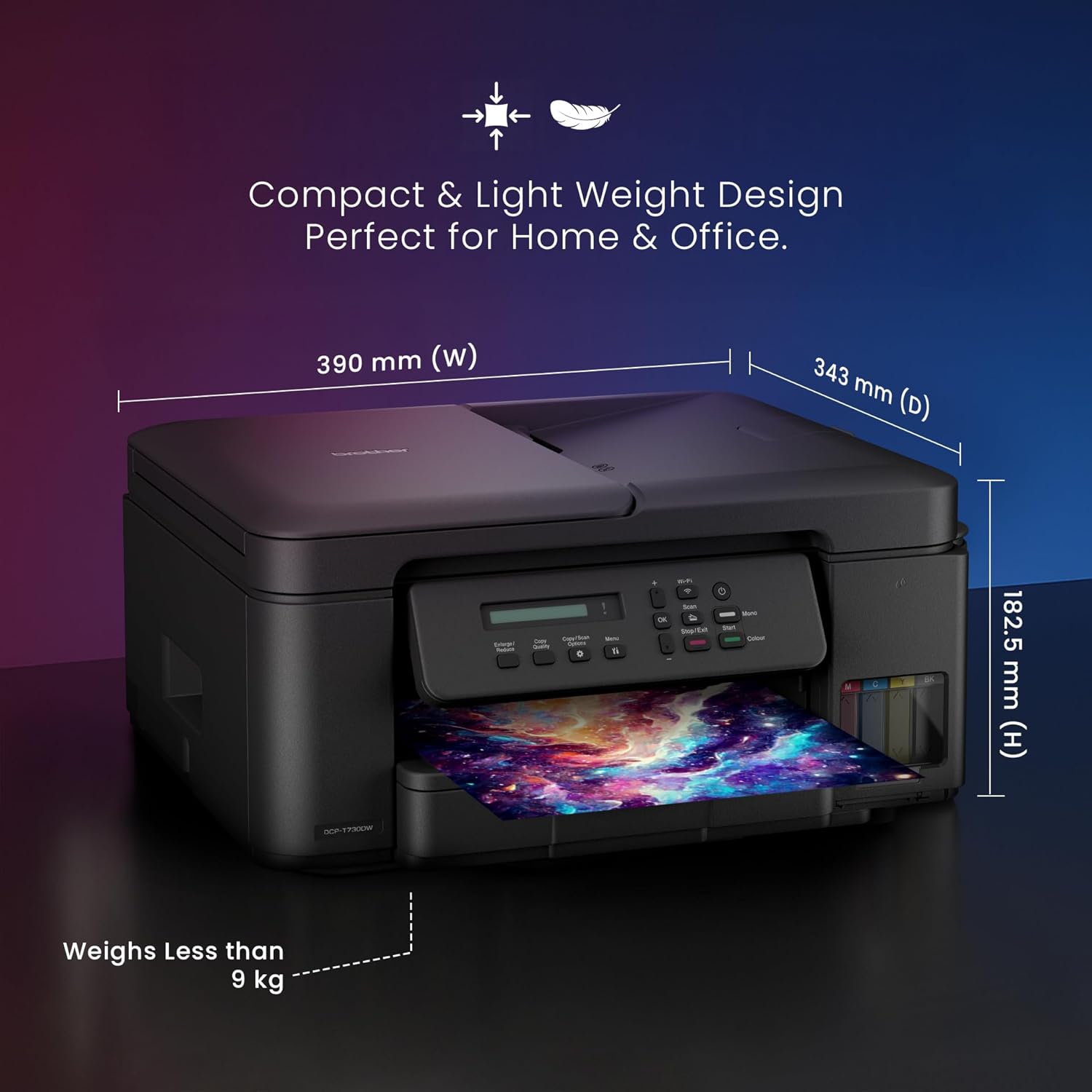
4. irudia: Brother DCP-T730DW printer dimensions. A diagram showing the compact dimensions (width, depth, height) and weight of the Brother DCP-T730DW printer, emphasizing its suitability for home and office.
9. Bermea eta Laguntza
For information regarding your product's warranty, please refer to the warranty card included in your product packaging or visit the official Brother website. Brother provides customer support for technical assistance and service inquiries.
For further assistance, visit the official Brother support page: Anaiaren denda ofiziala