
1. Produktua amaitu daview
The zelotes C-12 Professional Wired Gaming Mouse is designed for high-performance gaming and office use. It features an ergonomic design, 12 programmable buttons, adjustable DPI settings, multi-modes RGB backlighting, and a customizable weight system.

Image 1.1: The zelotes C-12 Professional Wired Gaming Mouse, showcasing its ergonomic shape and customizable RGB lighting.
Paketearen edukia:
- 1 x zelotes C-12 Gaming Mouse
- 1 x Argibide eskuliburua
- 1 x Software CDa
- 1 x Foot Pad Set
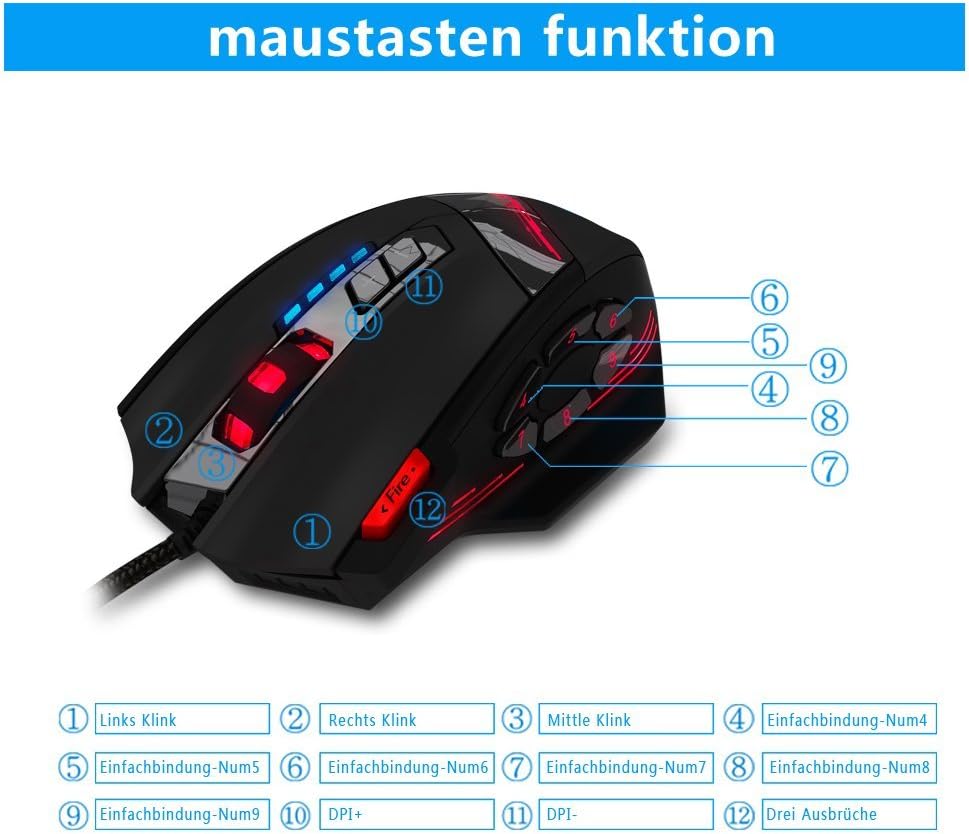
Image 1.2: The complete package contents of the zelotes C-12 Gaming Mouse.
2. Konfigurazioa
2.1 Sagua konektatzea
Connect the USB cable of the zelotes C-12 Gaming Mouse to an available USB port on your computer. The mouse is plug-and-play for basic functionality.
2.2 Softwarearen instalazioa (aukerakoa)
For full customization of buttons, DPI, and lighting, install the provided software from the included CD. Insert the CD into your computer's optical drive and follow the on-screen instructions. If your computer does not have an optical drive, please visit the official zelotes website to download the latest software driver.
Note: The programming software is not fully compatible with Mac operating systems.
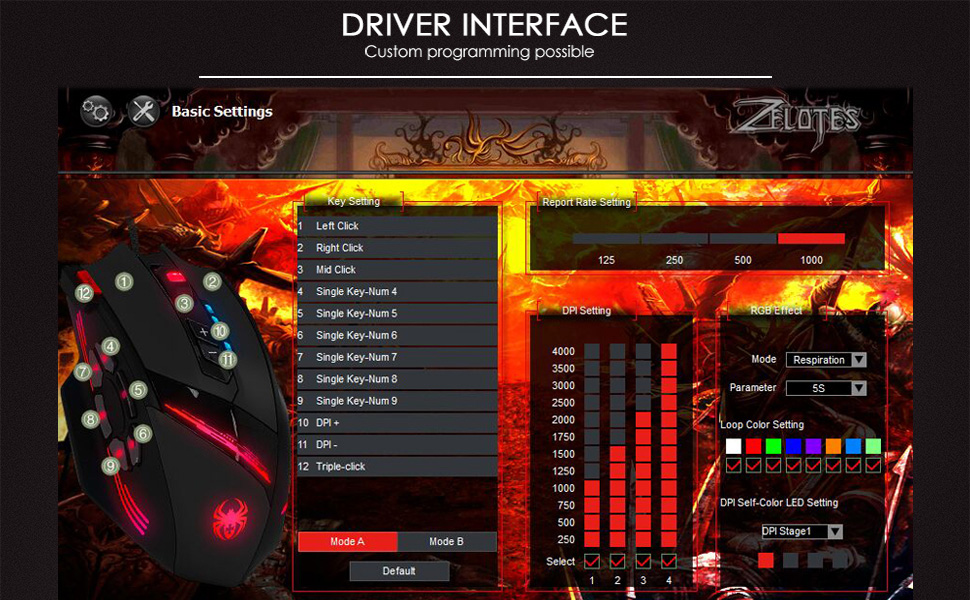
Image 2.1: The software interface for customizing the zelotes C-12 Gaming Mouse.
2.3 Weight Tuning
The mouse includes 8 removable weight blocks, each weighing 2.5 grams, located in a compartment on the underside of the mouse. To adjust the mouse's weight:
- Gently twist and remove the circular cover on the bottom of the mouse.
- Add or remove the 2.5g weight blocks as desired to achieve your preferred mouse feel.
- Replace the circular cover by twisting it back into place.
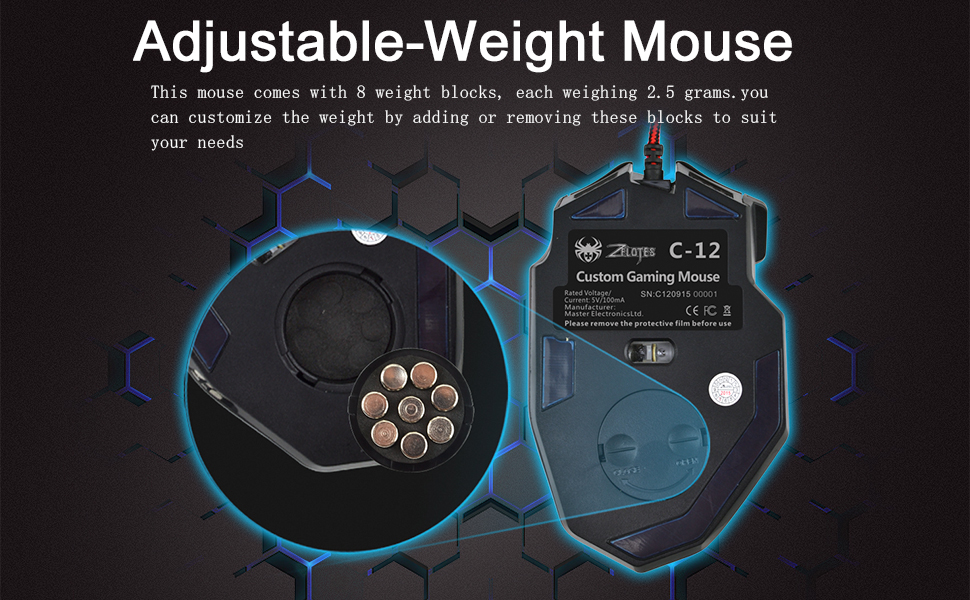
Image 2.2: Adjusting the weight of the zelotes C-12 mouse by adding or removing the 2.5g blocks.
Video 2.1: A demonstration of the weight tuning feature and programmable buttons on the zelotes C-12 Gaming Mouse.
3. Funtzionamendu-argibideak
3.1 Botoien funtzioak
The zelotes C-12 mouse features 12 programmable buttons. The default functions are:
- Ezkerreko klik (1. botoia)
- Egin klik eskuineko botoiarekin (2. botoia)
- Erdiko klik / Korritu gurpila (3. botoia)
- Alboko botoiak (Buttons 4-9): Default to various functions, customizable via software.
- DPI+ (Button 10): Increases DPI sensitivity.
- DPI- (Button 11): Decreases DPI sensitivity.
- Su botoia (Button 12): Default to triple-click, customizable via software.

Image 3.1: Labeled diagram of the zelotes C-12 mouse buttons.
3.2 DPI doikuntza
The mouse offers 4 default DPI levels: 1000/1500/2000/4000 DPI. You can cycle through these levels using the dedicated DPI+ and DPI- buttons. For finer control and to reach up to 8000 DPI, use the included software.
3.3 RGB argiztapena
The mouse features multi-modes RGB backlighting, including 7-color cycle breathing and monochromatic constant bright modes. Lighting effects can be customized through the software to match your preferences.
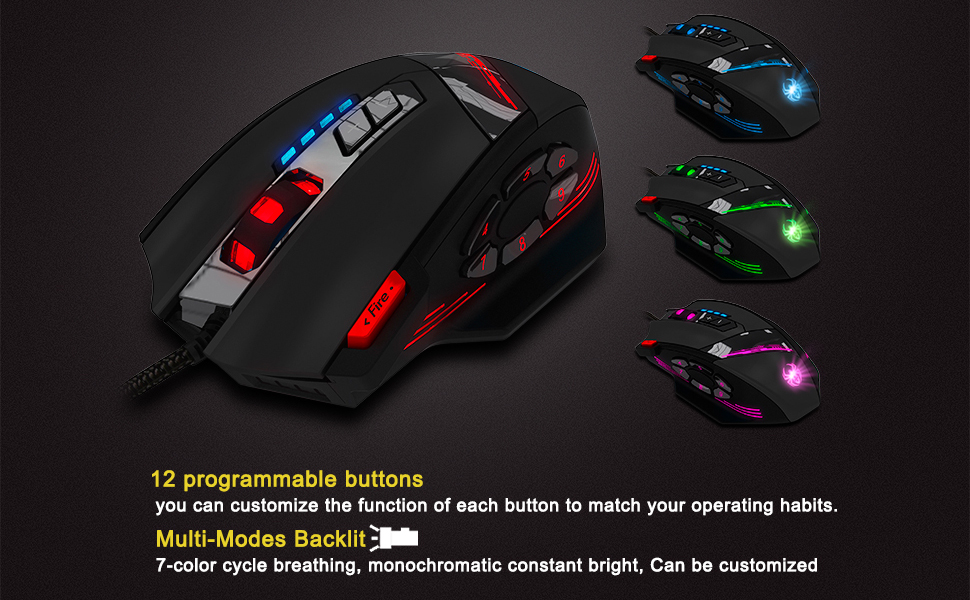
Image 3.2: The zelotes C-12 mouse showcasing its multi-color RGB lighting options.
3.4 Diseinu ergonomikoa
The mouse is designed for comfort during extended use, featuring a sweat-resistant and anti-slip rubber surface. Its ergonomic shape helps prevent wrist fatigue.

Image 3.3: The ergonomic design of the zelotes C-12 mouse provides a comfortable grip.
4. Mantentzea
To ensure the longevity and optimal performance of your zelotes C-12 Gaming Mouse, follow these maintenance guidelines:
- Garbiketa: Erabili zapi leun eta lehor bat saguaren gainazala garbitzeko. Zikinkeria egoskorra bada, garbitu pixka bat.ampGarbitu zapi bat urarekin edo garbiketa-soluzio leun batekin. Saihestu produktu kimiko gogorrak edo material urratzaileak.
- Sentsoreen zainketa: Mantendu saguaren azpialdean dagoen sentsore optikoa garbi eta hautsik edo hondakinik gabe. Erabili kotoi-zapi bat edo aire konprimitua beharrezkoa bada.
- Kableen kudeaketa: Kalteak ekiditeko, saihestu USB kablea estutzea edo gehiegi tiratzea.
- Biltegiratzea: Erabiltzen ez duzunean, gorde sagua leku garbi eta lehor batean, muturreko tenperaturetatik urrun.
5. Arazoak
5.1 Saguak ez du erantzuten
- Ziurtatu USB kablea zure ordenagailura ongi konektatuta dagoela.
- Saiatu sagua beste USB ataka batera konektatzen.
- Test the mouse on another computer to rule out a computer-specific issue.
- Berrabiarazi ordenagailua.
5.2 DPI or Button Settings Not Changing
- Ensure the zelotes C-12 software is correctly installed and running.
- Check if the settings are saved within the software after making changes.
- For Mac users, note that the programming software has limited compatibility. Basic DPI changes via mouse buttons should still function.
5.3 RGB Lighting Not Working or Incorrect
- Verify lighting settings within the zelotes C-12 software.
- Ensure the mouse is properly connected and receiving power.
5.4 Mouse Movement Is Erratic
- Garbitu saguaren beheko aldean dagoen sentsore optikoa.
- Ziurtatu sagua gainazal egoki batean erabiltzen ari zarela (adibidez, sagu-alfonbra batean). Saihestu gainazal oso islatzaileak edo gardenak.
6. Zehaztapenak
| Ezaugarri | Deskribapena |
|---|---|
| Marka | zelotes |
| Ereduaren izena | C-12 |
| Konektibitate Teknologia | USB kableduna |
| Mugimenduak detektatzeko teknologia | Optical (A3050 Gaming Chip) |
| DPI ezarpenak | 1000/1500/2000/4000 (Adjustable up to 8000 DPI via software) |
| Botoi kopurua | 12 botoi programagarri |
| Pisuaren sintonizazioa | 8 x 2.5g removable weights |
| Eskuen Orientazioa | Eskuinekoa |
| Sistema eragileen bateragarritasuna | Win11, Win10, Win8, Win7, Mac OS (limited software compatibility for Mac) |
| Neurriak (L x W x H) | 130 mm x 81.5 mm x 39.8 mm |
| Bozketa-tasa | 125-1000Hz |
| Kablearen luzera | 1.8 m |
| Materiala | Plastikoa (Akabera matea) |

Image 6.1: Detailed technical specifications and dimensions of the zelotes C-12 Gaming Mouse.
7. Bermearen informazioa
The zelotes C-12 Professional Wired Gaming Mouse comes with a 1 urteko fabrikatzailearen bermea erosketa-datatik aurrera. Berme honek materialen eta fabrikazioaren akatsak estaltzen ditu erabilera normalaren pean. Ez ditu estaltzen erabilera okerrak, istripuek, baimenik gabeko aldaketek edo kanpoko kausek eragindako kalteak.
Mesedez, gorde zure erosketa-froga berme-erreklamazioetarako.
8. Laguntza
For further assistance, technical support, or warranty inquiries, please refer to the contact information provided with your product packaging or visit the official zelotes webgunea.