
KLIM K7
KLIM K7 Portable Cassette Player and MP3 Converter User Manual
Eredua: K7
1. Sarrera
The KLIM K7 is a versatile portable cassette player designed for both playback of audio cassettes and conversion of cassette audio to digital MP3 format. It features a built-in microphone for recording, an integrated speaker, and a rechargeable battery for on-the-go use. This manual provides detailed instructions for setting up, operating, and maintaining your KLIM K7 device.

Irudia: Gainetikview of KLIM K7 features including cassette to MP3 conversion, tape playback, built-in microphone, earphone jack, speaker, and compact size.
2. Paketearen edukia
Mesedez, egiaztatu behean zerrendatutako elementu guztiak zure paketean sartuta daudela:
- KLIM K7 Portable Cassette Player and Converter
- KLIM Fusion entzungailuak
- 32GB Mikro SD txartela
- Micro SD Card Reader (USB adapter)
- C motako USB kargatzeko kablea
- Erabiltzailearen eskuliburua (dokumentu hau)

Image: A visual representation of all items included in the KLIM K7 package: the cassette player, Type-C USB cable, 32GB Micro SD card, SD card reader, and Fusion earphones.
3. Produktua amaitu daview
Familiarize yourself with the various parts and controls of your KLIM K7 device.

Irudia: Aurrealdea view of the KLIM K7 cassette player, showing the cassette compartment, control buttons, built-in speaker, display, and included earphones, SD card, and USB adapter.
Kontrolak eta Portuak:
- Kasete konpartimentua: Insert your audio cassettes here.
- Bistaratzeko pantaila: Shows track time, SD card status, and recording indicator.
- Erreproduzitu/Pausatu botoia: Starts or pauses cassette playback/MP3 playback.
- Gelditzeko botoia: Erreprodukzioa edo grabazioa gelditzen du.
- Aurrera/itzultzeko botoiak: Navigates through cassette tape or MP3 tracks.
- Grabatu botoia: Initiates recording from cassette or microphone to SD card.
- Modu botoia: Switches between cassette playback, MP3 playback, and recording modes.
- Bolumen kontrola: Audio irteerako maila doitzen du.
- 3.5 mm-ko aurikularretarako konektua: Connect included earphones or other standard headphones.
- Mikrofonoa: Built-in microphone for voice recording.
- SD txartelaren zirrikitua: Insert the provided 32GB Micro SD card for storage.
- C motako USB ataka: Gailua kargatzeko.
- Pizteko etengailua (ON/OFF): Gailua pizten edo itzaltzen du.
4. Konfigurazioa
4.1 Gailua kargatzea
The KLIM K7 is equipped with a 1000mAh rechargeable battery. Before first use, or when the battery is low, charge the device using the provided Type-C USB cable.
- Connect the Type-C end of the USB cable to the charging port on the KLIM K7.
- Konektatu kablearen USB-A mutur estandarra USB elikatze-egokitzaile batera (ez dago barne) edo ordenagailuaren USB ataka batera.
- The charging indicator on the device will illuminate. A full charge typically takes approximately 2 hours.
- Guztiz kargatuta dagoenean, deskonektatu kablea.

Image: The KLIM K7 device shown with its Type-C USB charging cable, illustrating the rechargeable battery feature.
4.2 Mikro SD txartela sartzea
The included 32GB Micro SD card is essential for converting cassettes to MP3 and for recording audio. Ensure it is properly inserted before use.
- Locate the Micro SD card slot on the side of the KLIM K7.
- Gently insert the 32GB Micro SD card into the slot with the gold contacts facing down, until it clicks into place.
- Txartela kentzeko, astiro-astiro bultzatu barrurantz klik egin arte, gero askatu eta aterako da.

Image: The KLIM K7 with its cassette compartment open, illustrating the insertion of the 32GB Micro SD card into its designated slot.
4.3 Inserting an Audio Cassette
- Ireki kasetearen konpartimentuko atea.
- Insert your audio cassette with the open edge facing the playback head.
- Close the cassette compartment door firmly until it clicks.
5. Funtzionamendu-argibideak
5.1 Piztu/Itzaltzea
Slide the Power Switch (ON/OFF) located on the side of the device to the 'ON' position to power on. Slide it to 'OFF' to power off.
5.2 Kasete bat erreproduzitzea
- Ensure a cassette tape is inserted and the device is powered on.
- Sakatu Jolastu botoia (►). Zinta erreproduzitzen hasiko da.
- Doitu bolumena bolumen-kontrola erabiliz.
- Pausatzeko, sakatu Erreproduzitu/Pausatu botoia berriro.
- Gelditzeko, sakatu Gelditu botoia (■).
- Erabili Aurrera azkarra (►►) eta Atzera egin (◄◄) buttons to navigate the tape.
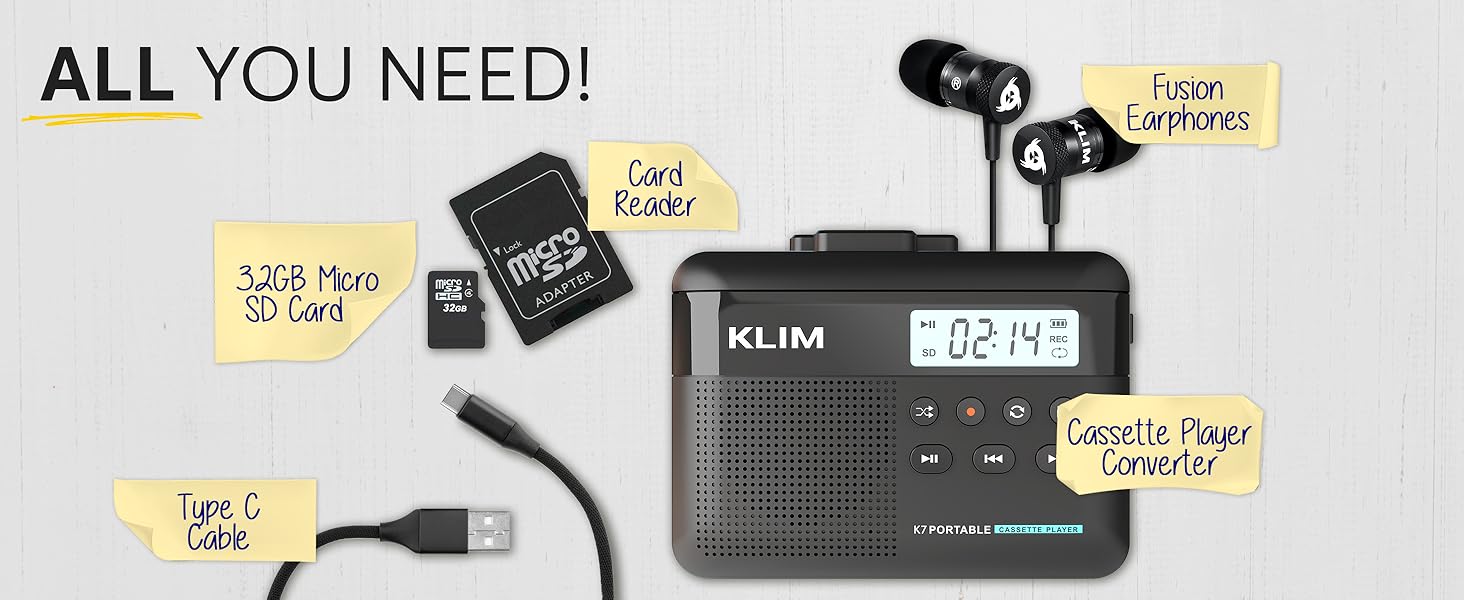
Image: A mother and child sharing earphones connected to the KLIM K7, demonstrating the device's use for listening to cassette tapes.
5.3 Converting Cassette to MP3
The KLIM K7 allows you to convert your cassette tapes directly to MP3 files on the inserted Micro SD card without needing a computer.
- Ensure a cassette tape is inserted and the 32GB Micro SD card is in its slot.
- Piztu gailua.
- Sakatu Jolastu botoia (►) to start playing the cassette.
- Luze sakatu Grabatu botoia (●) to begin recording. The display will show a recording indicator.
- The device will convert the audio from the cassette to an MP3 file on the SD card. Each side of the tape will typically be saved as one MP3 file.
- Grabaketa gelditzeko, sakatu Grabatu botoia (●) berriro.
- After recording, you can remove the SD card and use the provided USB adapter to transfer the MP3 files to a computer or other device.

Image: A five-step visual guide demonstrating how to convert cassette audio to MP3 files on the Micro SD card using the KLIM K7.
5.4 Using the Built-in Microphone for Recording
The KLIM K7 allows you to record external audio using its built-in microphone directly to the Micro SD card.
- Ensure the 32GB Micro SD card is inserted.
- Piztu gailua.
- Sakatu Modua button until the device is in microphone recording mode (indicated on the display).
- Sakatu Grabatu botoia (●) to start recording.
- Speak clearly towards the built-in microphone.
- Grabaketa gelditzeko, sakatu Grabatu botoia (●) berriro.
Note: The KLIM K7 does not support recording onto cassette tapes.

Image: A woman singing into a microphone, with the KLIM K7 and its SD card slot visible, illustrating the high-quality sound recording capability to the SD card.
5.5 MP3 erreproduzitzea Files from SD Card
The KLIM K7 can also function as an MP3 player, playing fileMikro SD txartelean gordetzen da.
- Ensure the Micro SD card with MP3 files txertatzen da.
- Piztu gailua.
- Sakatu Modua button until the device is in MP3 playback mode.
- Sakatu Jolastu botoia (►) to start playing the first MP3 file.
- Erabili Aurrera azkarra (►►) eta Atzera egin (◄◄) buttons to skip tracks.
- Doitu bolumena bolumen-kontrola erabiliz.
5.6 Using Earphones and Speaker
The KLIM K7 offers flexible listening options:
- earphones: For private listening, plug the included KLIM Fusion earphones into the 3.5mm earphone jack. The built-in speaker will automatically mute.
- Bozgorailu integratua: For shared listening, ensure no earphones are plugged in. The audio will play through the integrated speaker.

Image: A man wearing earphones, connected to the KLIM K7, highlighting the universal 3.5mm jack port for personal listening.
6. Mantentzea
Proper care and maintenance will ensure the longevity and optimal performance of your KLIM K7.
- Garbiketa: Use a soft, dry cloth to clean the exterior of the device. Do not use liquid cleaners or abrasive materials. For the playback head and pinch rollers, use a specialized cassette head cleaner if necessary, following its instructions.
- Biltegiratzea: Erabiltzen ez duzunean, gorde gailua leku fresko eta lehor batean, eguzki-argitik eta muturreko tenperaturatik urrun.
- Bateria zaintzea: Bateriaren iraupena luzatzeko, saihestu bateria maiz erabat deskargatzea. Kargatu gailua aldizka, etengabe erabiltzen ez baduzu ere.
- Cassette Tapes: Use clean, well-maintained cassette tapes to prevent damage to the playback head and ensure good audio quality.
7. Arazoak
If you encounter issues with your KLIM K7, refer to the following common problems and solutions:
| Arazoa | Kausa posiblea | Irtenbidea |
|---|---|---|
| Gailua ez da pizten. | Bateria baxua edo agortuta. | Kargatu gailua emandako USB-C kablea erabiliz. |
| No sound during cassette playback. | Volume too low; earphones not properly connected; dirty playback head. | Increase volume; ensure earphones are fully plugged in or removed for speaker; clean playback head. |
| Cassette to MP3 conversion not working. | SD card not inserted or full; cassette not playing. | Ensure SD card is correctly inserted and has free space; verify cassette playback is active before recording. |
| Poor audio quality during playback or recording. | Dirty playback head/pinch rollers; damaged cassette tape; low battery. | Clean playback head and pinch rollers; try a different cassette; ensure device is charged. |
| MP3 files not visible on computer after transfer. | SD card not properly read by computer/adapter. | Ensure SD card is fully inserted into the card reader; try a different USB port on your computer. |
8. Zehaztapenak
| Ezaugarri | Xehetasuna |
|---|---|
| Produktuaren neurriak | 4.76 x 3.61 x 1.56 hazbete |
| Elementuaren pisua | 7.7 ontza |
| Fabrikatzailea | KLIM |
| Modelo zenbakia | K7 |
| Bateria | 1000mAh Lithium Ion (rechargeable, included) |
| Kargatzeko ataka | C motako USB |
| Biltegiratzea | 32 GB Mikro SD txartela (barne) |
| Audio Irteera | Built-in Speaker, 3.5mm Earphone Jack |
| Grabaketa Funtzioa | Cassette to MP3, Built-in Microphone to MP3 (to SD card) |

Image: The KLIM K7 device with its compact dimensions (4.7" x 3.5" x 1.4") and weight (8 oz), highlighting its portability.
9. Bermea eta Laguntza
KLIM is committed to producing quality electronics. The KLIM K7 comes with a 5-year assurance against manufacturing defects. If you encounter any problems with your device, please contact KLIM customer support for assistance.
For further support, product registration, or to view frequently asked questions, please visit the official KLIM webgunea:
10. Segurtasun informazioa
- Ez jarri gailua uraren, hezetasunaren edo muturreko tenperaturen eraginpean.
- Saihestu gailua kolpe gogorrak erortzea edo jasaten.
- Ez saiatu gailua zeuk desmuntatzen edo konpontzen. Jarri harremanetan zerbitzu-langile kualifikatuekin.
- Mantendu haurren eskura.
- Tokiko araudien arabera bota gailua eta bateria arduraz.
Ask a question about this manual
Ask about setup, troubleshooting, compatibility, parts, safety, or missing instructions. Manuals+ will review the question and use this page’s manual context to help answer it.