
1. Sarrera
Welcome to the world of boAt Nirvana Zenith Pro TWS Earbuds. These earbuds are designed to provide a superior audio experience with advanced features such as Hybrid Adaptive Active Noise Cancellation, Spatial Audio, and Hi-Res Audio with LDAC support. This manual will guide you through the setup, operation, and maintenance of your new earbuds.
2. Zer dago kutxan
- boAt Nirvana Zenith Pro TWS entzungailuak
- Kargatzeko kaxa
- Entzungailu gehigarriak (tamaina desberdinak)
- USB motako C kargatzeko kablea
- Erabiltzailearen eskuliburua

Image: boAt Nirvana Zenith Pro TWS Earbuds and Charging Case in Platinum Gold.
3. Konfigurazioa eta lehen erabilera
3.1 Hasierako karga
Before first use, fully charge your earbuds and charging case. Connect the USB Type-C cable to the charging port on the case and a power source. The LED indicator on the case will show charging status.
3.2 Zure gailuarekin parekatzea
- Ireki kargatzeko zorroa. Aurikularrak automatikoki sartuko dira parekatze moduan.
- Zure telefonoan edo beste Bluetooth gaitutako gailu batean, joan Bluetooth ezarpenetara.
- Bilatu 'boAt Nirvana Zenith Pro' in the list of available devices.
- Hautatu konektatzeko. Konektatu ondoren, audio-abisu bat entzungo duzu.

Image: Earbuds resting in their open charging case, indicating readiness for Bluetooth pairing.
4. Funtzionamendu-argibideak
4.1 Ukitu Kontrolak
The boAt Nirvana Zenith Pro features intuitive touch controls on each earbud. Specific functions can be customized via the boAt Hearables App.
| Ekintza | Funtzioa |
|---|---|
| Ukitu bakarra (ezkerra/eskuina) | Musika erreproduzitu/pausatu, deia erantzun/amaitu |
| Sakatu bikoitza (eskuinean) | Hurrengo Pista |
| Sakatu bikoitza (ezkerra) | Aurreko Pista |
| Hirukoitz Ukitu (Ezkerra/Eskuina) | Aktibatu Ahots Laguntzailea |
| Sakatu luzea (ezkerra/eskuina) | Toggle ANC/Ambient Mode |
4.2 Active Noise Cancellation (ANC) & Ambient Mode
The earbuds feature 50dB Hybrid Adaptive ANC to minimize external noise, allowing for an immersive listening experience. Ambient Mode allows you to hear your surroundings while still enjoying your audio.

Image: Graphic demonstrating the effectiveness of 50dB Hybrid Adaptive Noise Cancellation.
4.3 Audio espaziala
Experience a theater-like sound from all directions with boAt Spatial Audio, co-tuned by filmmaker Imtiaz Ali. This feature provides a 360-degree immersive audio experience.
Video: Filmmaker Imtiaz Ali discussing the co-tuning of Spatial Audio for an immersive experience.

Image: Visual representation of Spatial Audio creating a 360-degree sound field around the listener.
4.4 Hi-Res Audio with LDAC
The Nirvana Zenith Pro supports Hi-Res Audio powered by the LDAC codec, ensuring high-quality sound transmission and a rich listening experience through its 12mm drivers.

Irudia: Xehetasun handikoa view of the 12mm audio drivers, highlighting Hi-Res Audio and LDAC compatibility.
4.5 boAt Hearables aplikazioaren bateragarritasuna
Unlock Pro Mode and customize your listening experience with the boAt Hearables App. Adjust EQ modes, customize touch functions, control ANC settings, and receive software updates.

Image: Screenshot of the boAt Hearables App, showing various settings and customization options.
Deskargatu aplikazioa hemen: boAt Hearables aplikazioa
4.6 Puntu anitzeko konexioa
Connect and switch seamlessly between two devices simultaneously. For example, watch a movie on your tablet and answer an incoming call on your phone without manually reconnecting.
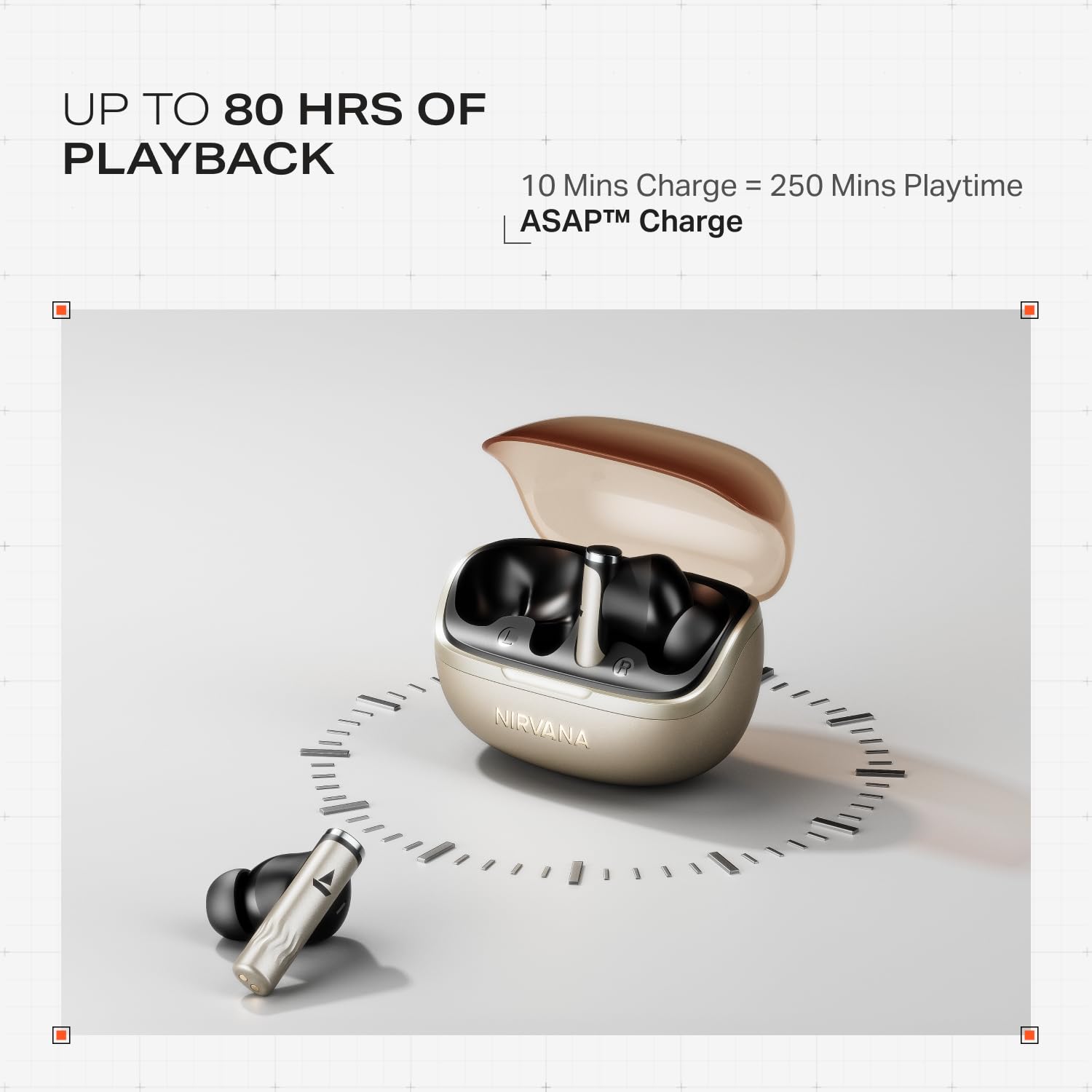
Image: Illustration of multipoint connectivity, with earbuds linked to both a smartphone and a tablet.
4.7 Belarrian detektatzea
The earbuds automatically pause playback when removed from your ears and resume when placed back in, providing a seamless listening experience.

Image: Diagram showing an earbud in an ear, with text indicating 'Plug-in to Play' and 'Plug-Out to Pause'.
4.8 Beast Mode (Low Latency)
Activate Beast Mode for an ultra-low latency of 60ms, ideal for gaming to ensure synchronized audio and visuals.

Image: A smartphone displaying a racing game, with earbuds positioned nearby, illustrating the Beast Mode for low-latency gaming.
4.9 Google-ren Parekatze Azkarreko Zerbitzua
Enjoy quick and effortless pairing with Android devices using Google Fast Pair Service, allowing for instant connection upon opening the case.

Image: A smartphone displaying a Google Fast Pair notification, prompting connection to the Nirvana Zenith Pro earbuds.
5. Kargatzea eta bateria
Entzungailuek 80 ordu arteko erreprodukzio-denbora eskaintzen dute kargatzeko zorroarekin. ASAP Charge funtzioak 250 minutuko erreprodukzio-denbora eskaintzen du 10 minutu kargatu ondoren.
- Bateriaren iraupena: 80 ordu arte (kargatzeko zorroarekin)
- Lehenbailehen karga: 10 minutuko karga = 250 minutuko erreprodukzio-denbora
- Kargatzeko denbora osoa: Approximately 110 minutes for earbuds and case.

Image: Visual representation of the earbuds and charging case, highlighting 80 hours of playback and ASAP Charge capabilities.
6. Mantentzea eta Zainketa
- Garbiketa: Regularly clean the earbuds and charging contacts with a soft, dry cloth. Avoid using harsh chemicals.
- Biltegiratzea: Gorde entzungailuak kargatzeko zorroan erabiltzen ez dituzunean babesteko eta kargatuta mantentzeko.
- Uraren erresistentzia: The earbuds are IPX4 rated, meaning they are resistant to splashes and sweat. Do not submerge them in water.
Video: A short animation demonstrating the IPX4 water resistance of the earbuds, showing protection against splashes.
7. Arazoak
7.1 entzungailuak ez dira parekatzen
- Ziurtatu bi entzungailuak kargatuta daudela.
- Jarri entzungailuak berriro zorroan, itxi tapa, itxaron segundo batzuk eta ireki berriro parekatze moduan sartzeko.
- Ezabatu gailua telefonoaren Bluetooth ezarpenetatik eta saiatu berriro parekatzen.
7.2 Low Volume/Poor Sound Quality
- Egiaztatu zure gailuaren eta entzungailuen bolumen mailak.
- Ziurtatu entzungailuak garbi eta hondakinik gabe daudela.
- Probatu belarri-punta tamaina desberdinak zigilu hobea lortzeko.
- Disable ANC temporarily to see if it improves sound in certain environments.
7.3 entzungailuak ez dira kargatzen
- Ziurtatu kargatzeko kablea ondo konektatuta dagoela bai kaxara bai elikatze-iturrira.
- Garbitu entzungailuen eta zorroaren kargatzeko kontaktuak.
- Saiatu beste kargatzeko kable edo korronte egokitzaile batekin.
8. Zehaztapenak
| Ezaugarri | Xehetasuna |
|---|---|
| Ereduaren izena | Nirvana Zenith Pro |
| Modelo zenbakia | PP0010 |
| Zarata Kontrola | 50dB Hybrid Adaptive Active Noise Cancellation |
| Audio-kodeka | LDAC (Hi-Res Audio) |
| Gidariak | 12 mm-ko kontrolatzaile dinamikoak |
| Mikrofonoak | 6 mikrofono AI-ENx teknologiarekin |
| Bateriaren iraupena | Gehienez 80 ordu (zorroarekin) |
| Bluetooth bertsioa | 5.4 |
| Uraren Erresistentzia | IPX4 |
| Latentzia baxua | 60ms (Beast Mode) |
| Pisua | 45 gramo |
9. Bermea eta Laguntza
Your boAt Nirvana Zenith Pro TWS Earbuds come with a 1 urteko bermea erosketa-datatik aurrera. Gorde erosketa-agiria berme-erreklamazioetarako.
Laguntza gehiago, euskarri teknikoa edo berme erreklamazioak lortzeko, bisitatu boAt ofiziala. website or contact their customer service. Contact information can typically be found on the product packaging or the official brand webgunea.