
Reolink B320
Reolink Argus Series B320 Wireless Security Camera User Manual
Eredua: B320
Marka: Reolink
Sarrera
This manual provides comprehensive instructions for the installation, operation, and maintenance of your Reolink Argus Series B320 Wireless Security Camera. Please read this manual carefully before using the product to ensure proper setup and optimal performance. Keep this manual for future reference.
Produktua amaituview
Paketearen edukia
- Reolink Argus Series B320 Camera
- Reolink Eguzki Panela
- Muntatzeko euskarria eta torlojuak
- USB kargatzeko kablea
- Hasierako gida azkarra
- Zaintza Seinalea
Kameraren osagaiak
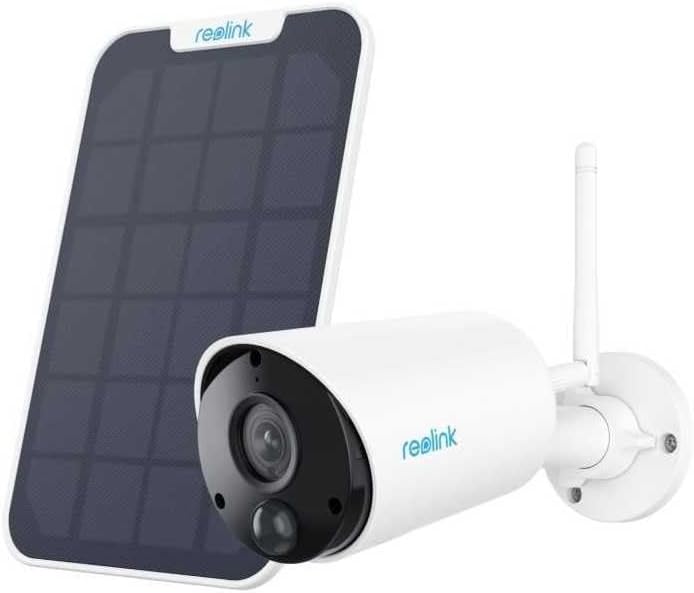
This image displays the Reolink Argus Series B320 wireless security camera alongside its accompanying solar panel. The camera is white with a black lens housing and an antenna, designed for outdoor use. The solar panel is dark, rectangular, and designed to provide continuous power to the camera, making it ideal for wire-free installation.
Ezaugarri nagusiak
3MP HD Clarity

This image illustrates the difference between 3MP HD and 1080P resolution. The 3MP image on the left shows significantly more detail and clarity compared to the 1080P image on the right, highlighting the camera's superior image capture capability for sharper video footage.
High-Definition Night Vision

This image demonstrates the camera's night vision capabilities. The left side shows a scene in daylight, while the right side displays the same scene at night using infrared illumination, providing clear black-and-white visibility in low-light conditions for 24/7 surveillance.
Smart Detection (Person/Vehicle/Motion)

This image shows the camera's intelligent detection features. It highlights how the camera can distinguish between general motion, people (e.g., a person mowing the lawn), and vehicles (e.g., a car in a garage), reducing false alarms and sending more accurate notifications. A notification pop-up indicates a person has been detected.
Bi norabideko audioa

This image depicts the two-way audio function, showing a smartphone screen with the live camera feed. Speech bubbles illustrate real-time communication between the user and someone near the camera, allowing for interactive communication from anywhere.
Tokiko eta hodeiko biltegiratzea

This image visually represents the camera's storage options, featuring a microSD card and a cloud icon. This indicates that the camera supports both local storage on a memory card (up to 128GB, not included) and optional cloud-based storage for recorded footage, ensuring secure data retention.
Konfigurazio Gida
Hasi aurretik
- Fully charge the camera battery using the provided USB cable before initial use.
- Download the Reolink App from the App Store (iOS) or Google Play (Android).
- Ensure your Wi-Fi network is stable and within range of the camera's intended installation location.
Kameraren Instalazioa
- Choose a suitable location for the camera, ensuring good Wi-Fi signal and optimal viewangelua.
- Mount the camera using the provided mounting bracket and screws.
- Eguzki-panela ondo jasotzen duen leku batean muntatu. ampeguzki-argia zuzenean egun osoan zehar.
- Connect the solar panel cable to the camera's charging port. Ensure the port cover is securely closed to prevent water ingress.
Aplikazioaren konfigurazioa
- Open the Reolink App and tap the "+" icon in the top right corner to add a new device.
- Eskaneatu kameraren gorputzean dagoen QR kodea.
- Follow the on-screen prompts to connect the camera to your Wi-Fi network.
- Set up a password for your camera and configure initial settings such as device name and time zone.
Funtzionamendu-argibideak
Zuzenean View
To access the live video feed, open the Reolink App and select your camera from the device list. You can view denbora errealean footage, take snapshots, record manually, and use the two-way audio feature.
Grabaketa eta Erreprodukzioa
- Mugimenduak eragindako grabaketa: The camera automatically records when motion is detected. These recordings are saved to the inserted microSD card or uploaded to the Reolink Cloud (subscription required).
- Eskuzko grabaketa: Tap the record button in the live view interface to start or stop manual recording.
- Erreprodukzioa: To view foo grabatuatage, go to the playback interface in the app, select the date, and drag the timeline to the desired recording.
Alarma ezarpenak
Configure motion detection sensitivity, detection zones, and notification preferences (push notifications, email alerts) within the camera settings in the Reolink App. Utilize the smart detection features to filter alerts for people and vehicles.
Mantentzea
Bateria zaintzea
- Saihestu kamera muturreko tenperaturetara denbora luzez.
- Ensure the solar panel is connected correctly to maintain continuous charging.
- If the camera is stored for an extended period, charge the battery to 50% and store it in a cool, dry place.
Eguzki Panelen Mantentzea
Garbitu eguzki-panelaren gainazala aldizka oihal leun eta lehor batekin.amp cloth to remove dust, dirt, or debris that may obstruct sunlight and reduce charging efficiency. Do not use abrasive cleaners.
Firmware eguneraketak
Periodically check for firmware updates via the Reolink App. Keeping your camera's firmware up-to-date ensures optimal performance, security enhancements, and access to new features.
Arazoak konpontzea
Ohiko arazoak eta irtenbideak
- Kamera ez pizten: Ensure the battery is charged. Connect the camera to a power adapter via USB to confirm charging.
- Wi-Fi konexioaren arazoak: Verify your Wi-Fi password is correct. Ensure the camera is within range of your router. Try restarting your router and the camera.
- Irudiaren kalitate eskasa: Check the camera lens for dirt or smudges. Ensure there are no obstructions in the camera's field of view. Verify the camera is set to the highest resolution in the app settings.
- Alarma faltsuak: Adjust motion detection sensitivity in the app. Utilize the person/vehicle detection feature to filter out irrelevant motion. Define specific motion detection zones to monitor only critical areas.
- Eguzki-panela ez da kargatzen: Ensure the solar panel is clean and receives direct sunlight. Check the connection cable between the solar panel and the camera.
Zehaztapenak
| Ezaugarri | Zehaztapena |
|---|---|
| Eredua | Argus seriea B320 |
| Ebazpena | 3MP (2304x1296) |
| ren eremua View | 120 ° -ko diagonala |
| Gaueko Ikusmena | Up to 10 meters (33 ft) with IR LEDs |
| Audioa | Two-way audio with built-in microphone and speaker |
| Biltegiratzea | MicroSD card slot (up to 128GB), Cloud storage (optional) |
| Konektibitatea | 2.4 GHz-ko wifia |
| Boterea | Rechargeable Battery, Solar Powered (via Reolink Solar Panel) |
| Funtzionamendu-tenperatura | -10 °C eta 55 °C (14 °F eta 131 °F) |
| Eguraldi erresistentea | IP65 Ziurtagiria |
| Fabrikatzailea | BERRILINKA |
| ASIN | B0DXPMJBYG |
| Eskuragarri dagoen lehen data | 25ko azaroaren 2024a |
Bermea eta Laguntza
Reolink products come with a limited warranty. For detailed warranty terms, technical support, and frequently asked questions, please visit the official Reolink website. You can also find support and product information on the official Reolink Amazon Store.
Official Reolink Amazon Store: Reolink Amazon Store
Ask a question about this manual
Ask about setup, troubleshooting, compatibility, parts, safety, or missing instructions. Manuals+ will review the question and use this page’s manual context to help answer it.