
GIGABYTE B550 EAGLE WIFI6
GIGABYTE B550 Eagle WIFI6 plaka basearen instrukzio eskuliburua
Model: B550 EAGLE WIFI6 | Brand: GIGABYTE
1. Sarrera
This manual provides essential information for the installation, operation, and maintenance of your GIGABYTE B550 Eagle WIFI6 Motherboard. This motherboard is designed to support AMD AM4 Ryzen 5000, 4000, and 3000 Series processors, offering a robust foundation for various computing needs. Please read this manual thoroughly before proceeding with any installation or configuration steps.

Figure 1: GIGABYTE B550 Eagle WIFI6 Motherboard and its retail packaging.
2. Ezaugarri nagusiak
- AMD AM4 socket-a: Supports AMD Ryzen 5000 / Ryzen 4000 / Ryzen 3000 Series processors.
- Enhanced Power Solution: Features a digital twin 10+3 phases VRM solution with premium chokes and capacitors for stable power delivery.
- Advanced Thermal Armor: Enlarged VRM heatsinks layered with 5 W/mk thermal pads for improved heat dissipation. Pre-Installed I/O Armor for simplified PC assembly.
- Memory Performance: Compatible with DDR4 memory and supports 4 x DIMMs with AMD EXPO Memory Module Support.
- Konektibitate osoa: Includes WIFI 6, PCIe 4.0, 2x M.2 Slots, 1GbE LAN, USB 3.2 Gen 2, and USB 3.2 Gen 1 Type-C.
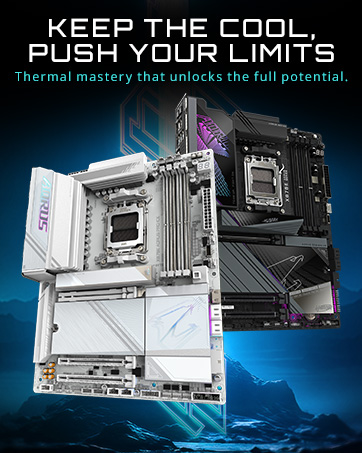
2 Irudia: Gainetikview of key features including Wi-Fi 6, advanced thermal design, and multiple M.2 slots.
3. Konfigurazioa eta instalazioa
Follow these steps for proper installation of your motherboard and components. Ensure your system is powered off and unplugged before beginning installation.
3.1. CPUaren instalazioa
- Unlatch the CPU socket lever.
- Carefully align the CPU with the socket, matching the golden triangle on the CPU with the corresponding mark on the socket.
- Jarri CPUa astiro-astiro socketean, indarrik eman gabe.
- Lower the socket lever to secure the CPU.
Video 1: AMD AM4 Motherboard Quick Review MSI B550 DDR4 PCIe 4.0. This video provides a general overview of an AM4 motherboard, including CPU installation steps. Note: The video features an MSI board, but the CPU installation process for AM4 sockets is similar.
3.2. RAM instalazioa
- Ireki DDR4 DIMM zirrikituen bi muturretan dauden klipak.
- Lerrokatu RAM modulua zirrikituarekin, ziurtatu moduluko koska zirrikituan dagoen giltzarekin bat datorrela.
- Press down firmly on both ends of the RAM module until the clips snap into place. Refer to your motherboard's manual for recommended slot population order (e.g., A2 and B2 for two modules).
3.3. M.2 SSD instalazioa
- Locate the M.2 slots on the motherboard. Your B550 Eagle WIFI6 has two M.2 slots.
- Remove the M.2 heatsink (if present) by unscrewing it.
- Sartu M.2 SSDa zirrikituan angelu batean.
- Gently push down the SSD and secure it with the provided screw or EZ-Latch mechanism.
- Reattach the M.2 heatsink if removed.
3.4. Motherboard Installation in Case
- Ensure the I/O shield is properly installed in your case. The B550 Eagle WIFI6 features a pre-installed I/O shield.
- Carefully align the motherboard with the standoffs in your PC case.
- Secure the motherboard to the standoffs using the appropriate screws. Do not overtighten.
Figure 3: EZ-Latch features for simplified assembly.
4. Funtzionamendu-argibideak
4.1. Hasierako abiarazpena eta BIOS konfigurazioa
After assembling your PC, connect your monitor, keyboard, and mouse. Power on the system. During startup, repeatedly press the DEL key to enter the BIOS setup utility. Here you can configure system settings, boot order, and enable features like XMP for memory.
4.2. Gidariaren instalazioa
After installing your operating system, it is crucial to install the latest drivers for your motherboard components. You can find these on the official GIGABYTE website for your specific model. Pay particular attention to chipset, LAN, and Wi-Fi drivers. For Wi-Fi functionality, you may need to install the drivers via a wired Ethernet connection or a USB drive if Wi-Fi is not immediately recognized.
Video 2: Gigabyte B550 EAGLE WIFI6 Motherboard Unboxing and Overview. This video provides a detailed look at the motherboard and its components, which can be helpful during initial setup.
5. Mantentzea
- Mantendu gidariak eguneratuta: Egiaztatu aldizka GIGABYTE website for the latest chipset, LAN, Wi-Fi, and audio drivers to ensure optimal performance and stability.
- BIOS eguneraketak: Only update the BIOS if necessary, following the instructions provided by GIGABYTE. Incorrect BIOS updates can lead to system instability.
- Garbiketa fisikoa: Periodically clean dust from your PC case and motherboard components using compressed air. Ensure the system is powered off and unplugged before cleaning.
6. Arazoak
6.1. No Display on First Boot
Ensure your monitor is connected to the graphics card (if installed) or the motherboard's video output (if using an APU). Verify that all power cables (24-pin ATX, 8-pin CPU, PCIe power for GPU) are securely connected. Check RAM seating and try reseating modules. If using an AMD CPU without integrated graphics, a dedicated graphics card is required for display output.
6.2. Wi-Fi Not Working After OS Installation
This is a common issue. The operating system may not have built-in drivers for the Wi-Fi 6 module. Connect your PC to the internet via a wired Ethernet connection or use another device to download the Wi-Fi drivers from the GIGABYTE website onto a USB drive. Install the drivers manually.
6.3. Sistemaren ezegonkortasuna edo kraskadurak
Ensure all components are properly seated. Check CPU and GPU temperatures. Update all drivers and BIOS to the latest stable versions. If overclocking, revert to default settings to rule out instability caused by overclocks.
7. Zehaztapenak
| Ezaugarri | Zehaztapena |
|---|---|
| Marka | GIGABYTE |
| Ereduaren izena | B550 EAGLE WIFI6 |
| CPU Socketa | AM4 entxufea |
| Prozesadore bateragarriak | AM4 (Ryzen 5000/3000/4000) |
| RAM Memoria Teknologia | DDR4 |
| Memoria Erlojuaren Abiadura | 3600 MHz |
| Txip mota | AMD B550 |
| Produktuaren neurriak | 12 x 9.61 x 1 hazbete |
| Elementuaren pisua | 4 kilo |
| Konektibitatea | WIFI 6, PCIe 4.0, 2x M.2 Slots, 1GbE LAN, USB 3.2 Gen 2, USB 3.2 Gen 1 Type-C |
8. Bermea eta Laguntza
Bermeari buruzko informazio zehatza eta laguntza teknikoa lortzeko, jo ezazu GIGABYTE-ren webgune ofizialera. webwebgunera edo jarri harremanetan bezeroarentzako arreta-zerbitzura. Gorde erosketaren frogagiria berme-erreklamazioetarako.
Erlazionatutako dokumentuak - B550 EAGLE WIFI6
 |
GIGABYTE B550 EAGLE WIFI6 plaka basearen erabiltzailearen eskuliburua This user manual provides detailed information on the GIGABYTE B550 EAGLE WIFI6 and B550 EAGLE motherboards, including hardware installation, BIOS setup, operating system and driver installation, and regulatory notices. It covers specifications, component layouts, connector pinouts, and troubleshooting. |
 |
GIGABYTE B840M EAGLE WIFI6 plaka basearen erabiltzailearen eskuliburua - Instalazioa, zehaztapenak, BIOSa, kontrolatzaileak GIGABYTE B840M EAGLE WIFI6 plaka basearen erabiltzailearen eskuliburu osoa, hardwarearen instalazioa, produktuaren zehaztapenak, BIOS konfigurazioa, sistema eragilearen eta kontrolatzaileen instalazioa, RAID konfigurazioa eta araudi informazioa biltzen dituena. |
 |
GIGABYTE B550M DS3H AC eta B550M DS3H plaka basearen erabiltzailearen eskuliburua Erabiltzailearen eskuliburu honek GIGABYTE B550M DS3H AC eta B550M DS3H ama plakei buruzko informazio eta argibide zehatzak eskaintzen ditu, hardwarearen instalazioa, BIOS konfigurazioa, sistema eragilearen instalazioa eta kontrolatzaileen instalazioa barne hartzen dituelarik. |
 |
GIGABYTE B840M AORUS ELITE WIFI6E Motherboard User's Manual Comprehensive user manual for the GIGABYTE B840M AORUS ELITE WIFI6E motherboard, detailing hardware installation, BIOS setup, driver installation, product specifications, and regulatory information. |
 |
GIGABYTE B550I AORUS PRO AX plaka basearen erabiltzailearen eskuliburua GIGABYTE B550I AORUS PRO AX plaka basearen erabiltzailearen eskuliburu osoa, hardwarearen instalazioa, BIOS konfigurazioa, sistema eragilearen eta kontrolatzaileen instalazioa, produktuaren zehaztapenak eta araudiaren betetzeari buruzko informazioa zehaztuz. |
 |
GIGABYTE B650 AORUS ELITE AX / B650 AORUS ELITE Erabiltzailearen eskuliburua GIGABYTE B650 AORUS ELITE AX eta B650 AORUS ELITE plaka baseen erabiltzailearen eskuliburu osoa, hardwarearen instalazioa, BIOS konfigurazioa, kontrolatzaileen instalazioa, produktuaren zehaztapenak eta araudi informazioa zehaztuz. |
Ask a question about this manual
Ask about setup, troubleshooting, compatibility, parts, safety, or missing instructions. Manuals+ will review the question and use this page’s manual context to help answer it.