
H9 PRO MAX
H9 PRO MAX Smart Watch User Manual
Model: H9 PRO MAX
Sarrera
Welcome to the H9 PRO MAX Smart Watch user manual. This guide provides comprehensive instructions for setting up, operating, and maintaining your new smartwatch. The H9 PRO MAX is designed to enhance your daily lifestyle with features like Bluetooth calling, a vibrant AMOLED display, advanced health monitoring, and extensive fitness tracking capabilities. Please read this manual thoroughly to ensure optimal performance and longevity of your device.

Figure 1: H9 PRO MAX Smart Watch
The H9 PRO MAX Smart Watch features a sleek design with a black strap and a rectangular display showing a vibrant watch face.
Kutxan dagoena
Upon unboxing your H9 PRO MAX Smart Watch, please verify that all the following items are included:
- H9 PRO MAX Smart Watch
- Kargatzeko kablea
- Erabiltzailearen eskuliburua (dokumentu hau)
- Watch Band
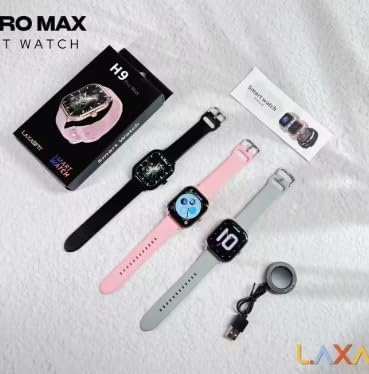
2. irudia: paketearen edukia
The image displays the H9 PRO MAX Smart Watch in black, along with its charging cable and a small user manual booklet, laid out on a white surface.
Konfigurazioa
1. Erloju adimenduna kargatzea
Before first use, fully charge your H9 PRO MAX Smart Watch.
- Konektatu kargatzeko kable magnetikoa erlojuaren atzealdeko kargatzeko kontaktuetara.
- Plug the USB end of the charging cable into a standard USB power adapter (5V/1A recommended) or a computer's USB port.
- Erlojuaren pantailak kargatze-egoera adieraziko du. Karga oso batek normalean 2 ordu inguru behar ditu.
- Once fully charged, the watch can provide 5-7 days of continuous usage or up to 30 days of standby time.
2. Aplikazioaren instalazioa eta parekatzea
To unlock the full potential of your H9 PRO MAX Smart Watch, download and install the companion application on your smartphone.
- Scan the QR code below or search for the official app in your smartphone's app store (e.g., Google Play Store for Android, Apple App Store for iOS).
- Instalatu aplikazioa eta eman beharrezko baimenak.
- Ziurtatu Bluetootha gaituta dagoela zure telefonoan.
- Open the app and follow the on-screen instructions to pair your H9 PRO MAX Smart Watch. The app will guide you through the pairing process, which may involve selecting your device from a list or scanning a QR code displayed on the watch.
- Once paired, the watch will synchronize data with your smartphone.
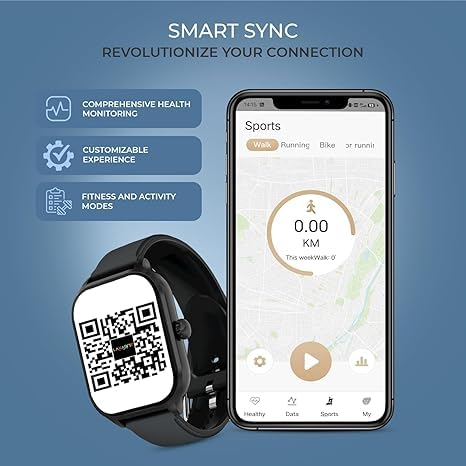
Figure 3: App Pairing Interface
This image shows the H9 PRO MAX Smart Watch displaying a QR code for app pairing, alongside a smartphone screen illustrating the app's sports tracking interface. You can download the app by scanning the QR code or visiting https://me-qr.com/W37v4fPq.
Funtzionamendu-argibideak
Oinarrizko Nabigazioa
- Ukipen-pantaila: Irristatu ezkerrera, eskuinera, gora edo behera menuetan eta funtzioetan nabigatzeko. Sakatu aukera bat hautatzeko.
- Alboko botoia: Press the side button to return to the home screen or wake the display.
- AMOLED pantaila: The 4cm AMOLED display provides clear and vibrant visuals for easy interaction.
Bluetooth bidezko deiak
Behin zure telefonoarekin parekatuta, deiak zuzenean eskumuturretik egin eta jaso ditzakezu.
- Deiak erantzutea: Dei bat jasotzen duzunean, sakatu erlojuaren pantailan dagoen telefono berdearen ikonoa erantzuteko.
- Deiak egitea: Dei bat hasteko, sartu erlojuaren markagailura edo kontaktuen zerrendara.
Jakinarazpen adimendunak
Receive instant alerts for calls, text messages, and app notifications directly on your watch.
- Ensure notification permissions are enabled in the companion app on your smartphone.
- Swipe down from the top of the watch face to view azken jakinarazpenak.
Musika erreproduzitzailearen kontrola
Kontrolatu musika erreprodukzioa zure telefonoan zuzenean zure erlojutik.
- Access the music control feature on your watch.
- Erreproduzitu, pausatu, saltatu abestiak eta doitu bolumena zure telefono konektatutaan erreproduzitzen ari den musikarako.
Activity Tracking and Sports Modes
The H9 PRO MAX tracks your daily activity and supports various sports modes.
- Eguneroko jarduera: Automatically tracks steps, distance, and calories burned throughout the day. View summaries on the watch or in the app.
- Kirol moduak: Select from a variety of sports modes (e.g., walking, running, cycling, badminton, basketball, football, climbing) to get specific workout data.
- Workout Memory: The watch stores workout data, which can be synced to the app for detailed analysis.

Figure 4: Sports Modes
This image illustrates the diverse sports modes available on the H9 PRO MAX Smart Watch, including icons for various activities and photos of individuals participating in sports like running, basketball, football, and climbing.
Osasunaren Jarraipen Aurreratua
Monitor your health with built-in sensors for key vital signs.
- Bihotz-maiztasuna (HR): Bihotz-maiztasunaren denbora errealeko monitorizazioa.
- Odoleko oxigenoa (SpO2): Neurtu zure odoleko oxigeno saturazio mailak.
- Odol-presioa (OTA): Odol-presioaren estimazioa ematen du. Oharra: Ezaugarri hau erreferentzia gisa baino ez da eta ez da erabili behar diagnostiko medikoetarako.
- Loaren jarraipena: Zure loaren ereduak kontrolatzen ditu, lo sakona, lo arina eta esnatzeko orduak barne.
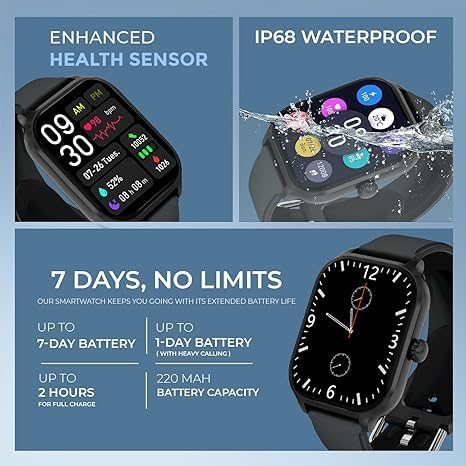
Figure 5: Health Monitoring and Battery Life
The image highlights the watch's ability to display health metrics such as heart rate, blood oxygen, and sleep data. It also emphasizes the long battery life, stating up to 7 days of use and 2 hours for a full charge.
Mantentzea
Urarekiko erresistentzia (IP68)
The H9 PRO MAX Smart Watch is rated IP68 for splash and water resistance.
- It is resistant to splashes, rain, and incidental exposure to water.
- It can withstand immersion in up to 1.5 meters of fresh water for up to 30 minutes.
- Kontuz: Not suitable for hot water, saunas, diving, or high-pressure water activities. Avoid contact with soap, detergents, or chemicals, as these can damage the seals.
- If the watch gets wet, wipe it dry with a soft cloth before charging or operating.
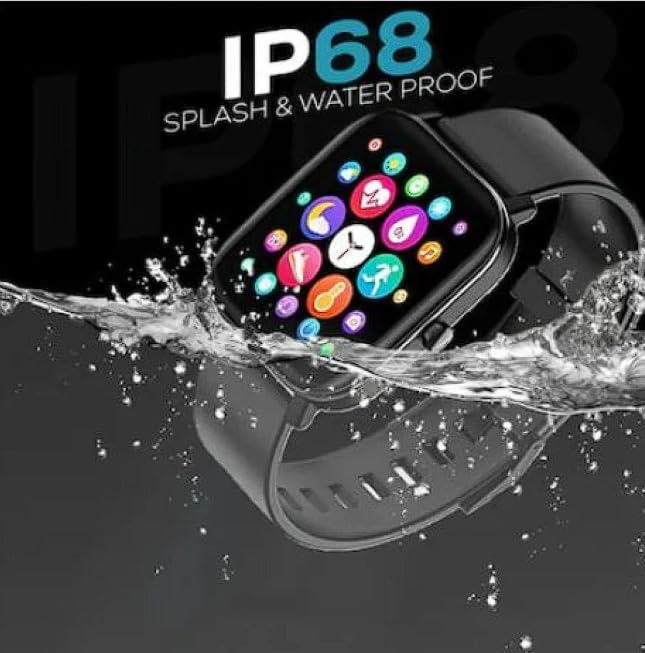
6 irudia: IP68 urarekiko erresistentzia
This image shows the H9 PRO MAX Smart Watch being splashed with water, emphasizing its IP68 rating for splash and water proofing.
Garbiketa eta Zainketa
- Regularly clean the watch and strap with a soft, dry, lint-free cloth.
- Beharrezkoa bada, dampBusti zapi pixka bat urarekin. Ez erabili produktu kimiko gogorrik edo garbitzaile urratzailerik.
- Kargatzeko kontaktuak garbi eta lehor mantendu behar bezala kargatzen dela ziurtatzeko.
- Saihestu erlojua tenperatura altuetan edo eguzki-argia zuzenean denbora luzez jartzea.
Bateria zaintzea
- Kargatu erlojua aldizka, erabiltzen ez bada ere, bateriaren egoera mantentzeko.
- Saihestu bateria maiz erabat deskargatzea.
- Erabili emandako kargatzeko kablea soilik.
Arazoak konpontzea
| Arazoa | Kausa posiblea | Irtenbidea |
|---|---|---|
| Erlojua ez da pizten | Bateria baxua; gailuaren matxura | Charge the watch for at least 30 minutes. If it still doesn't turn on, contact customer support. |
| Ezin da telefonoarekin parekatu | Bluetooth off; app issue; watch not in pairing mode | Ensure Bluetooth is on for both devices. Restart both the watch and phone. Reinstall the app. Try pairing again. |
| Jakinarazpenak ez dira jaso | App permissions; notification settings | Check app notification permissions on your phone. Ensure notifications are enabled within the watch's companion app. |
| Osasun-datu zehaztugabeak | Improper fit; sensor obstruction | Ziurtatu erlojua eskumuturrean ondo estututa dagoela, ez gehiegi estututa ez gehiegi solte. Garbitu erlojuaren atzealdeko sentsorea. |
| Bateriaren iraupen laburra | Frequent use of power-intensive features; old battery | Reduce screen brightness. Limit continuous heart rate monitoring. Disable unnecessary notifications. Ensure full charge cycles. |
Zehaztapenak
| Ezaugarri | Xehetasuna |
|---|---|
| Ereduaren izena | H9 PRO MAX |
| Bistaratzeko mota | AMOLED |
| Pantailaren tamaina | 4 cm (2 hazbete) |
| Sistema eragilea | Android Wear 2.9 |
| Konektibitatea | Bluetootha |
| Bateria Edukiera | 220 mAh |
| Bateriaren iraupena (erabilera arrunta) | 5-7 egun |
| Egonean Denbora | Gehienez 30 egun |
| Kargatzeko Denbora | Gutxi gorabehera. 2 ordu |
| Uraren Erresistentzia | IP68 (Splash & Water Proof) |
| Pisua | 100 g |
| Gailu bateragarriak | Smartphone |
| Ezaugarri bereziak | Music Player, Bluetooth Calling, Fitness Tracker, Sleep Monitoring, Heart Rate, Blood Oxygen, Blood Pressure |
Bermea eta Laguntza
For warranty information and customer support, please refer to the warranty card included in your product packaging or contact the retailer where you purchased the H9 PRO MAX Smart Watch.
Manufacturer: INDIA
Erlazionatutako dokumentuak - H9 PRO MAX
 |
Noise ColorFit Pulse 4 Max Smartwatch User Manual Comprehensive user manual for the Noise ColorFit Pulse 4 Max smartwatch. This guide provides detailed information on setup, features like AMOLED display and Bluetooth calling, health tracking, safety precautions, and disposal guidelines. Learn to use your Noise smartwatch effectively. |
 |
boAt Storm Pro Call Smartwatch: Features, Specifications, and User Guide Explore the boAt Storm Pro Call smartwatch, featuring Bluetooth calling, AMOLED display, health tracking, and more. Get detailed information on its capabilities and specifications. |
 |
Amazfit Active Smartwatch-aren erabiltzailearen eskuliburua: Ezaugarriak, konfigurazioa eta erabilera gida Amazfit Active erloju adimendunaren erabiltzailearen eskuliburu osoa, konfigurazioa, parekatzea, entrenamenduaren jarraipena, osasunaren monitorizazioa, jakinarazpenak, Bluetooth deiak eta erlojuaren ezarpenak bezalako funtzioak biltzen dituena. Ikasi zure Amazfit Active gailua bere potentzial osoa erabiltzen. |
 |
Smartwatch X8 MAX: User Manual and Operating Instructions Comprehensive guide to the Smartwatch X8 MAX, covering setup, compatibility, app download, pairing, features like phone dialing, sports modes, health monitoring, and troubleshooting. Learn how to use your smartwatch effectively. |
 |
URBAN Bella Smartwatch User Manual | Setup, Features, and Guide Comprehensive user manual for the URBAN Bella smartwatch, detailing setup, features like Bluetooth calling, sports tracking, health monitoring (heart rate, sleep, SPO2, blood pressure), and device care. Includes instructions for app syncing, charging, and using various functions. |
 |
Amazfit Cheetah Pro erabiltzailearen eskuliburua Amazfit Cheetah Pro erloju adimendunaren erabiltzailearen eskuliburu osoa, hasierako konfigurazioa, parekatzea, sistemaren eguneraketak, oinarrizko eragiketak, keinuak, kontrol zentroa, telefonoa aurkitzea, erlojuaren aurpegiak, entrenamendu moduak, GPSa, osasunaren jarraipena (bihotz-maiztasuna, odoleko oxigenoa, estresa, jarduera), Zepp Coach, nabigazioa, musika erreprodukzioa, ahots funtzioak eta erlojuaren hainbat ezarpen jorratzen dituena. |