
254585 hutsa
Pure Classic H4i Internet Radio User Manual
Eredua: 254585
1. Sarrera
The Pure Classic H4i is a versatile internet radio designed to provide a comprehensive audio experience. It combines traditional radio functionalities with modern connectivity options, allowing access to a vast array of content. This manual provides detailed instructions for setting up, operating, and maintaining your Pure Classic H4i to ensure optimal performance and longevity.

1. irudia: Aurrealdea view of the Pure Classic H4i Internet Radio, showcasing its display, control knobs, and buttons.
2. Zer dago kutxan
Upon unpacking your Pure Classic H4i, please ensure all the following components are present:
- Pure Classic H4i Internet Radio Unit
- Hasierako gida azkarra
- Urruneko Kontrola
- Battery (for Remote control)
- Antena teleskopikoa
- Power Adapter with two plug adapters

Figure 2: The Pure Classic H4i unit shown alongside its remote control.
3. Konfigurazio gida
3.1 Hasierako piztea
- Konektatu energia: Plug the provided power adapter into the DC input on the back of the Pure Classic H4i, then connect it to a wall outlet.
- Zabaldu antena: Fully extend the telescopic antenna for optimal FM and DAB+ reception.
- Piztu: Sakatu Egonean button on the front panel or remote control to turn on the radio.
3.2 Sare konexioa (Wi-Fi)
The Pure Classic H4i requires a Wi-Fi connection for Internet Radio and software updates. It supports 2.4GHz Wi-Fi networks.
- Hizkuntza hautaketa: Upon first power-up, the display will prompt you to select your preferred language. Use the Hautatu knob to navigate and press to confirm.
- Network Scan: The radio will automatically scan for available Wi-Fi networks.
- Hautatu sarea: Erabili Hautatu knob to choose your Wi-Fi network from the list and press to confirm.
- Sartu pasahitza: Erabili Hautatu knob to navigate through characters (letters, numbers, symbols) and press to enter each character of your Wi-Fi password. Select the "Done" option when finished.
- Konexioaren berrespena: The radio will attempt to connect. Once successful, a Wi-Fi icon will appear on the display.
Note: The device only supports 2.4GHz Wi-Fi bands. Ensure your router is configured to allow connections on this frequency.
3.3 Initial Setup and Updates
- Ordu-eremuaren ezarpena: Follow the on-screen prompts to set your correct time zone.
- DAB+ Scan: The radio will perform an initial scan for DAB+ stations. This may take a few minutes.
- Firmware eguneratzea: The radio may prompt you to update its firmware. It is recommended to perform this update to ensure you have the latest features and bug fixes. Follow the on-screen instructions.
- Audio Codec Update: After a firmware update, an audio codec update might be offered. Allow this to complete for optimal audio performance.

Figure 3: The Pure Classic H4i displaying station information on its color screen.
4. Funtzionamendu-argibideak
4.1 Oinarrizko kontrolak
- Bolumen-eskulekua: Rotate to adjust the listening volume.
- Aukeratu botoia: Rotate to scroll through menus and lists. Press to confirm a selection.
- Atzera botoia: Aurreko menura edo pantailara itzultzen da.
- Iturriaren botoia: Cycles through available audio sources (Internet Radio, DAB+, FM, Bluetooth, USB, AUX).
- Egonean egoteko botoia: Unitatea pizten edo itzaltzen du.
4.2 Audio iturriak
The Pure Classic H4i offers multiple ways to enjoy audio content:

Figure 4: Visual representation of the multiple connectivity options available on the Pure Classic H4i.
- Interneteko irratia: Access thousands of radio stations worldwide via your Wi-Fi connection. Navigate by genre, location, or search for specific stations.
- DAB+ Irrati Digitala: Enjoy high-quality digital radio broadcasts. The radio will automatically scan and list available stations.
- FM irratia: Tune into traditional FM radio stations. Use the tuning function to find stations or perform an auto-scan.
- Bluetooth 5.3: Parekatu zure telefonoa, tableta edo beste Bluetooth gaitutako gailu bat audioa haririk gabe erreproduzitzeko.
- Sakatu Iturria button until Bluetooth is selected.
- Sakatu Bikoteka button (Bluetooth icon) on the radio.
- Enable Bluetooth on your device and select "Pure Classic H4i" from the list of available devices.
- USB erreprodukzioa: Connect a USB flash drive to the USB port on the back to play audio files (e.g., MP3, WMA).
- AUX sarrera: Connect external audio devices (e.g., MP3 players, CD players) using a 3.5mm audio cable to the AUX input on the back.
4.3 Presets and Favourites
The Pure Classic H4i allows you to save up to 150 favourite stations for quick access.

Figure 5: The radio's interface highlighting the quick access buttons for favourite stations.
- Aurrez aurreko ezarpena gordetzea:
- Sintonizatu nahi duzun geltokia.
- Press and hold one of the numbered preset buttons (1-4) or the Gehitu button (for additional presets) until "Preset Saved" appears on the display.
- Aurrezarpen bat berreskuratzea:
- Briefly press the desired numbered preset button (1-4).
- For other saved favourites, press the Gogokoak botoia eta erabili Hautatu knob to choose from the list.
4.4 Smart Features: Timers and Alarms
The Pure Classic H4i includes convenient timing functions.

Figure 6: Icons representing the sleep timer, kitchen timer, and alarm functions.
- Lo egiteko tenporizadorea: Set the radio to turn off automatically after a set period (e.g., 15, 30, 60 minutes). Press the Tenporizadorea button repeatedly to cycle through options.
- Sukaldeko tenporizadorea: A countdown timer useful for cooking or other activities. Access via the menu or dedicated button (if available).
- Alarma funtzioa: Set one or more alarms to wake up to your favourite station or a buzzer. Configure alarm time, source, and volume through the menu settings.
- Atzeratzea Funtzioa: Alarma jotzen duenean, sakatu Hautatu knob or a designated snooze button to temporarily silence it for a few minutes.
4.5 Sound Settings (EQ)
Adjust the audio output to suit your preference with the built-in equalizer settings.

Figure 7: Icons indicating the powerful sound and equalizer settings of the radio.
- Navigate to the "Audio Settings" or "Equalizer" option in the main menu.
- Choose from preset EQ modes (e.g., Normal, Jazz, Rock, Classical) or a custom setting to adjust bass and treble levels.
5. Mantentzea
Proper care and maintenance will ensure the longevity of your Pure Classic H4i.
- Garbiketa: Use a soft, dry cloth to clean the exterior of the radio. For stubborn marks, a slightly damp cloth can be used, followed by a dry cloth. Do not use abrasive cleaners, waxes, or solvents.
- Bistaratzeko zainketa: The 2.4" color TFT display can be cleaned with a soft, lint-free cloth. Avoid pressing too hard on the screen.
- Aireztapena: Ziurtatu unitateko aireztapen-irekidurak ez daudela blokeatuta gehiegi berotzea saihesteko.
- Antena: Kontuz ibili antena teleskopikoa tolestu edo haustea saihesteko.
- Biltegiratzea: If storing the radio for an extended period, disconnect it from the power supply and store it in a cool, dry place.
6. Arazoak
If you encounter issues with your Pure Classic H4i, refer to the following common problems and solutions:
| Arazoa | Kausa posiblea | Irtenbidea |
|---|---|---|
| Argindarrik ez / Unitatea ez da pizten. | Korronte-egokitzailea ez dago konektatuta edo entxufea akastuna da. | Ensure the power adapter is securely plugged into the radio and a working wall outlet. Try a different outlet. |
| Ezin da wifira konektatu. | Incorrect password, out of range, or 5GHz network. | Double-check Wi-Fi password. Move the radio closer to the router. Ensure your Wi-Fi network is 2.4GHz. Restart your router. |
| Poor DAB+ or FM reception. | Antenna not extended, weak signal area. | Fully extend the telescopic antenna. Try repositioning the radio, especially near a window. Perform a new station scan. |
| Ez dago soinurik bozgorailutik. | Volume too low, muted, or incorrect source selected. | Increase volume. Check if the radio is muted. Ensure the correct audio source (Internet Radio, DAB+, FM, Bluetooth, USB, AUX) is selected. |
| Bluetooth gailua ez da parekatzen. | Radio not in pairing mode, device too far, or already paired with another device. | Ensure the radio is in Bluetooth pairing mode. Move devices closer. Disconnect from other Bluetooth devices. |
| Pantaila hutsik edo izoztuta dago. | Softwarearen aldi baterako akatsa. | Unplug the power adapter from the radio, wait 10 seconds, then plug it back in to perform a soft reset. |
If the problem persists after trying these solutions, please refer to the warranty and support information.
7. Zehaztapenak
| Ezaugarri | Xehetasuna |
|---|---|
| Modelo zenbakia | 254585 |
| Marka | Hutsa |
| Produktuaren neurriak (L x W x H) | 29 x 36.5 x 13 cm (approx. 200 x 117 x 140 mm for unit) |
| Pisua | 1.2 kg |
| Bozgorailuaren irteera | 10W full-range speaker |
| Bistaratzea | 2.4" Color TFT Screen |
| Konektibitate Teknologia | Bluetooth 5.3, Wi-Fi (2.4GHz) |
| Onartutako Irrati Bandak | Interneteko irratia, DAB+, FM |
| Sarrerak | USB, AUX (3.5mm) |
| Aurrez ezarriak | 150 (Internet Radio, DAB+, FM combined) |
| Ezaugarri bereziak | Alarm & Sleep Timer, Kitchen Timer, Snooze Function, Quick Access Buttons |
| Energia iturria | Kable elektrikoa |
| Jatorrizko Herrialdea | Txina |
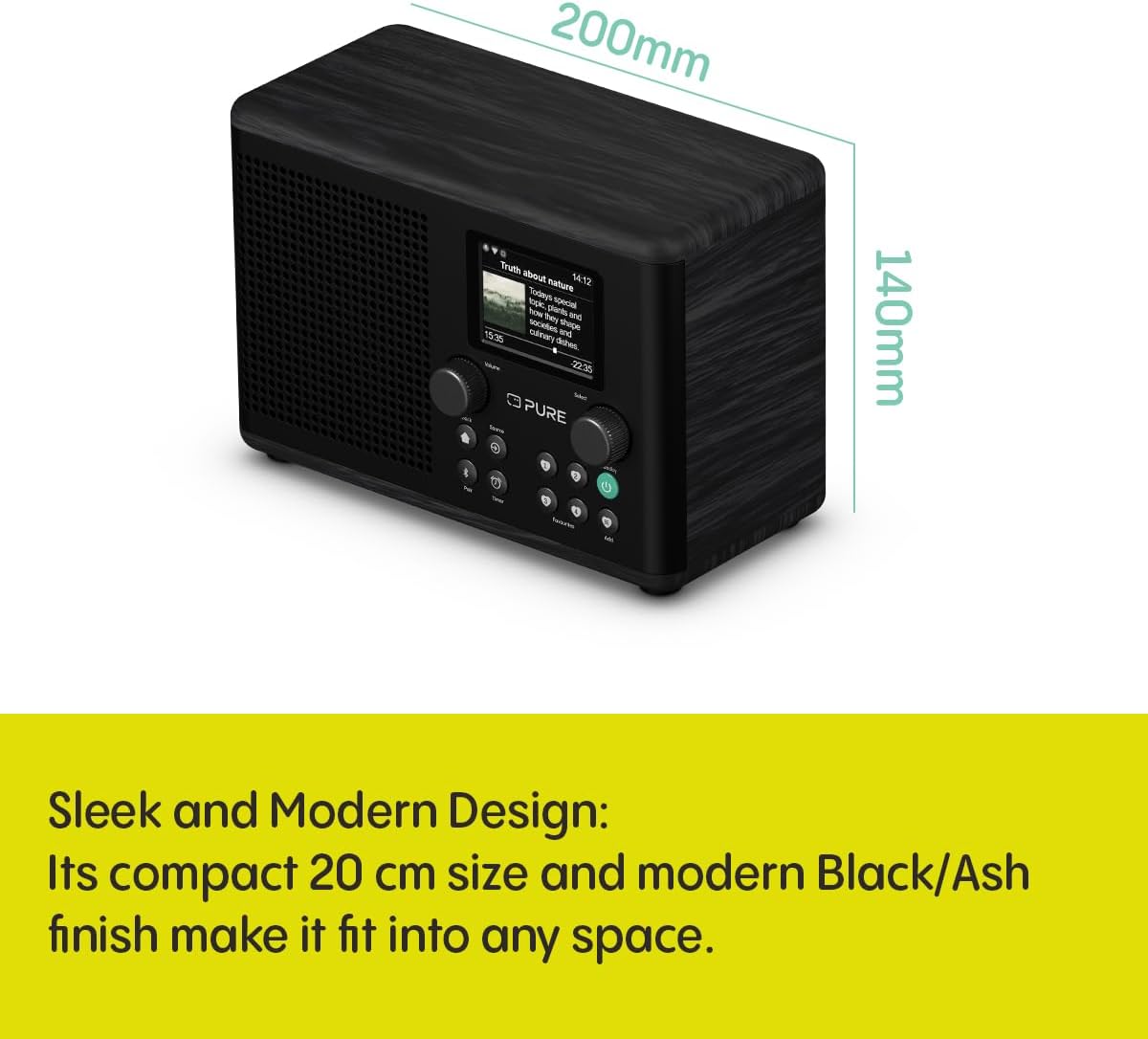
Figure 8: The Pure Classic H4i with its approximate dimensions indicated.
8. Bermea eta Laguntza
For warranty information, technical support, or service inquiries, please refer to the official Pure website or contact their customer support directly. The product typically comes with a manufacturer's warranty covering defects in materials and workmanship for a specified period from the date of purchase.
Mesedez, gorde zure erosketa-froga berme-erreklamazioetarako.
Sareko baliabideak: For the most up-to-date information, FAQs, and additional support, visit the Pure official webgunea: www.pure.com