
1. Produktua amaitu daview
The atomberg Studio Nexus 1200mm BLDC Ceiling Fan is designed for efficient air circulation and modern aesthetics. It features a Brushless Direct Current (BLDC) motor for energy savings, a BEE 5-star rating, and quiet operation. This fan includes a remote control for convenient adjustments and a unique Moonbeam Light function.
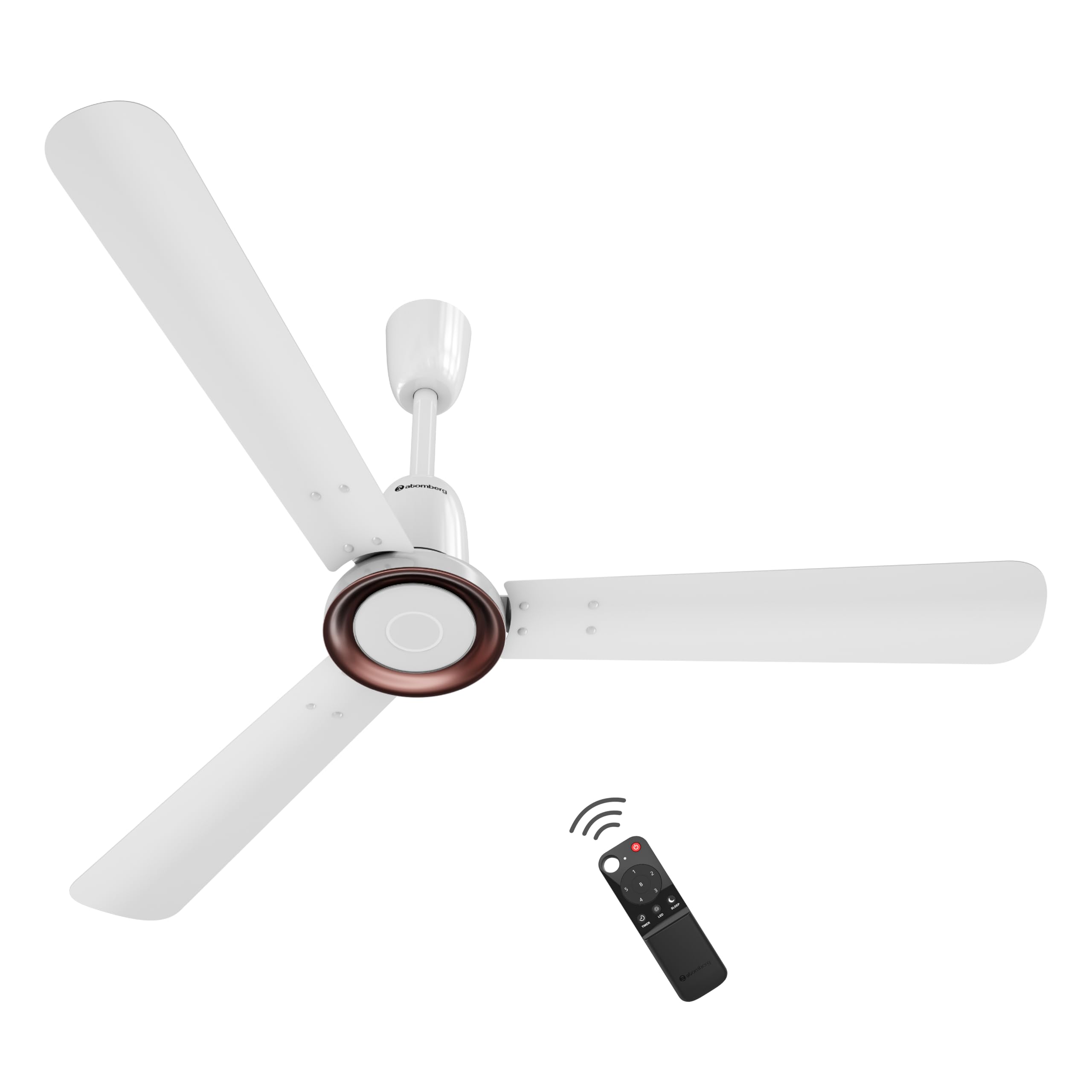
Figure 1: atomberg Studio Nexus 1200mm BLDC Ceiling Fan (Gloss White)
Ezaugarri nagusiak:
- Energy-Efficient BLDC Motor: Consumes only 35W at top speed, saving up to 65% electricity compared to unrated fans.
- BEE 5-Star Rated: Certified for high energy efficiency.
- High Air Delivery: Provides 230 CMM (Cubic Meters Per Minute) for optimal airflow.
- Zarata gutxiko funtzionamendua: Operates at less than 57 dB, ensuring a quiet environment.
- Smart IR Remote Control: Allows adjustment of speed, Boost Mode, Timer, and Sleep Mode.
- Moonbeam Light: Integrated night light with two intensity levels, providing visual feedback for remote commands.
- IoT konexioa: Supports smart control (details for app control are typically provided in a separate IoT guide).
- Diseinu minimalista modernoa: Features a premium metallic body trim and wide designer curved blades.

Figure 2: Advanced Air+ Technology for enhanced air delivery and comfort.

3 Irudia: Gainetikview of best-in-class performance, including remote operation, high air delivery, and low noise.
2. Segurtasun informazioa
Mesedez, irakurri arretaz segurtasun-argibide guztiak instalatu eta erabili aurretik. Gorde eskuliburu hau etorkizunean erreferentzia gisa.
- Ziurtatu energia-iturria deskonektatuta dagoela instalazioa, garbiketa edo mantentze-lanak egin aurretik.
- Instalazioa elektrizista kualifikatu batek egin behar du, tokiko araudi elektrikoen arabera.
- Mount the fan securely to a ceiling structure capable of supporting its weight.
- Keep hands, hair, and clothing clear of the fan blades during operation.
- Do not attempt to repair or modify the fan yourself. Contact customer support for assistance.
3. Paketearen edukia
Instalazioarekin jarraitu aurretik, egiaztatu osagai guztiak paketean daudela:
- Blade set (1 Unit)
- Remote (1 Unit)
- Motor box (1 Unit)
- Canopy set (1 Unit)
- Downrod (1 Unit)
- Shackle kit (1 Unit)
- Manual Leaflet & Warranty card (1 Unit)
4. Instalazioa
The atomberg Studio Nexus fan is designed for versatile installation, accommodating both standard and false/low ceilings.
Sabaiaren bateragarritasuna:
- For Standard Ceilings: Use both the bottom and top canopy for a complete finish.
- For Low Height or False Ceilings: An additional ceiling plate is provided. Use this ceiling plate with the bottom canopy for a flush installation.
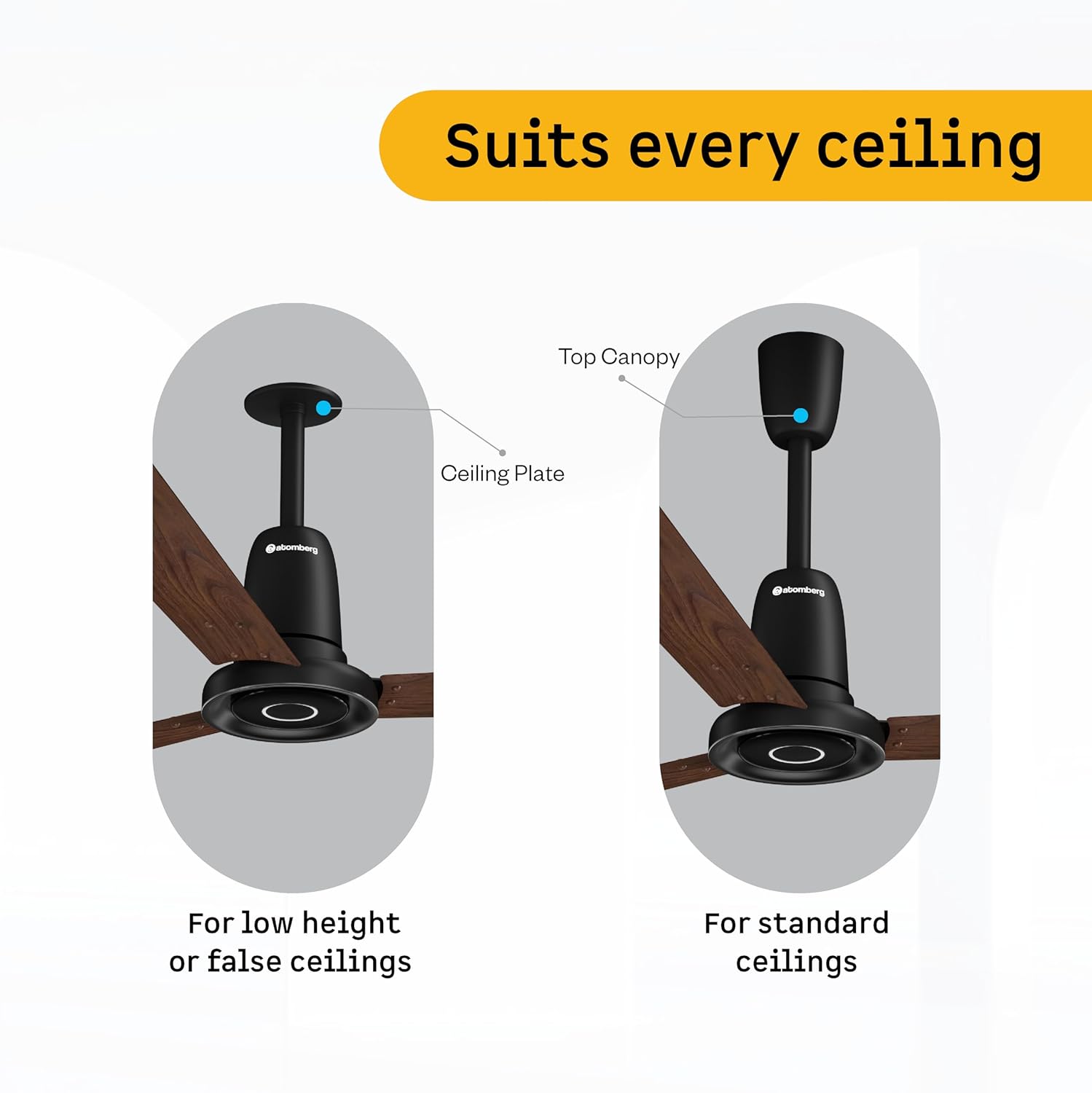
Figure 4: Illustration of ceiling fan installation for different ceiling types.
Detailed installation steps are provided in the included manual leaflet. It is recommended to have the fan installed by a professional.
5. Funtzionamendua
Control your atomberg Studio Nexus fan using the included Smart IR Remote or through IoT connectivity.
Urruneko kontrola erabiltzea:
The universal IR remote allows for easy control of various fan functions. No pairing is required.

Figure 5: Smart IR Remote Control for the Studio Nexus fan.
- Piztu/Itzali: Sakatu pizteko botoia haizagailua piztu edo itzaltzeko.
- Abiadura doitzea: Use the numbered buttons (1-6) to select your desired fan speed.
- Boost modua: Activates the highest fan speed for rapid cooling.
- Tenporizadore modua: Set the fan to switch off automatically after a pre-set number of hours.
- Lo egiteko modua: Gradually decreases the fan's speed every two hours for comfortable sleep.
- LED argiaren kontrola: Turn the Moonbeam Light ON or OFF.
Moonbeam Light Function:
The integrated Moonbeam Light serves as a night light and provides visual feedback.
- It has two intensity levels, adjustable via the remote.
- The light blinks in response to remote commands (e.g., power on/off, speed change, timer, sleep mode) to confirm action.
IoT and App Control:
For advanced control and smart home integration, refer to the dedicated IoT setup guide or the atomberg app for instructions on connecting and controlling your fan via a smart device.
6. Mantentzea
Mantentze-lan erregularrak zure haizagailuaren errendimendu optimoa eta iraupen luzea bermatzen ditu.
- Garbiketa: Aldian-aldian garbitu haizagailuaren palak eta motorraren karkasa zapi leun eta lehor batekinamp oihal. Ez erabili garbitzaile edo disolbatzaile urratzailerik.
- Palan ikuskatzea: Check blades for any damage or warping. Damaged blades can cause imbalance and noise.
- Muntaketa segurua: Ensure all mounting hardware remains tight and secure.
- Lubrifikazioa: The BLDC motor is designed for maintenance-free operation and does not require lubrication.
Deskonektatu beti energia garbiketa edo mantentze-lanak egin aurretik.
7. Arazoak
If you encounter issues with your atomberg Studio Nexus fan, refer to the following common troubleshooting tips:
- Fan ez da pizten:
- Check if the main power supply to the fan is on.
- Ziurtatu urrutiko agintearen bateriak ez daudela agortuta.
- Verify that the remote control is pointed directly at the fan's receiver.
- Haizagailuaren dardarak:
- Ensure all blade screws are tightened securely.
- Check that the downrod and mounting bracket are firmly attached to the ceiling.
- Verify that the blades are not bent or damaged.
- Urruneko kontrolak ez du erantzuten:
- Ordeztu urrutiko agintearen bateriak.
- Ziurtatu urruneko eta haizagailuaren artean oztoporik ez dagoela.
- Moonbeam Light Not Working:
- Check if the light function is enabled via the remote.
- Arazoak jarraitzen badu, jarri harremanetan bezeroarentzako laguntza-zerbitzuarekin.
For issues not covered here, please contact atomberg customer support.
8. Zehaztapenak
Detailed technical specifications for the atomberg Studio Nexus 1200mm BLDC Ceiling Fan:
| Ezaugarri | Zehaztapena |
|---|---|
| Marka | atomberg |
| Ereduaren izena | Studio Nexus |
| Kolorea | Zuri distiratsua |
| Haizagailu elektrikoaren diseinua | Sabaiko Fan |
| Energia iturria | Kable elektrikoa |
| Produktuaren neurriak (L x W x H) | 57D x 29Z x 25.5A zentimetro |
| Gela Mota | Logela, Jangela, Etxeko Bulegoa, Egongela, Ikasgela |
| Ezaugarri bereziak | BLDC Motor with Remote, Low noise, Boost Mode, Timer, Moonbeam Light |
| Muntatze Mota | Sabaiko Muntaia |
| Kontrolagailu mota | Button Control, Remote Control, App |
| Abiadura kopurua | 6 |
| Zarata Maila | 57 dezibelio |
| Wattage | 35 Watt |
| Pala kopurua | 3 |
| Aire Fluxuaren Ahalmena | 230 Cubic Meters Per Minute |
| Abiadura | 360 RPM |
| liburukiatage | 220 Volt |
| Barruko Kanpoko Erabilera | Barruan |
| Material Mota | Aluminioa |
| Pala Materiala | Aluminioa |
| Zehaztapena Met | BEE 5 Star |
| Pala Luzera | 1200 milimetro |
| Elementuaren pisua | 4.2 kilogramo |
| Jatorrizko Herrialdea | India |
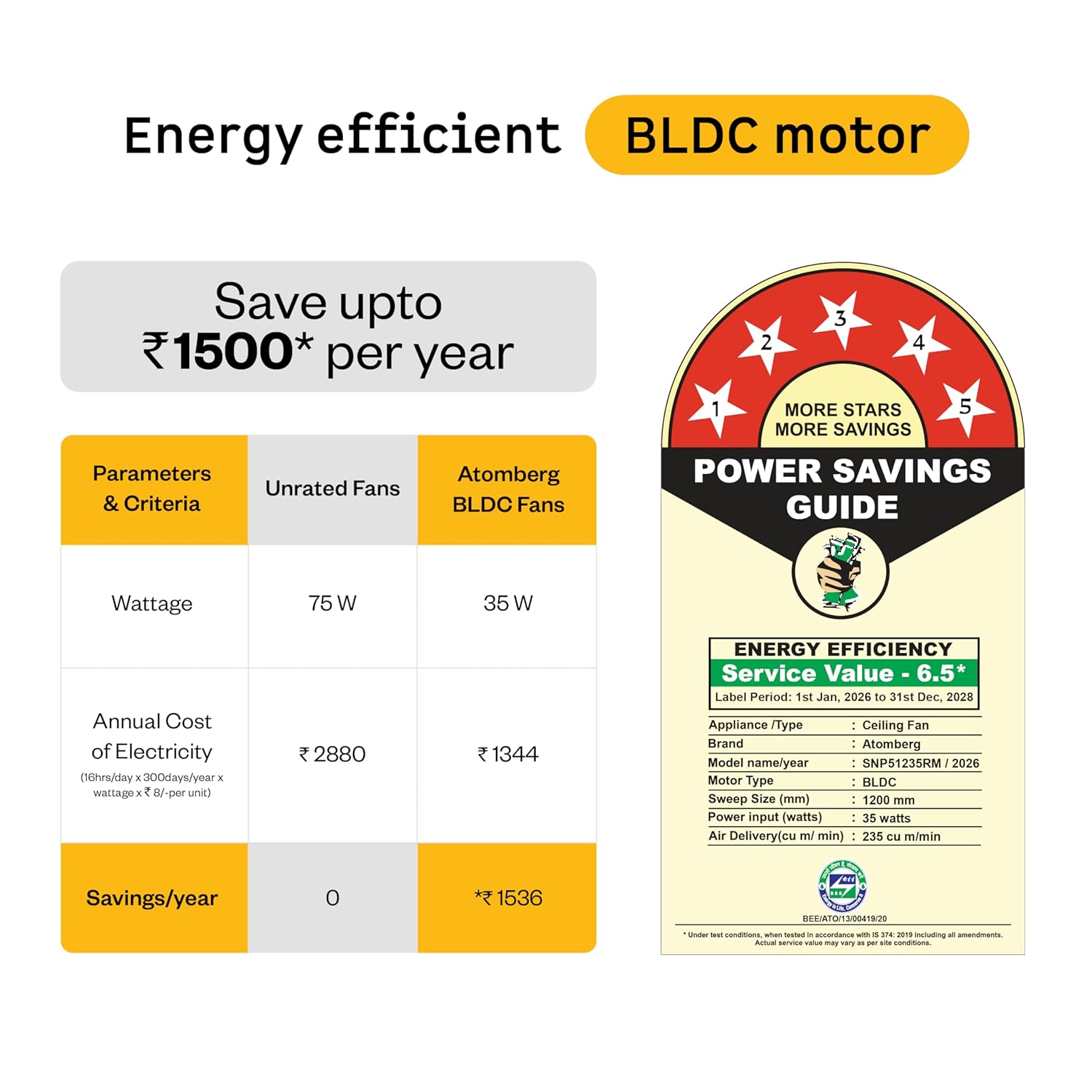
Figure 6: Energy Efficiency Guide for atomberg BLDC motor, highlighting 5-star rating and electricity savings.
9. Bermea eta Laguntza
Your atomberg Studio Nexus ceiling fan comes with comprehensive warranty coverage and dedicated customer support.
Bermearen informazioa:
- Berme estandarra: A 3-year warranty is included with your purchase.
- Berme Hedatua: An additional 2-year warranty can be availed by registering your product on the official atomberg website. This extends the total warranty period to 5 years.

Figure 7: Warranty details and registration process for extended coverage.
Bezeroarentzako laguntza:
For any queries, technical assistance, or warranty claims, please contact atomberg customer support:
- Posta elektronikoa: support@atomberg.com
- Telefonoa: 08448449442
- Webgunea: Visit the official atomberg website for product registration and further information.


