
Produktua amaituview
The GOBOULT Y1 Pro Wireless Earbuds are designed to provide a high-quality audio experience with features like extended playtime, clear calling, and low-latency gaming. This manual provides detailed instructions for setting up, operating, and maintaining your earbuds.

Irudia: Collage erakusketa batasing key features of the GOBOULT Y1 Pro Earbuds, including 60 hours playtime, Zen Quad Mic ENC, 45ms low latency gaming, 13mm bass drivers, Type-C fast charging, and Bluetooth 5.3.
Paketearen edukia
- GOBOULT Y1 Pro Wireless Earbuds
- Kargatzeko kaxa
- USB motako C kargatzeko kablea
- Belarri-kuxinak (tamaina desberdinak)
- Belarri-puntak (tamaina desberdinak)
- Berme Txartela
Konfigurazioa
1. Entzungailuak eta zorroa kargatzea
Before initial use, ensure both the earbuds and the charging case are fully charged. This optimizes battery life and performance.
- Connect the provided USB Type-C charging cable to the charging port on the case and to a compatible USB power adapter (not included).
- The LED indicator on the charging case will illuminate to show charging status.
- A full charge typically takes a few hours. A quick 10-minute charge can provide approximately 120 minutes of playtime.

Image: The GOBOULT Y1 Pro earbuds and charging case, illustrating the Type-C fast charging capability, where 10 minutes of charge provides 120 minutes of playtime.
2. Hasierako parekatzea
Jarraitu urrats hauek entzungailuak zure gailuarekin lehen aldiz parekatzeko:
- Remove any protective film from the charging contacts on the earbuds.
- Place both earbuds into the charging case and close the lid for a few seconds.
- Open the charging case lid. The earbuds will automatically power on and enter pairing mode, indicated by flashing LED lights.
- Zure telefonoan edo Bluetooth gaitutako beste gailu batean, joan Bluetooth ezarpenetara.
- Bilatu eskuragarri dauden gailuak eta hautatu "GOBOULT Y1 Pro"zerrendatik.
- Behin konektatuta, ahots-abisu batek parekatzea behar bezala egin dela baieztatuko du.

Image: A diagram illustrating the initial setup steps, including removing protective film and opening the case, along with a detailed guide to the touch controls for both left and right earbuds.
3. Berkonexio automatikoa
After initial pairing, the earbuds will automatically connect to the last paired device when removed from the charging case and Bluetooth is enabled on the device.

Image: GOBOULT Y1 Pro earbuds and charging case, demonstrating Bluetooth 5.3 for stable, efficient, and fast pairing with a connected smartphone.
Funtzionamendu-argibideak
Piztu/Itzali
- Piztu: Open the charging case lid. The earbuds will power on automatically. Alternatively, if outside the case, long press the touch area on both earbuds for 3 seconds.
- Itzali: Place both earbuds back into the charging case and close the lid. They will power off automatically. Alternatively, long press the touch area on both earbuds for 5 seconds.
Ukitu Kontrolak
The GOBOULT Y1 Pro earbuds feature intuitive touch controls for managing music, calls, and other functions. Refer to the diagram below and the following list for specific actions:
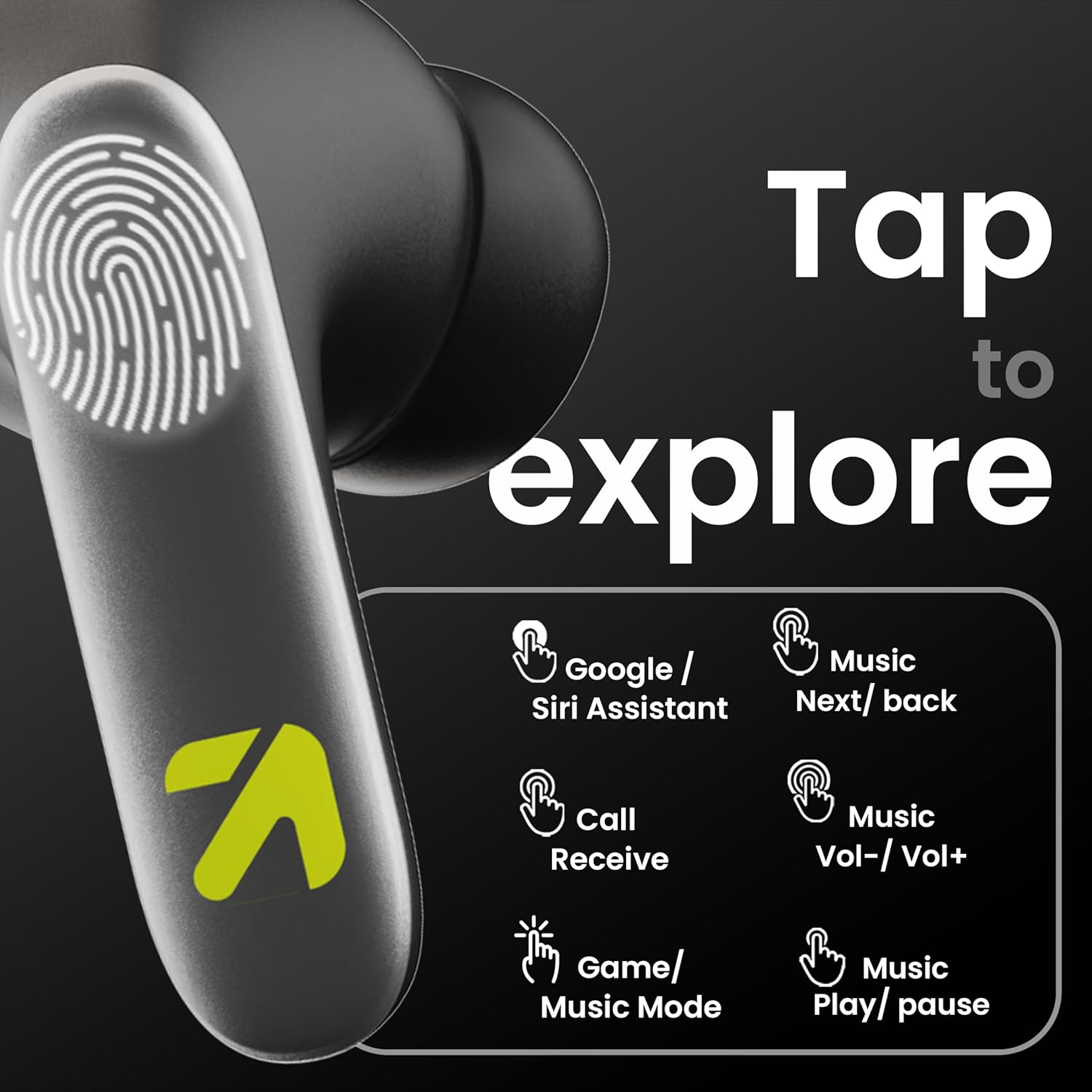
Image: A visual guide to the touch controls on the GOBOULT Y1 Pro earbuds, detailing actions for Google/Siri Assistant, music navigation, call management, volume control, and game/music mode switching.
- Single Tap (Left/Right): Musika erreproduzitu/pausatu, deia erantzun/amaitu.
- Sakatu birritan (ezkerreko aurikularra): Aurreko abestia.
- Sakatu birritan (eskuineko aurikularra): Hurrengo abestia.
- Hirukoitz Ukitu (Ezkerreko Aurikularra): Bolumena jaitsi.
- Hirukoitz ukitua (eskuineko entzungailua): Bolumena igo.
- Long Press (2 seconds, Left/Right): Reject incoming call, Activate Voice Assistant (Google/Siri).
- Four Taps (Left/Right): Activate/Deactivate Gaming Mode.
Joko modua
For an enhanced gaming experience, activate the ultra-low latency Gaming Mode:
- Aktibazioa: Tap the touch area four times on either earbud.
- Desaktibazioa: Tap the touch area four times again.

Image: GOBOULT Y1 Pro earbuds and charging case, highlighting the 45ms low latency gaming mode for real-time audio synchronization, activated by four taps.
Ahots Laguntzailea
Quickly access your device's voice assistant (Siri or Google Assistant) for hands-free control:
- Aktibazioa: Perform a long tap on the touch area of either earbud.

Image: Illustration showing how to access Siri or Google Assistant with a long tap on the earbud's touch sensor.
Ingurumeneko zarata baliogabetzea (ENC)
The GOBOULT Y1 Pro features Zen Quad Mic ENC technology, ensuring crystal-clear calls by effectively filtering out ambient noise from your surroundings.

Image: A diagram explaining how Environmental Noise Cancellation (ENC) works by isolating your voice from environmental noise, ensuring clear communication during calls.
Mantentzea
Garbiketa
- Garbitu aldizka entzungailuak eta kargatzeko zorroa oihal leun, lehor eta lihorik gabeko batekin.
- Ensure the charging contacts on both the earbuds and inside the case are free from dust and debris to maintain proper charging.
- Do not use abrasive cleaners, solvents, or harsh chemicals, as these may damage the product.
Uraren Erresistentzia
The GOBOULT Y1 Pro earbuds are rated IPX5 water-resistant. This means they are protected against low-pressure water jets from any direction, making them suitable for workouts and light splashes.
- Ez murgildu entzungailuak uretan.
- Avoid exposing them to heavy rain or extreme moisture.
- Ziurtatu entzungailuak lehor daudela kargatzeko zorroan berriro sartu aurretik, kalteak ekiditeko.

Image: GOBOULT Y1 Pro earbuds with water droplets, illustrating their IPX5 water resistance, providing protection against sweat and splashes.
Arazoak konpontzea
If you encounter any issues with your GOBOULT Y1 Pro earbuds, refer to the following common troubleshooting steps:
Aurikularrak ez dira parekatzen edo konektatzen
- Ziurtatu entzungailuek eta kargatzeko zorroak bateria nahikoa dutela.
- Turn off Bluetooth on your device, wait 5 seconds, then turn it back on.
- On your device, "Forget" or "Unpair" "GOBOULT Y1 Pro" from the Bluetooth list, then attempt the pairing process again.
- Place both earbuds back into the charging case, close the lid, wait 10 seconds, then open the lid to re-enter pairing mode.
Aurikular bakarra funtzionatzen du
- Ziurtatu bi entzungailuak kargatuta daudela.
- Jarri bi entzungailuak berriro kargatzeko zorroan, itxi tapa eta ireki berriro. Honek askotan berriro sinkronizatzen ditu.
- If the issue persists, try resetting the earbuds (refer to the manufacturer's webwebgunean berrezartzeko argibide zehatzak ikusteko, hemen zehaztu ez badira).
Soinuaren kalitate eskasa edo bolumen baxua
- Ensure the earbuds are properly seated in your ears to create a good seal. Try different sized eartips.
- Garbitu entzungailuen parrillatik geratzen diren hondakin guztiak.
- Check the audio source device's volume and sound settings.
- Hurbildu konektatutako gailura seinalearen interferentziak saihesteko.
Kargatzeko arazoak
- Ziurtatu kargatzeko kablea ondo konektatuta dagoela bai kaxara bai elikatze-iturrira.
- Try a different USB Type-C charging cable or power adapter.
- Garbitu entzungailuen eta kaxaren barruko kargatzeko kontaktuak kotoi-zapi lehor batekin.
Zehaztapenak
| Ezaugarri | Xehetasuna |
|---|---|
| Marka | GOBOULT |
| Ereduaren izena | AirBass |
| Bluetooth bertsioa | 5.3 |
| Belarrien Kokatzea | Belarrian |
| Zarata Kontrola | Ingurumeneko zarata baliogabetzea (ENC) |
| Audio kontrolatzailearen tamaina | 13 milimetro |
| Jolasaldi osoa | Gehienez 60 ordu (kargatzeko zorroarekin) |
| Latentzia baxua | 45ms (Joko modua) |
| Kargatzeko mota | C motako karga azkarra |
| Uraren Erresistentzia | IPX5 |
| Kontrol-metodoa | Ukitu |
| Gailu bateragarriak | Smartphone-ak, tabletak, ordenagailu eramangarriak, mahaigaineko ordenagailuak, bozgorailu adimendunak |
| Elementuaren pisua | 50 gramo |
| Jatorrizko Herrialdea | Txina |
Bermearen informazioa
The GOBOULT Y1 Pro Wireless Earbuds are covered by a Urtebeteko fabrikatzailearen bermea erosketa-datatik aurrera.
This warranty covers manufacturing defects. Please retain your proof of purchase for any warranty claims. The warranty does not cover damage caused by misuse, accidents, unauthorized modifications, or normal wear and tear.
Laguntza
Laguntza gehiago, laguntza teknikoa edo bermeari buruzko kontsultak egiteko, jarri harremanetan:
- Fabrikatzailea: Exotic Mile Private Limited, B-67 Wazirpur Industrial Area, New Delhi 110052
- Inportatzailea: Exotic Mile Pvt. Ltd. , B67 Wazirpur Industrial Area , New Delhi 110052
- For customer service contact details, please refer to the GOBOULT official webproduktua erosi duzun gunea edo plataforma.