
Sarrera
Thank you for choosing the Koolatron Kenmore Commercial 72 Cu.ft Upright Convertible Refrigerator/Freezer. This appliance is designed for commercial use, offering versatile temperature control for both refrigeration and freezing. To ensure optimal performance, safety, and longevity of your unit, please read this manual thoroughly before installation, operation, or maintenance.
This manual provides essential information regarding the setup, operation, maintenance, and troubleshooting of your Model KKPro3D66SS unit.
Segurtasun informazio garrantzitsua
Beti jarraitu oinarrizko segurtasun neurriak tresna elektrikoak erabiltzean, sute, deskarga elektriko edo lesio arriskua murrizteko.
- Segurtasun elektrikoa: Ziurtatu unitatea behar bezala lurrera konektatutako entxufe elektriko batera konektatuta dagoela, bolumen egokia duena.tage eta amperage as specified on the rating label. Do not use extension cords or adapter plugs.
- Aireztapena: Maintain adequate clearance around the unit for proper ventilation. Refer to the installation section for specific requirements.
- Material sukoiak: Do not store explosive substances or flammable materials inside or near the appliance.
- Garbiketa eta mantentze-lanak: Disconnect power before cleaning or performing any maintenance. Use non-flammable cleaning agents.
- Haurrak: Tresna hau ez da gaitasun fisiko, sentsorial edo mental murriztua duten edo esperientzia eta ezagutza falta duten pertsonek (haurrak barne) erabiltzeko, baldin eta haien segurtasunaz arduratzen den pertsona batek gailuaren erabilerari buruz gainbegiratu edo jarraibiderik eman ez badu.
- Etxetresna astuna: This unit is heavy. Use appropriate lifting techniques and equipment during installation and relocation to prevent injury. The pre-installed heavy-duty casters are for movement, but caution is still required.
Konfigurazioa eta Instalazioa
1. Deskargatzea
Carefully remove all packaging materials, including tape and protective films. Inspect the unit for any shipping damage. Report any damage to your supplier immediately.
2. Kokapen
- Place the unit on a strong, level surface capable of supporting its weight when fully loaded.
- Ensure adequate air circulation around the unit. Maintain a minimum clearance of 6 inches (15 cm) from walls or other obstructions on the sides and rear, and 12 inches (30 cm) above.
- Avoid direct sunlight or proximity to heat-generating appliances (e.g., ovens, stoves) to ensure efficient operation.
- The unit comes with pre-installed 4-inch heavy-duty casters with brakes for easy movement. Once positioned, engage the brakes to secure the unit.

Irudia: Aurrealdea view of the Kenmore Commercial Refrigerator/Freezer, showing its three doors and the lower ventilation grille. This illustrates the overall design and size for placement considerations.

Irudia: Atzealdea view of the Kenmore Commercial Refrigerator/Freezer, highlighting the back panel and showing the necessary clearance for ventilation.
3. Konexio elektrikoa
- Before plugging in, ensure the power supply matches the requirements listed on the unit's rating label.
- Plug the unit directly into a dedicated, grounded electrical outlet. Do not use multi-outlet adapters or extension cords.
- Allow the unit to stand upright for at least 2-4 hours before plugging it in to allow refrigerants to settle.
4. Hasierako Garbiketa
Lehenengo aldiz erabili aurretik, garbitu barneko eta kanpoko gainazalak detergente leun batekin eta ur epelarekin. Garbitu ondo eta lehortu zapi leun batekin.
5. Apalategien instalazioa
The unit includes 9 adjustable PE-coated steel shelves. Install them into the desired positions within the cabinet. Ensure shelves are securely seated before loading items.

Irudia: Gertutik view of the adjustable PE-coated steel shelves inside the unit, showing the vertical tracks for height adjustment. Each shelf can hold up to 100 lbs.
Funtzionamendu-argibideak
1. Kontrol panela baino gehiagoview
The external control panel features a digital display for monitoring and adjusting temperature settings. It allows for one-touch conversion between refrigeration and freezing modes.

Image: Digital control panel displaying temperature and mode indicators. Below it, a graphic illustrates the one-touch conversion between Freezer Mode (-5 to -13°F) and Refrigerator Mode (33 to 41°F).
2. Moduen arteko bihurketa
- Press the designated button on the control panel to switch between Freezer Mode and Refrigerator Mode.
- Izozteko modua: Maintains temperatures between -5°F to -13°F (-20°C to -25°C).
- Hozkailu modua: Maintains temperatures between 33°F to 41°F (0.5°C to 5°C).
- Allow several hours for the unit to reach the desired temperature after switching modes or initial power-on.
3. Tenperatura Doikuntza
- Use the UP and DOWN arrow buttons on the control panel to adjust the set temperature within the operating range of the selected mode.
- Press the "SET" button to confirm your selection.
4. Loading Guidelines
- Do not overload shelves. Each shelf has a maximum capacity of 100 lbs.
- Ensure proper air circulation inside the unit by not blocking the air vents.
- For optimal performance, allow hot food to cool before placing it inside the unit.

Irudia: Barnealdea view of the unit with doors open, showing multiple shelves filled with various food containers and products, demonstrating its spacious storage capacity.
5. Atearen funtzionamendua
- The self-closing solid doors help maintain internal temperatures.
- For loading and unloading large items, the doors feature a 90-degree stay-open function. Push the door fully open until it locks into position. Gently pull to close.
- The locking doors provide added security for stored items.

Irudia: Albokoa view of the Kenmore Commercial Refrigerator/Freezer, showing the depth of the unit and the robust construction of the stainless steel doors.
6. LED Argiztapena
The unit is equipped with bright LED lighting inside, ensuring clear visibility of the entire interior for easy item location and access.
Mantentzea
Regular maintenance ensures the efficient and long-lasting operation of your appliance.
1. Barnealdea eta kanpoaldea garbitzea
- Deskonektatu beti energia garbitu aurretik.
- Clean interior surfaces, including shelves, regularly with a mild, non-abrasive detergent and warm water. Rinse and dry thoroughly.
- The stainless steel exterior can be cleaned with a soft cloth and a stainless steel cleaner. Avoid abrasive cleaners or scouring pads.
2. Kondentsadorearen bobina garbitzea
The condenser coil should be cleaned periodically (every 3-6 months, depending on environment) to maintain efficiency. The removable installation board provides easy access to the condenser coil.
- Deskonektatu energia unitateari.
- Locate and remove the installation board (usually at the bottom front or rear).
- Use a stiff brush or vacuum cleaner with a brush attachment to remove dust and debris from the condenser fins. Be careful not to bend the fins.
- Reinstall the board and reconnect power.
3. Desizozte automatikoa
This unit features an auto defrost design, which helps reduce ice buildup and freezer burn, enhancing efficiency. No manual defrosting is typically required under normal operating conditions.
4. Door Gasket Inspection
Regularly inspect door gaskets for cracks, tears, or signs of wear. Damaged gaskets can lead to air leaks and reduced efficiency. Clean gaskets with warm, soapy water and ensure they seal properly when the doors are closed.
Arazoak konpontzeko gida
Zerbitzuarekin harremanetan jarri aurretik, berriroview arazo eta irtenbide ohikoenak hauek dira:
| Arazoa | Kausa posiblea | Irtenbidea |
|---|---|---|
| Unitateak ez du funtzionatzen | Ez dago energia-iturririk; etengailu magnetotermikoa jauzi egin du; kablea deskonektatuta. | Check power connection; reset circuit breaker; ensure cord is securely plugged in. |
| Unit is not cooling sufficiently | Temperature set too high; condenser coil dirty; door left open; excessive loading; poor ventilation. | Adjust temperature setting; clean condenser coil; ensure doors are closed properly; reduce load; check for adequate clearance. |
| Gehiegizko zarata | Unitatea ez dago maila berean; osagaiak solteak; haizagailua oztopatua. | Ensure unit is level and casters are locked; check for loose parts; inspect fan for obstructions. |
| Ura zoruan (ihesa) | Drain pan overflowing; clogged drain line. | Check and empty drain pan if accessible; clear any obstructions in the drain line. |
| Digital display error | Sensor malfunction; temporary electrical glitch. | Try power cycling the unit (unplug for 5 minutes, then plug back in). If error persists, contact service. |
Irtenbide hauek saiatu ondoren arazoak konpontzen ez badira, jarri harremanetan bezeroarentzako arreta-zerbitzuarekin.
Produktuaren zehaztapenak
| Ezaugarri | Xehetasuna |
|---|---|
| Modelo zenbakia | KKPro3D66SS |
| Edukiera | 72 Oin kubikoa |
| Produktuaren neurriak (L x W x H) | 31.5" x 82.56" x 83.07" |
| Pisua | 564.5 kilo |
| Marka | Koolatron |
| Kolorea | Altzairu herdoilgaitza |
| Atearen Material Mota | Altzairu herdoilgaitza |
| Hozkailuaren tenperatura-tartea | 33 °F eta 41 °F (0.5 °C eta 5 °C) |
| Izozkailuen Tenperatura Tartea | -5 °F eta -13 °F (-20 °C eta -25 °C) |
| Konpresorea | Cubigel |
| Hozgarria | R290 Hidrokarburoa |
| Apalategiak | 9 Adjustable PE-Coated Steel, 100 lbs capacity each |
| Gurpilak | 4" Heavy-Duty with Brakes (pre-installed) |
| Ziurtagiriak | ETL-certified for safety and sanitation |
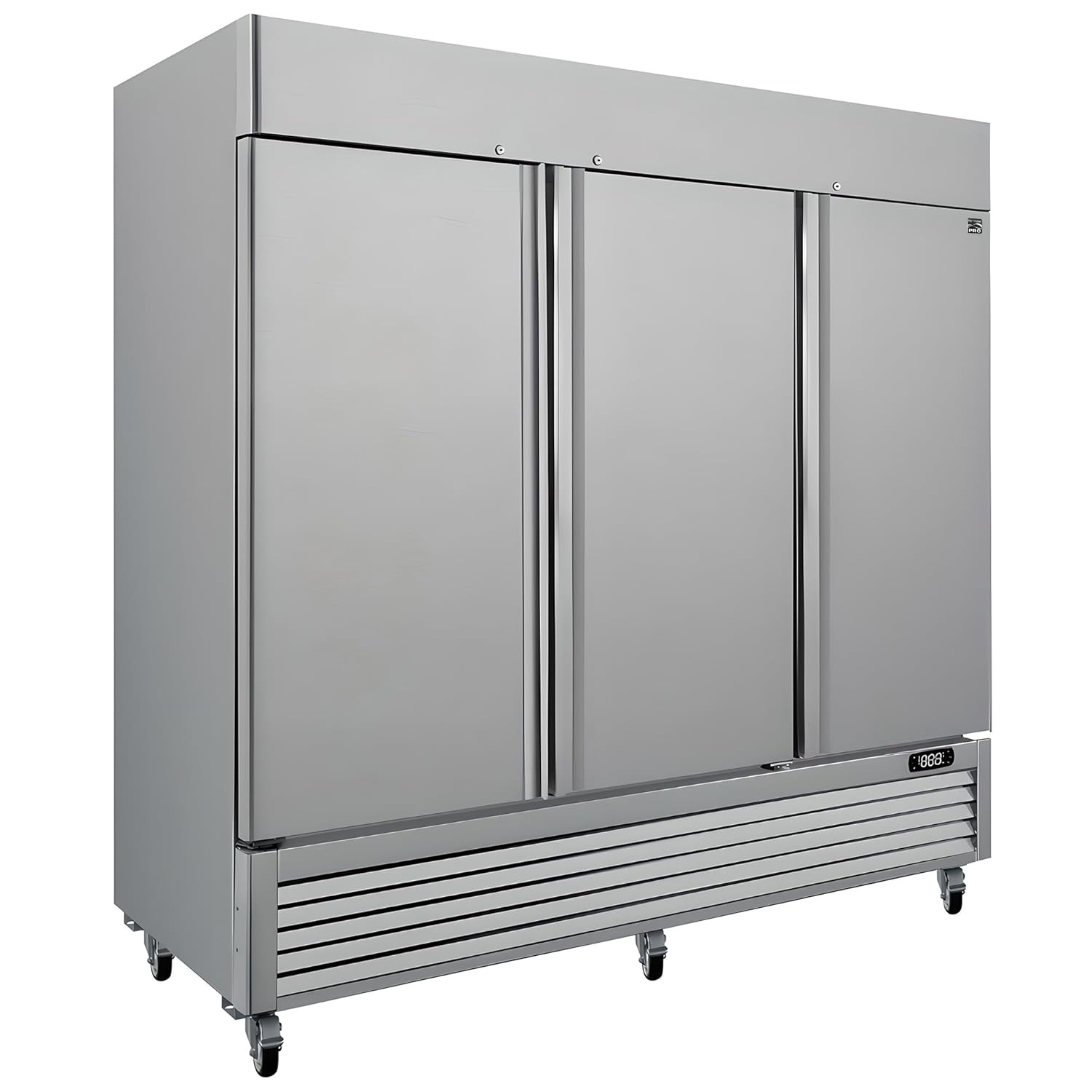
Image: An overall perspective view of the Kenmore Commercial Refrigerator/Freezer, showcasing its full size and stainless steel finish, including the digital display and casters.

Irudia: Barnealdea view of the unit with doors open, showing the empty adjustable shelves ready for loading. This highlights the internal configuration and spaciousness.
Kutxan dagoena
- 1 x Koolatron Kenmore Commercial 72 Cu.ft Upright Convertible Refrigerator/Freezer Unit
- 9 x Removable PE-Coated Steel Shelves
Bermea eta Bezeroarentzako Arreta
The Kenmore Pro 72 Cu.ft Commercial Freezer/Refrigerator comes with a 2 urteko berme integrala. This warranty covers defects in materials and workmanship under normal use. For warranty claims, technical assistance, or any questions not covered in this manual, please contact Koolatron customer support.
Please have your model number (KKPro3D66SS) and purchase date available when contacting support.