
Sarrera
Thank you for choosing the CHUWI Wireless Mouse S1. This 2.4GHz USB computer mouse is designed for comfort and efficiency, featuring a 1600 DPI optical sensor with 3-level adjustable DPI settings, long battery life, and broad compatibility with various devices. This manual provides essential information for setting up, operating, maintaining, and troubleshooting your new wireless mouse.
Paketearen edukia
Mesedez, egiaztatu elementu guztiak zure paketean daudela:
- CHUWI Wireless Mouse
- USB hargailua
- Erabiltzailearen Dokumentazioa
- AA bateria 1 (aurrez instalatuta edo aparte sartuta)
Konfigurazio Gida
Follow these steps to set up your CHUWI Wireless Mouse S1:
- Aurkitu USB hargailua: Gently remove the bottom cover of the mouse by sliding it downward. The USB receiver and the battery compartment are located inside.
- Instalatu bateria: Insert the provided AA battery into the battery compartment, ensuring correct polarity.
- Retrieve the USB Receiver: Take out the small USB receiver from its storage slot.
- Konektatu zure gailura: Konektatu USB hargailua zure ordenagailuko, ordenagailu eramangarriko edo tabletaren USB ataka libre batera.
- Itxi azala: Replace the bottom cover of the mouse.
- Piztu: Slide the power switch at the bottom of the mouse to the "on" position. The mouse should now be ready for use.

Figure 1: Locating the USB receiver and installing the AA battery.
Funtzionamendu-argibideak
Sagua konektatzen
The CHUWI Wireless Mouse S1 uses 2.4G wireless technology for a stable connection up to 33 feet (10 meters). Once the USB receiver is plugged into your device and the mouse is powered on, it will automatically establish a connection. No complex pairing is required.

Figure 2: Establishing a 2.4G wireless connection.
DPI doikuntza
The mouse features three adjustable DPI (Dots Per Inch) settings: 800, 1200, and 1600. To switch between DPI levels, simply press the DPI button located below the scroll wheel. Each press cycles through the available settings, allowing you to adjust cursor sensitivity for different tasks such as general browsing, office work, graphic design, or gaming.

Figure 3: Adjusting DPI settings with the dedicated button.
Nabigazio-botoiak
The mouse is equipped with convenient forward and back buttons on the side. These buttons allow for quick navigation through web pages, documents, and folders, enhancing your workflow efficiency.
Klik isilaren funtzioa
The CHUWI Wireless Mouse S1 is designed with silent click buttons, making it suitable for quiet environments such as libraries, offices, or late-night use. This feature minimizes click noise without compromising tactile feedback.

Figure 4: The silent click feature for quiet operation.
Diseinu Ergonomikoa
The mouse features an ergonomic design that conforms to the natural curve of your hand, providing a comfortable grip for extended use. Its compact and lightweight build, along with rubber-coated side grips, helps reduce hand fatigue. The design is ambidextrous, accommodating both left-handed and right-handed users.

5. irudia: Erabilera erosoa lortzeko diseinu ergonomikoa.
Bateriaren informazioa
The CHUWI Wireless Mouse S1 is powered by a single AA battery, offering an approximate battery life of 12-15 months. The mouse is designed for convenience with no on/off switch; simply pick it up and start using it. This design eliminates the need for frequent charging, providing hassle-free use for mobile work and daily tasks.
Mantentzea
To ensure optimal performance and longevity of your CHUWI Wireless Mouse S1:
- Garbiketa: Erabili zapi leun eta lehor bat saguaren gainazala garbitzeko. Zikinkeria egoskorra bada, garbitu pixka bat.ampGarbitu zapi bat urarekin edo garbiketa-soluzio leun batekin. Saihestu produktu kimiko gogorrak edo material urratzaileak erabiltzea.
- Sentsoreen mantentze-lanak: Periodically clean the optical sensor area at the bottom of the mouse with a cotton swab to prevent dust buildup, which can affect tracking performance.
- Biltegiratzea: When not in use for extended periods, consider removing the AA battery to prevent potential leakage. Store the USB receiver in its designated slot within the mouse to prevent loss.
- Ingurumena babestea: The mouse features a splash-proof and dust-proof design, contributing to its durability. However, avoid exposing it to excessive moisture or dust.
Arazoak konpontzea
If you encounter issues with your CHUWI Wireless Mouse S1, refer to the following common solutions:
- Saguak ez du erantzuten:
- Ensure the AA battery is correctly installed and has sufficient charge. Replace the battery if necessary.
- Egiaztatu USB hargailua ondo konektatuta dagoela ordenagailuko USB ataka funtzional batean. Saiatu beste USB ataka batekin.
- Make sure the mouse's power switch (if present, though this model is designed to be always on when battery is inserted) is in the 'on' position.
- Berrabiarazi ordenagailua.
- Kurtsorearen mugimendu irregularra:
- Garbitu saguaren beheko aldean dagoen sentsore optikoa.
- Ziurtatu sagua gainazal egoki batean erabiltzen ari zarela. Gainazal oso islatzaileek edo gardenek jarraipena eragin dezakete. Sagu-alfonbra bat erabiltzea gomendatzen da.
- Check for interference from other wireless devices. Move the mouse closer to the USB receiver.
- Konexio-arazoak:
- If the connection is unstable, try plugging the USB receiver into a different USB port, preferably one closer to the mouse.
- Ziurtatu saguaren eta hargailuaren artean seinalea oztopatu dezaketen metalezko objektu handirik ez dagoela.
- Botoiak ez funtzionatzen:
- Check if the mouse is properly connected and powered on.
- Probatu sagua beste ordenagailu batean arazoa saguarekin edo ordenagailuaren ezarpenekin den zehazteko.
Zehaztapenak
Detailed specifications for the CHUWI Wireless Mouse S1:
| Produktuaren neurriak | 3.89 x 2.36 x 0.04 hazbete |
| Elementuaren pisua | 1.76 ontza |
| Elementuaren eredu-zenbakia | CHUWI Wireless Mouse S1 |
| Pilak | 1 AA bateria (barne) |
| Konektibitate Teknologia | 2.4G Haririk gabekoa (USB Hartzailea) |
| Mugimenduak detektatzeko teknologia | Optikoa |
| DPI ezarpenak | 800, 1200, 1600 (erregulagarria) |
| Botoiak | 4 (Left, Right, Scroll Wheel/Middle, DPI, Forward, Back) |
| Kolorea | Beltza |
| Bateragarritasuna | PC, Mac, Laptop, Windows Tablets (Universal USB interface) |
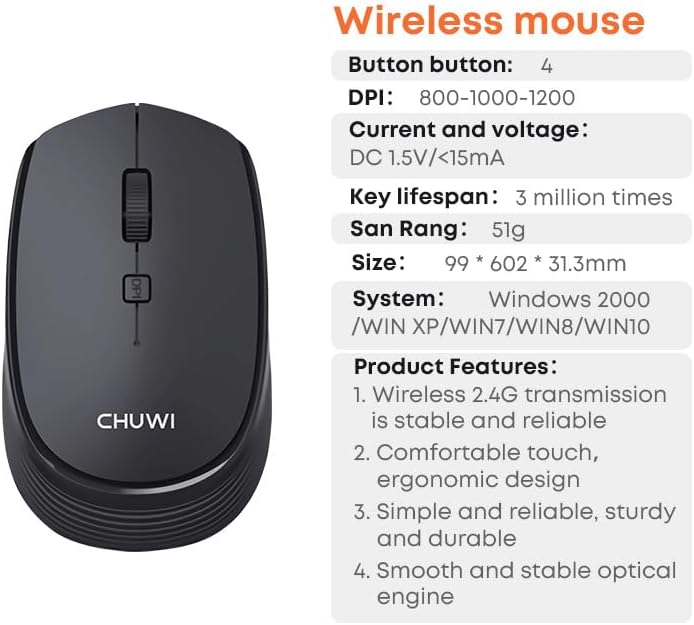
Figure 6: CHUWI Wireless Mouse S1 and its key specifications.
Bermea eta Laguntza
CHUWI is committed to providing high-quality products and excellent customer service. While specific warranty details for this mouse are not provided, CHUWI generally offers professional support for its products.
- Laguntza profesionala: CHUWI offers lifetime factory professional support.
- Lineako laguntza: 24 hours of online support is available to assist with any issues or questions you may have.
For further assistance, please visit the official CHUWI webgunera edo jarri harremanetan zuzenean bezeroarentzako arreta-zerbitzuarekin.