
1. Produktua amaitu daview
The XUMO Stream Box Remote is designed to provide effortless navigation and control for your XUMO streaming experience. It offers quick access to channels, shows, and applications, enhancing your entertainment system.

1.1. irudia: Aurrealdea view of the XUMO Stream Box Remote, showcasing its button layout including power, input, volume, navigation, and dedicated app buttons.
Ezaugarri nagusiak:
- Bateragarritasun Unibertsala: Designed to work seamlessly with a range of smart TVs, allowing control of both your TV and streaming services.
- Long-Range Performance: Provides reliable connection and performance across the room.
- Sleek, Ergonomic Design: Crafted for comfort, lightweight, and fits comfortably in hand.
2. Konfigurazio gida
2.1 Pilak sartzea
The XUMO Stream Box Remote requires 2 AAA bateria for operation. Follow these steps to insert them correctly:
- Kokatu bateriaren konpartimentuaren estalkia urrutiko agintearen atzealdean.
- Irristatu estalkia beherantz edo sakatu pestilloa (baldin badago) konpartimentua irekitzeko.
- Sartu bi AAA pila, ziurtatuz terminal positiboa (+) eta negatiboa (-) konpartimentuaren barruko markekin lerrokatuta daudela.
- Itxi bateriaren konpartimentuaren estalkia berriro bere lekuan jarriz, ondo klik egin arte.

2.1. irudia: Aurrealdea eta atzealdea view of the XUMO Stream Box Remote. The back view illustrates the location of the battery compartment.
2.2 Initial Pairing/Connection
In most cases, the XUMO Stream Box Remote is designed to connect automatically with your XUMO Stream Box or compatible smart TV upon battery insertion. If the remote does not respond immediately, follow these general steps:
- Ensure your XUMO Stream Box or TV is powered on.
- Zuzendu urrutiko agintea gailurantz.
- Press any button (e.g., the Home button or Power button) to initiate the connection.
- If the remote still does not respond, navigate to your TV's or Stream Box's settings menu (using an existing remote or on-device controls) and look for a 'Remote Control' or 'Bluetooth Devices' section to manually pair the new remote. Some users have reported success by pressing various buttons randomly around the center of the remote until a setup message appears on screen.
3. Funtzionamendu-argibideak
3.1 Botoien funtzioak
Familiarize yourself with the various buttons on your XUMO Stream Box Remote:
- Pizteko botoia: Konektatutako gailua piztu edo itzaltzen du.
- Sarrerako botoia: Cycles through available input sources (HDMI 1, HDMI 2, etc.).
- Bolumena igo/behera: Audioaren bolumena doitzen du.
- Mututu botoia: Audioa desaktibatu edo aktibatzen du.
- Nabigazio-panela (zirkularra): Used to move up, down, left, and right within menus and content.
- OK/Select Button (Center of Navigation Pad): Hautaketak berresten ditu.
- Atzera botoia: Aurreko pantailara edo menura itzultzen da.
- Hasierako botoia: Returns to the main home screen of your XUMO Stream Box.
- Dedicated App Buttons (Netflix, Peacock, Prime Video, Xumo): Streaming aplikazio hauetarako sarbide zuzena eskaintzen du.
- Zenbaki-teklatua (0-9): Used for direct channel entry or other numerical inputs.
- Voice Control Button (Microphone Icon): Bilaketa eta kontrolerako ahots-komandoak aktibatzen ditu.
3.2 Oinarrizko nabigazioa
To navigate menus and select content:
- Erabili Nabigazio Pad to move the cursor or highlight items on the screen.
- Sakatu Ados/Hautatu botoia to open an app, select a movie, or confirm an action.
- Sakatu Atzera botoia to go back one step in the menu hierarchy.
- Sakatu Hasierako botoia to return to the main XUMO home screen at any time.
3.3 Ahots kontrola
To use voice commands:
- Eduki sakatuta Ahots kontrolatzeko botoia (microphone icon).
- Hitz egin argi urrutiko agintearen mikrofonoan.
- Release the button when you have finished speaking.
Examples of voice commands include: "Open Netflix," "Bilatu action movies," "Go to channel 5," or "Turn up the volume."
4. Mantentzea
4.1 Urrutiko agintea garbitzea
Urrutiko agintearen itxura eta funtzionaltasuna mantentzeko:
- Garbitu urrutiko agintea oihal leun eta lehor batekin.
- Zikinkeria egoskorrerako, apur bat lehortuampeu zapi urarekin edo garbitzaile leun eta ez urratzaile batekin.
- Do not use harsh chemicals or abrasive materials, as they may damage the remote's surface or internal components.
4.2 Bateria ordezkatzea
Replace the batteries when the remote's response becomes sluggish or it stops functioning. Refer to Section 2.1 for detailed instructions on inserting batteries.
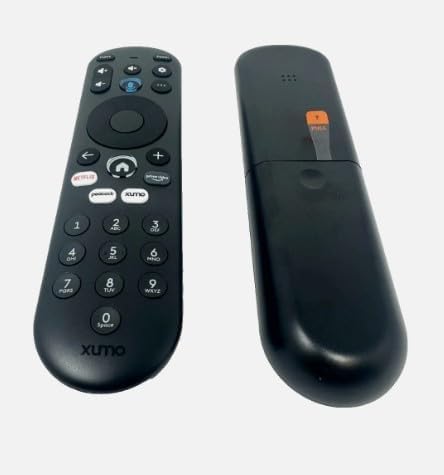
4.1 irudia: Albokoa view of the XUMO Stream Box Remote, illustrating its ergonomic design.
5. Arazoak
If you encounter issues with your XUMO Stream Box Remote, try the following troubleshooting steps:
| Arazoa | Kausa posiblea | Irtenbidea |
|---|---|---|
| Urrunekoak ez du erantzuten | Dead or incorrectly inserted batteries; remote out of range; obstructed signal. | Replace batteries, ensuring correct polarity. Move closer to the device. Remove any objects blocking the line of sight between the remote and the device. |
| Remote not pairing/connecting | Initial pairing failed; interference. | Ensure the device is on. Try pressing various buttons on the remote to initiate connection. If necessary, manually pair through your TV/Stream Box settings (e.g., Bluetooth devices). |
| Limited functionality (e.g., only power works) | Partial pairing; device-specific settings. | Ensure the remote is fully paired. Check your TV/Stream Box settings for remote control options or universal remote setup. Some TVs may require manual power-on before the remote can control other functions. |
6. Produktuaren zehaztapenak
| Zehaztapena | Xehetasuna |
|---|---|
| Produktuaren neurriak | 7 x 2.5 x 7 hazbete |
| Elementuaren pisua | 4 ontza |
| Modelo zenbakia | *Remote. SCXI11BEI |
| Beharrezko bateriak | 2 AAA bateria (ez daude barne) |
| Gailu bateragarriak | Streaming Device (XUMO Stream Box, compatible Smart TVs) |
| Onartutako gailuen gehienezko kopurua | 2 |
| Kolorea | BELTZA |
| Ezaugarri Berezia | Arinak |
| Fabrikatzailea | XUMO |
| Marka | Generikoa |
7. Bermea eta Laguntza
This product is manufactured by XUMO and sold under the Generic brand. For specific warranty information, please refer to the retailer or the original purchase documentation. For technical support or further assistance, please contact the seller or refer to the support resources provided with your XUMO Stream Box.
Please note that while this remote is designed for broad compatibility, specific features and pairing methods may vary slightly depending on your XUMO Stream Box model or connected smart TV.