
for Keeson MC120PR (JLDP 15.020.035)
Ordezko urrutiko agintearen erabiltzailearen eskuliburua
Eredua: for Keeson MC120PR (JLDP 15.020.035)
Marka: Generikoa
Sarrera
This manual provides essential information for the proper use, setup, and maintenance of your new replacement remote control for adjustable bed bases. This remote is specifically designed for compatibility with the Keeson MC120PR (JLDP 15.020.035) control box. Please read this manual thoroughly before attempting to use the remote control.
Bateragarritasun Informazio Garrantzitsua
This remote control is NOT universal.
It is crucial to verify compatibility with your existing adjustable bed base control box. This remote is only compatible with control boxes manufactured by Keeson with the model number MC120PR (JLDP 15.020.035).
Before attempting to use this remote, ensure your control box model number matches exactly. If you are unsure, it is recommended to provide clear photos of your control box and old remote control (front and back), including any product numbers found in the battery compartment, to the supplier for verification.

1. irudia: Adibample of control box label and remote control for compatibility verification.
Konfigurazioa
1. Bateriaren instalazioa
The remote control requires 2 AAA batteries (not included). To install:
- Kokatu bateriaren konpartimentuaren estalkia urrutiko agintearen atzealdean.
- Irristatu estalkia beherantz konpartimentua irekitzeko.
- Sartu 2 AAA pila, konpartimentuaren barruan adierazten den polaritate zuzena (+/-) ziurtatuz.
- Jarri bateriaren konpartimentuaren estalkia gora irristatuz, bere lekuan sartu arte klik egin arte.
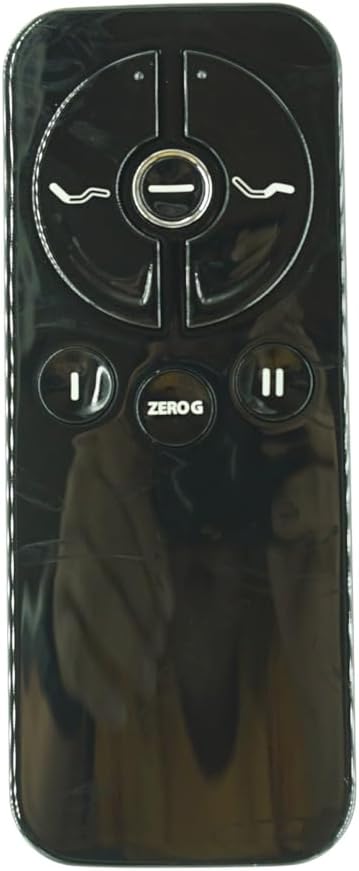
Figure 2: Remote control battery compartment.
2. Urruneko agintea parekatzea
The remote control must be paired with your adjustable bed base's control box before first use. The pairing distance between the remote and control box should be less than 2 meters (approximately 6.5 feet).
- Deskonektatu korronte-kablea hormako entxufetik.
- Itxaron 5 segundo gutxi gorabehera.
- Konektatu berriro kablea entxufera.
- Within 10 seconds of plugging in the power cord, locate the PAIR button on the back of the remote control.
- Press and hold the PAIR button on the remote. The PAIR button will illuminate blue and begin flashing.
- Continue holding the PAIR button until the LED light on the control box goes out, indicating successful pairing.
- Release the PAIR button. The remote is now paired with the adjustable base.
- Test all remote functions to confirm successful pairing.

Figure 3: Visual guide for pairing process, showing remote and control box LED.
Funtzionamendu-argibideak
The remote control features intuitive buttons for adjusting your bed base. Familiarize yourself with the button layout:

Figure 4: Remote Control Front View.
- Burua gora/behera botoiak: Control the elevation of the head section of the bed.
- Oina gora/behera botoiak: Control the elevation of the foot section of the bed.
- ZERO G Button: "Zero Grabitatea" aurrezarritako posizioa aktibatzen du, eta horrek burua eta oina bizkarreko presioa arintzeko posizio batera igotzen ditu.
- Flat Button (if applicable): Returns the bed to a flat position. (Note: This specific remote image does not clearly show a dedicated flat button, but it's a common feature. Refer to your bed base manual for specific functions.)
Press and hold the desired button to move the bed section. Release the button when the desired position is reached.
Mantentzea
Zure urrutiko agintearen iraupena eta funtzionamendu egokia bermatzeko:
- Keep the remote clean by wiping it with a soft, dry cloth. Avoid using liquid cleaners or abrasive materials.
- Do not expose the remote to excessive moisture, heat, or direct sunlight.
- Urrutiko agintea denbora luzez erabiliko ez baduzu, kendu pilak isuriak saihesteko.
- Handle the remote with care to avoid dropping it or subjecting it to strong impacts.
Arazoak konpontzea
Urrunekoek ez dute erantzuten:
- Egiaztatu bateriak: Ziurtatu bateriak behar bezala instalatuta daudela eta ez daudela agortuta. Beharrezkoa bada, ordezkatu AAA bateria berriekin.
- Re-Pair Remote: Follow the "Pairing the Remote Control" steps in the Setup section to re-establish connection with the control box.
- Power Cycle Bed Base: Unplug the bed base from the power outlet for 30 seconds, then plug it back in. This can reset the control box.
- Oztopoak: Ensure there are no objects blocking the signal path between the remote and the control box.
Bed Base Not Moving:
- Egiaztatu potentzia: Verify the bed base is properly plugged into a working electrical outlet.
- Control Box Status: Check the LED indicator on the control box (if present) for any error codes or status lights. Refer to your bed base's original manual for control box specific troubleshooting.
- Gainkarga babesa: Some bed bases have overload protection. If the motor has been running continuously for an extended period, it may temporarily shut off. Allow it to cool down before attempting to operate again.
If problems persist after following these steps, contact the product supplier or a qualified technician for assistance.
Zehaztapenak
| Ezaugarri | Xehetasuna |
|---|---|
| Modelo zenbakia | for Keeson MC120PR (JLDP 15.020.035) |
| Marka | Generikoa |
| Gailu bateragarriak | Adjustable bed base with Keeson MC120PR (JLDP 15.020.035) control box |
| Energia iturria | 2 x AAA bateria (ez daude barne) |
| Kolorea | Beltza |
| Ezaugarri Berezia | Not Universal, specific compatibility required |
Bermea eta Laguntza
For warranty information or technical support, please refer to the documentation provided with your original adjustable bed base or contact the seller directly. It is recommended to have your product model number and purchase details ready when seeking support.
Erlazionatutako dokumentuak - for Keeson MC120PR (JLDP 15.020.035)
 |
KEESON MC120PR kontrol-kutxaren zehaztapenak eta gehiagoview Zehaztapen zehatzak eta gehiagoview of the KEESON MC120PR Control Box, including input/output, serial number, FCC/IC IDs, and usage environment. This document provides essential product information for the MC120PR model. |
 |
DEWERT OKIN MC242SC Functional Test Guidance This document provides detailed functional test procedures for the DEWERT OKIN MC242SC system, covering motor operations, user interface controls, and regulatory compliance for adjustable furniture. |
 |
MC120PR Kontrol Kutxaren Funtzio Argibideak MC120PR kontrol-kutxarako argibide zehatzak, konfigurazio elektrikoa, funtzio-probak eta Bluetooth parekatzea barne. FCC eta ISED betetzeari buruzko informazioa barne hartzen du. |
 |
TEMPUR-PEDIC RF396C Urrutiko Agintearen Erabiltzaile Eskuliburua TEMPUR-PEDIC RF396C urrutiko agintearen erabiltzailearen eskuliburua, ohe-oinarri erregulagarrien botoien funtzioak zehazten dituena, besteak beste, haurren blokeoa, masajea, telebistaren posizioa eta gehiago. FCC eta ISED betetzeari buruzko informazioa barne hartzen du. |
 |
RC302F Remote Control User Manual - Keeson Technology User manual for the Keeson Technology Corporation Limited RC302F remote control. Provides detailed instructions for operating bed positions, massage functions, and includes FCC/ISED compliance information. |
 |
RC302E Remote Control User Manual This document provides instructions for operating the RC302E remote control for adjustable beds, detailing button functions for head and foot adjustments, massage features, and memory settings. |
Ask a question about this manual
Ask about setup, troubleshooting, compatibility, parts, safety, or missing instructions. Manuals+ will review the question and use this page’s manual context to help answer it.