
1. Sarrera
The Lamzu Inca Gaming Mouse is engineered for competitive gaming, featuring an ultra-lightweight design, high-precision sensor, and advanced connectivity options. This manual provides essential information for setting up, operating, maintaining, and troubleshooting your Lamzu Inca mouse to ensure optimal performance.
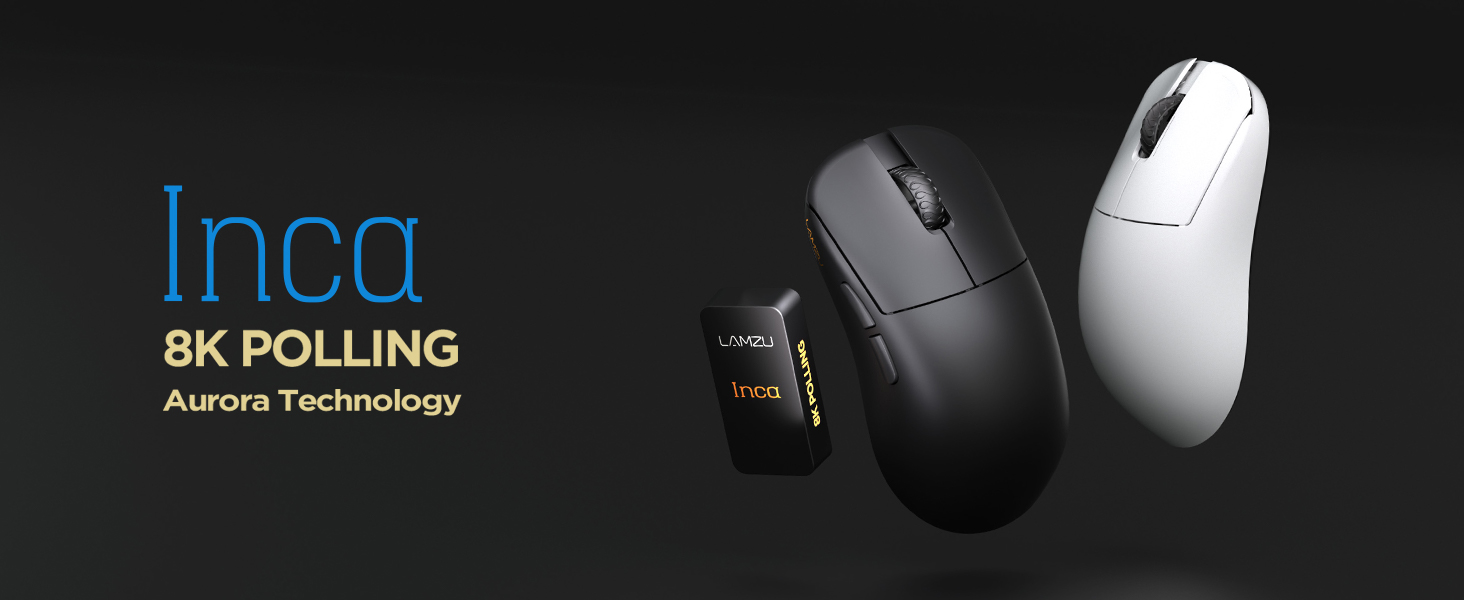
Image: The Lamzu Inca Gaming Mouse, highlighting its 8K Polling Rate and Aurora Technology.

Irudia: Gainetikview of key features including Pixart 3950 sensor, 40g weight, Aurora Technology, 8K Polling, Dual Mode connectivity, and Nordic 52840 MCU.
2. Paketearen edukia
Mesedez, ziurtatu elementu guztiak paketean daudela:
- Lamzu Inca Gaming Mouse (Black)
- 8K Polling Rate Dongle
- USB C motako kablea (1.8 m)
- PTFE Feet (x2 sets)
- Belusezko poltsa
- Saguaren Grip Tape
3. Konfigurazioa
3.1 Sagua konektatzea
The Lamzu Inca mouse supports both 2.4GHz wireless and wired connectivity.
Wireless Mode (2.4GHz)
- Locate the 8K Polling Rate Dongle included in your package.
- Plug the 8K dongle into an available USB port on your computer.
- Piztu sagua saguaren behealdean dagoen pizteko/itzaltzeko etengailua erabiliz.
- The mouse should automatically connect to the dongle. If not, refer to the pairing instructions in the software section.

Image: The Lamzu Inca mouse with its 8K dongle, illustrating the bottom view of the mouse where the sensor and power switch are located.
Kable modua
- Connect the provided USB Type-C cable to the front port of the Lamzu Inca mouse.
- Konektatu USB kablearen beste muturra ordenagailuko USB ataka erabilgarri batean.
- Saguak kable bidezko moduan funtzionatuko du eta barneko bateria ere kargatuko du.

Irudia: Aurrealdea view of the Lamzu Inca mouse, clearly showing the USB-C port for wired connection and charging.

Image: Diagram illustrating the dual connectivity modes: 2.4G Wireless and Wired (Type-C).
3.2 Software Installation (LAMZU Aurora Driver)
To unlock the full customization potential of your Lamzu Inca mouse, download and install the LAMZU Aurora driver from the official Lamzu webgunea.
- The software allows adjustments for DPI, polling rate, debounce time, macro settings, and more.
- Oharra macOS erabiltzaileentzat: To use the Aurora driver on macOS, you must first update the firmware to version 0.0.0.15 or later using a Windows system.

Image: Screenshot of the LAMZU Aurora driver interface, showing options for macro settings, button customization, DPI, polling rate, and debounce time.
4. Sagua erabiltzea
4.1 Botoien funtzioak
The Lamzu Inca is a 6-button gaming mouse:
- Ezkerreko klik: Lehen mailako ekintza.
- Egin klik eskuineko botoiarekin: Secondary action.
- Korritzeko gurpila: Scroll up/down, Middle click.
- DPI botoia: Aurrezarritako DPIen artean txandakatzen datages (customizable via software).
- Aurrera egiteko botoia: Navigational forward.
- Atzera botoia: Navigational back.
- Piztu/Itzali etengailua: Located on the bottom of the mouse to power on or off.

Image: A detailed diagram labeling all buttons on the Lamzu Inca gaming mouse, including Left, Right, Scroll Wheel, DPI, Forward, Back, and On/Off switch.
4.2 DPI doikuntza
The Lamzu Inca features a PixArt PAW3950 sensor capable of up to 30,000 DPI. DPI settings can be customized and adjusted using the LAMZU Aurora driver. The dedicated DPI button on the mouse allows for quick cycling through your configured DPI profiles.

Irudia: Behealdea view of the Lamzu Inca mouse, emphasizing its maximum 30,000 DPI capability and the sensor area.
4.3 Bozketa-tasa
The mouse supports an 8K polling rate, ensuring faster and more accurate responses, particularly beneficial in fast-paced games. The polling rate can be configured via the LAMZU Aurora driver.

Image: The Lamzu Inca mouse connected to its 8K dongle, demonstrating the smooth tracking achieved with an 8K polling rate.
4.4 Recommended Grip Style
The Lamzu Inca features a symmetrical high-back design, making it suitable for various grip styles. It is particularly recommended for claw-grip gamers.
- For hand length ≤ 18cm: Palm grip (extended), Claw grip (inward), Fingertip grip.
- For hand length ≥ 18cm: Fingertip grip, Claw grip (extended), Hybrid grip.
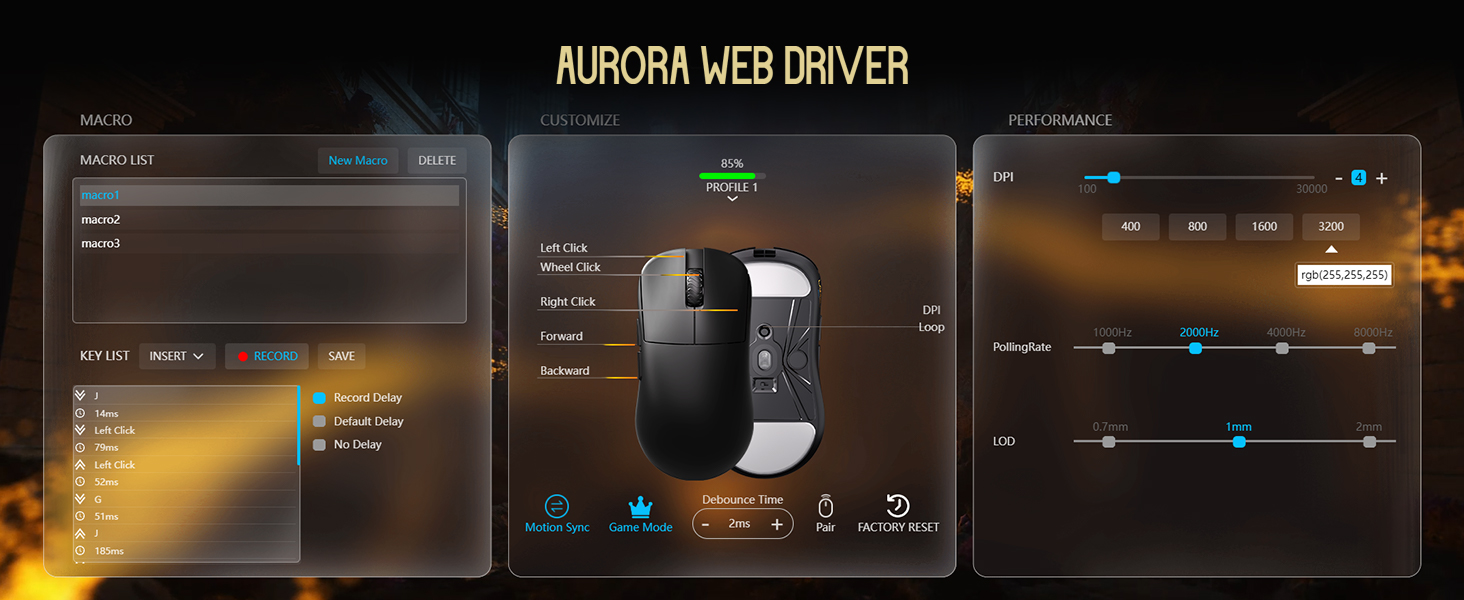
Image: Illustrations of common mouse grip methods (Palm Grip, Claw Grip, Fingertip Grip), indicating the Lamzu Inca's suitability for claw grip.
5. Mantentzea
5.1 Garbiketa
- Regularly clean the mouse surface with a soft, dry cloth.
- Zikinkeria egoskorrerako, apur bat lehortuampGarbitu oihal bat urarekin edo garbiketa-soluzio leun batekin, eta gero lehortu berehala.
- Saihestu produktu kimiko gogorrak edo material urratzaileak erabiltzea, hauek saguaren akabera kaltetu baitezakete.
- Clean the sensor area on the bottom of the mouse periodically to ensure accurate tracking.
5.2 Bateria zaintzea
- The mouse uses a nonstandard battery (included).
- Kargatu sagua emandako USB C motako kablea erabiliz.
- Saihestu bateria maiz erabat deskargatzea, haren iraupena luzatzeko.
- Gorde sagua leku fresko eta lehor batean denbora luzez erabiltzen ez duzunean.
6. Arazoak
6.1 Saguak ez du erantzuten
- Egiaztatu potentzia: Ensure the mouse is turned on using the switch on the bottom.
- Egiaztatu bateria: If in wireless mode, ensure the battery is charged. Connect the USB-C cable to charge.
- Egiaztatu konexioa: For wireless, ensure the 8K dongle is securely plugged into a USB port. For wired, ensure the USB-C cable is firmly connected to both the mouse and the computer.
- Saiatu beste USB ataka bat: Plug the dongle or cable into a different USB port on your computer.
- Re-pair (Wireless): If connection is lost, use the LAMZU Aurora driver to re-pair the mouse with the dongle.
6.2 Sensor Stutter or Inaccurate Tracking
- Garbitu sentsorea: Ziurtatu saguaren beheko aldean dagoen sentsore optikoa garbi eta hautsik edo hondakinik gabe dagoela.
- Saguaren alfonbraren gainazala: Use the mouse on a clean, uniform mouse pad surface. Avoid highly reflective or uneven surfaces.
- Polling Rate/DPI Settings: Adjust polling rate and DPI settings in the Aurora driver. Sometimes very high polling rates can cause issues on older systems or with certain USB controllers.
- Firmware eguneratzea: Ensure your mouse firmware is up to date via the LAMZU Aurora driver.
6.3 Software Not Detecting Mouse
- Reinstall Driver: Uninstall and reinstall the LAMZU Aurora driver.
- Egiaztatu USB konexioa: Ensure the mouse is connected directly to the computer, not through a USB hub.
- Berrabiarazi ordenagailua: A system restart can often resolve software detection issues.
- macOS Firmware: If on macOS, ensure the firmware has been updated on a Windows system as required.
7. Zehaztapenak
| Ezaugarri | Xehetasuna |
|---|---|
| Produktu Eredua | LA-INCA |
| Produktuaren neurriak | 122 × 63 × 40 mm (4.8 x 2.48 x 0.1 hazbete) |
| Elementuaren pisua | 40 gramo (1.41 ontza) |
| Sentsore IC | PixArt PAW3950 |
| Gehienezko DPI | 30,000 DPI |
| MCU | 52840 nordikoa |
| Bozketa-tasa | 8K arte (8000Hz) |
| Konektibitatea | 2.4 GHz haririk gabekoa, USB kable bidezkoa (C motakoa) |
| Etengailuak | Optical Switches (70 million clicks durability) |
| Kodetzailea | TTC Gold Dustproof Encoder |
| Ezaugarri bereziak | Ultra-Lightweight, Symmetrical High-Hump Design |
| Bateria | Bateria ez-estandarra 1 (barne) |
| Kolorea | Beltza |

Image: Detailed diagram showing the dimensions of the Lamzu Inca mouse and a summary of its key specifications.
7.1 Component Highlights
- Pixart 3950 Sensor: High-precision optical sensor for accurate tracking.
- Nordic 52840 MCU: Advanced microcontroller for efficient performance and improved battery life.
- Konmutadore optikoak: Provide tactile feedback, ultra-fast actuation, and enhanced durability.
- TTC Encoder: Features a five-layer dustproof structure for improved longevity and scroll wheel reliability.

Irudia: Gertuko planoa view of the Pixart 3950 sensor IC, a core component for precise mouse tracking.

Irudia: Gertuko planoa view of the Nordic 52840 MCU, highlighting its role in advanced mouse functionality and 8K polling rate compatibility.

Irudia: Gardena view illustrating the internal mechanism of the optical switches, designed for optimized click feel and to prevent double clicks.

Irudia: Gertuko planoa view of the TTC Encoder, responsible for the scroll wheel's precise and durable operation.
8. Bermea eta Laguntza
For warranty information, technical support, and frequently asked questions, please visit the official Lamzu website or contact Lamzu customer service directly. Keep your proof of purchase for warranty claims.
Fabrikatzailea: Lamzu
Lehen eskuragarri dagoen data: 12ko martxoaren 2025a