
1. Sarrera
The PRUNUS A10 Wireless Voice Amplifier diseinatuta dago amplify your voice for various settings such as classrooms, speeches, training sessions, and outdoor activities. It features a wireless lavalier microphone, a built-in charging case, and multiple connectivity options.
2. Zer dago kutxan
- Ahotsa Amplifier Unitatea
- Haririk gabeko lavalier mikrofonoa
- Pearl Chain
- Sorbalda-uhal
- USB kargatzeko kablea
- Wired Headset Microphone (optional use)
3. Konfigurazioa
3.1 Hasierako karga
Lehenengo aldiz erabili aurretik, kargatu guztiz ahots-babesleak amplifier and the wireless lavalier microphone.
- Konektatu USB kargatzeko kablea amplifier's charging port.
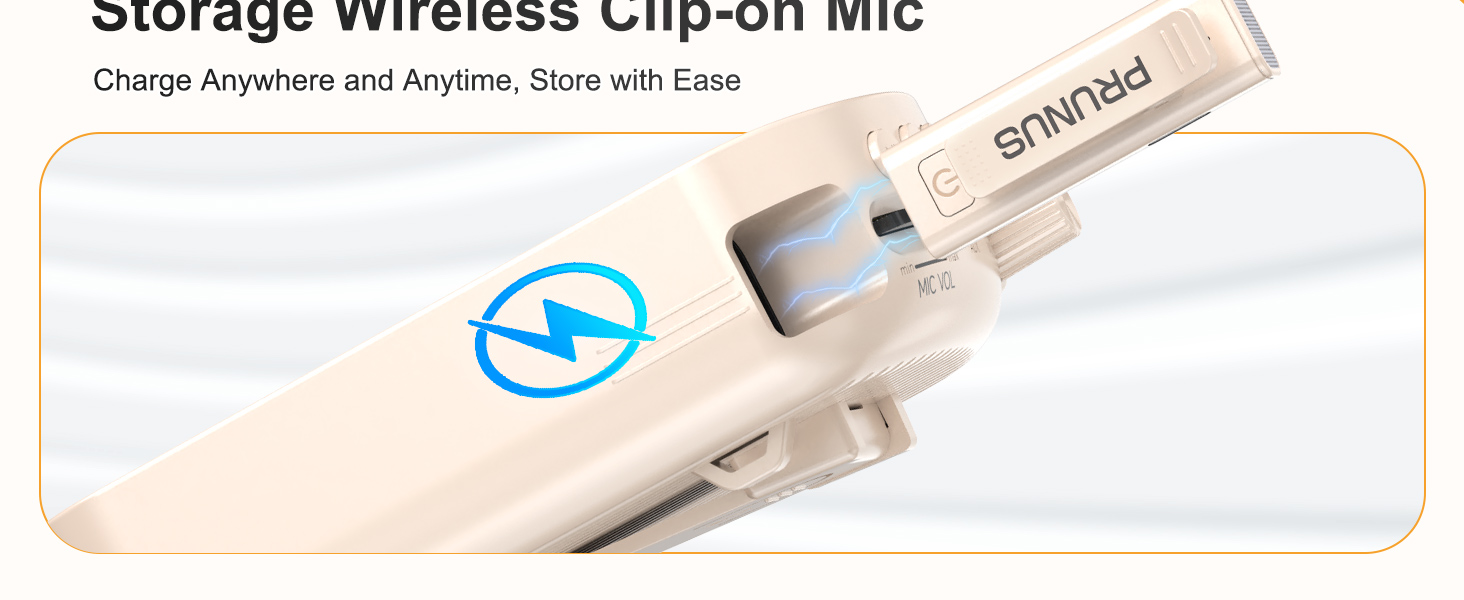
- Insert the wireless microphone into its designated slot on the amplifier for charging.
- Ensure both devices indicate a full charge before proceeding.

3.2 Parekatze automatikoa
The wireless lavalier microphone and amplifier are designed for automatic pairing. Once both devices are powered on, they should connect automatically.
3.3 Janzteko aukerak
The amplifier offers multiple ways to wear it for hands-free convenience:
- Pearl Chain: Wear it around your neck.
- Sorbalda uhala: Use it crossbody or over the shoulder.
- Atzeko klipa: Clip it to your waist or clothing.
4. Funtzionamendu-argibideak
4.1 Piztu/Itzali
- Pizteko ampbizigarria, biratu AUDIO VOL knob clockwise until the display illuminates.
- To power on the wireless microphone, press and hold its power button.
- Itzaltzeko, biratu AUDIO VOL knob counter-clockwise until the display turns off, and press and hold the microphone's power button.
4.2 Bolumenaren doikuntza
Adjust the volume for both the speaker and the microphone independently:
- Bozgorailuaren bolumena: Biratu AUDIO VOL botoian ampbiziagoa.
- Mikrofonoaren bolumena: Erabili MIC VOL botoian ampbiziagoa.

4.3 Mute/Unmute Function
The wireless lavalier microphone features a one-touch mute button for convenience:
- Press the mute button on the wireless microphone once to mute your voice.
- Sakatu berriro soinua aktibatzeko.
4.4 Konexio aukerak
The amplifier supports various audio input methods:
- Bluetooth 5.0: Pair with compatible devices for wireless audio playback.
- AUX sarrera: Connect external audio sources using an AUX cable.
- TF txartelaren zirrikitua: Insert a TF card for direct audio playback.
- USB erreproduzitzailea: Insert a USB drive for direct audio playback.

4.5 Erabilera-eszenatokiak
The PRUNUS A10 is suitable for a range of applications:
- Teaching in classrooms.
- Public speaking and presentations.
- Tour guiding.
- Kanpoko jarduerak eta ekitaldiak.

5. Mantentzea
5.1 Bateriaren iraupena eta kargatzea
The amplifier features a 3000mAh battery, providing up to 12 hours of continuous use. The wireless microphone lasts up to 10 hours on a full charge.

5.2 Arreta orokorra
- Mantendu gailua garbi, zapi leun eta lehor batekin.
- Saihestu gailua muturreko tenperatura, hezetasun edo zuzeneko eguzki-argitara.
- Gorde gailua leku fresko eta lehor batean erabiltzen ez duzunean.
6. Arazoak
6.1 Preventing Feedback or Distortion
To prevent audio feedback or distortion:
- Maintain a distance of at least 40 cm (15.7 inches) between the wireless microphone and the ampbiziagoa.
- Avoid placing the microphone directly in front of the ampbozgorailu indartzailea.

6.2 Konexio arazoak
- Ziurtatu biak amplifier and microphone are powered on and fully charged.
- If using Bluetooth, ensure the amplifier is in Bluetooth mode and your device's Bluetooth is enabled and paired.
- For wired connections (AUX, headset mic), ensure cables are securely plugged into the correct ports.
7. Zehaztapenak
| Ezaugarri | Zehaztapena |
|---|---|
| Marka | PRUNUS |
| Modelo zenbakia | A10 |
| Elementuaren neurriak (L x W x H) | 3.54 x 1.73 x 5.28 hazbete |
| Elementuaren pisua | 0.45 kilogramo |
| Kolorea | Beixa |
| Konektibitate Teknologia | Bluetooth, AUX, TF txartela |
| Gailu bateragarriak | Laptop, MP3 Player, Smartphone, Tablet, Wired Microphone |
| Muntatze Mota | Eramangarria |
| Energia iturria | Bateriaren bidez |
| Konektore mota | Laguntzailea, RCA |
| Kanal kopurua | 1 |
| Audio Sarrera | Wireless (Bluetooth), Wired (AUX) |
| Irteera Wattage | 15 Watt |
| Itxituraren Materiala | Aluminioa, Plastikoa |
8. Bermea
This product comes with a 1-Year Warranty. For detailed warranty information and claims, please refer to the official PRUNUS webwebgunean edo jarri harremanetan bezeroarentzako laguntzarekin.
9. Laguntza
For further assistance, troubleshooting, or product inquiries, please visit the PRUNUS Store on Amazon edo kontsultatu zure produktuaren ontzian emandako harremanetarako informazioa.