
MONODEAL 8818
MONODEAL CD Player Model 8818 User Manual
Desktop Portable CD Player with Bluetooth, Wireless Charging, Alarm Clock, and FM Radio
Sarrera
The MONODEAL Model 8818 is a versatile desktop portable CD player designed to provide a comprehensive audio experience. It integrates multiple functions including a CD player, Bluetooth 5.0 HiFi speaker, FM radio, USB flash drive player, and 3.5mm audio player. Additionally, it features wireless charging, an intelligent dual alarm clock, and a sleep timer, making it an ideal companion for various settings from home to office.

Image: The MONODEAL Model 8818 CD Player, showcasing its sleek black design, digital display, control buttons, and included remote control. A CD is visible in the player, and two vinyl records are placed next to it.
Kutxan dagoena
- CD erreproduzitzailea
- Erabiltzailearen eskuliburua
- Urruneko Kontrola
- Elikatze kablea
Produktua amaituview
Familiarize yourself with the various components and controls of your MONODEAL CD Player.
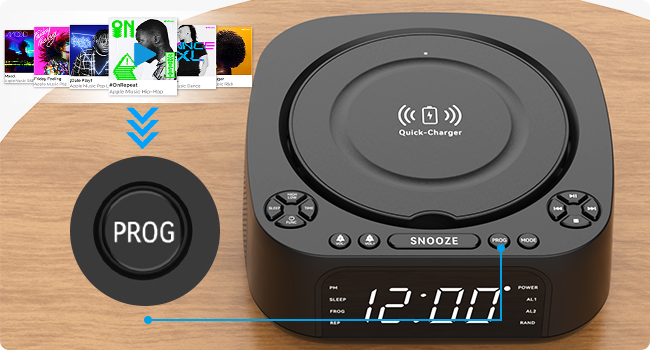
Image: A detailed diagram of the MONODEAL CD Player, highlighting its various buttons, ports, and features with corresponding numbers for easy identification.
| Ez. | Ezaugarri | Deskribapena |
|---|---|---|
| 1 | High/Low Brightness | Pantailaren distira doitzen du. |
| 2 | Lo egiteko botoia | Activates/sets sleep timer. |
| 3 | Denbora Ezarria | Uneko ordua ezartzen du. |
| 4 | Function/Shutdown | Switches modes or powers off. |
| 5 | Alarm Clock 1 / Volume - | Sets Alarm 1 or decreases volume. |
| 6 | Alarm Clock 2 / Volume + | Sets Alarm 2 or increases volume. |
| 7 | Kargagailuaren Oinarria | Haririk gabeko kargatzeko kutxa. |
| 8 | Errepikatzeko botoia | Snoozes active alarm. |
| 9 | PROG (Program) | Programs CD tracks or FM presets. |
| 10 | Modu botoia | Switches between playback modes (CD, Bluetooth, FM, USB, AUX). |
| 11 | Erreproduzitu / Pausatu | Erreprodukzioa hasten edo eten egiten du. |
| 12 | Hurrengoa / Aurrera azkarra | Skips to next track or fast forwards. |
| 13 | Aurrekoa / Atzeratu | Skips to previous track or rewinds. |
| 14 | Gelditu botoia | Erreprodukzioa geldiarazten du. |
| 15 | USB Port (Data/Playback) | USB flash unitatean erreproduzitzeko. |
| 16 | USB ataka (kargatzen) | Kanpoko gailuak kargatzeko (5V/1A). |
| 17 | 3.5 mm-ko sarrera | Audio input jack. |
| 18 | AUX Portua | Audio sarrera laguntzailea. |
| 19 | Bistaratzeko pantaila | Shows time, mode, and playback information. |
Konfigurazioa
1. Energia-konexioa
Connect the provided power cord to the DC IN port on the back of the CD player and plug the other end into a standard wall outlet. The display will light up.
2. Ordua ezartzea
- Sakatu DENBORA button (3) on the unit.
- Erabili Aurrekoa / Atzeratu (13) eta Hurrengoa / Aurrera azkarra (12) buttons to adjust the hour.
- Sakatu DENBORA berriro ordua berresteko eta minutuetara joateko.
- Erabili Aurrekoa / Atzeratu (13) eta Hurrengoa / Aurrera azkarra (12) buttons to adjust the minutes.
- Sakatu DENBORA once more to save the time setting.
3. Bistaratzeko distira doitzea
Sakatu High/Low Brightness button (1) to toggle between high and low brightness modes for the display screen (19).

Image: Comparison of the display screen's brightness in daylight and night settings, demonstrating the high and low brightness modes.
Funtzionamendu-argibideak
CD erreprodukzioa
- Ireki CDaren konpartimentuaren estalkia.
- Insert a CD (compatible with CD, CD-R, CD-RW, MP3, WMA formats) with the label side facing up.
- Itxi CD konpartimentuaren estalkia.
- Sakatu Function/Shutdown button (4) to power on the unit, then press the Modua button (10) until "CD" mode is selected.
- Sakatu Erreproduzitu / Pausatu botoia (11) erreprodukzioa hasteko.
- Erabili Aurrekoa / Atzeratu (13) eta Hurrengoa / Aurrera azkarra (12) to navigate tracks.
- Sakatu Gelditu (14) to stop playback.

Image: The MONODEAL CD Player with a CD being inserted, illustrating the CD playback function.
Bluetooth Function (RX & TX)
The unit supports both Bluetooth reception (RX) to play audio from your phone/tablet and Bluetooth transmission (TX) to send audio to Bluetooth headphones/speakers.

Image: A visual representation of the two Bluetooth modes (RX and TX), showing the CD player receiving audio from a laptop and transmitting audio to headphones and a portable speaker.
Bluetooth Reception (RX Mode)
- Sakatu Modua button (10) until "BT" (Bluetooth) mode is selected. The display will show "BT" and flash, indicating pairing mode.
- On your smartphone or tablet, enable Bluetooth and search for "MONODEAL 8818".
- Select the device to pair. Once connected, "BT" will stop flashing.
- You can now play audio from your device through the CD player's speakers.

Image: A user connecting their smartphone to the MONODEAL CD Player via Bluetooth reception, illustrating how to stream music from a mobile device.
Bluetooth Transmission (TX Mode)
This feature allows you to transmit audio from the CD player (e.g., CD playback, FM radio) to external Bluetooth headphones or speakers.
- Ziurtatu zure Bluetooth entzungailuak/bozgorailuak parekatze moduan daudela.
- On the CD player, while in CD, FM, or USB mode, press and hold the Modua button (10) for a few seconds to activate TX mode. The display will show "TX" and flash.
- The CD player will automatically search for and connect to nearby Bluetooth audio devices.
- Once connected, audio will be routed to your external Bluetooth device.
Note: This device does not support car Bluetooth connections.

Image: A user wearing Bluetooth headphones, connected wirelessly to the MONODEAL CD Player, demonstrating the Bluetooth transmission feature for private listening.
FM Irratia
- Sakatu Modua button (10) until "FM" mode is selected.
- Extend the antenna for better reception.
- Eduki sakatuta Erreproduzitu / Pausatu button (11) to auto-scan and save available stations. The unit can store up to 40 stations.
- Erabili Aurrekoa / Atzeratu (13) eta Hurrengoa / Aurrera azkarra (12) buttons to cycle through saved stations.
- To manually tune, briefly press Aurrekoa / Atzeratu (13) edo Hurrengoa / Aurrera azkarra (12).
- The unit supports FM stereo/mono switching.

Image: A woman and a child listening to the FM radio on the MONODEAL CD Player, with icons indicating various FM frequencies for different environments.
USB erreprodukzioa
- Sartu MP3/WMA audioa duen USB flash unitate bat files into the USB data port (15).
- Sakatu Modua button (10) until "USB" mode is selected.
- Erreprodukzioa automatikoki hasiko da.
- Erabili Aurrekoa / Atzeratu (13) eta Hurrengoa / Aurrera azkarra (12) to navigate tracks.

Image: The MONODEAL CD Player with a USB flash drive inserted for music playback and a tablet connected to the charging USB port, demonstrating simultaneous charging and playback.
AUX sarrera
- Connect an external audio device (e.g., MP3 player, mobile phone) to the AUX port (18) or 3.5mm input (17) using a 3.5mm audio cable.
- Sakatu Modua button (10) until "AUX" mode is selected.
- Audio from your connected device will now play through the CD player's speakers. Control playback from your external device.

Image: A smartphone connected to the MONODEAL CD Player via a 3.5mm audio cable, demonstrating the AUX-IN mode for playing audio from external devices.
Haririk gabeko kargatzea
The top of the CD player features a built-in wireless charging panel (7) for compatible smartphones.
- Place your wireless charging compatible smartphone directly on the charger base (7) on top of the unit.
- Ensure the phone is centered on the charging area.
- The phone should indicate that it is charging.
Note: For optimal charging, remove any thick phone cases. Charging time may vary (3-8 hours).

Image: A smartphone wirelessly charging on top of the MONODEAL CD Player, with an indicator showing the charging process and estimated time.
Erlojuaren funtzioa
The unit features a dual alarm clock function, allowing you to set two separate alarms.
- Luze sakatu 1. iratzargailua (5) edo 2. iratzargailua (6) button. The hour will flash.
- Erabili Aurrekoa / Atzeratu (13) eta Hurrengoa / Aurrera azkarra (12) to adjust the hour, then press the corresponding alarm button again to confirm.
- Adjust the minutes similarly and press the alarm button to confirm.
- Select the alarm source (CD, FM radio, USB, Bluetooth) using the Modua button (10) and confirm with the alarm button.
- To activate/deactivate an alarm, briefly press the corresponding alarm button. An alarm icon will appear/disappear on the display.
- Alarma jotzen duenean, sakatu Atzeratu button (8) for a temporary pause, or press any other button to turn off the alarm.

Image: Two scenes depicting the sleep timer and morning alarm clock functions. One shows a person sleeping with the display showing 23:58, and the other shows a person waking up with the display showing 08:00.
Sleep Timer Funtzio
The sleep timer allows the unit to play music for a set duration before automatically turning off.
- While playing audio (CD, FM, USB, Bluetooth), press the Lo egin button (2) repeatedly to cycle through sleep timer options (e.g., 15, 30, 45, 60, 90, 120 minutes).
- The unit will automatically power off after the selected time.
Urruneko Kontrolaren Eragiketa
The included remote control allows convenient operation from a distance of up to 5 meters.
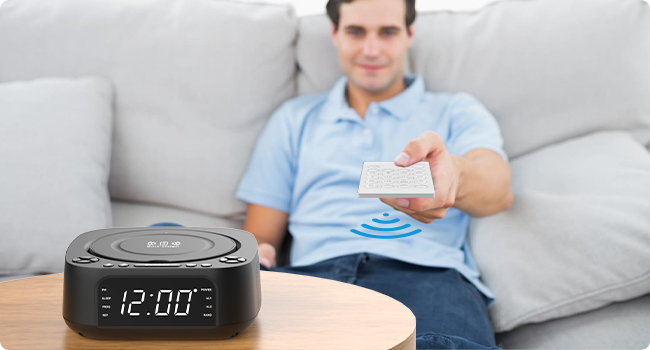
Image: A person using the remote control to operate the MONODEAL CD Player from a distance, highlighting the convenience of remote operation.
Most functions available on the unit's control panel are also accessible via the remote control. Refer to the remote control's button labels for specific functions (e.g., Mute, EQ, Repeat, etc.).
Mantentzea
- Garbiketa: Erabili zapi leun eta lehor bat unitatearen kanpoaldea garbitzeko. Ez erabili garbitzaile edo disolbatzaile urratzailerik.
- CDaren zainketa: CDak ertzetik heldu. Mantendu garbi eta marradurarik gabe. Erabili zapi leun eta lihorik gabeko bat CDak erdialdetik kanporantz garbitzeko.
- Biltegiratzea: When not in use for extended periods, unplug the unit and store it in a cool, dry place.
- Aireztapena: Ziurtatu unitatearen inguruan behar bezala aireztatuta dagoela gehiegi berotzea saihesteko. Ez blokeatu aireztapen-irekidurak.
Arazoak konpontzea
| Arazoa | Kausa posiblea | Irtenbidea |
|---|---|---|
| Unitatea ez da pizten. | Ez dago energia konexiorik. | Ensure power cord is securely plugged into the unit and a working wall outlet. |
| Bozgorailuetatik ez dago soinurik. | Volume too low; incorrect mode; mute activated. | Increase volume; ensure correct mode (CD, BT, FM, USB, AUX); check if mute is on (remote). |
| CDak salto egiten du edo ez da erreproduzitzen. | CDa zikinduta, urratuta edo gaizki sartuta dago. | Clean CD; try a different CD; ensure CD is inserted label-side up. |
| Bluetooth parekatzeak huts egiten du. | Gailua urrunegi dago; ez dago parekatze moduan; interferentziak. | Ensure unit is in BT mode and flashing; bring devices closer; restart both devices. |
| FM irratiaren harrera eskasa. | Antena ez dago luzatuta; seinalea ahula. | Fully extend the FM antenna; try repositioning the unit. |
| Haririk gabeko kargatzeak ez du funtzionatzen. | Phone not compatible; phone case too thick; phone not centered. | Ensure phone supports wireless charging; remove thick cases; reposition phone on the charging pad. |
Zehaztapenak
| Ezaugarri | Xehetasuna |
|---|---|
| Modelo zenbakia | 8818 |
| Produktuaren neurriak (L x W x H) | 7.32 x 7.32 x 2.89 hazbete (186 x 186.5 x 73.5 mm) |
| Elementuaren pisua | 2.4 kilo |
| Konektibitate Teknologia | Bluetootha, laguntzailea, USBa |
| Hizlari mota | Stereo (2 x 1W speakers) |
| Onartutako disko formatuak | CD, CD-R, CD-RW, MP3, WMA |
| FM Irrati Maiztasuna | 87.5-108 MHz (up to 40 presets) |
| USB erreprodukzioa | Supports MP3/WMA from USB flash drives |
| Haririk gabeko kargaren irteera | 5W/10W |
| USB kargatzeko irteera | 5V/1A |
| Iratzargailuaren funtzioak | Dual alarm, 4 wake-up modes (CD, FM, USB, Bluetooth) |
| Lo egiteko tenporizadorea | 15-120 minutu |
| Urruneko Kontrolaren barrutia | Gehienez 5 metro |
| Fabrikatzailea | MONODEALA |
| Jatorrizko Herrialdea | Txina |

Image: The MONODEAL CD Player with its dimensions (length, width, height) indicated in millimeters, showcasinbere diseinu trinkoa dela eta.
Bermea eta Laguntza
MONODEAL is committed to providing quality products and customer satisfaction.
- 12 hilabeteko ordezkapena: Your product is covered by a 12-month replacement policy for manufacturing defects.
- Bizi osorako laguntza: MONODEAL offers lifetime technical support for this product.
For any questions or problems, please contact MONODEAL customer support. Contact information can typically be found on the product packaging or the official MONODEAL webgunea.
Ask a question about this manual
Ask about setup, troubleshooting, compatibility, parts, safety, or missing instructions. Manuals+ will review the question and use this page’s manual context to help answer it.