1. Produktua amaitu daview
The TABWEE T20 is a versatile 10-inch Android tablet designed for both productivity and entertainment. It features a high-resolution Incell display, a powerful Octa-Core processor, and ample memory and storage, making it suitable for a wide range of applications from content creation to multimedia consumption.
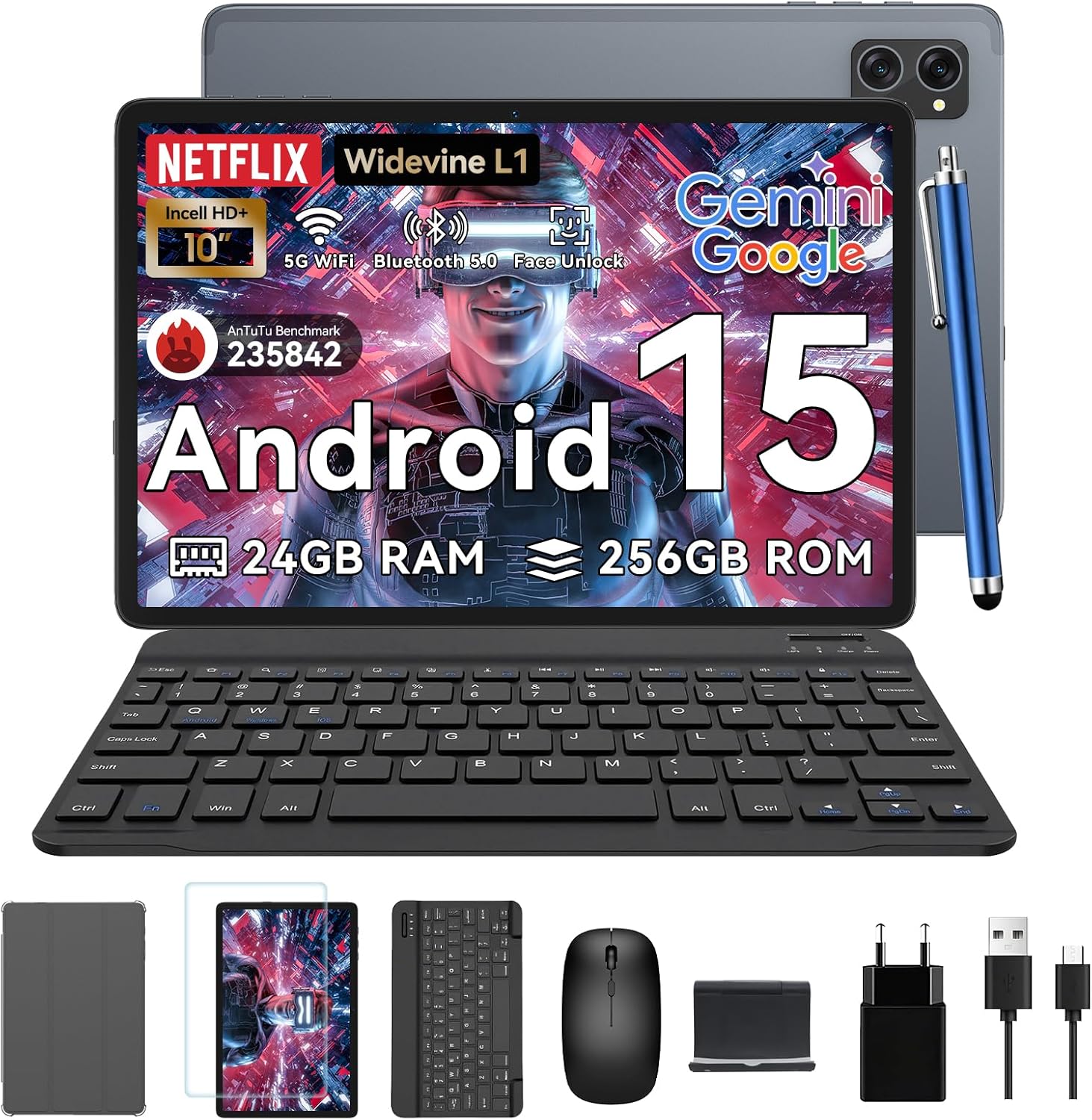
Figure 1.1: TABWEE T20 Tablet and its complete accessory package, including a Bluetooth keyboard, mouse, stylus, protective case, screen protector, charger, and USB cable.
Kutxan dagoena
Upon unboxing your TABWEE T20 Tablet, verify that all components are present:

Figure 1.2: Contents of the TABWEE T20 Tablet retail package.
- 1x TABWEE T20 Tablet
- 1x Bluetooth teklatua
- 1x Sagua
- 1x Stylus
- 1x Babes-zorroa
- 1x Pantaila babeslea
- 1x Tablet Stand
- 1x kargagailua
- 1x USB kablea
2. Konfigurazioa eta hasierako erabilera
Tableta kargatzen
Before first use, fully charge the tablet using the provided charger and USB cable. Connect the charger to a power outlet and the USB cable to the tablet's charging port. The charging indicator will illuminate.
Piztu/Itzaltzea
- Pizteko: Press and hold the Power button until the TABWEE logo appears on the screen.
- Itzaltzeko: Press and hold the Power button until the power options menu appears. Select "Power Off" and confirm.
- Berrabiarazteko: Energia aukeren menuan, hautatu "Berrabiarazi" eta baieztatu.
Hasierako konfigurazio morroia
Lehen aldiz piztean, tabletak hasierako konfigurazio-morroi baten bidez gidatuko zaitu. Jarraitu pantailan agertzen diren argibideei:
- Hautatu zure hizkuntza.
- Konektatu Wi-Fi sare batera.
- Hasi saioa zure Google kontuarekin edo sortu berri bat.
- Set up screen lock (PIN, pattern, password, or Face Unlock).
- Review eta baldintzak eta zehaztapenak onartu.
Osagarriak konektatzea
The TABWEE T20 comes with a Bluetooth keyboard and mouse for enhanced productivity.
- Bluetooth teklatua:
- Ziurtatu teklatua kargatuta eta piztuta dagoela.
- Tabletan, joan hona Ezarpenak > Konektatutako gailuak > Bluetooth.
- Turn on Bluetooth and tap "Pair new device".
- Select the keyboard from the list of available devices and follow pairing instructions.
- Bluetooth sagua:
- Ziurtatu sagua piztuta dagoela eta parekatzeko moduan dagoela.
- Tabletan, joan hona Ezarpenak > Konektatutako gailuak > Bluetooth.
- Tap "Pair new device" and select the mouse from the list.
- Larrua: The included stylus can be used directly on the screen for navigation, drawing, and note-taking. It features palm-rejection precision.
3. Tabletaren erabilera
Android 15 sistema eragilea
The TABWEE T20 runs on Android 15, offering enhanced privacy controls, seamless cross-device collaboration, and improved multitasking capabilities.

Figure 3.1: Key features of the Android 15 operating system.
Gemini AI integrazioa
The tablet integrates Google Gemini AI, which intelligently optimizes tasks, from photo editing to document formatting, while prioritizing security with a dedicated encrypted privacy space.

3.2 Irudia: Gainetikview Gemini AI gaitasunak tabletan.
Display and Multimedia
The 10.1-inch Incell HD+ display (1280x800 resolution) provides vivid colors and crisp details. With Widevine L1 certification, you can enjoy 1080P streaming on platforms like Netflix, Disney+, and Hulu.

Figure 3.3: Display features and eye-friendly modes.
The tablet also features Dual Smart-K Box Speakers for an immersive audio experience.

Figure 3.4: Dual Smart-K Box Speakers for enhanced audio.
Kameraren Ezaugarriak
Equipped with an 8MP rear camera and a 5MP front camera, the tablet supports Google Lens integration for smart scanning and object recognition. Face Unlock is also supported for convenient security.

Figure 3.5: Camera specifications and features.

Figure 3.6: Smart Google Lens functionalities.
Konektibitatea
The TABWEE T20 supports dual-band 5G WiFi and Bluetooth 5.0 for fast and stable connections.
- Wi-Fi: Connect to 2.4GHz or 5GHz networks for seamless streaming and quick downloads.
- Bluetooth 5.0: Pair with wireless earbuds, speakers, or other Bluetooth-enabled devices with 20% faster data transfer speed.
- OTG euskarria: Allows for easy transfer of files to and from external storage devices.

Figure 3.7: Advanced Bluetooth 5.0 connectivity.

Figure 3.8: Lightning Fast WiFi 5 Technology.
4. Mantentzea eta Zainketa
Proper maintenance ensures the longevity and optimal performance of your TABWEE T20 Tablet.
Baterien kudeaketa
The 5000mAh battery provides extended usage times. To maximize battery life:
- Saihestu muturreko tenperaturak.
- Erabili emandako kargagailua.
- Enable smart power-saving modes in settings.
- Itxi atzeko planoan exekutatzen diren erabili gabeko aplikazioak.

Figure 4.1: 5000mAh Mega Battery performance metrics.
Tableta garbitzea
- Erabili zapi leun eta lihorik gabeko bat pantaila eta gorputza garbitzeko.
- Orban egoskorretarako, apur bat dampGarbitu oihal bat urarekin edo pantaila-garbitzaile batekin.
- Saihestu produktu kimiko gogorrak edo material urratzaileak erabiltzea.
Biltegiratzea eta Memoria Kudeatzea
The tablet comes with 256GB of internal storage and supports up to 2TB TF card expansion. It also features 24GB RAM (8GB physical + 16GB virtual) for smooth multitasking.

Figure 4.2: Storage and RAM expansion capabilities.
To optimize performance and storage:
- Regularly clear cache and temporary files.
- Desinstalatu erabiltzen ez diren aplikazioak.
- Utilize the 2TB TF card slot for large files like 4K videos and design documents.
5. Arazoak
This section addresses common issues you might encounter with your TABWEE T20 Tablet.
| Arazoa | Kausa posiblea | Irtenbidea |
|---|
| Tableta ez da pizten. | Bateria baxua; sistemaren kraskadura. | Kargatu tableta gutxienez 30 minutuz. Oraindik ere erantzuten ez badu, sakatu eta eutsi pizteko botoia 10-15 segundoz berrabiarazteko. |
| Wi-Fi konexio arazoak. | Incorrect password; router issues; out of range. | Verify Wi-Fi password. Restart your router. Ensure tablet is within Wi-Fi range. Forget the network and reconnect. |
| Bluetooth accessories not pairing. | Accessory not in pairing mode; Bluetooth off on tablet. | Ensure accessory is in pairing mode. Turn Bluetooth off and on again on the tablet. Restart both devices. |
| Errendimendu motela edo aplikazioaren huts egitea. | Aplikazio gehiegi martxan; biltegiratze gutxi; software zaharkitua. | Close background apps. Clear app caches. Free up storage space. Check for system updates in Ezarpenak > Sistema > Sistemaren eguneraketa. |
| Pantailak ez du erantzuten. | Softwarearen aldi baterako akatsa. | Force restart the tablet by holding the Power button for 10-15 seconds. |
Irtenbide hauek saiatu ondoren arazoa konpontzen ez bada, jarri harremanetan bezeroarentzako arreta-zerbitzuarekin.
7. Bermea eta Laguntza
TABWEE is committed to providing excellent customer service and support for your T20 Tablet.
Bermearen informazioa
Your TABWEE T20 Tablet is covered by a 2 urteko bermea from the date of purchase. This warranty covers manufacturing defects and ensures risk-free ownership.
Bezeroarentzako Arreta
For any technical assistance, troubleshooting, or warranty claims, please contact our support team:
- Posta elektronikoko laguntza: serviceplus.linda@gmail.com
- Online Call Support: Available 24/7 for US/CA customers.
- Repair Support: 2-Year Repair Support is provided.

Figure 7.1: TABWEE Customer Support Services.
Please have your purchase details and tablet model number ready when contacting support to expedite the process.


