
Sarrera
Eskerrik asko erosketagatik.asing the Sigma 50mm F2 DG Contemporary lens. This manual provides essential information for the safe and effective use of your new lens. Please read it thoroughly before using the product and keep it for future reference.
Segurtasun-neurriak
- Do not look at the sun or other strong light sources through the lens, as this can cause permanent vision damage.
- Keep the lens away from direct sunlight when not in use to prevent fire hazards.
- Avoid exposing the lens to extreme temperatures, humidity, or dust.
- Ez saiatu lentea desmuntatzen edo aldatzen. Konponketak baimendutako zerbitzu-langileek bakarrik egin behar dituzte.
- Mantendu haurren eskura.
Paketearen edukia
Egiaztatu elementu guztiak zure paketean daudela:
- Sigma 50mm F2 DG Contemporary Lens
- Lens Hood (LH633-02S)
- Aurrealdeko lentearen kapela
- Atzeko lentilen txanoa
- Argibide eskuliburua (dokumentu hau)
Lentearen zatiak
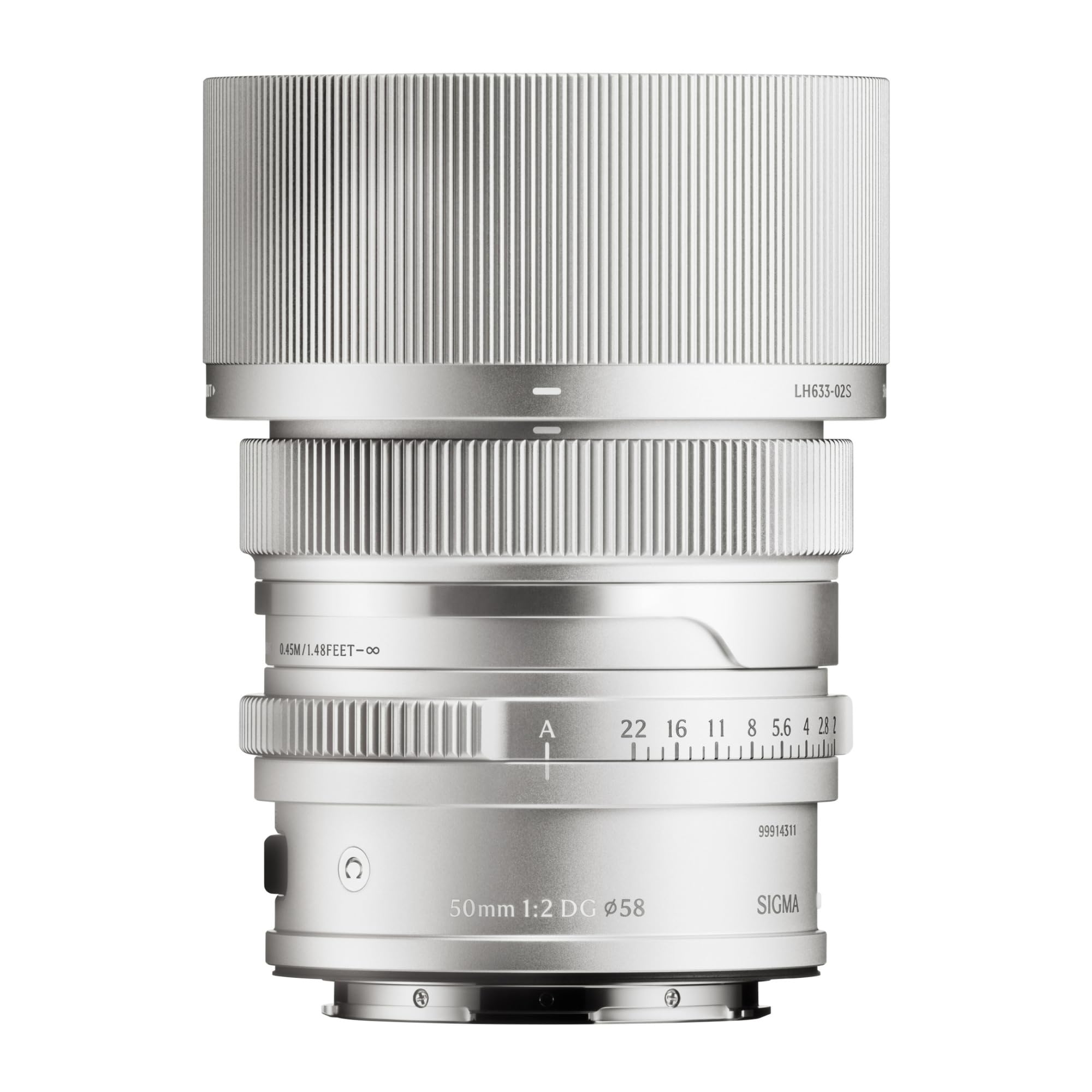
This image displays the Sigma 50mm F2 DG Contemporary lens, a prime lens designed for L-mount cameras. It features a sleek silver finish and a compact design, suitable for various photographic applications.
The Sigma 50mm F2 DG Contemporary lens features several key components:
- Fokatzeko eraztuna: Eskuzko fokatzerako erabiltzen da.
- Irekidura-eraztuna: Lentearen diafragmaren gaineko kontrol zuzena ahalbidetzen du.
- Lentearen muntaia: Connects the lens to the camera body (L-Mount).
- Lens Hood Attachment Point: Where the dedicated lens hood is secured.

The image shows the LH633-02S lens hood, a cylindrical accessory with a ribbed exterior, designed to attach to the Sigma 50mm F2 DG Contemporary lens. It helps to prevent stray light from entering the lens, reducing flare and ghosting, and offers protection to the front element.
Konfigurazioa
Lentea eranstea
- Ziurtatu kamera eta lentea itzalita daudela.
- Kendu atzeko lentearen estalkia lentetik eta gorputzaren estalkia kameratik.
- Align the mounting index on the lens with the mounting index on the camera body.
- Sartu lentea kameraren euskarrian eta biratu erlojuaren orratzen noranzkoan klik egin arte. Ez behartu lentea.
Attaching the Lens Hood (LH633-02S)
- Lerrokatu lentearen estalkiko puntu gorria lentearen aurrealdeko puntu gorriarekin.
- Rotate the lens hood clockwise until it locks securely into position.
- To remove, press the release button on the lens hood and rotate counter-clockwise.
Funtzionamendua
Enfokatzea
This lens supports both autofocus (AF) and manual focus (MF).
- Fokatze automatikoa: Set your camera's focus mode to AF. The lens will automatically focus when the shutter button is half-pressed.
- Eskuzko fokua: Set your camera's focus mode to MF. Rotate the focus ring on the lens to adjust focus manually. Use your camera's focus peaking or magnification features for precise focusing.
Irekiduraren kontrola
The lens features an aperture ring for direct control over the aperture setting. You can also control the aperture through your camera body, depending on your camera's settings and mode.
Kamera bateragarriak
This lens is designed for L-Mount cameras, including models such as Leica SL, Leica TL2, and Leica CL.
Mantentzea
Lentea garbitzea
- Erabili putz egiteko eskuila bat lentearen gainazaleko hautsa kentzeko.
- Orban edo hatz-marken kasuan, erabili lente optikoetarako bereziki diseinatutako mikrofibrazko zapi garbi eta leun bat. Aplikatu lenteak garbitzeko soluzio kantitate txiki bat zapi gainean, ez zuzenean lentean.
- Never use abrasive materials, solvents, or harsh chemicals to clean the lens.
Biltegiratzea
- Erabiltzen ez duzunean, jarri aurreko eta atzeko lenteen estalkiak.
- Store the lens in a cool, dry place, away from direct sunlight and high humidity.
- If storing for an extended period, consider using a desiccant to prevent mold growth.
Arazoak konpontzea
- Kamerak ez du lentea ezagutzen: Ensure the lens is securely attached to the camera body. Power off and restart the camera. Check for any firmware updates for both the lens and camera.
- Autofokua ez dabil: Verify the camera's focus mode is set to AF. Ensure there is sufficient light and contrast in the scene for the autofocus system to operate effectively.
- Irudiak lausoak dira: Check that the lens is properly focused. Ensure the shutter speed is fast enough to prevent camera shake, especially in low light. Clean the lens elements if smudges are present.
- Lens hood difficult to attach/remove: Ensure proper alignment of the red dots. Do not force the hood; it should click into place smoothly.
Zehaztapenak
| Ereduaren izena | 31S969 |
| Fokua | 50 mm |
| Gehieneko irekiera | F2 |
| Gutxieneko irekiera | F2 |
| Lente mota | Lehen Lentea |
| Muntaketa bateragarriak | Leica L. |
| Foku mota | Foku automatikoa |
| Irudi Egonkortzea | No image stabilization |
| Uraren Erresistentzia Maila | Ez Urarekiko Erresistentea |
| Elementuaren pisua | 2 kilo |
Bermea eta Laguntza
Bermearen informazioa
Produktu hau a 9 urteko bermea. Please retain your proof of purchase for warranty claims. The warranty covers manufacturing defects under normal use. It does not cover damage caused by misuse, accidents, unauthorized repairs, or normal wear and tear.
Bezeroarentzako Arreta
For technical assistance, service, or warranty inquiries, please contact Sigma customer support through their official website or the retailer where you purchased the product. Have your model number (31S969) and proof of purchase ready when contacting support.