
1. Sarrera
This manual provides essential information for the proper setup, operation, and maintenance of your EC Buying STM32H7B0VBT6 Core Board. This development board is designed around the STM32H7B0 microcontroller, offering high performance for various embedded applications, including camera and display modules.
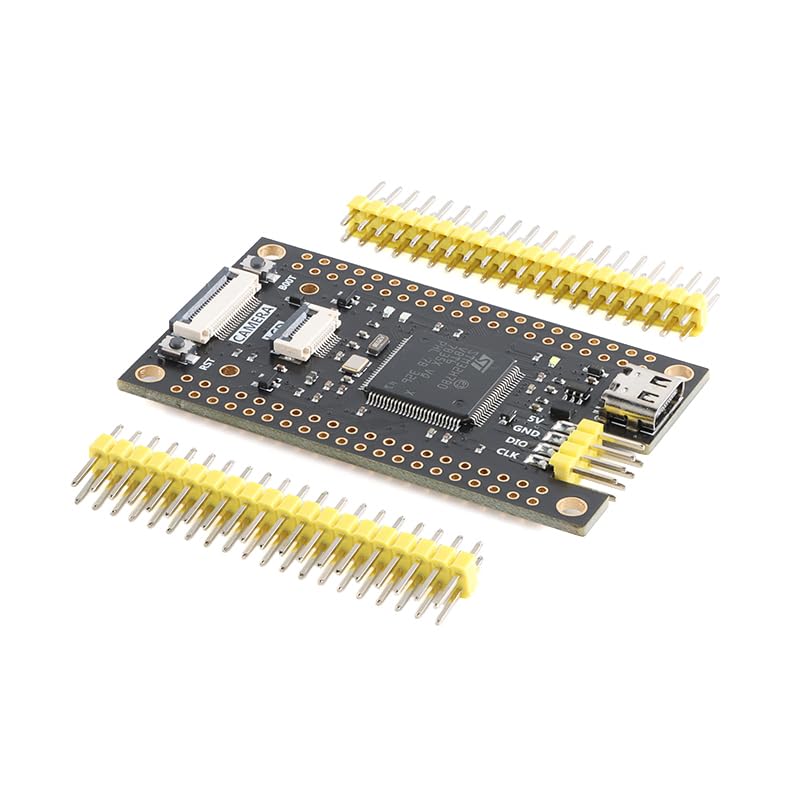
2. Konfigurazioa
Follow these steps to set up your STM32H7B0VBT6 Core Board:
- Potentzia-konexioa: Connect the board to a power source using the Type-C USB interface. Ensure the power supply meets the board's voltage eskakizunak.
- Gidariaren instalazioa: Install necessary USB drivers on your computer if the board is not automatically recognized. Refer to the official STMicroelectronics documentation for specific driver details.
- Garapen-ingurunea: Set up your preferred Integrated Development Environment (IDE), such as STM32CubeIDE or Keil MDK, and configure it for the STM32H7B0 microcontroller.
- Peripheral Integration: For applications requiring display or camera functionality, connect your SPI LCD or camera module to the dedicated interfaces on the board. The board features 73 IO ports for extensive customization and peripheral integration.
- Kanpoko memoria: If utilizing the 8M byte W25Q64 external memory, ensure it is properly connected and configured within your software project.
3. Funtzionamendu-argibideak
The STM32H7B0VBT6 Core Board is designed for efficient development with several user-friendly features:
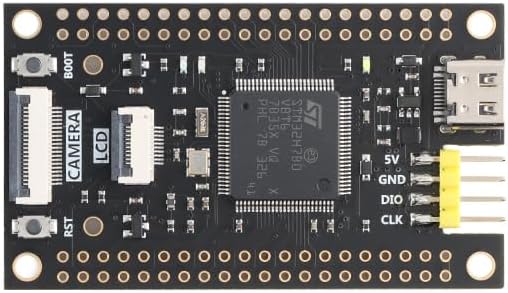
- Bootloader Access: To enter bootloader mode, press and hold the BOTA button while powering on or resetting the board. This allows for easy firmware flashing.
- Berrezarri funtzioa: The RST button allows for a hardware reset of the microcontroller, restarting the program execution.
- Erabiltzailearen botoia: A dedicated user button is available for custom application input, configurable within your firmware.
- LED adierazlea: An onboard LED provides visual feedback, often used for power indication, status, or debugging purposes.
- Programazioa: Utilize the Type-C USB interface for programming and debugging. The board operates at a 280MHz main frequency, leveraging 128K Flash and 1.4M SRAM for robust application development.
4. Mantentzea
To ensure the longevity and optimal performance of your STM32H7B0VBT6 Core Board, observe the following maintenance guidelines:
- Ingurumen-baldintzak: Operate the board within its specified temperature range of -30°C to 80°C. Avoid exposure to extreme humidity, dust, or corrosive environments.
- Garbiketa: Beharrezkoa bada, garbitu taula astiro-astiro eskuila leun eta lehor batekin edo aire konprimatuarekin hautsa kentzeko. Saihestu likidoak edo material urratzaileak erabiltzea.
- Konektibitatea: Ensure all connections, especially the Type-C USB and peripheral connectors, are secure and free from damage.
- Firmware eguneraketak: Regularly check for and apply firmware updates for the STM32H7B0 microcontroller and associated libraries to benefit from performance improvements and bug fixes.

5. Arazoak
If you encounter issues with your STM32H7B0VBT6 Core Board, consider the following:
- Energiarik ez/LED itzalita:
- Verify the Type-C USB cable is securely connected to both the board and the power source.
- Ensure the power source is functional and provides adequate voltage.
- Board Not Recognized by PC:
- Check USB cable integrity.
- Confirm that the correct USB drivers are installed on your computer.
- Probatu beste USB ataka edo ordenagailu batekin.
- Firmwarearen kargatze-hutsegitea:
- Ensure the board is in bootloader mode (if required by your programming method).
- Verify your IDE settings and programmer configuration are correct for the STM32H7B0.
- Check for any error messages from the IDE or programming tool.
- Peripheral Malfunction (LCD/Camera):
- Confirm all connections to the peripheral are correct and secure.
- Verify that your firmware correctly initializes and communicates with the peripheral.
- Consult the peripheral's datasheet and example kodea.
For more complex issues, refer to the official STMicroelectronics documentation for the STM32H7B0 microcontroller or seek assistance from the EC Buying support team.
6. Zehaztapenak
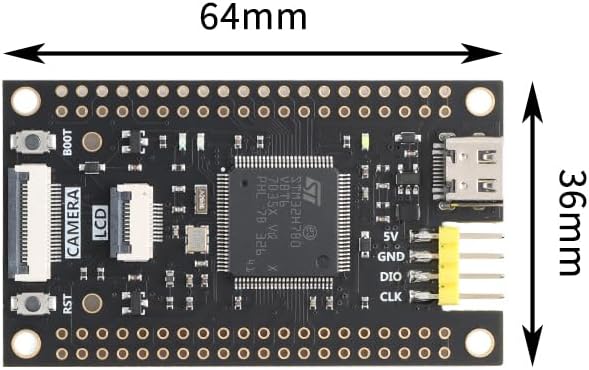
Key technical specifications for the STM32H7B0VBT6 Core Board:
| Ezaugarri | Xehetasuna |
|---|---|
| Ereduaren izena | STM32H7B0VBT6 |
| CPU Abiadura | 280 MHz |
| Flash Memoria | 128 KB |
| SRAM memoria | 1.4 MB |
| Kanpoko Memoria | 8 MB W25Q64 (QSPI) |
| IO Portuak | 73 |
| Konektibitatea | USB C motakoa |
| Interfazeak | SPI LCD, Camera Interface |
| Funtzionamendu-tenperatura | -30°C eta 80°C artean |
| Operating System (Compatible) | FreeRTOS |
| Prozesadorearen marka | STMicroelectronics |
| Gailu bateragarriak | Cameras, Computers (PCs, laptops, tablets), Smartphones |
7. Bermearen informazioa
EC Buying warrants this product against defects in materials and workmanship for a period of 30 days from the original date of purchase. This warranty does not cover damage caused by accident, misuse, abuse, improper installation, unauthorized repair or modification, or external causes such as but not limited to power fluctuations or lightning strikes. For warranty claims, please retain your proof of purchase and contact customer support.
8. Bezeroarentzako arreta
For technical assistance, troubleshooting, or general inquiries regarding your EC Buying STM32H7B0VBT6 Core Board, please visit the EC Buying store on Amazon or contact their customer service directly through the platform. Ensure you have your product model number (STM32H7B0VBT6) and purchase details ready when contacting support.