
1. Produktua amaitu daview
The WVX Gaming Laptop R9-6900HX (Model A02) is a high-performance portable computer designed for demanding tasks such as gaming, content creation, and multitasking. It features an AMD Ryzen 9 6900HX processor, AMD Radeon 680M integrated graphics, and fast DDR5 memory.
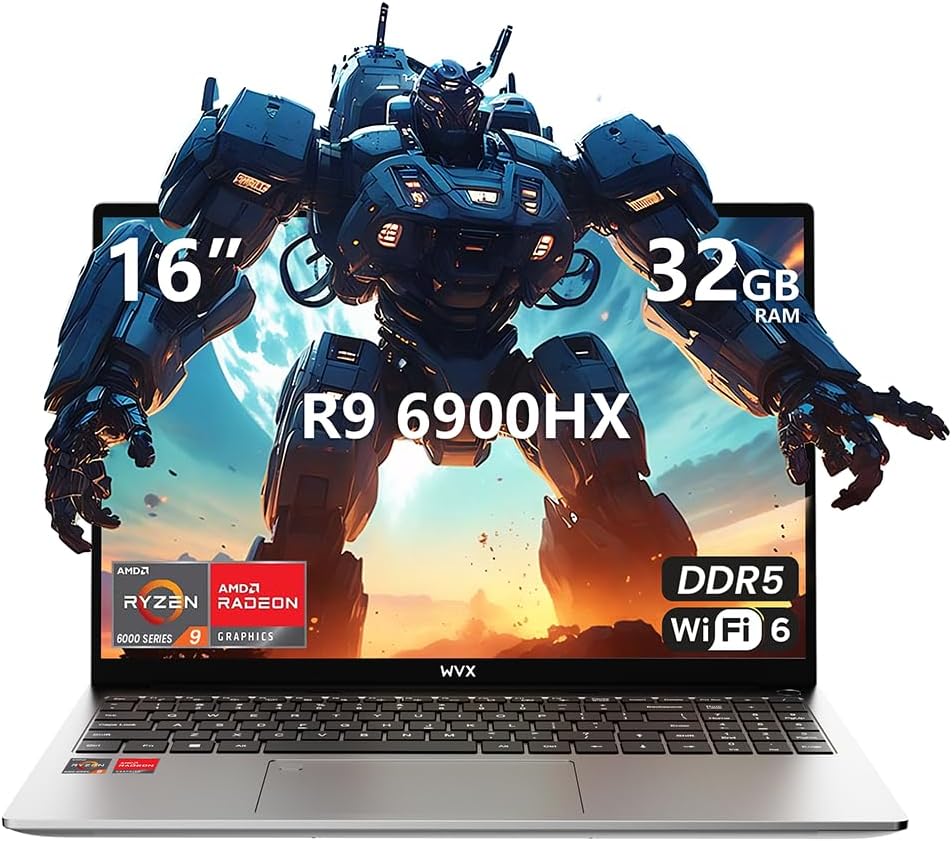
Image 1.1: WVX Gaming Laptop R9-6900HX
Ezaugarri nagusiak:
- High-Performance CPU: AMD Ryzen 9 6900HX with 8 cores and 16 threads, up to 4.9 GHz.
- Grafiko integratuak: AMD Radeon 680M, delivering strong visual performance.
- Fast Memory: 32GB DDR5 RAM, expandable up to 64GB.
- AmpBiltegiratzea: 512GB SSD, expandable up to 2TB.
- Pantaila bizia: 16 hazbeteko Full HD (1920x1200) pantaila.
- Konektibitate aurreratua: Wi-Fi 6 eta Bluetooth 5.2.
- Sistema eragilea: Pre-installed with Windows 11 Pro.
2. Konfigurazioa
2.1 Kutxatik ateratzea eta hasierako ikuskapena
Carefully remove the laptop and its accessories from the packaging. Ensure all components listed in the 'What's in the Box' section are present and undamaged.
- R9-6900HX laptop
- PD100W adapter (charger)
2.2 Energia-egokitzailea konektatzea
Connect the PD100W adapter to the laptop's power input port and then plug it into a power outlet. It is recommended to fully charge the laptop before its first use.
2.3 Hasierako abiaraztea eta Windows konfigurazioa
Press the power button located on the laptop. The system will guide you through the initial Windows 11 Pro setup process. Follow the on-screen instructions to configure your language, region, network, and user account.
3. Funtzionamendu-argibideak
3.1 Teklatua eta ukipen-panela
The laptop features a full-size keyboard with a numeric keypad and a responsive touchpad. The keyboard is backlit for comfortable use in low-light conditions. The touchpad supports multi-touch gestures for enhanced navigation.

Image 3.1: Laptop keyboard and touchpad layout.
3.2 Pantaila eta grafikoak
The 16-inch FHD display offers a resolution of 1920x1200 pixels, providing clear and vibrant visuals. The AMD Radeon 680M graphics processor handles demanding visual tasks efficiently.

Image 3.2: Display features including 300 nits brightness, IPS, and low blue light.
3.3 Portuak eta Konexioa
Ordenagailu eramangarriak kanpoko gailuetarako eta konektibitaterako hainbat ataka ditu:
- 4x USB 3.0 ataka
- HDMI ataka
- Full-function Type-C Port (supports charging, data transfer, external 4K monitor)
- 3.5 mm-ko entzungailua
- SD txartelaren irakurgailua
For wireless connectivity, the laptop supports Wi-Fi 6 for high-speed internet and Bluetooth 5.2 for connecting peripherals.
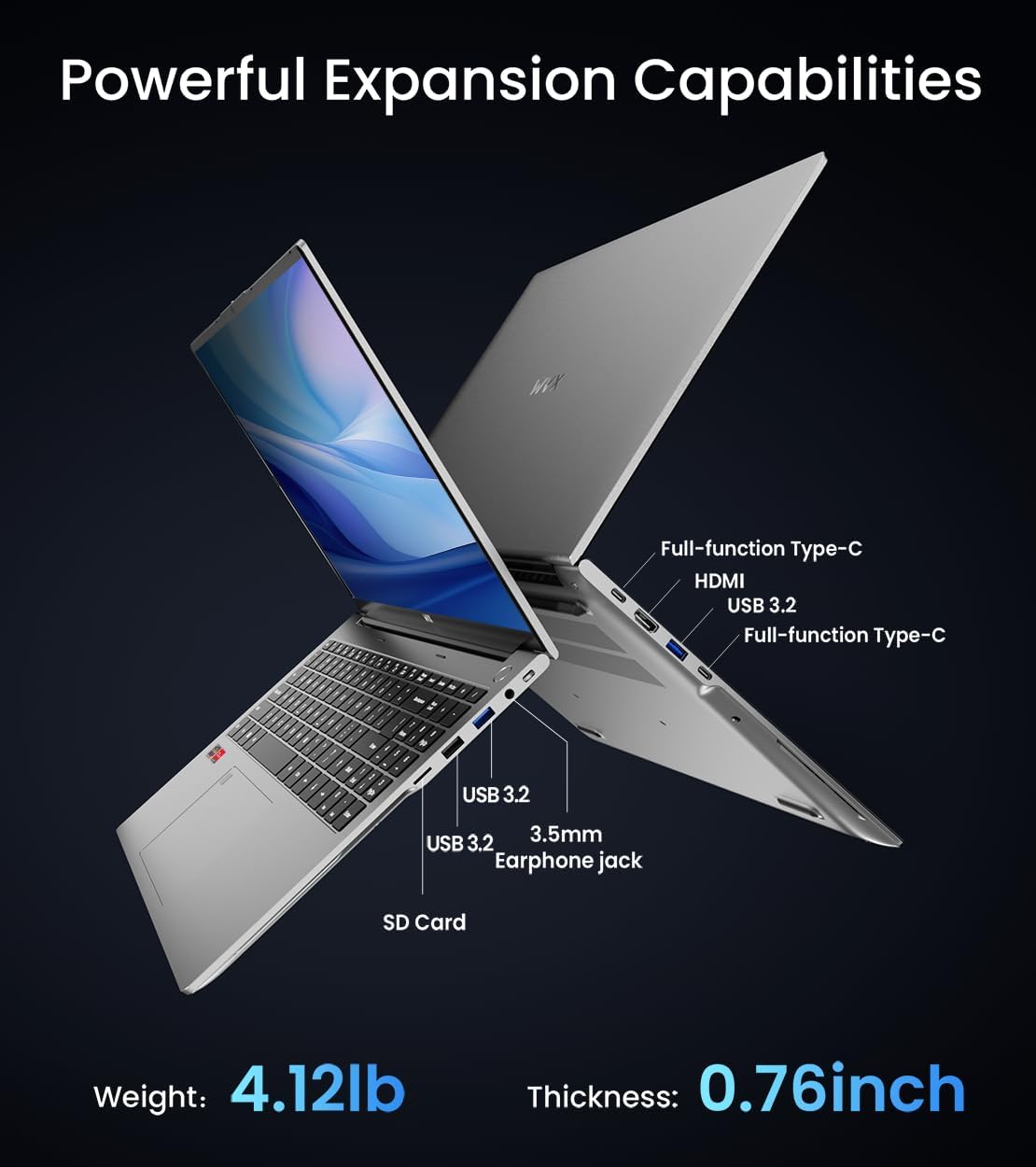
3.3. irudia: Amaituview of available ports and physical dimensions.
4. Mantentzea
4.1 Garbiketa
To maintain optimal performance and appearance, regularly clean your laptop. Use a soft, lint-free cloth for the screen and exterior. For stubborn smudges, a slightly dampened cloth with water or a specialized screen cleaner can be used. Avoid harsh chemicals.
4.2 Software eguneraketak
Regularly update your Windows operating system and drivers to ensure system stability, security, and optimal performance. Windows Update can be accessed through the Settings menu.
4.3 Biltegiratze eta memoria eguneratzeak
The laptop's RAM can be upgraded to a maximum of 64GB, and the SSD storage can be expanded up to 2TB. Consult a qualified technician for hardware upgrades to avoid voiding your warranty.

Image 4.1: Illustration of memory and storage upgrade capabilities.
5. Arazoak
5.1 Energia arazoak
- Ordenagailu eramangarria ez da pizten: Ziurtatu korronte-egokitzailea ondo konektatuta dagoela eta bateriak nahikoa karga duela. Saiatu beste korronte-hartune batekin.
- Bateria ez da kargatzen: Verify the power adapter is functioning correctly. Check the charging port for any obstructions.
5.2 Bistaratzeko arazoak
- Pantaila hutsa: Connect an external monitor to check if the issue is with the laptop's display. Restart the laptop.
- Pantaila keinukaria: Eguneratu grafikoen kontrolatzaileak. Doitu pantailaren freskatze-tasa Windows ezarpenetan.
5.3 Errendimendu arazoak
- Errendimendu motela: Itxi beharrezkoak ez diren aplikazioak. Egiaztatu malwarea. Ziurtatu biltegiratze leku nahikoa dagoela.
- Gehiegizko berotzea: Ensure ventilation vents are clear. Consider using a cooling pad.

Image 5.1: Illustration of the laptop's cooling system with pure copper heat pipes and fan speed.
6. Zehaztapenak
| Ezaugarri | Zehaztapena |
|---|---|
| Marka | WVX |
| Ereduaren izena | R9-6900HX (A02) |
| Prozesadorea | AMD Ryzen 9 6900HX (4.9 GHz, 8 Cores, 16 Threads) |
| Koprozesadore grafikoa | AMD Radeon 680M |
| RAM | 32 GB DDR5 (gehienez 64 GB) |
| Disko gogorra | 512 GB SSD (Max 2TB) |
| Pantailaren tamaina | 16 hazbete |
| Gehienezko pantailaren bereizmena | 1920x1200 pixel |
| Sistema eragilea | Windows 11 Pro |
| Haririk gabeko mota | 802.11ax (Wi-Fi 6) |
| Bluetootha | 5.2 |
| USB 3.0 ataka kopurua | 4 |
| Produktuaren neurriak | 14 x 9.7 x 0.78 hazbete |
| Elementuaren pisua | 5.89 kilo |
| Bateria | 58Wh |
| Ezaugarri bereziak | Backlit Keyboard, Fingerprint Reader, HD Audio |
7. Bermea eta Laguntza
WVX offers comprehensive support for your laptop:
- Laguntza teknikoa: Enjoy unlimited technical support.
- Konponketa Zerbitzua: 12 months of repair service for all customers.
- Erantzun denbora: Online connection within 24 hours for inquiries.
For any questions or concerns, please reach out to the WVX support team.

7.1. irudia: Amaituview of WVX customer support services.
8. Produktuaren bideo ofiziala
8.1 bideoa: Bideo emanaldi ofizialaasing the WVX R9 6900HX Laptop, highlighting its features and design.