
1. Sarrera
The JCLOUD Smart Scent Air Machine 1000ML is an advanced, waterless cold air diffuser designed to provide consistent and long-lasting fragrance coverage for large areas, up to 4500 square feet. This upgraded 2024 model utilizes cold air technology to disperse essential oils into dry mist microparticles, ensuring a pure and mess-free scent experience. It is suitable for both residential and commercial environments.

Figure 1: JCLOUD Smart Scent Air Machine 1000ML, Upgraded White model.
2. Unique Features
This JCLOUD scent machine offers several key features for an enhanced aromatherapy experience:
- Whole House and Commercial Scenting: Ensures consistent, long-lasting fragrance coverage throughout your entire space, covering up to 4500 Sq. Ft.
- Powerful and Efficient Cold Air Technology: Disperses essential oils into dry mist microparticles without heat or water, preserving the integrity of the oils.
- Quick Setup with App Control: Easily set desired run times and multiple advanced schedules via Bluetooth through the 'Aroma Link' app.
- Waterless, Heatless, and Mess-Free Operation: Eliminates the need for water refills and prevents noisy bubbling sounds.
- Safe & Natural: The cold air diffusion method is safe for children and pets, making it ideal for any household or commercial area.
- Kokapen polifazetikoa: Can be used standalone, wall-mounted, or connected directly to your HVAC system.

Figure 2: Visual representation of the unique features, including nano-level fine atomization and pet-friendly design.
3. Paketearen edukia
Upon opening your JCLOUD Smart Scent Air Machine package, please verify that all components are present and in good condition:
- JCLOUD Smart Scent Air Machine (OV10-White)
- Korronte egokitzailea (kable elektrikoa)
- Essential Oil Bottle (1000ML capacity, typically pre-installed or included empty)
- Erabiltzailearen eskuliburua (dokumentu hau)
- Warranty/Service Card
- (Optional, depending on package) Wall-mounting accessories, HVAC connection tubing.
4. Konfigurazio gida
4.1 Hasierako kokapena
Choose a suitable location for your scent machine. It can be placed standalone on a flat surface, mounted on a wall, or integrated with your HVAC system. Ensure the area is well-ventilated and away from direct heat sources or obstructions.

Figure 3: The JCLOUD scent diffuser effectively covers large areas, suitable for whole-house scenting.
4.2 Olio esentzialaren botila betetzea
- Carefully open the essential oil compartment on the device.
- Unscrew the cap of the 1000ML essential oil bottle.
- Fill the bottle with your preferred pure essential oil. Do not overfill.
- Securely screw the bottle back into its designated slot within the machine.
- Itxi konpartimentuaren estalkia.
4.3 Energia-konexioa
Connect the provided power adapter to the machine's power input port and then plug it into a standard electrical outlet. The device will power on and be ready for app connection.
5. Erabilera-argibideak (aplikazioaren kontrola)
The JCLOUD Smart Scent Air Machine is primarily controlled via the 'Aroma Link' mobile application. Follow these steps for quick setup and customization:
- Deskargatu aplikazioa: Bilatu "Aroma Link" in your mobile device's app store (iOS App Store or Google Play Store) and download it.
- Bluetooth bidez konektatu:
- Open the Aroma Link app.
- Choose the Bluetooth mode for connection.
- Select your JCLOUD machine from the device list (e.g., "Smart.A5.WIFI").
- If prompted for a password, the default password is 1234.
- Sartu ezarpenak: Once connected, navigate to the 'Set' or 'Working Period' section within the app.
- Customize Schedules:
- You can set up to 5 different time schedule programs for each day of the week.
- For each program, define the Hasiera Ordua eta Amaiera Ordua.
- Egokitu Work(s) (duration of scent spray in seconds) and Pause(s) (pause duration between sprays in seconds) to control scent intensity.
- Ensure to press the Gorde botoia after making any changes to prevent settings from being lost.
- Fan kontrola: The app also allows you to turn the internal fan on or off, which aids in scent distribution.
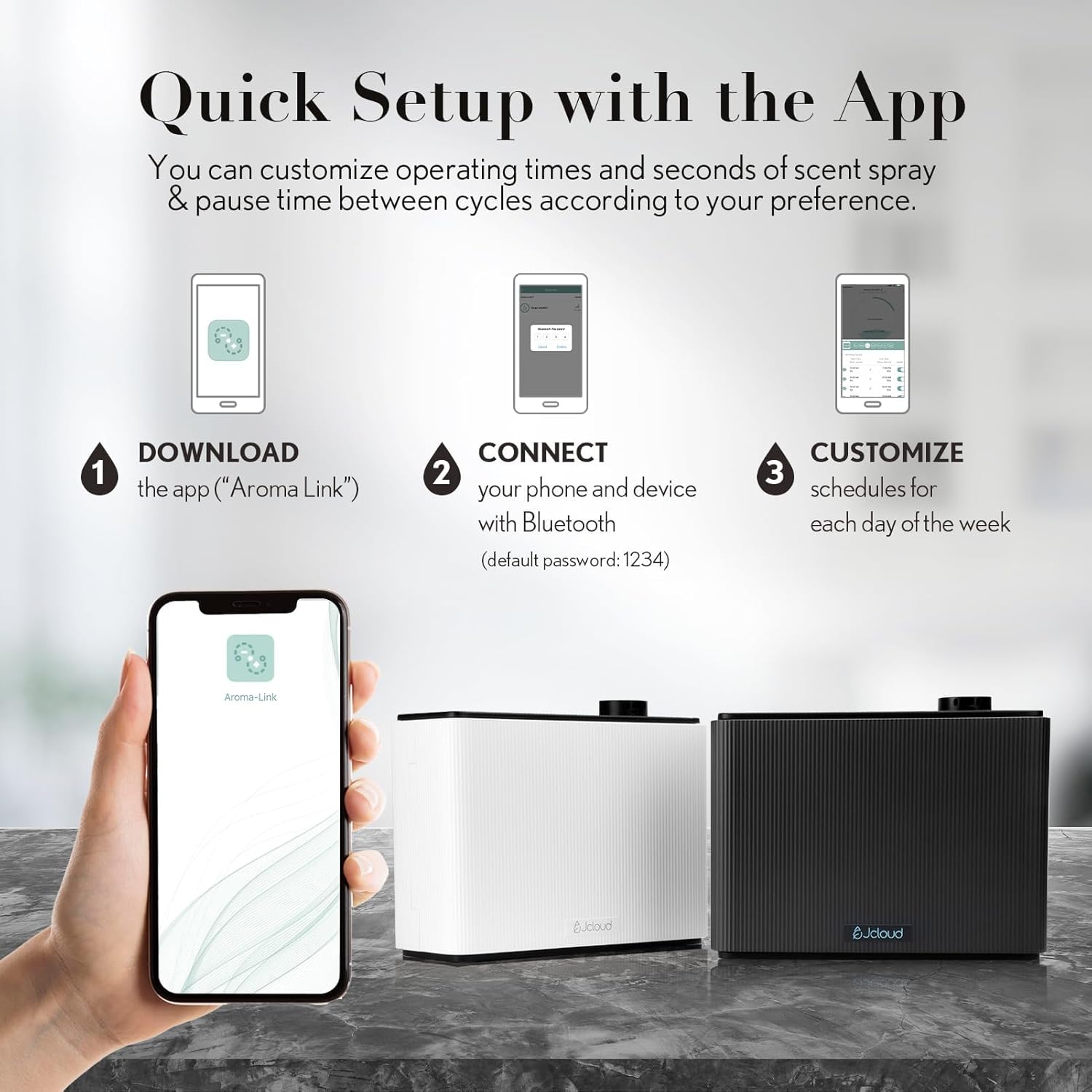
Figure 4: Steps for quick setup and customization using the Aroma Link app.
Video 1: Demonstrates how to use the "Aroma Link" app to control the JCLOUD scent machine, including connecting via Bluetooth and setting work/pause times.
6. Mantentzea
To ensure optimal performance and longevity of your JCLOUD Smart Scent Air Machine, follow these simple maintenance guidelines:
- Essential Oil Refill: Regularly check the essential oil level and refill as needed. Only use pure essential oils designed for cold air diffusers. Avoid water-diluted oils or other liquids.
- Garbiketa: Periodically wipe the exterior of the machine with a soft, dry cloth to remove dust. Do not use abrasive cleaners or immerse the unit in water.
- Toberaren zainketa: If you notice a decrease in scent output, ensure the nozzle is not clogged. Refer to the manufacturer's guidelines for specific cleaning instructions for the atomizing nozzle, if necessary.
- Biltegiratzea: If storing the machine for an extended period, empty the essential oil bottle and clean it. Store the unit in a cool, dry place.
7. Arazoak
If you encounter issues with your JCLOUD Smart Scent Air Machine, please refer to the following common troubleshooting tips:
| Arazoa | Kausa posiblea | Irtenbidea |
|---|---|---|
| No scent output or weak scent |
|
|
| Gailua ez da pizten |
|
|
| Aplikazioaren konexio-arazoak |
|
|
| Ezohiko zarata funtzionamenduan |
|
|
If the problem persists after trying these solutions, please contact JCLOUD customer support for further assistance.
8. Zehaztapenak

Figure 5: Dimensions of the JCLOUD Smart Scent Air Machine.
| Zehaztapena | Xehetasuna |
|---|---|
| Marka | JCLOUD |
| Ereduaren izena | OV10-White |
| Kolorea | Upgraded White |
| Estaldura Eremua | 2000 - 4500 Sq. Ft. |
| Edukiera | 1000 mililitro |
| Energia iturria | Kable elektrikoa |
| Wattage | 15 watt |
| Materiala | Plastikoa |
| Produktuaren neurriak (L x W x H) | 11.59" x 4.4" x 9" |
| Elementuaren pisua | 7.76 kilo |
| Auto itzalketa | Ez |
9. Bermea eta Laguntza
JCLOUD is committed to providing exceptional customer service and support for your Smart Scent Air Machine.
9.1 Bermearen informazioa
Your product comes with a standard warranty. Please refer to the service card included in your package for specific warranty terms and conditions. Some customers may be eligible for an extended warranty:
- Berme Hedatua: According to customer feedback, JCLOUD may offer a free two-year extended warranty upon emailing your device ID to the brand's official email or via Amazon mail, as indicated on the service card. Please check your service card for details on how to claim this extension.
9.2 Bezeroarentzako laguntza
If you have any questions regarding installation, operation, troubleshooting, or need assistance with choosing essential oils, our customer service team is ready to help. You can reach us via the contact information provided on the service card in your package or through Amazon's messaging system.


