
1. Sarrera
This manual provides detailed instructions for the safe and efficient use of your KYOCERA DuraXA Equip E4831 rugged flip phone. The DuraXA Equip is designed to withstand challenging environments, featuring robust protection against temperature extremes, blowing rain, salt fog, humidity, freeze-thaw cycles, icing/freezing rain, water submersion, and dust. It is also certified to withstand drops, shocks, and vibrations, and offers protection in hazardous locations.
Please read this manual thoroughly before operating your device to ensure proper functionality and longevity.
2. Gailua amaitu daview
Familiarize yourself with the physical components of your DuraXA Equip E4831.
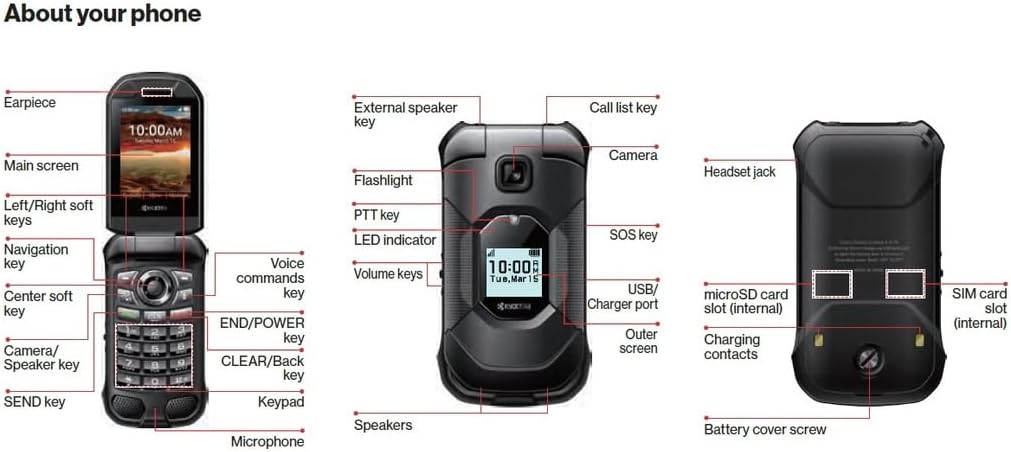
2.1. irudia: Key components of the KYOCERA DuraXA Equip E4831, including internal and external features, and port locations.

2.2. irudia: Aurrealdea view of the KYOCERA DuraXA Equip E4831 when closed, displaying the external screen.
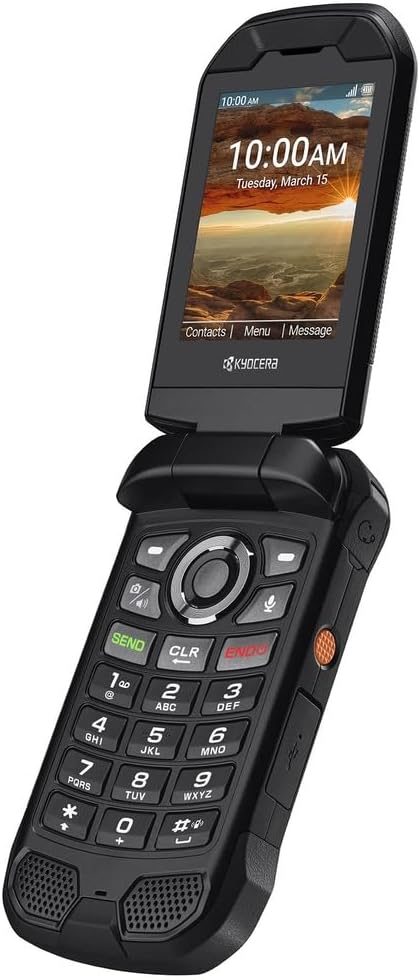
2.3. irudia: Ireki view of the KYOCERA DuraXA Equip E4831, showcasing the main display and keypad.
3. Konfigurazioa
3.1 Kutxatik ateratzea eta hasierako ikuskapena
Paketea irekitzean, ziurtatu osagai guztiak daudela:
- KYOCERA DuraXA Equip E4831 Phone
- USB kablea
- Elikatze-moldagailua
Inspect the phone for any visible damage. If any components are missing or damaged, contact your retailer immediately.
3.2 SIM txartela eta microSD txartela sartzea
The DuraXA Equip E4831 supports a single SIM card and a microSD card for expandable storage. Both slots are internal, typically located under the battery cover.
- Power off the device and remove the battery cover.
- Carefully insert your SIM card into the designated SIM card slot with the gold contacts facing down.
- If desired, insert a microSD card into the microSD card slot.
- Replace the battery and battery cover securely.
3.3 Bateriaren instalazioa eta kargatzea
Your phone comes with a 1770 Milliamp Hours (mAh) nonstandard battery. The battery is included and may be pre-installed.
- If the battery is not installed, align the battery contacts with the terminals in the phone and gently press it into place.
- Connect the USB cable to the phone's USB Type C connector port.
- Connect the other end of the USB cable to the power adapter, then plug the adapter into a wall outlet.
- Allow the phone to charge fully before first use. The LED indicator will show charging status.
3.4 Piztu/Itzaltzea
- Pizteko: Press and hold the END/POWER key until the screen illuminates.
- Itzaltzeko: Press and hold the END/POWER key until the power options appear on the screen, then select 'Power Off'.
4. Zure gailua funtzionatzea
4.1 Basic Navigation and Keypad Functions
The DuraXA Equip features a large, tactile, glove-friendly keypad and a 4-way navigation key for easy menu access.
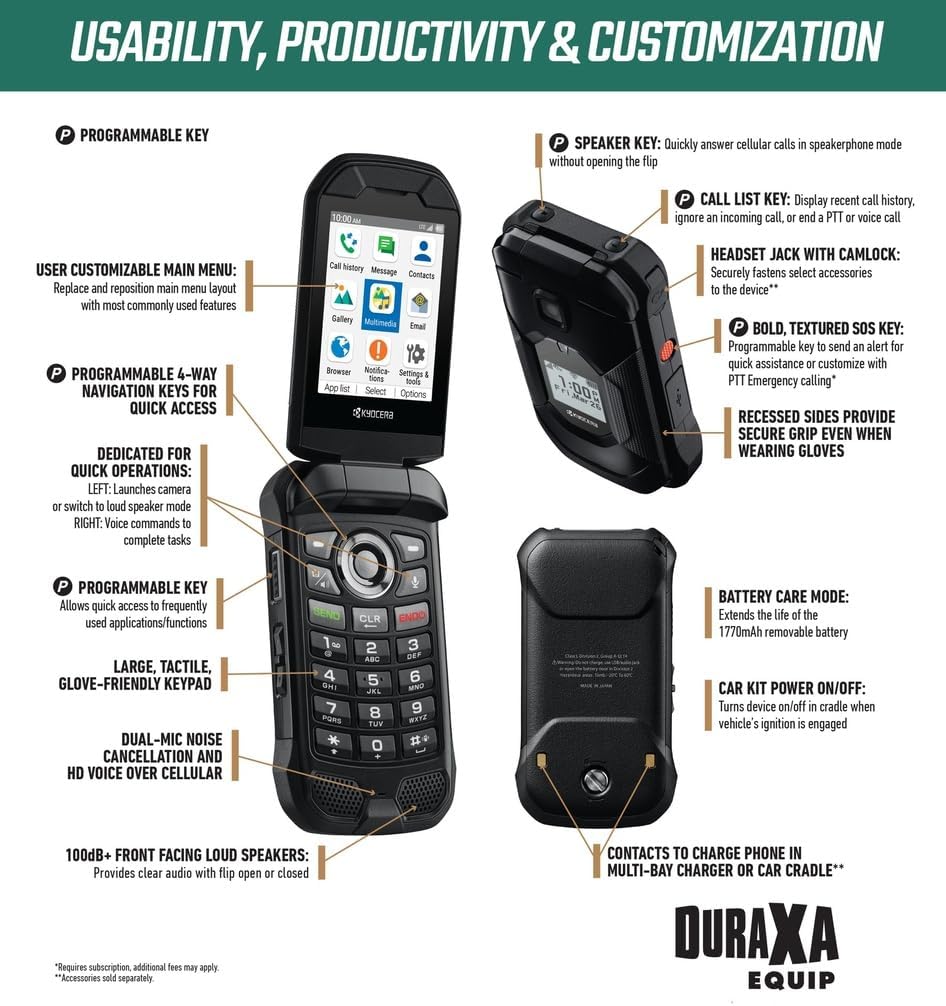
4.1. irudia: Usability, Productivity & Customization Features.
- Nabigazio-gakoa: Use the up, down, left, and right directions to navigate through menus and options. The center soft key confirms selections.
- Soft Keys: The keys directly below the screen (Left/Right soft keys) perform functions indicated on the display above them, which change depending on the context.
- SEND Key: Initiates calls or answers incoming calls.
- END/POWER Key: Ends calls or powers the device on/off.
- CLEAR/Back Key: Deletes characters or goes back to the previous screen.
4.2 Deiak egitea eta jasotzea
- Dei bat egiteko: Sartu telefono zenbakia teklatua erabiliz eta sakatu tekla BIDALI giltza.
- Dei bati erantzuteko: Telefonoak jotzen duenean, sakatu BIDALI giltza.
- Dei bat amaitzeko: Sakatu END/POWER giltza.
- Bozgorailuaren gakoa: Quickly answer cellular calls in speakerphone mode without opening the flip.
- Call List Key: Display recent call history, ignore an incoming call, or end a PTT or voice call.
4.3 Mezuak bidaltzea eta jasotzea
Access the messaging application from the main menu to compose and send text messages (SMS) or multimedia messages (MMS).
4.4 Kameraren erabilera
The DuraXA Equip E4831 includes a camera. To access the camera, navigate to the camera application from the main menu or use the dedicated programmable key if assigned.
- Argazkiak ateratzen: Open the camera app, frame your shot, and press the designated capture button (often the center soft key or a volume key).
4.5 Konektibitatea
The device supports 4G cellular technology for reliable communication.
- Datu zelularrak: Access mobile internet services through your carrier's 4G network.
- Bluetootha: Connect to compatible Bluetooth devices such as headsets or car kits.
4.6 Programmable Keys and Customization
The DuraXA Equip offers several customizable features:
- Tekla programagarria: This key allows quick access to frequently used applications or functions.
- Programmable 4-Way Navigation Keys: The left navigation key can launch the camera or switch to loudspeaker mode. The right navigation key can be set for voice commands.
- User Customizable Main Menu: Replace and reposition main menu layout with most commonly used features for personalized access.
- Bold, Textured SOS Key: Programmable key to send an alert for quick assistance or customize with PTT Emergency calling.
5. Mantentzea
5.1 Gailua garbitzea
Due to its rugged design, the DuraXA Equip E4831 is waterproof and dustproof. To clean your device:
- Garbitu telefonoa zapi leun batekin,amp oihal.
- For tougher grime, a mild soap solution can be used, followed by rinsing with clean water.
- Ziurtatu ataka-estalki guztiak ondo itxita daudela likidoekin garbitu aurretik.
- Do not use harsh chemicals, cleaning solvents, or aerosol sprays.
5.2 Bateria zaintzea
To extend the life of your phone's battery:
- Saihestu telefonoa tenperatura altuetan jartzea.
- Do not leave the phone charging for extended periods after it is fully charged.
- Utilize the phone's built-in 'Battery Care Mode' if available, which helps optimize charging cycles.
5.3 Biltegiratzea eta manipulazioa
- Gorde telefonoa leku fresko eta lehor batean erabiltzen ez duzunean.
- Avoid placing heavy objects on the phone.
- Ensure all port covers are sealed to maintain water and dust resistance.
6. Arazoak
This section addresses common issues you might encounter with your DuraXA Equip E4831.
| Arazoa | Kausa posiblea | Irtenbidea |
|---|---|---|
| Gailua ez da pizten | Low or depleted battery; software glitch. | Charge the battery for at least 30 minutes. Attempt a soft reset by removing and reinserting the battery (if removable). |
| Ez dago sareko konexiorik | SIM card not inserted correctly; out of network coverage; network settings issue. | Check SIM card insertion. Move to an area with better coverage. Restart the phone. Verify network settings with your carrier. |
| Deien kalitate eskasa | Weak signal; microphone/speaker obstruction; environmental noise. | Move to an area with stronger signal. Ensure microphone and speaker are clear of debris. Use the dual-mic noise cancellation feature. |
| Telefonoa blokeatu egiten da edo ez du erantzuten | Application error; low memory. | Press and hold the END/POWER key to force a restart. If persistent, consider a factory reset (backup data first). |
| Bateria azkar agortzen da | Excessive background apps; high screen brightness; aging battery. | Close unused applications. Reduce screen brightness. Enable Battery Care Mode. If battery is old, consider replacement. |
Irtenbide hauek probatu ondoren arazoa konpontzen ez bada, jarri harremanetan bezeroarentzako arreta-zerbitzuarekin.
7. Zehaztapenak
Key technical specifications for the KYOCERA DuraXA Equip E4831:
| Ezaugarri | Zehaztapena |
|---|---|
| Ereduaren izena | DuraXA Equip |
| Marka | KYOCERA |
| Sistema eragilea | AOSP |
| Pantailaren tamaina | 2.6 Inches (Main Display) |
| Memoria Biltegiratzeko Ahalmena | 16 GB |
| Bateria Edukiera | 1770 milioiamp Orduak |
| Haririk gabeko garraiolaria | Desblokeatua |
| Teknologia Zelularra | 4G |
| Kolorea | Beltza |
| SIM txartelaren zirrikituen kopurua | SIM bakarra |
| Konektore mota | USB C mota |
| Elementuaren pisua | 1 kilo |
| Paketearen neurriak | 7 x 4 x 2 hazbete |
8. Bermea eta Laguntza
This KYOCERA DuraXA Equip E4831 is a renewed product. Renewed products typically come with a specific return policy and limited warranty provided by the seller or refurbisher, rather than the original manufacturer's new product warranty.
For this specific renewed device, a 90-day refund/replacement return policy is offered by the seller, USA OEM, and fulfilled by Amazon.
For any issues not covered in the troubleshooting section or for warranty claims, please contact the seller directly through the platform where the purchase was made. Keep your proof of purchase for any warranty or return inquiries.