
Micool DY20PLUS
Micool DY20PLUS Bluetooth Headset V5.4 User Manual
Model: DY20PLUS | Brand: Micool
Sarrera
Thank you for choosing the Micool DY20PLUS Bluetooth Headset V5.4. This manual provides comprehensive instructions to help you set up, operate, and maintain your new headset. Please read this manual carefully before use to ensure optimal performance and longevity of your device.
Paketearen edukia
- Micool DY20PLUS Bluetooth Headset
- USB-C kargatzeko kablea
- Erabiltzailearen eskuliburua
- Multiple Sized Ear Tips (L, M, S)
Produktua amaituview
Familiarize yourself with the components of your Micool DY20PLUS Bluetooth Headset.
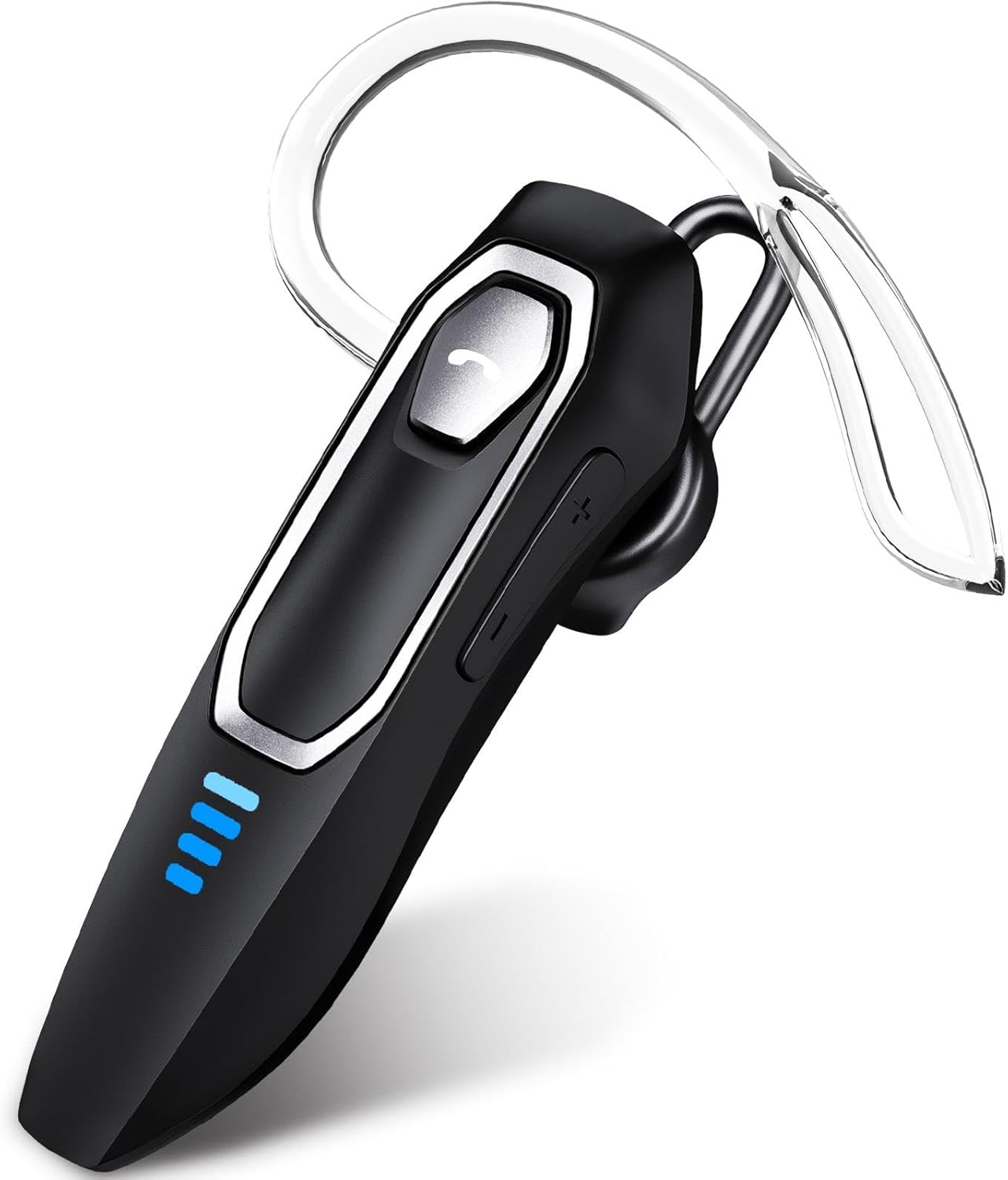
Image 1: Micool DY20PLUS Bluetooth Headset. This image displays the main headset unit, highlighting the call button, volume controls, and LED power indicators.

Image 2: Headset Controls Diagram. This diagram illustrates the Multi-Function Button (MFB) for power, play/pause, and Bluetooth pairing, along with volume controls and mute function.
Entzungailua kargatzen
Lehenengo aldiz erabili aurretik, kargatu guztiz entzungailuak.
- Connect the provided USB-C charging cable to the charging port on the headset.
- Konektatu kablearen beste muturra USB elikadura-iturri batera (adibidez, ordenagailura, hormako egokigailua).
- The LED indicators will show charging status. A full charge typically takes 1.5-2 hours.
- Once fully charged, the LED indicators will change or turn off (refer to LED Power Display section for details).
The headset offers up to 36 hours of talk time and 45 hours of music playback on a single charge.
Konfigurazioa
Piztu/Itzali
- Piztu: Press and hold the Multi-Function Button (MFB) for approximately 3 seconds until the LED indicator flashes.
- Itzali: Sakatu eta eutsi MFB botoia 3 segundo inguru, LED adierazlea itzali arte.
Bluetooth parekatzea
- Ziurtatu entzungailua itzalita dagoela.
- Press and hold the MFB for approximately 3 seconds until the LED indicator flashes red and blue alternately, indicating pairing mode.
- Zure gailuan (telefono adimenduna, tableta, ordenagailua), gaitu Bluetooth eta bilatu eskuragarri dauden gailuak.
- Select "DY20PLUS" from the list of found devices.
- Behin konektatuta, entzungailuen LED adierazlea urdinez keinuka hasiko da poliki.
Puntu anitzeko konexioa: The DY20PLUS headset can connect to two devices simultaneously. After pairing with the first device, disable Bluetooth on that device. Then, put the headset back into pairing mode and connect to the second device. Re-enable Bluetooth on the first device, and the headset should automatically connect to both.
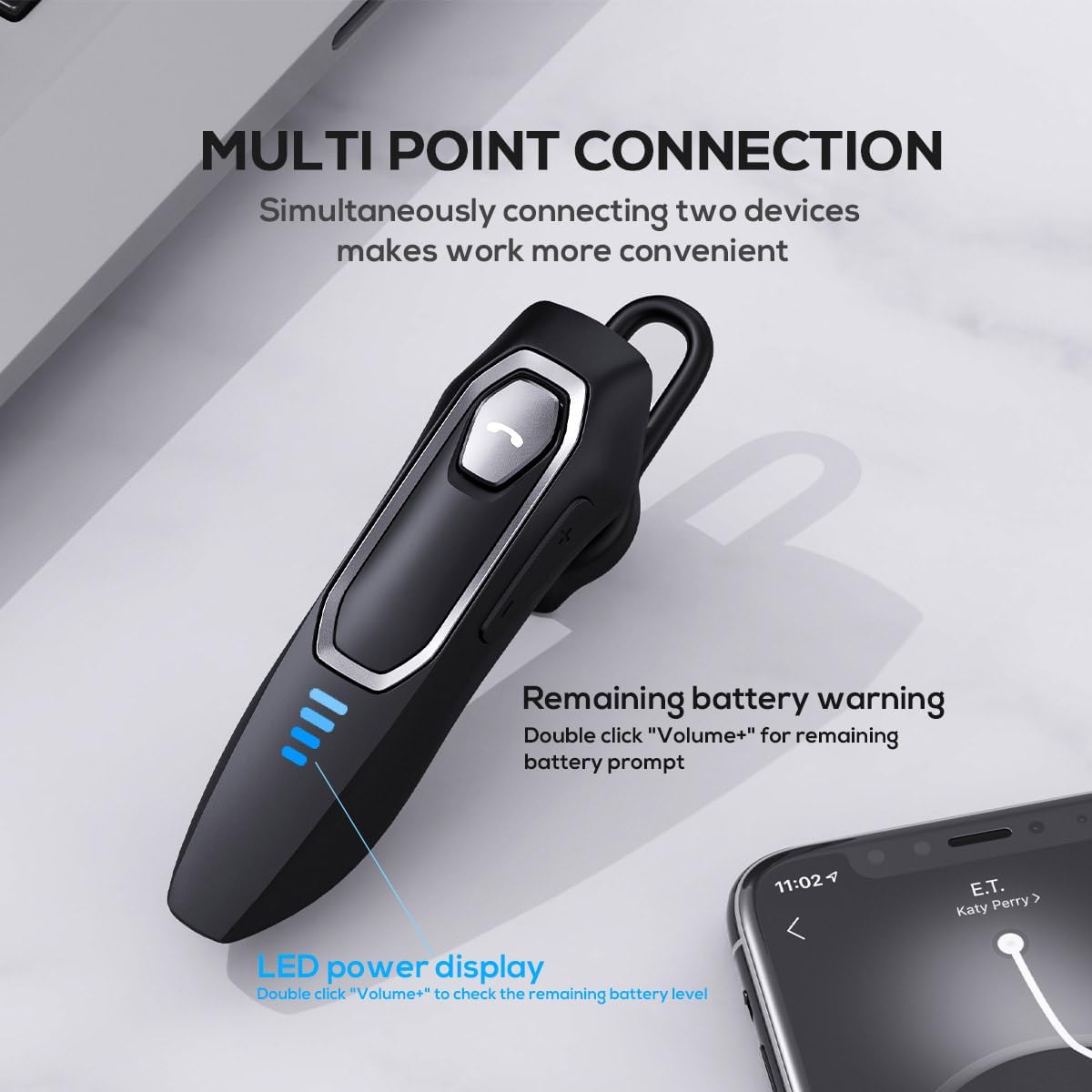
Image 3: Multi-Point Connection and LED Display. This image illustrates the headset's ability to connect to two devices simultaneously and the LED power display.
Funtzionamendu-argibideak
Deien Kudeaketa
- Deia erantzun/amaitu: Sakatu MFB behin.
- Deia baztertu: Sakatu eta eutsi MFB botoia 2 segundo inguru.
- Mikrofonoa desaktibatu/desaktibatu: During a call, press and hold the volume down button (marked with a microphone icon) for approximately 2 seconds.
- Azken irteerako deia berriro markatu: Triple-tap the MFB.
Musika erreproduzitzea
- Erreproduzitu/Pausatu: Sakatu MFB behin.
- Hurrengo ibilbidea: Press and hold the Volume + button for approximately 2 seconds.
- Aurreko pista: Press and hold the Volume - button for approximately 2 seconds.
- Bolumena igo/behera: Press the Volume + or Volume - button briefly.
Ahots Laguntzailea
- Aktibatu ahots-laguntzailea (Siri, Google Assistant, etab.): Double-tap the MFB.
LED potentzia bistaratzea
The headset features an LED power display with four levels, each representing 25% of the battery charge.
- To check the remaining power, double-click the Volume + button.
Erosotasuna eta egokitasuna
The Micool DY20PLUS is designed for comfortable, all-day wear.
- The ergonomic design ensures a secure fit without causing ear fatigue.
- Interchangeable ear tips (L, M, S) are included to help you find the best fit for your ear canal, optimizing bass and overall sound quality.
- The headset can be worn on either the left or right ear.

Image 4: Ear Tips and Durability. This image shows the included ear tips in different sizes (L, M, S) and highlights the enhanced durability features of the headset.
Mantentzea
- Garbiketa: Erabili zapi leun eta lehor bat entzungailuak garbitzeko. Ez erabili produktu kimiko gogorrik edo material urratzailerik.
- Biltegiratzea: Erabiltzen ez dituzunean, gorde entzungailuak leku fresko eta lehor batean, eguzki-argitik eta muturreko tenperaturetatik urrun.
- Bateria zaintzea: Bateriaren iraupena luzatzeko, saihestu entzungailuak maiz erabat deskargatzea. Kargatu aldizka, etengabe erabiltzen ez badituzu ere.
- Uraren erresistentzia: The headset is water-resistant, but not waterproof. Avoid submerging it in water or exposing it to heavy rain.
Arazoak konpontzea
| Arazoa | Irtenbide posiblea |
|---|---|
| Aurikularrak ez dira pizten. | Ensure the headset is charged. Connect it to a power source using the USB-C cable. |
| Ezin da gailuarekin parekatu. |
|
| Soinurik ez edo soinu kalitate eskasa. |
|
| Mikrofonoa ez dabil deietan zehar. |
|
| Voice assistant not activating. | Ensure the headset is connected and double-tap the MFB firmly. Check your device settings for voice assistant activation. |
Zehaztapenak
| Ezaugarri | Xehetasuna |
|---|---|
| Ereduaren izena | DY20PLUS |
| Konektibitate Teknologia | Haririk gabeko (Bluetooth) |
| Bluetooth bertsioa | 5.4 |
| Bluetooth barrutia | Gehienez 50 metro (164 oin) |
| Bateriaren iraupena (elkarrizketa denbora) | Gehienez 36 ordu |
| Bateriaren iraupena (musika erreprodukzioa) | Gehienez 45 ordu |
| Kargatzeko Denbora | 1.5 - 2 ordu |
| Kargatzeko ataka | USB-C |
| Zarata Deuseztatzea | Dual Microphones with Noise Reduction Algorithm |
| Ezaugarri bereziak | Voice Assistant, Multipoint Pairing, LED Power Display, Mute Function, Fast Charging |
| Pisua | Gutxi gorabehera 12 g (0.42 oz) |
| Uraren Erresistentzia Maila | Urarekiko erresistentea |
| Gailu bateragarriak | Smartphones, Tablets, Smart Speakers |
Bermea eta Laguntza
For warranty information or technical support, please refer to the documentation included with your purchase or contact Micool customer service through their official channels.
Ask a question about this manual
Ask about setup, troubleshooting, compatibility, parts, safety, or missing instructions. Manuals+ will review the question and use this page’s manual context to help answer it.